Google ADK vs LangGraph: Differences and Similarities
By upGrad
Updated on Oct 28, 2026 | 5 min read | 1.32K+ views
Share:

All courses
Certifications
More
By upGrad
Updated on Oct 28, 2026 | 5 min read | 1.32K+ views
Share:
Table of Contents
Key Highlights
Ready to build your expertise in Generative AI and Agentic AI? Explore upGrad’s Generative AI and Agentic AI courses to develop practical AI skills, understand intelligent AI agents, and prepare for emerging opportunities in the AI industry.
Agentic AI Courses to upskill
Explore Agentic AI Courses for Career Progression
IIIT Bangalore
EPGP in Applied AI and Agentic AIIIIT Bangalore
Executive Diploma in Machine Learning and AI360° Career Support
The Google Agent Development Kit (ADK) is an open-source framework created by Google for building artificial intelligence agents. It was announced by Google in April 2025 at Cloud Next.It's the same toolkit that sits behind agents inside Google products such as Agentspace.
You write agents in Python, and Google has added Java, Go and TypeScript support too. ADK works best with Gemini and Vertex AI. It isn't locked to them, though. Other models plug in through LiteLLM or direct connectors.
The core idea is simple. An agent is a unit with instructions, a model, and tools. You compose agents into teams, and ADK runs them.
ADK ships with a clear set of building blocks:
Aspect |
Advantages |
Limitations |
| Development | Quick setup with less code. | Complex workflows may need extra effort. |
| Deployment | Supports Cloud Run, GKE, and Vertex AI Agent Engine. | Works best with Google Cloud services. |
| Community | Offers official documentation. | Smaller community and fewer online answers. |
Ready to bring AI into your business strategy? Explore the Generative AI for Business Leaders programme from IIIT Bangalore to understand how Generative AI can support business decisions, improve operational efficiency, and help you identify new opportunities for growth.
LangGraph is a low-level orchestration framework from the LangChain team. It models an agent as a graph. Nodes are steps, edges decide what runs next, and a shared state object travels through the whole thing.
That design came from a real pain point. Early LangChain agents ran in loops that were hard to control. LangGraph made the loop explicit, so you decide where it starts, where it branches, and where it stops. It reached a stable 1.0 release in late 2025.
It's available in Python and JavaScript, and it works with any model provider. You don't need LangChain to use it, though the two fit together well.
Here are the key features of LangGraph:
Aspect |
Advantages |
Limitations |
| Workflow Control | Supports cycles, retries, and parallel branches. | Takes time to learn. |
| State Management | Offers built-in persistence. | Requires understanding state schemas and reducers. |
| Simplicity | Handles complex workflows well. | Simple tasks may need extra setup. |
| Documentation | Has a growing ecosystem of tutorials and resources. | Older tutorials may show outdated APIs. |
Also Read: LangGraph Tools: Complete Practical Guide
Here are the major differences between Google ADK vs LangGraph:
Factor |
Google ADK |
LangGraph |
| Architecture | Agent hierarchy | Nodes and edges |
| Workflow Control | Built-in routing | Custom flows, loops, and branches |
| Multi-Agent Systems | Easy agent delegation | Flexible agent coordination |
| Learning Curve | Easier to start | Steeper learning curve |
| State and Memory | Session state and memory service | Graph state, checkpoints, and long-term memory |
| Tool Integration | Python tools, MCP, OpenAPI, Google Search | LangChain tools and broad integrations |
| LLM Support | Strong Gemini integration, supports other models | Supports multiple model providers |
| Human Approval | Confirmations and callbacks | Interrupts and checkpoint-based resumption |
| Debugging | Built-in UI and Cloud Trace | LangSmith tracing and Studio |
| Deployment | Google Cloud, Vertex AI, Cloud Run, GKE | Flexible hosting and LangSmith Deployment |
| Pricing | Free framework, plus hosting and model costs | Free framework, plus hosting, model, and optional LangSmith costs |
| License | Apache 2.0 | MIT |
Despite having some major differences, there are similarities between Google ADK vs LangGraph.
And here are the things that both have in common:
Must read: Build AI Agent From Scratch: A Practical Step-by-Step Guide
Here are some real-world use case examples. So that you can know when its better to use which one between Google ADK vs LangGraph:
Use Case |
Google ADK |
LangGraph |
| Customer Support | Routes queries to support agents. | Manages complex support workflows. |
| Voice and Video | Supports real-time Gemini Live agents. | Supports workflows using compatible models and tools. |
| Internal Search | Connects with Google Cloud data tools. | Connects with varied search and data tools. |
| Research Agents | Builds teams of collaborating agents. | Supports planning, review, and repeat searches. |
| Approval Workflows | Supports tool confirmations. | Pauses for human approval and resumes later. |
| Coding Agents | Supports tool-based coding tasks. | Supports coding, testing, and retry loops. |
| Long-Running Tasks | Uses session state and deployment services. | Resumes workflows using saved checkpoints. |
| Best Fit | Quick setup, especially on Google Cloud. | Complex workflows needing precise control. |
Special Tip: Choose based on your workflow. Simple tasks may need neither framework’s advanced features.
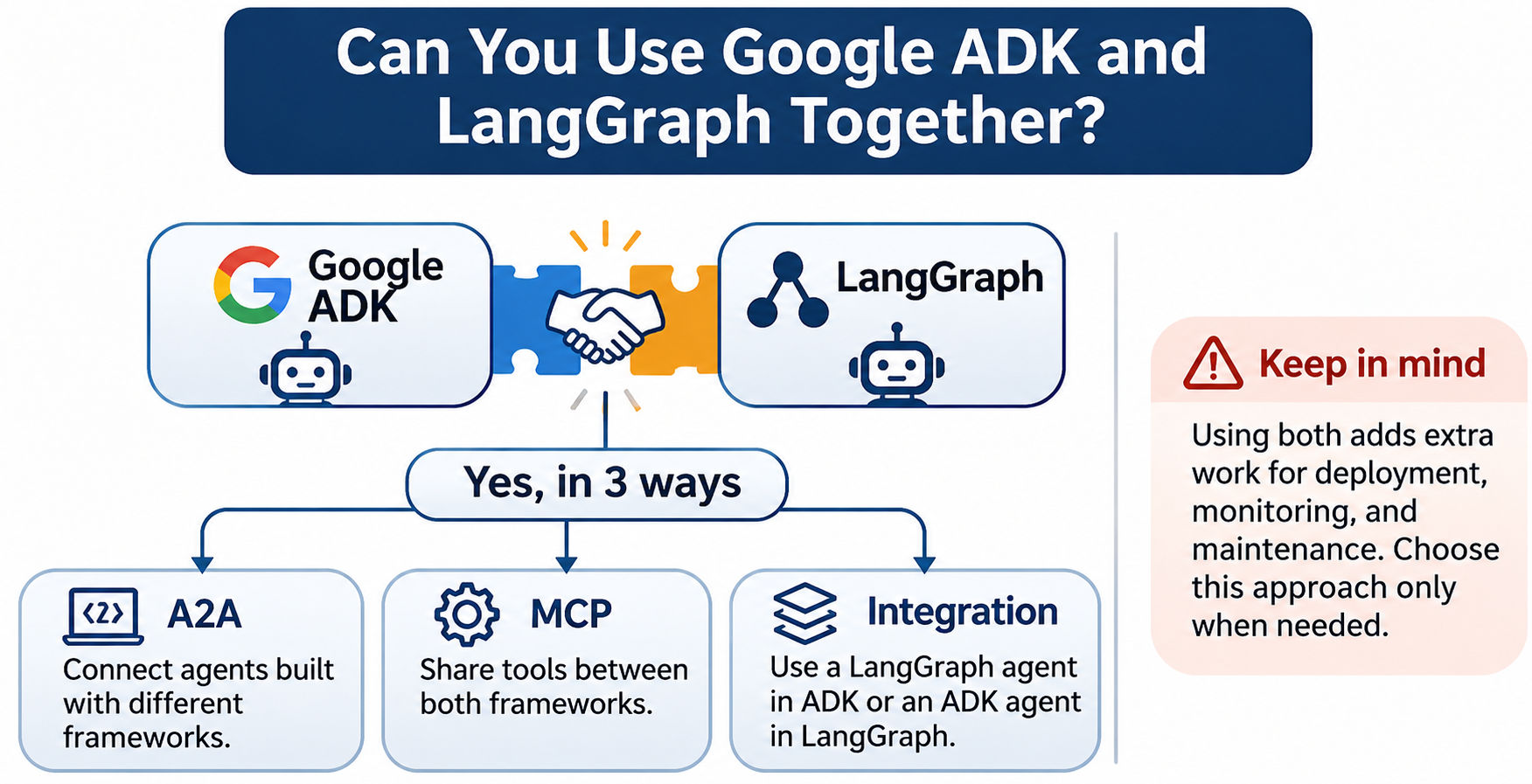
Yes, you can use them together. But why should you do it? Suppose your support team built a quick ADK assistant, while the risk team needs a LangGraph approval flow. Rewriting either one will cost you weeks, but linking them costs will cost you days.
But there are problems too. Two frameworks means that you have now two sets of logs, two deployment pipelines and two skill sets to maintain. Hence, do it only when different teams or constraints really call for it.
Here is how:
Start with your situation, and decide which one you should choose.
If this sounds like you |
Pick |
| You build on Google Cloud and use Gemini | ADK |
| You want a working multi-agent demo quickly | ADK |
| You need voice or video streaming agents | ADK |
| You need strict control over every branch and loop | LangGraph |
| You need approvals that can wait for days | LangGraph |
| You run on AWS, Azure or on-premises | LangGraph |
| You want replay and time travel debugging | LangGraph |
| You use several model providers | Either, LangGraph slightly easier |
Here's a simple opinion. Beginners should begin with ADK first, since it will allow you to build an agent quickly. Audited and long-lived processes should use LangGraph, since control is more important than efficiency at that point.
If you are still not sure? Build the same small agent in both. Give yourself some time for each. The one that feels natural to debug is probably your choice.
Ready to start your journey? Book a free consultation with upGrad today to find the best path for your career.
Yes. The framework is open source under the Apache 2.0 license, so you can install and run it at no cost. You'll still pay for the services around it, such as Gemini API calls, Cloud Run hosting or Vertex AI Agent Engine usage.
Yes. LangGraph is open source under the MIT license and free to run on your own servers. Costs show up when you use paid models, host it yourself or choose LangSmith plans for tracing, evaluation and managed deployment beyond the free developer tier.
No. ADK is optimized for Gemini, but it's model-agnostic. You can connect models from OpenAI, Anthropic and open-source providers through LiteLLM or other integrations. Some Gemini-only features, like live audio and video streaming, won't carry over to other models.
Yes. LangGraph is cloud-neutral, so it runs on Cloud Run, GKE or Compute Engine like any Python or Node app. You can also call Gemini models through Vertex AI from inside a graph. You simply don't get the managed shortcuts that ADK has there.
ADK is usually easier to start with. You define an agent with instructions and tools, then run it in the built-in web UI within minutes. LangGraph asks you to learn state schemas, nodes and edges first. That effort pays off later, but the first hour feels slower.
For production work, LangChain's own team recommends LangGraph for anything beyond simple agents. It offers explicit control, persistence and human approval steps that basic LangChain agent loops lack. LangChain's newer agent tools are now built on top of LangGraph.
Yes. ADK can expose an agent over A2A and call remote agents that follow the standard. This lets your agent work with agents built in other frameworks, including LangGraph, without custom integration code. It's a good fit for larger organizations with several teams.
Yes, but expect real work. Your prompts, tools and business logic carry over. The orchestration layer doesn't, because graph edges and state reducers don't map one to one onto ADK's agent tree. Plan a rewrite of the flow logic and fresh tests.
Both handle retrieval well. ADK connects easily to Vertex AI Search and RAG Engine, which suits Google Cloud teams. LangGraph works with almost any vector store through LangChain integrations and lets you add steps like query rewriting and answer grading as separate nodes.
No. LangGraph runs on its own, and you can build graphs with plain Python functions and any model SDK. LangChain helps by supplying ready-made tools and model wrappers. But it's optional, and many developers skip it to keep their code simpler.
LangGraph has the edge today. Its checkpointers save progress after every step, so a task can pause, crash and resume without starting over. ADK can handle long tasks through sessions and Agent Engine, but you'll write more of the recovery logic yourself.
1321 articles published
We are an online education platform providing industry-relevant programs for professionals, designed and delivered in collaboration with world-class faculty and businesses. Merging the latest technolo...
Speak with AI & ML expert
By submitting, I accept the T&C and
Privacy Policy