Google Agent Development Kit: Guide for Building AI Agents
By Sriram
Updated on Jun 19, 2026 | 8 min read | 2.49K+ views
Share:

All courses
Certifications
More
By Sriram
Updated on Jun 19, 2026 | 8 min read | 2.49K+ views
Share:
Table of Contents
Google Agent Development Kit is a popular tool that helps people easier in developing agents. As artificial intelligence is changing fast, and Google agents are becoming a big part of it. Modern agents can plan tasks, use tools according to their requirements, access information sources they require, and finish multiple tasks. This is why there is a demand for such tools.
In this guide, you'll learn everything you need to know about the google agent development kit, what it is, how it works, its core features, architecture, use cases, benefits, limitations, and how it compares with other popular frameworks.
Explore Agentic AI Courses Online from upGrad and enhance your skills in Agent Development.
Agentic AI Courses to upskill
Explore Agentic AI Courses for Career Progression
IIIT Bangalore
Executive Diploma in Machine Learning and AI360° Career Support
The Google Agent Development Kit (ADK) is an open-source, code-first framework built for creating, testing, and deploying AI agents from single agents to complex multi-agent systems at scale. Instead of relying on simple prompt tweaks, it treats agent design as real software engineering, with support for Python, TypeScript, Go, Java, and Kotlin.
The ADK is different from traditional chatbot frameworks. ADK supports advanced agent architectures that include multi-agent systems and workflow automation. The ADK also does tool integration and memory management and orchestration. The ADK works well with Gemini models, but ADK is not limited to; developers can use ADK with other AI models as well.
Also Read: Build AI Agent From Scratch: A Practical Step-by-Step Guide
When it comes to AI applications, it is getting complicated, so developers need a planned framework to follow these applications properly instead of relying on prompt engineering alone.
Google introduced ADK to solve common challenges such as:
Feature |
Description |
| Open Source | Freely available framework |
| Multi-Agent Support | Create teams of AI agents |
| Tool Integration | Connect APIs and external systems |
| Model Agnostic | Works beyond Gemini |
| Cloud Ready | Deploy locally or in the cloud |
| Enterprise Scale | Designed for production workloads |
Example
Imagine building a travel planning assistant. The google agent development kit is helpful because it lets these google agents work together and finish tasks.
This approach is better because it makes the google agents more reliable, scalability work and it is easier to keep them running smoothly.
Instead of one large AI model doing everything, you can create:
Also Read: Agentic AI Learning Path: A Complete Guide for Developers and AI Professionals
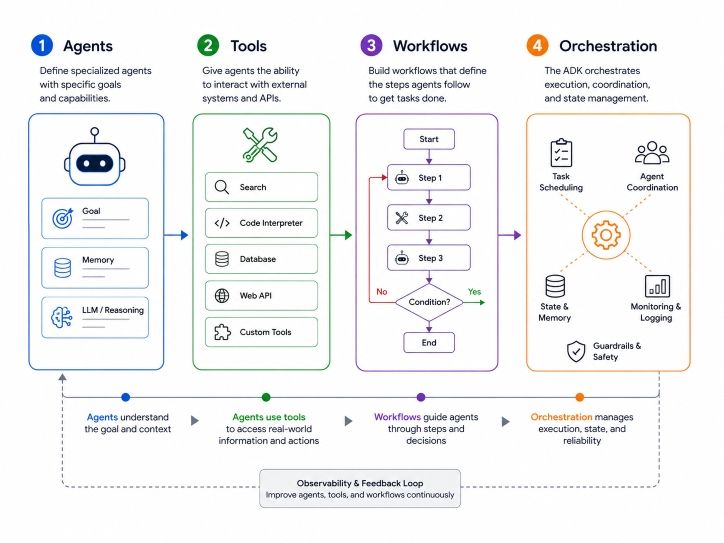
The google agent development kit is different, from traditional AI tools. To understand this, you need to know how it is set up. The google agent development kit is basically made up of a few things: the agents, tools, workflows and orchestration.
Agents are autonomous units that perform tasks. Think of it as a specialized employee within a digital organization.
An agent can:
Tools extend agent capabilities. Without tools, agents can only generate text, with tools; agents can take action.
Examples include:
Workflows explain how tasks are executed. Workflows make agent behavior more predictable.
For example:
Orchestration manages communication between multiple agents. This structure enables complex automation.
For example:
Agent |
Responsibility |
| Research Agent | Collect information |
| Analysis Agent | Process findings |
| Writer Agent | Create report |
| Reviewer Agent | Check quality |
Also Read: Types of Agents in AI: A Complete Guide to How Intelligent Agents Work
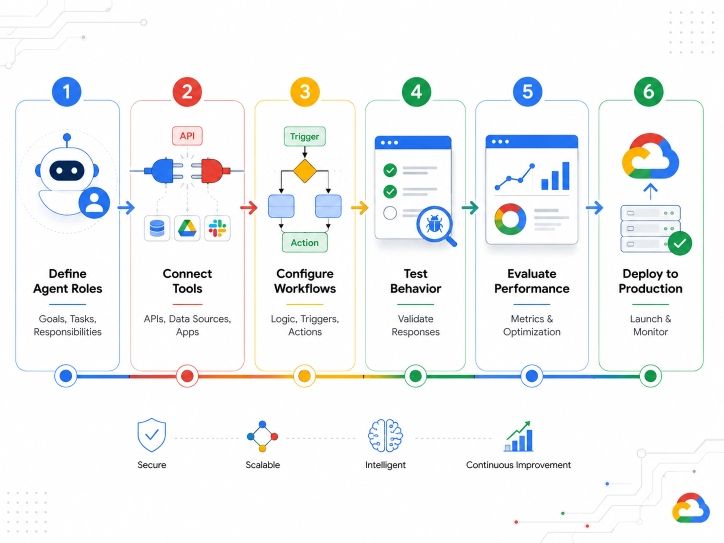
Google provides deployment support through Vertex AI Agent Engine, making it easier to scale enterprise applications.
The typical development workflow looks like this:
ADK currently supports multiple programming languages; this flexibility allows developers to work with familiar technology stacks.
Languages are:
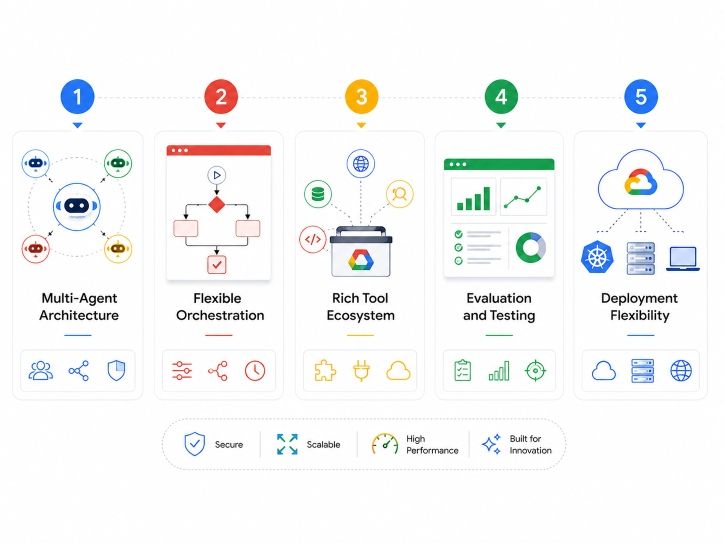
The growing popularity of the google agent development kit comes from its practical feature set. It is designed for both experimentation and production deployment.
One standout feature is native multi-agent support.
Developers can create:
Each agent handles a specific task while collaborating with others.
This improves:
ADK supports both structured and dynamic workflows.
Developers can:
This flexibility makes it suitable for different business scenarios.
ADK supports integration with:
Agents can interact with external environments instead of simply generating text.
One major challenge in AI development is reliability.
ADK includes evaluation capabilities that help developers:
This is particularly important for enterprise deployments.
ADK is deployment-agnostic and not restricted to Google Cloud.
Developers can deploy agents:
Deployment Option |
Use Case |
| Local Machine | Testing |
| Cloud Run | Small applications |
| Kubernetes | Large-scale systems |
| Vertex AI | Enterprise workloads |
Many companies are exploring agent-based systems because they can perform tasks that previously required significant human effort.
Organizations can use the google agent development kit to:
The google agent development kit can be applied across many industries and business functions.
However, understanding both strengths and limitations helps determine whether it is the right framework for a project.
AI agents can:
Research agents can:
Organizations can automate:
Development teams can use agents for:
Despite its strengths, ADK has some challenges.
Multi-agent systems are more complex than traditional chatbots.
Beginners may need time to understand:
Large deployments require:
Even advanced frameworks can produce incorrect outputs. Human oversight remains important.
AutoGen is another popular framework for building AI agents.
Here's a comparison:
Feature |
Google ADK |
AutoGen |
| Open Source | Yes | Yes |
| Multi-Agent Support | Yes | Yes |
| Enterprise Focus | Strong | Moderate |
| Google Ecosystem Integration | Excellent | Limited |
| Deployment Options | Extensive | Moderate |
| Workflow Control | Strong | Flexible |
| Evaluation Tools | Built-in | Basic |
Both frameworks are powerful, but ADK is increasingly positioned as a production-focused solution for large-scale agent applications.
Choose Google ADK if you need:
Choose AutoGen if you need:
The google agent development kit represents Google's vision for the future of AI agents. While there is a learning curve, the framework provides a strong foundation for developers who want to move beyond simple chatbots and create intelligent agent ecosystems.
As AI agents become more common across industries, understanding frameworks like Google ADK will be an increasingly valuable skill for developers, AI engineers, and technology leaders.
Want to explore more about, google agent development kit? Book your free 1:1 personal consultation with our expert today.
Google's Agent Development Kit (ADK) is an open-source framework for creating AI agents and multi-agent systems. It provides tools for development, orchestration, testing, deployment, and monitoring. Developers can use it to build intelligent applications that perform tasks autonomously.
Yes, the Google agent development kit is open source and available for free. Developers can download and use the framework without licensing fees. However, costs may arise when using cloud services, APIs, or enterprise infrastructure for deployment.
Google ADK focuses heavily on enterprise-grade deployment, workflow orchestration, and production scalability. AutoGen is often preferred for rapid prototyping and experimentation. Both support multi-agent systems, but ADK offers stronger integration with Google's ecosystem.
Yes. Beginners can start with simple single-agent projects before moving to advanced multi-agent architectures. Familiarity with Python and basic AI concepts helps, but extensive machine learning knowledge is not mandatory.
Google ADK supports Python, TypeScript, Java, and Go. This allows developers from different backgrounds to build agents using their preferred technology stack while maintaining consistent architecture patterns.
No. Although ADK is optimized for Gemini, it is designed to be model agnostic. Developers can integrate other language models depending on project requirements and infrastructure preferences.
Yes. The framework is deployment-agnostic. Developers can run agents locally, on private servers, Kubernetes clusters, AWS, Azure, or Google Cloud environments depending on their needs.
Multi-agent systems involve multiple specialized agents working together. Each agent performs a specific role, such as research, analysis, or execution. Collaboration between agents helps solve complex tasks more effectively.
Yes. ADK was designed with enterprise workloads in mind. Features such as evaluation, orchestration, observability, deployment flexibility, and scalability make it suitable for large business applications.
ADK enables agents to access tools, execute tasks, communicate with other agents, and follow structured workflows. This allows organizations to automate repetitive processes while maintaining greater control and visibility.
Popular use cases include customer support automation, enterprise research assistants, software development helpers, workflow automation systems, data analysis platforms, and intelligent business process management applications.
730 articles published
Sriram K is a Senior SEO Executive with a B.Tech in Information Technology from Dr. M.G.R. Educational and Research Institute, Chennai. With over a decade of experience in digital marketing, he specia...
Speak with AI & ML expert
By submitting, I accept the T&C and
Privacy Policy