Google ADK Agents: The Complete Guide to Google's Agent Development Kit
By Sriram
Updated on Jul 16, 2026 | 14 min read | 4.5K+ views
Share:

All courses
Certifications
More
By Sriram
Updated on Jul 16, 2026 | 14 min read | 4.5K+ views
Share:
Table of Contents
Quick Overview
This guide walks you through what Google ADK Agents are, how they work, how to build your first agent, and how to scale from a single agent script to a full multi-agent system. You will also find working examples, deployment options, a comparison with other agent frameworks, and answers to the questions developers most often ask.
If MCP servers and deploying agents to production interest you, upGrad's Agentic AI Programs can help you develop the practical skills to build, deploy, and scale production-ready AI agents with confidence.
Agentic AI Courses to upskill
Explore Agentic AI Courses for Career Progression
IIIT Bangalore
EPGP in Applied AI and Agentic AIIIIT Bangalore
Executive Diploma in Machine Learning and AI360° Career Support
Google ADK, short for Agent Development Kit, is an open-source framework for building, testing, and deploying AI agents. It is designed by Google to make agent development feel like regular software engineering rather than prompt engineering guesswork.
At its core, an agent built with Google ADK combines the following three things: a language model, a set of instructions, and access to tools.
The framework handles the parts developers used to build by hand, like managing conversation state, calling external functions, running multiple agents in sequence or in parallel, and recovering from failures mid task.
These agents are not tied to a single model. The framework works well with Gemini out of the box, but it also connects to other model providers through adapters, including models that run locally. This makes it a genuine framework rather than a wrapper around one company's API.
Also Read: Build AI Agent From Scratch: A Practical Step-by-Step Guide
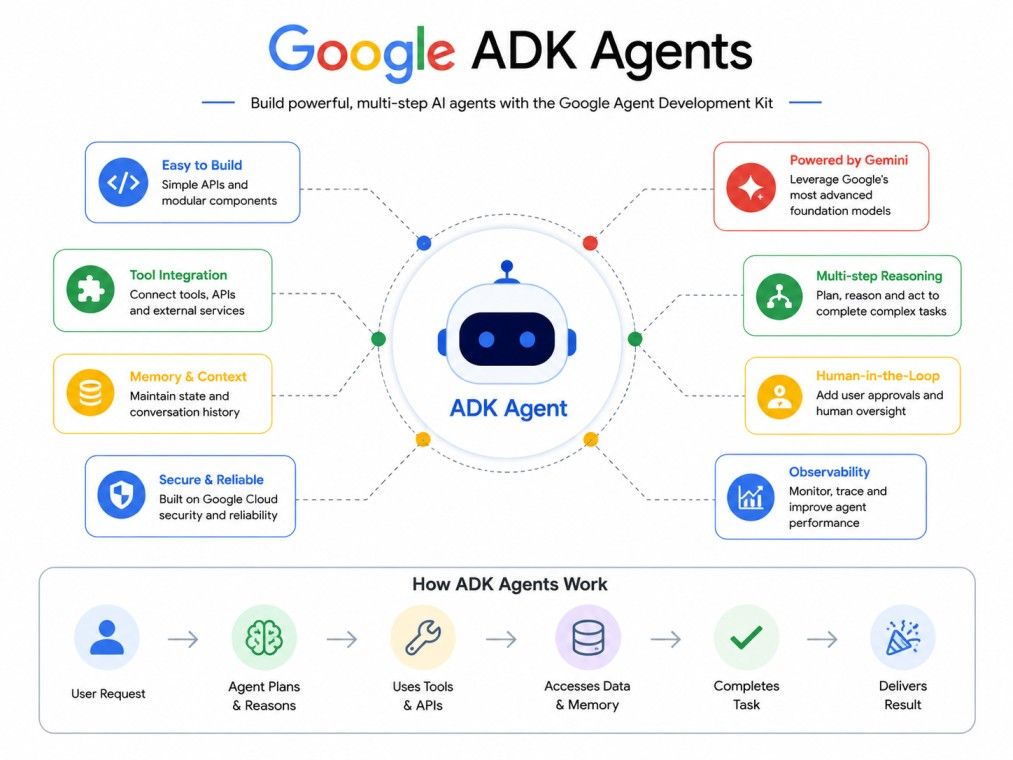
Before writing any code, it is important to know the vocabulary Google ADK uses:
Term |
What It Means |
| Agent | A single unit that has instructions, a model, and optional tools |
| Tool | A function or external service an agent can call |
| Workflow | A graph that defines how agents and tasks connect |
| Session | The record of a single conversation or run, including state |
| Memory | Longer term storage that persists across sessions |
| Runner | The component that executes an agent or workflow and streams events |
Two classes matter the most when you start: these are the Agent class and the Workflow class.
The Agent class defines an AI's instructions, tools, and behavior.
The Workflow class orchestrates agents and tasks in a graph based flow.
Once you understand these two, most of Google ADK's structure starts to make sense.
Google ADK agents come with a set of built-in capabilities that most teams would otherwise have to build themselves:
The framework treats context management as a first-class concern. Instead of simply appending every message to a growing prompt, Google ADK filters irrelevant events, summarizes older turns, and lazy-loads artifacts so agents stay fast and within token limits even during long running tasks.
Take your skills to the next level with upGrad's Executive Post Graduate Programme in Applied AI and Agentic AI from IIITB. The program covers AI fundamentals, agentic AI, agent frameworks like Google ADK, multi-agent orchestration, tool integration, and real-world projects to help you build job-ready expertise and advance your career in Agentic AI.
At a technical level, a Google ADK agent runs inside a loop managed by the Runner. The Runner sends the current context to the model, receives a response, checks whether the model wants to call a tool, executes that tool if needed, and repeats until the agent produces a final answer or the workflow says the task is complete.
A typical Google ADK application has three layers:
This distinction is what makes these agents easier to test and reuse. You can swap the model an agent uses, change how sessions are stored, or move from local development to Cloud Run without rewriting the agent's core logic.
A single agent run generally follows this pattern:
For long-running or multi-step tasks, ADK 2.0 introduced a graph-based workflow engine. This gives you a slider between two extremes: fully dynamic, model-led reasoning on one end, and strict, deterministic step-by-step workflows on the other. Most production systems land somewhere in between.
Seeing a minimal agent helps more than any explanation. Here is a basic single agent in Python:
from google.adk import Agent

root_agent = Agent(
   name="greeting_agent",
   model="gemini-2.5-flash",
   instruction="You are a helpful assistant. Greet the user warmly.",
)
Now here is a simple two-agent workflow, where one agent generates an idea and a second agent builds on it:
from google.adk import Agent, Workflow

generate_fruit_agent = Agent(
   name="generate_fruit_agent",
   instruction="Return the name of a random fruit. Return only the name.",
)

generate_benefit_agent = Agent(
   name="generate_benefit_agent",
   instruction="Tell me a health benefit about the specified fruit.",
)
root_agent = Workflow(
   name="root_agent",
   edges=[("START", generate_fruit_agent, generate_benefit_agent)],
)
Also Read: Python Tutorial: Learn Python from Scratch
Real-world Examples of ADK Agents in Use Today Include:
Google ADK is free and open source, and setting it up does not require a cloud account to begin. You can build and test agents entirely on your own machine before deciding whether to deploy to Google Cloud.
To get started with the Python version of Google ADK, you need Python 3.10 or higher. Installation is a standard pip install, and you can use a virtual environment to keep dependencies isolated. Once installed, ADK gives you two ways to interact with an agent locally:
adk run path/to/my_agent
adk web path/to/agents_dir
The first command runs your agent as an interactive command line chat. The second launches a browser-based UI where you can inspect every step of execution, including tool calls and intermediate state, which is genuinely useful when debugging why an agent made a particular decision.
A practical first project usually looks like this:
Starting small matters more with agents than with regular applications. An agent with too many tools and vague instructions tends to make unpredictable choices, which is harder to debug than a narrow agent that does one thing reliably.
Google maintains official documentation, sample repositories, and a public GitHub project for Google ADK. The Python package is the most mature, with the widest range of samples, though Java, Go, TypeScript, and a beta Kotlin version are all actively maintained and share the same core concepts.
Also Read: 52+ Top TypeScript Interview Questions and Answers for All Skill Levels in 2025
Google maintains official documentation, a public GitHub repository for the Python package, and getting-started guides for Java, Go, and TypeScript. These are the most reliable places to check for the latest updates, since Google ADK releases are roughly bi-weekly.
Most real applications outgrow a single agent quickly. ADK agents are designed from the ground up to work as teams, not just as isolated scripts.
There are two broad approaches to coordination in Google ADK: workflow agents, which follow a defined structure you set in advance, and dynamic routing, where a coordinator agent decides at runtime which sub-agent should handle a request. Most production systems use a mix of both.
A sequential agent runs a fixed order of steps, where each agent's output feeds into the next. This is the right choice when a task has a clear, predictable pipeline, such as gathering data, then summarizing it, then formatting the final report. Sequential flows are easy to test because the order never changes.
Parallel agents run at the same time and their results are combined afterward. This pattern works well when you need several independent pieces of information that do not depend on each other, such as checking inventory, pricing, and shipping estimates simultaneously instead of one after another. Parallel execution reduces total latency significantly for these kinds of tasks.
A loop agent repeats a step until a condition is met, such as retrying a task until it passes a quality check or refining an answer across several iterations. This is useful for self-correcting agents, where the first draft is rarely the final answer and the agent needs to critique and improve its own work.
Google ADK's newer collaborative workflow model adds three explicit delegation modes worth knowing:
Mode |
Behavior |
| Chat | Full handoff of the conversation to a sub-agent |
| Task | Sub-agent handles the assignment, returns automatically, asks for clarification if needed |
| Single-turn | Sub-agent acts like a tool, runs in parallel, returns once with no back and forth |
An agent without tools can only talk. Tools are what let these agents actually do things, like query a database, call an API, send a notification, or run code.
Google ADK ships with a library of pre-built tools and also lets you write custom functions that agents can call directly. Beyond its own tools, ADK can pull in integrations from other frameworks, including LangChain and CrewAI, so teams do not need to rebuild connectors that already exist elsewhere.
For sensitive actions, ADK supports a human-in-the-loop confirmation flow. A tool can pause execution and request approval before it runs, which matters for actions like sending money, deleting records, or anything with real-world consequences. Once approved, the agent resumes exactly where it left off.
Model Context Protocol, or MCP, is an open standard for connecting AI systems to external services without writing a custom connector for each one. ADK agents support MCP natively, and Google Cloud now hosts and manages many MCP servers directly, so connecting an agent to a service like BigQuery no longer requires building a bridge from scratch.
This matters because integration work used to be the most time-consuming part of building an agent. Instead of writing and maintaining a custom connector for every external system, teams can point an ADK agent at an existing, managed MCP server and get a secure, maintained connection immediately.
Also Read: MCP vs API Understanding the Key Differences and Use Cases
Every conversation an agent has needs somewhere to live. Google ADK separates this into two concepts: session state, which covers a single conversation, and memory, which persists across multiple sessions.
Google ADK offers several session service options depending on your needs:
For longer term memory across separate conversations, ADK provides memory services that can use simple keyword matching or more advanced retrieval, depending on how much continuity your agent needs.
Rather than dumping the entire conversation history into every request, ADK treats context like source code. Sessions, memory, tool outputs, and artifacts are assembled into a structured view where irrelevant events are filtered out and older turns are summarized automatically. This keeps token usage efficient without losing the information the agent actually needs.
Once an agent works locally, the next question is how to run it reliably in production. Google ADK was built with this transition in mind, so the move from a laptop to production does not require rewriting your agent logic.
There are several paths for deploying these agents:
Option |
Best For |
| Vertex AI Agent Engine | Fully managed runtime with built-in scaling and observability |
| Cloud Run | Serverless containers with simple, one-command deployment |
| Google Kubernetes Engine | Full control over infrastructure at larger scale |
| Custom Docker | Any environment, including on-premises or other clouds |
When deploying through Google's managed options, agents automatically inherit authentication, tracing, and enterprise-grade security without any change to the agent's code.
This deploy-anywhere approach is one of the more practical advantages of choosing ADK over a framework tied to one specific hosting model.
Also Read: Kubernetes Tutorial – The Complete Guide
Choosing between agent frameworks usually comes down to how much control you want versus how much the framework should handle for you. Here is how Google ADK Agent compares to the alternatives:
Framework |
Best Fit |
Key Difference from Google ADK |
| LangChain | Rapid prototyping, wide integration library | Less structured multi-agent orchestration by default |
| LangGraph | Fine-grained graph control | Similar graph concept, but without ADK's native Google Cloud deployment path |
| AutoGen | Research-style multi-agent conversation | Focused more on conversational patterns than production deployment |
| CrewAI | Role-based agent teams, simpler setup | Less flexible orchestration between strict and dynamic modes |
| Vertex AI Agent Builder | Configuration-first, low-code agent building | Managed and opinionated, while ADK is code-first and unconstrained |
| OpenAI Agents SDK | Teams already committed to OpenAI models | Model-agnostic in ADK, tightly coupled to OpenAI models here |
| Semantic Kernel | Microsoft ecosystem integration | ADK offers deeper multi-agent workflow tooling out of the box |
LangChain is broader and older, with an enormous integration library. ADK, by comparison, focuses more tightly on structured orchestration and production deployment, particularly if you are already using Google Cloud infrastructure.
Also Read: What is LangChain Used For?
Both use a graph-based approach to control agent flow. The practical difference is that ADK connects directly to Google's managed deployment and observability tools, while LangGraph leaves infrastructure choices entirely up to you.
Also Read: Difference Between LangGraph and LangChain
AutoGen leans toward experimental, conversation-driven multi-agent research. ADK is built more explicitly for shipping production systems, with evaluation, deployment, and monitoring built in from the start.
CrewAI is simpler to pick up for role-based agent teams, but ADK offers finer control over whether coordination is strict and deterministic or dynamic and model-led, which matters once workflows get complex.
Vertex AI Agent Builder is configuration-first, meant for teams that want a managed experience with less code. ADK is engineering-first, meant for developers who want to build custom agent architectures without constraints.
OpenAI's SDK works well if your stack is already built around OpenAI models. ADK is model-agnostic by design, supporting Gemini, other providers, and locally running models through adapters.
ADK agents show up across a wide range of applications, not just chatbots. Common patterns include:
Also Read: Agentic AI Roadmap: Skills, Tools, Frameworks, and Career Guide
Google ADK agents give developers a genuine software engineering approach to building AI agents, instead of a pile of prompt hacks held together with custom code. The framework covers the full lifecycle: single agents, multi-agent orchestration, tool integration, memory management, evaluation, and deployment, all without locking you into one model provider.
Whether you are building your first simple assistant or scaling to a mesh of coordinated agents running in production, Google ADK gives you a consistent set of concepts that scale with the complexity of what you are building.
Want to get started with Agentic AI? Speak with an expert for a free 1:1 counselling session today.
Google ADK is the open-source framework you use to write and structure agent code. Vertex AI is Google Cloud's broader AI platform, which includes managed services like Vertex AI Agent Engine where you can deploy and run ADK agents at scale with built-in infrastructure and monitoring.
Yes. These agents are model-agnostic by design. While Gemini is the most tightly integrated option, ADK provides adapters to connect with other model providers, including models that run locally on your own hardware, without changing your agent's core logic.
Yes, ADK is built to have a low floor and a high ceiling. Beginners can start with a single agent and one tool using simple Python code, then gradually add multi-agent workflows and advanced orchestration once they understand the basics.
Agents coordinate through workflows, dynamic routing, or the Agent2Agent protocol for remote communication. A coordinator agent can delegate to sub-agents using different modes, ranging from full conversation handoff to single-turn, tool-like execution.
Google ADK currently supports Python, Java, Go, and TypeScript, with a beta release for Kotlin as well. Python has the most mature ecosystem and the widest range of sample code, while the other languages share the same core concepts and features.
No. You can install Google ADK and build agents entirely on your local machine using the CLI and web UI without any cloud setup. A Google Cloud account is only needed if you choose to deploy to managed services like Vertex AI Agent Engine.
Google ADK manages context automatically by filtering irrelevant events, summarizing older conversational turns, and lazy-loading artifacts only when needed. This keeps token usage efficient and prevents agents from slowing down during long-running tasks.
Model Context Protocol, or MCP, is an open standard that lets agents connect to external services without a custom-built connector for each one. Google Cloud hosts many MCP servers directly, so ADK agents can connect to services like BigQuery immediately and securely.
Yes. Google ADK supports a human-in-the-loop confirmation flow, where a tool call can pause execution and request explicit approval before running. This is commonly used for sensitive actions like financial transactions or deleting data.
A custom-built agent requires you to handle context management, tool calling, multi-agent coordination, retries, and deployment entirely on your own. Google ADK provides all of this out of the box, letting you focus on the agent's logic instead of rebuilding infrastructure every project needs.
Google maintains a public GitHub repository for the Python package along with official documentation and getting-started guides for each supported language. These resources include working sample agents, workflow examples, and step-by-step quickstarts for local development.
724 articles published
Sriram K is a Senior SEO Executive with a B.Tech in Information Technology from Dr. M.G.R. Educational and Research Institute, Chennai. With over a decade of experience in digital marketing, he specia...
Speak with AI & ML expert
By submitting, I accept the T&C and
Privacy Policy