OpenAI Agents SDK: What It Is and How to Build AI Agents With It
By Rahul Singh
Updated on Jun 24, 2026 | 10 min read | 3.51K+ views
Share:

All courses
Certifications
More
By Rahul Singh
Updated on Jun 24, 2026 | 10 min read | 3.51K+ views
Share:
Table of Contents
The OpenAI Agents SDK is an open-source Python framework that lets developers build, run, and orchestrate AI agents. Released by OpenAI in early 2025, it gives you the tools to create agents that can think, act, use tools, and hand off tasks to other agents. If you have heard about AI agents but were not sure how to actually build one, this SDK is where you start.
This blog covers everything you need to know about the OpenAI Agents SDK: what it is, how it works under the hood, its core building blocks, and how to write your first agent. Whether you are a student just getting into AI or a developer already working with LLMs, this guide walks you through it step by step.
Build the next generation of AI applications with upGrad's Agentic AI and Generative AI programs. Learn to design AI agents, orchestrate multi-agent workflows, integrate tools, and develop production-ready agentic systems through hands-on projects.
Agentic AI Courses to upskill
Explore Agentic AI Courses for Career Progression
IIIT Bangalore
Executive Diploma in Machine Learning and AI360° Career Support
The OpenAI Agents SDK is a lightweight framework built to make agent development simple and structured. Before this SDK existed, building an AI agent meant writing a lot of boilerplate code to handle loops, tool calls, and responses. The framework takes care of most of that complexity so you can focus on the logic.
At its core, it lets you define agents with instructions, give them tools to use, and connect them to each other through handoffs. It also includes built-in support for tracing, so you can see exactly what your agent did and why.
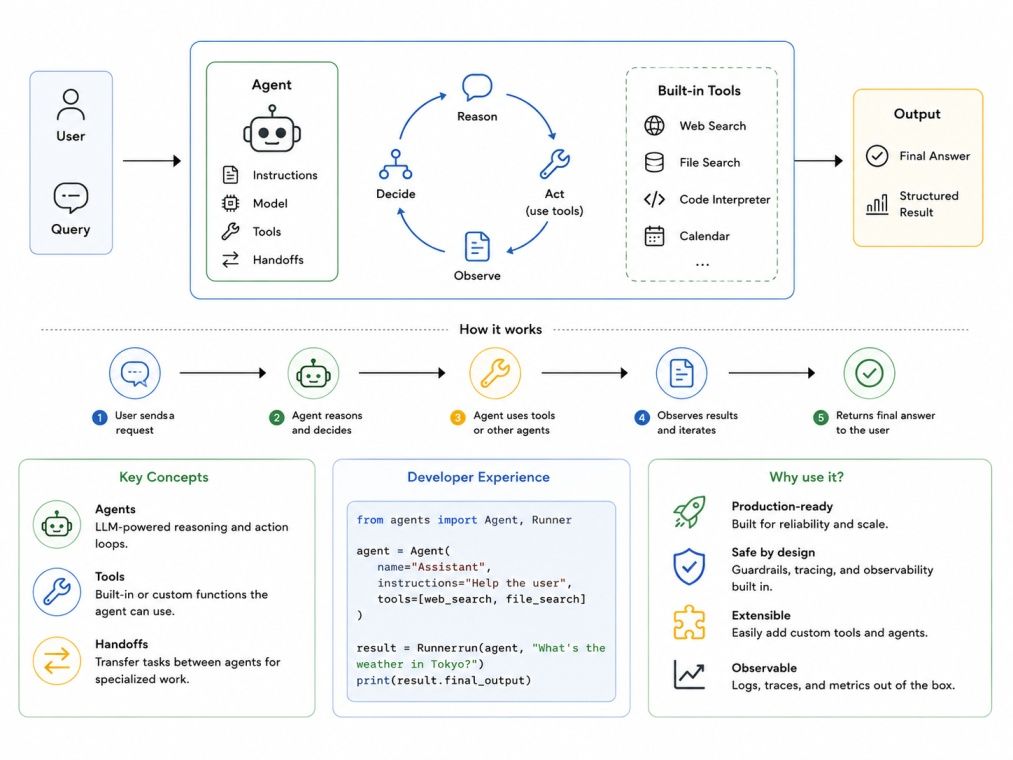
OpenAI designed this SDK as a production-ready upgrade to their earlier experiment called Swarm. Swarm was a research project that explored multi-agent coordination, but it was never meant for production use. The Agents SDK takes those ideas and makes them stable, testable, and practical for real applications.
The SDK is model-agnostic in one important way: while it works best with OpenAI models, it can connect to any model provider that follows the OpenAI Chat Completions API format. That includes models from Anthropic, Google, and others through compatible wrappers.
Also Read: How LLMs Works: Understanding the Technology Behind Large Language Models
Goal |
What It Means |
| Simplicity | Minimal setup to get an agent running |
| Composability | Agents can call other agents through handoffs |
| Observability | Built-in tracing for every agent run |
| Flexibility | Works with custom tools, LLMs, and memory systems |
The SDK is built around a small set of concepts. Once you understand these, everything else in the framework becomes straightforward.
An agent is the central unit. It is a language model paired with a set of instructions and, optionally, a set of tools. You define an agent by giving it a name, a model, and instructions that tell it how to behave.
from agents import Agent

my_agent = Agent(
   name="Research Assistant",
   model="gpt-4o",
   instructions="You are a helpful research assistant. Always cite your sources."
)
The instructions work like a system prompt. They shape the agent's behavior across every interaction.
Tools are functions your agent can call. The SDK supports three types of tools:
Here is a simple function tool example:
from agents import Agent, function_tool

@function_tool
def get_weather(city: str) -> str:
   return f"The weather in {city} is sunny and 28 degrees."

weather_agent = Agent(
   name="Weather Bot",
   model="gpt-4o",
   tools=[get_weather]
)
The SDK automatically converts the function signature and docstring into a JSON schema that the model understands. You do not have to write the schema manually.
Handoffs are one of the most useful features in the SDK. They let one agent transfer control to another agent. This is how you build multi-agent systems.
For example, a triage agent can receive a user query and then hand it off to a billing agent or a technical support agent depending on the topic. The handoff includes the conversation context, so the receiving agent knows what has already been discussed.
billing_agent = Agent(name="Billing Agent", model="gpt-4o", instructions="Handle billing questions.")
support_agent = Agent(name="Support Agent", model="gpt-4o", instructions="Handle technical issues.")

triage_agent = Agent(
   name="Triage Agent",
   model="gpt-4o",
   instructions="Route the user to the right department.",
   handoffs=[billing_agent, support_agent]
)
Also Read: Generative AI Solutions: Types, Benefits, and Use Cases
The Runner is what actually executes your agent. You call Runner.run() with an agent and an input message, and it handles the entire loop: calling the model, processing tool calls, running handoffs, and returning the final output.
from agents import Runner
import asyncio

result = asyncio.run(Runner.run(triage_agent, "I was charged twice for my subscription."))
print(result.final_output)Understanding the agent loop helps you debug problems and design better systems. Every time you run an agent, the same loop runs in the background.
Mode |
How to Use |
Best For |
| Runner.run() | Async execution | Most production use cases |
| Runner.run_sync() | Synchronous execution | Scripts and simple testing |
| Runner.run_streamed() | Streaming responses | Real-time user interfaces |
The streaming mode is particularly useful when you are building a chatbot or assistant where users expect to see the response appear word by word rather than waiting for the full answer.
Also Read: Agentic Workflows: A Guide to AI-Powered Autonomous Execution
The framework includes a guardrails system that lets you validate inputs and outputs. You can define input guardrails that check a user's message before the agent sees it, and output guardrails that check the agent's response before it reaches the user.
Guardrails run in parallel with the agent to keep things fast. If a guardrail fails, it raises an exception that you can catch and handle.
Interested in building AI-powered applications and intelligent agents? Explore these upGrad programs and learn data science, machine learning, and generative AI through hands-on projects:
Getting started with the SDK takes less than five minutes.
pip install openai-agentsYou also need an OpenAI API key. Set it as an environment variable:
export OPENAI_API_KEY="your-api-key-here"from agents import Agent, Runner
import asyncio
agent = Agent(
name="Assistant",
model="gpt-4o",
instructions="You are a helpful assistant. Answer questions clearly and concisely."
)
result = asyncio.run(Runner.run(agent, "What is machine learning?"))
print(result.final_output)That is all it takes to run a basic agent. From here you can add tools, handoffs, and more complex logic.
Also Read: Generative AI Fundamentals: A Practical Guide to Understanding How Modern AI Works
Every run creates a trace automatically. Traces record every step the agent took, including model calls, tool executions, and handoffs. You can view traces in the OpenAI dashboard under the Traces section.
For local debugging, you can also inspect the RunResult object that Runner.run() returns. It contains the full history of the run, including all messages and tool outputs.
The market has several agent frameworks now. Here is how this SDK compares to the most popular ones.
Feature |
OpenAI Agents SDK |
LangChain |
AutoGen |
CrewAI |
| Learning curve | Low | High | Medium | Medium |
| Multi-agent support | Yes (handoffs) | Yes (complex setup) | Yes | Yes |
| Built-in tracing | Yes | Partial | No | No |
| Streaming support | Yes | Yes | Limited | Limited |
| Model flexibility | Moderate | High | High | High |
| Production readiness | High | Medium | Medium | Medium |
| Code verbosity | Low | High | Medium | Medium |
The SDK is the right choice if you are already using OpenAI models and want something that works out of the box with minimal setup. LangChain gives you more flexibility but requires significantly more configuration. AutoGen is better suited for research scenarios where multiple agents debate and collaborate.
The OpenAI Agents SDK makes agent development accessible to a much wider audience. Its clean design around agents, tools, handoffs, and the runner loop means you can build a working multi-agent system in a few dozen lines of code. The built-in tracing and guardrails features also make it much easier to move from a prototype to something you can actually trust in production.
If you want to go deeper into AI and machine learning concepts like this, upGrad's programs in Agentic AI are designed to take you from the fundamentals to building production-ready systems. You will work on projects that mirror real industry problems, with mentorship from practitioners who have built these systems themselves.
Want personalized guidance on Agentic AI and upskilling? Speak with an expert for a free 1:1 counselling session today.
The OpenAI Agents SDK is used to build AI agents that can use tools, make decisions, and hand off tasks to other agents. It is designed for creating automated workflows, assistants, and multi-agent systems that run in production environments.
The SDK itself is open-source and free to install and use. However, running agents requires API calls to OpenAI models, which are billed based on token usage. You will need an OpenAI account and API key to get started.
A chatbot typically only generates text responses. An agent can also take actions, such as calling APIs, running code, or searching the web. With the OpenAI Agents SDK, you can give agents tools and the ability to decide when and how to use them.
Yes, the SDK is a Python library. You need basic Python knowledge to define agents, write function tools, and run the agent loop. You do not need to be an advanced developer, but familiarity with Python functions and async code helps.
The SDK works natively with OpenAI models like GPT-4o, GPT-4o mini, and o1. It can also work with other models that support the OpenAI Chat Completions API format, including some open-source and third-party providers through compatible endpoints.
A handoff is when one agent transfers control of a conversation to another agent. The sending agent decides which agent to route to based on the context. The receiving agent gets the full conversation history so it can continue seamlessly.
When a tool call fails, the SDK passes the error message back to the model as part of the conversation. The model can then decide whether to retry, use a different approach, or explain the failure to the user. You can also add custom error handling in your tool functions.
Guardrails are validation checks you attach to an agent. Input guardrails check the user's message before the agent processes it. Output guardrails check the agent's response before it is returned. They help you enforce safety, format, or business logic constraints.
The Assistants API is a hosted service where OpenAI manages state and execution. The OpenAI Agents SDK gives you a local framework where you control the execution loop, state management, and deployment. It is more flexible but requires you to handle infrastructure yourself.
Yes. Multi-agent systems are a core use case. With this framework, you can create networks of agents where each one specializes in a specific task and hands off to others when needed. This is how you build complex automated pipelines.
The official documentation is available at the OpenAI website and the SDK's GitHub repository. The GitHub repo includes quickstart guides, example projects, and detailed API references. OpenAI also maintains an active community forum where developers share implementations and ask questions.
98 articles published
Rahul Singh is an Associate Content Writer at upGrad, with a strong interest in Data Science, Machine Learning, and Artificial Intelligence. He combines technical development skills with data-driven s...
Speak with AI & ML expert
By submitting, I accept the T&C and
Privacy Policy