What is Ollama Used For? Key Use Cases and Examples
By upGrad
Updated on Oct 15, 2026 | 9 min read | 2.36K+ views
Share:

All courses
Certifications
More
By upGrad
Updated on Oct 15, 2026 | 9 min read | 2.36K+ views
Share:
Table of Contents
Key Highlights
Ready to go beyond running models locally? Learn how upGrad’s Agentic AI courses can help you build AI agents, automate tasks, and solve real business problems using tools like Ollama and local language models.
Agentic AI Courses to upskill
Explore Agentic AI Courses for Career Progression
IIIT Bangalore
EPGP in Applied AI and Agentic AIIIIT Bangalore
Executive Diploma in Machine Learning and AI360° Career Support
Ollama is software that puts an AI model on your laptop or PC. It handles the download, the setup, and the chat. You pick a model and start typing.
Most AI chatbots work online. You type a prompt, it goes to a company’s server, and the answer comes back. Ollama works differently. The model runs on your laptop or PC. Nothing is sent out.
Ollama is not an AI model, it is the tool that runs them. Some examples of AI models are Llama by Meta, Gemma by Google, Mistral, and Qwen by Alibaba.
People use Ollama to run AI models on their own computers. That is the core of it. Most other uses are built on this one.
Running a model locally means the AI works on your own computer instead of someone else’s server. It works in three steps:
Why do people want to use AI models locally? Because of privacy. Think about pasting a client contract into an online chatbot. Plenty of people don’t like doing that. With Ollama the file never leaves your machine, so there’s nothing to worry about.
Other reasons people give:
Ollama doesn’t ship a chatbot builder. What it gives you is the engine. You supply the look and the instructions.
You can use the Ollama desktop app for 5 minute tasks also. It opens a plain chat window and that’s all you need to start talking to a model.
Else you can add a front end on top. Open WebUI is a popular pick, it looks like ChatGPT and adds:
Now the fun part. A Modelfile turns a general model into your own bot. It’s a small text file with a base model and a system prompt.
FROM llama3
SYSTEM You work on the IT help desk. Keep answers under 100 words and ask which operating system the user has.
Build it, then run it:
ollama create helpdesk -f Modelfile
ollama run helpdesk
Done. You have a helpdesk bot that stays in its role.
Where does this work well? Internal FAQs, onboarding questions, policy lookups, and study helpers. All of these have a narrow scope, which suits smaller models.
Ollama can write text for you. You give it a prompt and the model drafts a reply on your machine. People mostly asked it to do everyday writing:
Summarizing is where most people begin. Paste in a long article, a report, or a meeting transcript. Ask for the short version. A few seconds later, you have the key points.
Try a prompt like this:
Summarize this report in five bullet points for a busy manager.
Privacy helps here too. Meeting notes, legal drafts, and client emails often hold details you’d rather not upload anywhere. A local model keeps them on your device.
Also read: Top 25+ AI Chatbot Project Ideas in 2026
Developers use Ollama as an offline coding helper. It writes code, explains it, and helps fix it. Here is what it can do:
You can try it straight from the terminal:
ollama run qwen2.5-coder
Then ask: Explain what this Python function does, line by line.
Pick a model built for code. Qwen2.5-Coder, Code Llama, and DeepSeek-Coder are popular choices. General models can code too, but the coding ones usually do better.
Task |
How well it works locally |
| Explaining code | Very well |
| Writing small functions | Well |
| Writing unit tests | Well |
| Large, multi-file changes | Weaker |
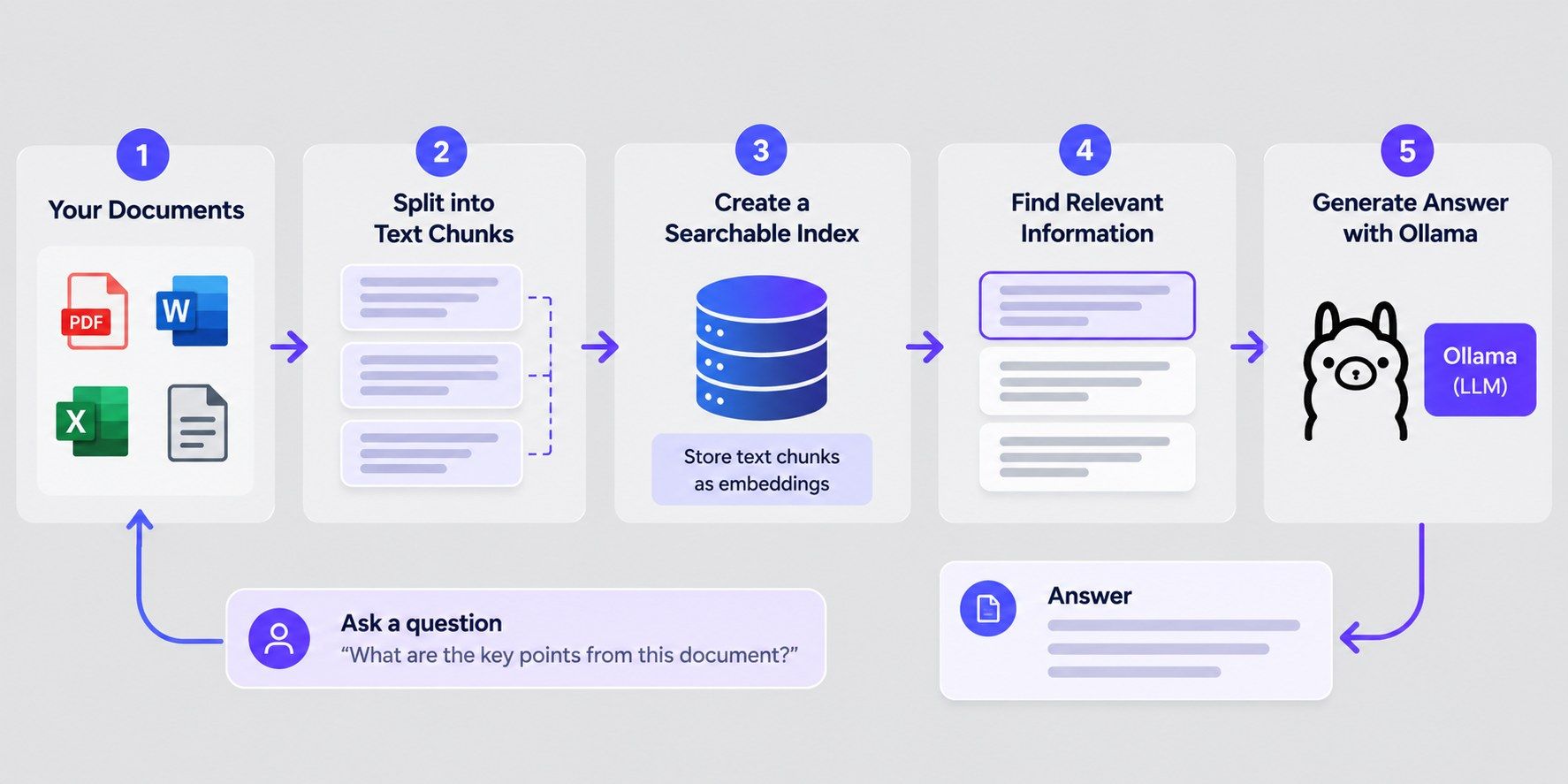
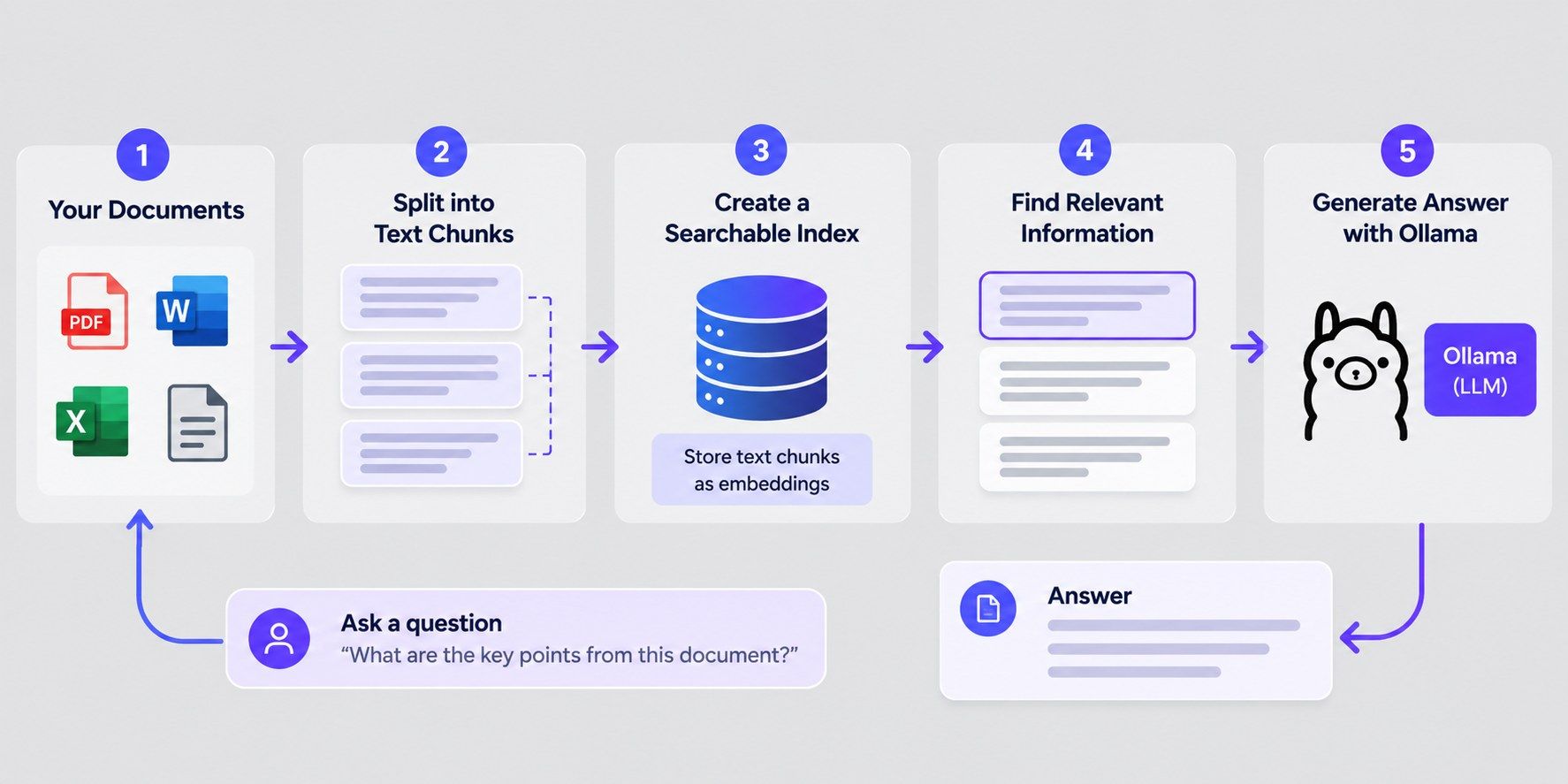
Ollama can read a document and answer questions about it. You hand it a file or a block of text. Then you ask what you need to know.
Say you have a 40-page policy PDF. Instead of scrolling for the leave rules, you ask: What is the notice period for resigning? The model finds the answer and tells you.
There are two ways to do this.
This is where Ollama gets interesting for developers. When it runs, it starts a local server at http://localhost:11434. Any app on your machine can send it a prompt and get a reply.
Here is a basic request:
curl http://localhost:11434/api/generate -d '{
  "model": "llama3",
  "prompt": "Write a two-line product description for a steel water bottle.",
  "stream": false
}'
The reply comes back as JSON. Your app reads it and uses the text.
Ollama also supports an OpenAI-compatible endpoint. That means code written for the OpenAI API can often point at Ollama with a small change. You swap the base URL. The rest stays much the same.
Here switching models takes one command. No new account, no new app. If you want to try Mistral? Run this:
ollama run mistral
Want to compare it with Gemma? Same thing:
ollama run gemma3
Ollama downloads the model the first time you call it. After that, it’s stored on your machine and ready to go.
A few commands you’ll use often
Command |
What it does |
| ollama pull <model> | Downloads a model without running it |
| ollama list | Shows every model on your machine |
| ollama rm <model> | Deletes a model to free up space |
Comparing models is important because they’re not equal. One may write better emails. Another may handle code well. A third may be small enough to run fast on an older laptop.
Here’s a simple way to compare them:
Want to turn AI tools into business results? Explore the IIM Kozhikode Professional Certificate Programme in AI for Business Professionals. Learn to lead AI strategy, run pilots, and scale impact in 6 months, with no coding required.
Ollama supports hundreds of open models. You can browse them all in the Ollama library at ollama.com/library. Each model has its own page with sizes, tags, and a run command.
The models come from many creators. Some of the big names:
Models by task
Task |
Models to try |
| General chat and writing | Llama 3.1, Gemma 3, Mistral |
| Reasoning and math | DeepSeek-R1, Qwen3, gpt-oss |
| Coding | Qwen2.5-Coder, Qwen3-Coder, Code Llama |
| Image understanding | LLaVA, Llama 3.2 Vision, Qwen3-VL |
| Embeddings (for document search) | nomic-embed-text, mxbai-embed-large |
| Small devices and older laptops | Llama 3.2 (1B, 3B), Gemma 3 (270M, 1B), SmolLM2 |
Some models are “thinking” models. They work through a problem step by step before they answer. DeepSeek-R1 and Qwen3 do this. Others are multimodal, which means they can read images along with text.
Also read: What Is Microsoft Copilot? Features, Use Cases, and Benefits Explained
Ollama makes local AI simple. Here is what you get from it.
Also read: Data Modeling for Data Integration: Best Practices and Tools
Ollama is useful, but it isn’t right for every job. Here is where it falls short.
Models need a lot of memory. Small ones (3B to 8B) run on most modern laptops with 8 to 16 GB of RAM. Larger models need much more. A 70B model wants a strong GPU or a high-memory machine.
If a model is too big for your hardware, it slows to a crawl. Long prompts and big context windows use even more memory.
Local models vary a lot. A small model can miss details, lose track of long texts, or get facts wrong. Speed also depends on your hardware, so the same model can feel fast on one machine and sluggish on another.
Always check important answers. Local models can sound sure and still be wrong.
Basic use is easy. Install, pull a model, and chat. But more advanced setups take effort. RAG, custom apps, and chat front ends like Open WebUI need extra tools and some technical skill. Choosing the right model and size also takes some trial and error.
The top hosted models are usually stronger. They are bigger and run on powerful servers. For hard reasoning, complex coding, or large documents, a local model may fall behind.
Ollama also isn’t built for heavy traffic. A single machine suits personal use or small teams. Serving many users at once calls for stronger hardware or a different setup.
Also read: Artificial Intelligence Tools: Platforms, Frameworks, & Uses
Conclusion
So, what is Ollama used for? It lets you run AI models on your own computer, and most of its uses build on that. People use it to build chatbots, write and summarize text, get help with code, and ask questions about their documents. Developers also use its local API to build AI apps and test different language models.
Its biggest strengths are privacy, control over your data, offline use, and no per-message fees. It does have limits. You need enough memory, and local models may not match the strongest hosted tools on complex tasks.
If you want to try local AI, install Ollama and run a small model first. A few minutes of testing will show you whether it fits your work.
Have any questions about Agentic AI courses? Book a free consultation call with our experts and get personalized guidance on the right learning path for you.
Similar reads:
AI Chatbot for Business: A Complete Guide to Use Cases, Benefits, and Implementation
Generative AI Chatbot: How Intelligent Conversational Systems Work
It depends on the size. Small models under 3B can take 1 to 2 GB. An 8B model is usually around 5 GB. A 70B model can take 40 GB or more. These add up fast if you keep several, so remove the ones you don’t use.
Local models process your prompts on your own device. Cloud models and web search are different, because they send data to Ollama’s servers. Read Ollama’s privacy policy if this matters for your work.
The software allows it. What matters is the license of the model you pick. Some models allow commercial use freely. Others add conditions, such as size limits or usage rules. Read the license on the model’s page before you build a product on it.
All three run models locally. Ollama focuses on a simple command line and a ready-made local API. LM Studio is built around a visual interface. llama.cpp is a lower-level engine for people who want fine control, and Ollama was originally built on it. Pick based on how you like to work.
It supports NVIDIA, AMD, and Apple Silicon. If you have no supported GPU, it falls back to the CPU, which is slower. Check Ollama’s hardware docs for the current list of supported cards.
In a hidden .ollama/models folder in your user directory by default. The exact path depends on your operating system. If your main drive is short on space, set the OLLAMA_MODELS environment variable to point to another drive.
About five minutes by default. After that, Ollama unloads it to free memory. You can change this with the keep_alive setting. A longer time means faster replies later. A shorter one frees your RAM sooner.
Every model has a context window, which is the amount of text it can hold at once. Once a chat passes that limit, the oldest parts drop out. You can raise the limit in Ollama’s settings or with the num_ctx parameter. A bigger window uses more memory.
Not directly. Ollama runs models. It doesn’t train them. You can fine-tune a model with another tool, then import the result into Ollama using a Modelfile.
A local model can’t browse on its own. Ollama offers a web search API that apps can call to feed fresh results to a model. It needs an Ollama account and an internet connection. Check the docs for current limits.
On macOS and Windows, the app downloads updates and prompts you to restart. On Linux, run the install script again. Updating matters because new models often need the latest version. Your downloaded models stay in place.
1141 articles published
We are an online education platform providing industry-relevant programs for professionals, designed and delivered in collaboration with world-class faculty and businesses. Merging the latest technolo...
Speak with AI & ML expert
By submitting, I accept the T&C and
Privacy Policy