Amazon Bedrock Agents: How to Build and Deploy AI Agents
By upGrad
Updated on Oct 06, 2026 | 9 min read | 2.37K+ views
Share:

All courses
Certifications
More
By upGrad
Updated on Oct 06, 2026 | 9 min read | 2.37K+ views
Share:
Table of Contents
Key Highlights
Want to build agents on your own? Our agentic AI courses take you from the basics to deploying working AI agents with hands-on projects.
Agentic AI Courses to upskill
Explore Agentic AI Courses for Career Progression
IIIT Bangalore
EPGP in Applied AI and Agentic AIIIIT Bangalore
Executive Diploma in Machine Learning and AI360° Career Support
Amazon Bedrock agents are AI agents built on AWS that use a foundation model to understand a request, decide what to do, and carry out multi-step tasks through APIs and company data.
These agents not only answer questions but complete the tasks also. For example, a customer types: "Where is my order? Can you move the delivery to Friday?"
Here a basic chatbot can only reply with text, but a Bedrock agent can go further:
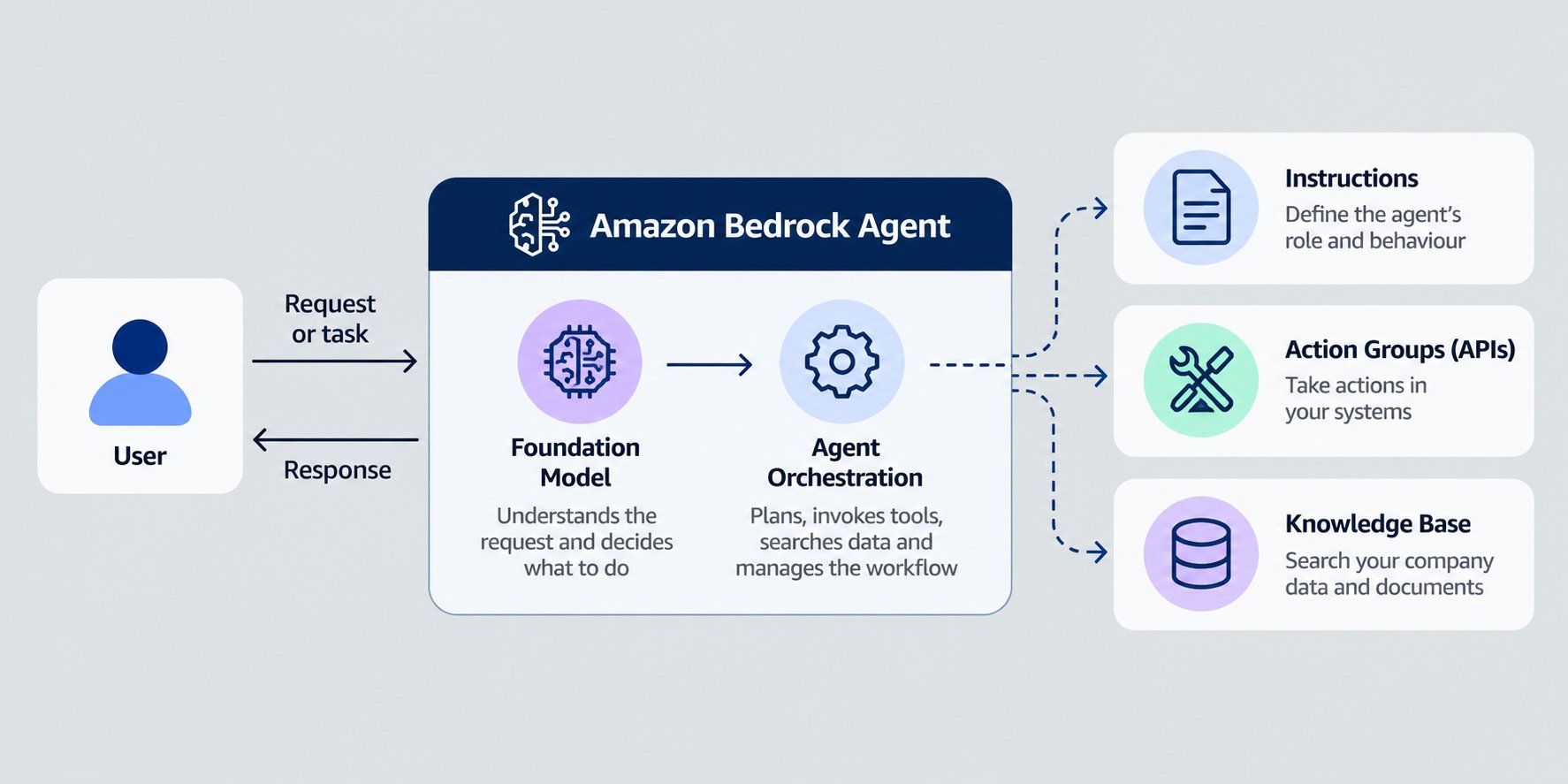
All of this happens inside one chat by following these three main parts:
AWS uses "Bedrock agents" for two different services. Here is how they differ.
Agents Classic |
AgentCore |
|
| What it is | The original service, launched in November 2023 | The newer platform for building and running agents |
| How you build | You set up the agent with instructions and settings | You use separate building blocks, such as Runtime, Memory, Gateway, and Identity |
| Flexibility | Works inside Bedrock | Works with any framework and any model |
Bedrock Agents Classic has not been open to new customers since July 30, 2026, and the service is in maintenance mode. Existing Bedrock models, Knowledge Bases, and Guardrails are not affected.
AWS recommends that you evaluate AgentCore for new agent development, as no new features will be added to Classic. The rest of this guide explains how Classic works, since many teams still run it, and then shows what AgentCore offers and how the two compare.
Also read: AWS Agentic AI: A Beginner’s Guide
Every agent follows the same loop. A request comes in, the agent does the planning, takes action, and replies. Below is the detailed explanation of how bedrock agents work.
It starts when a user sends a message like "What is the status of order 421?" Your app passes this message to the agent through the InvokeAgent API. Each call is one "turn". Calls that share the same session ID belong to the same conversation, so the agents remember what was said earlier.
An optional pre-processing step can run first. It helps the agent sort the request and can check that the input is valid.
The foundation model is the "brain" of the agent. It is the AI model you choose when you set up the agent, and it does the thinking. When a message comes in, it reads that message together with your instructions and works out what to do next. Sometimes that means calling one of your APIs. Sometimes it means searching a knowledge base, or asking the user for a detail that's missing, like an order number.
This happens in a loop called orchestration. At each round, the model picks the next API call or knowledge base search. It repeats this until it has what it needs.
Action groups are the things your agent can do. You define each action in one of two ways:
Some questions don't need an action at all. The agent just has to know the answer. For that, you attach a knowledge base, which is a set of your own documents, such as a returns policy or a product manual. The agent searches it when a question needs it.
A shopper who types "can I send back something I bought on sale?" gets an answer taken from your actual policy. The model isn't left to guess from its training data.
Here the agent writes the reply. It combines the action results and any knowledge base findings into one clear answer. There is also an optional post-processing step to format the final response. It is turned off by default.
Want to see how the agent reached its answer? Turn on trace. It shows the agent's reasoning step by step, which helps a lot when you are testing.
Also read: What Is AWS Bedrock? How It Works, Uses and Bedrock vs SageMaker
Think of an agent as a small team. Each part has its own job. Some parts are required. Others are optional extras that make the agent safer or smarter.
The core parts that you need to build an agent are:
Component |
What it does |
| Foundation model | The AI model that reads requests, plans the steps, and writes replies |
| Instructions | Plain-language rules that tell the agent its job, such as "You are a support agent for an online store" |
| Action groups | The tasks the agent can perform, defined through an OpenAPI schema or function details and run by Lambda functions |
| Knowledge bases | The documents and data the agent can search to find answers |
Also read: AWS Architecture Explained: Function, Components, Deployment Models & Advantages
A process to create an Amazon bedrock agents is as follows:
The Lambda function is usually called by an agent to get the date and time. Here are the steps to create one:
Don't skip the last step. Without it, the agent can't run your function.
Now you build the agent itself.
Last, open the agent's IAM service role from the Permissions section. Check that its permissions point to your Lambda function's ARN.
Time to see if it works.
If you change anything later, choose Prepare again so the agent picks up your changes. AWS says you must do this every time you update the working draft.
The test alias is only for testing. To use the agent in a real app, you must deploy it with an alias. AWS requires this before an agent can be used in an application.
Each alias points to a version of your agent. That means you can keep updating the draft without breaking the live version.
Now call your agent from code. You use the AWS SDK for Python (boto3) and the InvokeAgent operation.
import boto3
import uuid

client = boto3.client("bedrock-agent-runtime", region_name="your-region")

response = client.invoke_agent(
    agentId="YOUR_AGENT_ID",
    agentAliasId="YOUR_ALIAS_ID",
    sessionId=str(uuid.uuid4()),
    inputText="What time is it?",
)

answer = ""
for event in response["completion"]:
    chunk = event.get("chunk")
    if chunk:
        answer += chunk["bytes"].decode("utf-8")

print(answer)
Reuse the same session ID for follow-up questions, so the agent remembers the conversation. If you turn on streaming, the agent's role also needs the bedrock:InvokeModelWithResponseStream permission.
When you're done, delete what you built so you don't pay for things you no longer use.
Want to lead AI projects without writing code? The IIM Kozhikode Strategic AI for Business Professionals programme helps you apply AI in your domain and make strategic decisions that drive measurable business outcomes.
Both services build AI agents on AWS, but they work very differently. Classic is a fixed, settings-based service in maintenance mode. AgentCore is a flexible platform that AWS keeps adding to.
Here is how they compare, row by row.
Agents Classic |
AgentCore |
|
| Setup | Fill in settings for the model, instructions, and tools | Use a config-based harness, or write your own agent code and run it on AgentCore |
| Models | Bedrock models. The list has been frozen since July 30, 2026 | The full Bedrock catalog, plus OpenAI, Gemini, and any OpenAI-compatible model. New models arrive here |
| Actions | Action groups, defined by an OpenAPI or function schema, with an optional Lambda function | Tools exposed through Gateway, wrapping REST APIs, Lambda functions, or code |
| Knowledge bases | Attached directly to the agent | Connected through Gateway, or through a retrieval tool in code |
| Memory | Session and memory settings on the agent | AgentCore Memory, short and long term, with different strategies |
| Prompt control | Override prompts at four stages | One system prompt on the harness. Stage-by-stage overrides are not directly copied, but code-defined agents allow them |
| Guardrails | Attached to the agent | Set in Bedrock, with enforcement on Gateway |
| Code execution | Built-in code interpreter action group | AgentCore Code Interpreter |
| Multi-agent | Supervisor and routing roles are built in | Limited on the harness. You can use an agent-as-tool pattern. Full multi-agent needs custom framework code |
| Tracing | Trace window and APIs | Persistent, end-to-end tracing of all agent actions |
| Cost | No charge for Classic itself. You pay for model use and related resources | Consumption-based pricing. No separate harness orchestration charge |
| Future | Maintenance mode, with no new features | Active development |
Also read: What is RAG in AI and How Retrieval-Augmented Generation Works
Classic agents save teams a lot of setup work. Here is where they help most.
Also read: Understanding Multi Agent Systems: A Complete Beginner Guide
Classic is still useful, but it has clear limits. The biggest one is its future.
Must read: Agentic AI Learning Path: A Complete Guide for Developers and AI Professionals
Conclusion
Amazon Bedrock agents are AI helpers that do more than chat. They plan, call your tools, search your data, and finish tasks.
The original service, now called Agents Classic, is quick to set up and still works well for teams that use it. But it's in maintenance mode. New accounts can't create Classic agents, and AWS isn't adding features. Existing agents keep running, and there's no migration deadline.
For new projects, use Amazon Bedrock AgentCore. It works with any model and framework. Whichever route you take, the basics stay the same: give the agent a clear job, the right tools, and good data, then test it before you go live.
Not sure which course fits your goals? Book a free consultation and get personalized guidance on choosing between Generative AI and Agentic AI.
No. Amazon Bedrock is fully supported, and it keeps getting new models. Only the Agents Classic service is closed to new accounts. Your models, knowledge bases, and guardrails are not affected.
You'll see an AccessDeniedException with HTTP status 403 when you call CreateAgent or InvokeInlineAgent. The message says Bedrock Agents is in maintenance mode. AWS says there is no exception process, so the fix is to use AgentCore.
No. AWS calls it a naming update only. The bedrock-agent API namespace, SDK clients, CloudFormation resource types, and IAM action prefixes stay the same.
Yes, for accounts that are still allowed to use Classic. In a new account without prior usage, AWS says to use AgentCore resources in your templates instead.
Your knowledge bases stay as they are. You connect them to your AgentCore agent through Gateway. Guardrails set on the Bedrock model still apply when the model runs through AgentCore. For agent-level enforcement, you use Gateway policies.
Yes. You connect them through Gateway, which turns REST APIs and Lambda functions into tools your agent can call. This is usually the main migration task. You redeploy your action groups behind Gateway.
AWS says a straightforward agent, with a model, action groups, and a knowledge base, takes hours. Agents with custom orchestrators or multi-agent setups need more code work.
Yes. AWS offers an amazon-bedrock skill in its agent toolkit for AWS. It checks your agent, builds a migration plan, and uses the AgentCore CLI to deploy the harness. It pauses for your approval first and never changes your original agent.
No. AWS publishes a list of supported Regions, so check it before you plan. If your Classic agents run in a Region without AgentCore, you can keep using them there and build new projects in a supported Region.
On the AgentCore harness, yes. AWS says you can switch between model providers mid-session without redeploying. You can also override the model on a single invocation.
Yes. Memory is on by default in the harness. If you pass an actor ID with each request, every actor gets isolated memory, and long-term memory is scoped to that actor.
1141 articles published
We are an online education platform providing industry-relevant programs for professionals, designed and delivered in collaboration with world-class faculty and businesses. Merging the latest technolo...
Speak with AI & ML expert
By submitting, I accept the T&C and
Privacy Policy