What Is AWS Bedrock? How It Works, Uses and Bedrock vs SageMaker
By Sriram
Updated on Sep 01, 2026 | 15 min read | 4.27K+ views
Share:

All courses
Certifications
More
By Sriram
Updated on Sep 01, 2026 | 15 min read | 4.27K+ views
Share:
Table of Contents
Key Highlights
Explore the generative AI syllabus to understand the concepts, tools, and techniques behind modern AI. Build practical knowledge and take the next step towards advancing your AI career.
Generative AI Courses to upskill
Explore Generative AI Courses for Career Progression
IIIT Bangalore
EPGP in Applied AI and Agentic AIIIIT Bangalore
Executive Diploma in Machine Learning and AI360° Career Support
AWS Bedrock, or Amazon Bedrock, is a fully managed AWS service for building generative AI applications with foundation models. It gives developers access to models from Amazon and other providers through APIs, so they can add AI features without training or hosting models themselves.
In simple terms, Bedrock connects an application with a selected foundation model. The application sends a request, the model processes it, and Bedrock returns the result.
Training a foundation model requires large datasets, expensive computing resources, and specialised expertise. Most businesses would rather use existing models and focus on building useful applications.
Bedrock makes this easier by offering managed model access and a choice of foundation models for different tasks, requirements, and budgets.
AWS Bedrock is not an AI model. It is a service that lets applications use foundation models through APIs.
A foundation model is the AI system itself, while Bedrock provides the managed environment and tools needed to use such models in applications. AWS SageMaker, in contrast, offers broader capabilities for developing, training, tuning, deploying, and managing machine learning models.
Understanding how AWS Bedrock works becomes easier when you look at it as a sequence of application requests, model processing, and generated responses.
A simplified workflow looks like this:
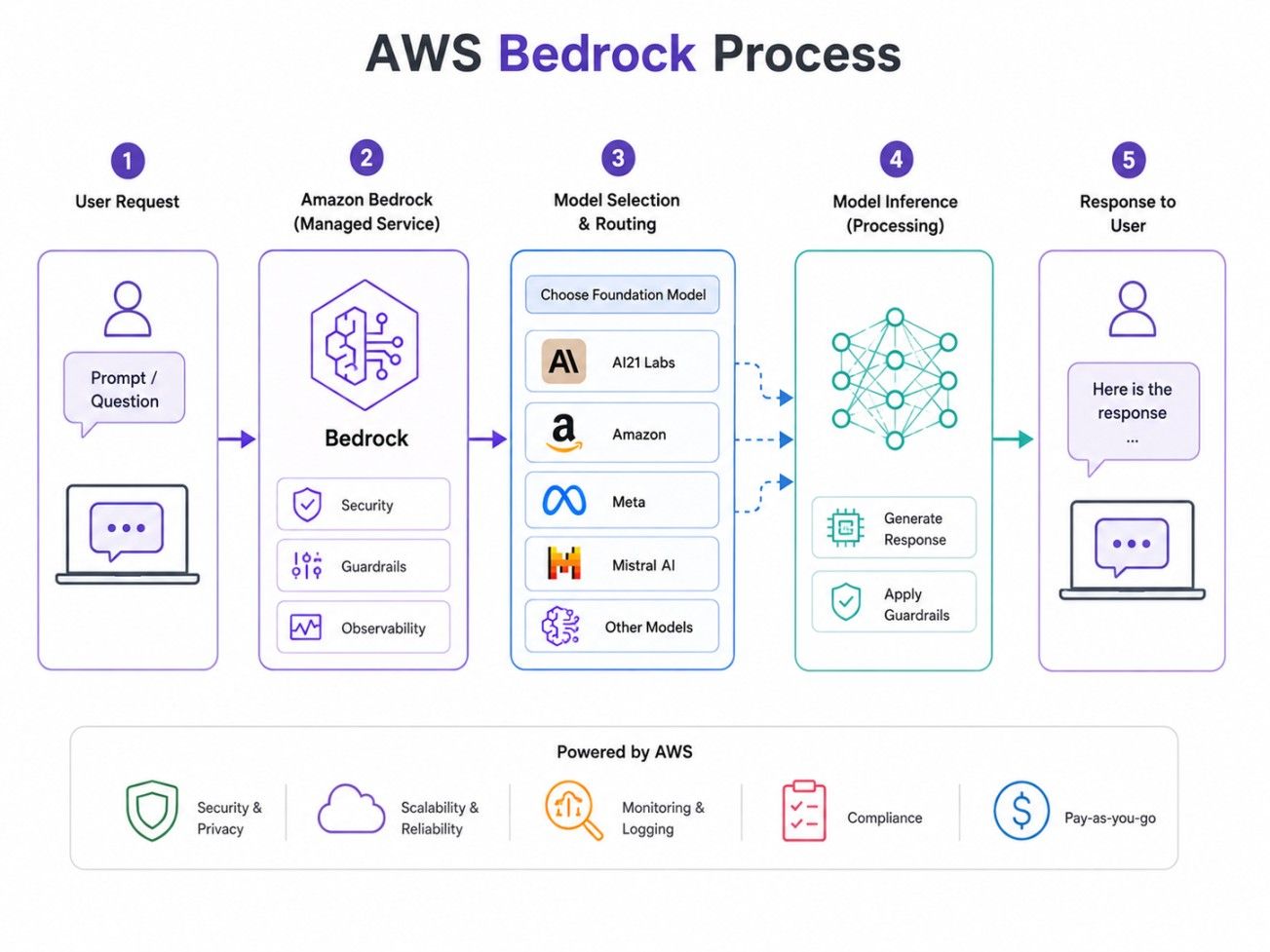
Here is what happens at each stage.
The process starts with selecting a foundation model that fits the application's requirements.
For example, an organisation building a conversational assistant may prioritise a model's language understanding and response quality. Another application may focus more heavily on summarisation, coding, image generation, embeddings, or cost.
The model selection process therefore depends on what the application needs rather than simply choosing the most powerful available model.
Once a model is selected, an application can send an input through the relevant Bedrock API.
The input could be a simple question, a detailed instruction, a document-related request, or another supported type of input. The application can also provide additional context depending on the workflow.
For example, a customer-support application could send:
"Summarise the customer's issue and suggest the next troubleshooting step."
Bedrock receives the request and routes it to the appropriate model.
The selected foundation model processes the input and generates an output.
The type of output depends on the model and the application. Generative AI applications can work with capabilities such as text generation, image generation, embeddings, and other supported modalities.
The quality of the response depends on several factors, including the model, instructions, context supplied to it, and the way the application has been designed.
The generated result is then returned to the application.
A developer might use that response to power:
The user does not necessarily interact with Bedrock directly. In many applications, Bedrock operates behind the scenes while the user interacts with a website, mobile application, business platform, or chatbot.
Bedrock can also be used with capabilities that extend beyond basic model inference.
For example, Knowledge Bases can support applications that need to retrieve information from connected data sources. Agents can help applications perform multi-step tasks using models, instructions, and connected tools. Guardrails can apply configured policies to inputs and model responses. AWS documents guardrails as a way to evaluate prompts and responses against configured policies before returning results.
This makes the workflow more than simply sending a prompt to a model. Developers can build a broader AI application around the foundation model.
Looking to build stronger business and leadership skills? Explore the MBA from LJMU with IIM Udaipur Certification and take the next step in your management career.
AWS Bedrock is mainly used to build generative AI applications without requiring organisations to develop foundation models from scratch. Its applications range from simple text-generation tools to more sophisticated enterprise AI systems.
One of the common applications is conversational AI.Businesses can build chatbots that answer customer questions, assist employees, provide product information, or guide users through processes.
For example, an online retailer could create an assistant that answers questions about products, shipping, returns, and order-related information.
Bedrock can also support applications that generate or transform content.
Examples include:
The model can generate an initial response, which can then be reviewed or modified by a person.
Businesses often have large amounts of internal information spread across documents, policies, manuals, and knowledge repositories.
A Bedrock-based application can be designed to answer questions using relevant organisational information rather than relying only on the model's general knowledge.
This is particularly useful for internal knowledge assistants and customer-support systems.
Retrieval-Augmented Generation, or RAG, combines information retrieval with generative AI.
Instead of asking a model to answer solely from what it learned during training, the application retrieves relevant information and provides that context to the model.
This approach can be useful when an organisation wants responses grounded in its own documents or information. Amazon Bedrock provides Knowledge Bases capabilities for building applications that retrieve information for generative AI workflows.
Some business tasks require more than generating a single answer.
An AI agent may need to interpret a request, decide what action is required, use a connected tool, retrieve information, and continue through several steps.
Bedrock supports agent-oriented application development, allowing developers to build AI systems that can work with models, instructions, knowledge, and tools.
Bedrock can also be incorporated into applications that perform language-based analysis.
Examples include:
The exact capabilities depend on the selected model and how the application is implemented.
Some supported foundation models can work with modalities beyond text.
This makes Bedrock useful for applications involving images and other forms of content, provided the selected model supports the required capability.
Also Read: What is QLoRA?
AWS Bedrock combines foundation model access with several capabilities intended to help developers build generative AI applications.
Feature |
What It Does |
| Foundation model access | Provides access to a range of foundation models |
| Model inference | Allows applications to send requests and receive model responses |
| Knowledge Bases | Helps connect generative AI applications with organisational information |
| Agents | Supports AI applications that can perform multi-step tasks using connected tools |
| Guardrails | Helps apply configured controls to model inputs and outputs |
| Model customisation | Provides options for adapting supported models for specific requirements |
| API integration | Allows applications to interact with Bedrock programmatically |
| AWS integration | Enables Bedrock to fit into broader AWS-based application architectures |
The combination is important because an enterprise AI application usually needs more than a model. It may also need access to business information, application logic, security controls, monitoring, and integration with existing systems.
Also Read: PyTorch vs TensorFlow
AWS Bedrock and Amazon SageMaker are built for different jobs. Bedrock helps developers add generative AI to applications using ready-made foundation models. SageMaker is better suited for teams that need to build, train, customise, deploy, and manage their own machine learning models.
AWS Bedrock vs SageMaker: Key Differences
Factor |
AWS Bedrock |
Amazon SageMaker |
| Primary purpose | Build generative AI applications | Develop and manage machine learning models |
| Foundation models | Access through managed APIs | Can develop, customise, train, and deploy models |
| Model training | Not its primary purpose | Strong training and tuning capabilities |
| Infrastructure | Highly managed model access | Provides extensive control over ML infrastructure |
| Target users | Developers and AI application builders | Data scientists and ML engineers |
| Generative AI | Strong focus | Supports generative AI as part of broader ML capabilities |
| Custom ML workflows | Less focused on end-to-end custom model development | Extensive flexibility |
| Getting started | Generally simpler for model-powered applications | More involved when building custom ML workflows |
AWS Bedrock is a strong fit when the main objective is to build an application around existing foundation models.
You might choose it when you want to:
For these scenarios, you are generally more interested in using a capable foundation model than building the entire model-development pipeline yourself.
SageMaker becomes more relevant when you need greater control over the machine learning lifecycle.
It can be suitable for organisations that need to:
SageMaker Studio, for example, provides a unified environment covering activities such as data preparation, model development, training, customisation, deployment, and management.
Also Read: AWS Project Ideas & Topics
Yes. They do not have to be treated as competing services.
An organisation may use SageMaker for developing or training a specialised model and Bedrock for application-level generative AI capabilities. AWS also provides mechanisms for models developed or deployed through SageMaker to work with Bedrock in supported scenarios.
The right combination depends on the application's architecture, model requirements, level of customisation, and operational needs.
Also Read: Parsing in Natural Language Processing
AWS Bedrock can save teams the effort of building AI models from scratch. It also gives them more choice when adding AI features to their applications.
Access to Multiple Foundation Models
One of Bedrock's biggest advantages is model choice. Developers can evaluate different foundation models and select one that fits their application's requirements.
This is useful because there is no single model that is automatically the best option for every task.
Faster AI Application Development
Teams can focus on building the application rather than creating a foundation model and managing its entire training infrastructure.
This can shorten the path from an AI idea to a working prototype.
Scalability
Bedrock is a managed AWS service, which reduces the amount of infrastructure work required for accessing supported foundation models.
This makes it easier to incorporate AI capabilities into applications that may experience changing workloads.
Enterprise Security
Businesses can build Bedrock into their existing AWS environments and apply appropriate security and governance controls.
However, security still depends on how the complete application is designed and configured.
Integration With AWS Services
For organisations already using AWS, Bedrock can become part of a larger cloud architecture alongside storage, databases, application services, identity controls, analytics, and other AWS capabilities.
Flexible Model Selection
Having access to different models gives development teams more flexibility when balancing response quality, capabilities, latency, and cost.
Also Read: Why Do We Need AWS Sagemaker?
AWS Bedrock makes it easier to work with foundation models, but there are still a few things to consider before using it in production.
Model Availability Can Vary
Not every model is available in every AWS Region or configuration. Model capabilities can also differ, so choosing the right one requires testing against your specific use case.
Costs Depend on Usage
Bedrock pricing varies by model, provider, modality, and usage. Features such as Knowledge Bases and Guardrails may also add to the overall cost.
Output Quality Needs Testing
Good results are not guaranteed. Prompts, context, data quality, and application design can all affect the responses generated by a model.
Customisation May Require Expertise
More advanced use cases can involve model customisation, evaluation, data preparation, security controls, and responsible AI practices. These areas may require specialised skills.
Costs Can Grow at Scale
A small experiment may be inexpensive, while a high-volume application can become considerably more costly. It is worth testing expected usage before moving to production.
Also Read: AWS Lambda Function: How it Works & How to Create It?
AWS Bedrock can be applied across industries because the underlying technology can be adapted to different business workflows.
Industry |
Use Case |
| Banking | Customer-service assistants |
| Healthcare | Document summarisation |
| Retail | Product recommendations and content generation |
| Education | AI learning assistants |
| Marketing | Content creation |
| IT | Developer and support assistants |
| E-commerce | Product search and conversational shopping |
| Enterprise | Internal knowledge assistants |
For example, a bank could use a Bedrock-powered assistant to help customers find information about banking products. A retailer could use it to generate product descriptions or create a conversational shopping experience.
In an enterprise environment, the same technology could support employees by answering questions about internal policies, procedures, or company documentation.
The important point is that Bedrock is not limited to one industry or one type of AI application. Its usefulness depends largely on the foundation model selected and the surrounding application architecture.
Getting started with AWS Bedrock can be approached as a gradual process rather than trying to build a complete enterprise application immediately.
Step 1: Set Up an AWS Account
Create or use an AWS account and configure the appropriate permissions for working with Bedrock.
Step 2: Open Amazon Bedrock
Access the Bedrock service through the AWS environment and explore the available capabilities and models.
Step 3: Explore Available Foundation Models
Review the models available for your intended use case. Compare their capabilities, supported modalities, performance requirements, and pricing.
Step 4: Select a Suitable Model
Choose a model based on what your application actually needs rather than selecting one solely because it is popular.
Step 5: Test Prompts
Experiment with representative prompts and evaluate the responses. Try realistic examples that your eventual users are likely to submit.
Step 6: Integrate Bedrock APIs Into an Application
Once the model performs adequately, developers can connect Bedrock with the application's backend and user interface.
Step 7: Evaluate and Monitor Results
Test accuracy, relevance, response quality, latency, and cost. Production systems should also be monitored continuously.
Step 8: Add Security and Governance Controls
As the application becomes more mature, introduce appropriate permissions, data controls, guardrails, logging, and other governance measures.
This staged approach helps teams identify problems early instead of discovering them after deploying an AI application at scale.
AWS Bedrock uses a usage-based pricing model, so there is no single price for every user or application. Your overall cost depends on the model you select, the amount of data processed, and the Bedrock features you use.
The main factors include:
Before deploying Bedrock in production, identify the models and features your application needs, estimate expected usage, and review the current AWS pricing for those services. AWS canupdate model availability and pricing, so use its latest pricing information when preparing a budget.
So, what is AWS Bedrock? It is an AWS service that gives developers access to foundation models for building generative AI applications. It can power chatbots, content tools, RAG systems, AI agents, and document analysis without requiring teams to build models from scratch. Bedrock suits applications that rely on existing foundation models, while SageMaker offers broader tools for training and managing machine learning models.
Choosing between them ultimately depends on the project’s goals, level of customisation, and technical requirements.
Ready to start your journey? Book a free consultation with upGrad today to find the best path for your career
Yes, eligible AWS customers can use Amazon Bedrock through AWS Free Tier credits, although free usage has limits and eligibility conditions. Once available credits or free usage limits are exhausted, standard charges can apply. Check your current AWS account and Free Tier details before starting a larger workload.
The AWS Free Tier should not be assumed to mean that every AWS service is free for 12 months. AWS has changed its Free Tier structure over time, and eligibility depends on the account and offer. Amazon Bedrock can have promotional or credit-based free usage rather than unlimited access.
There is no single fixed price for AWS Bedrock because costs depend on the model, inference option, and capability being used. Many model requests are charged according to usage, such as processed input and generated output. Additional Bedrock features can have separate pricing structures.
The cost per 1,000 tokens depends entirely on the foundation model and pricing tier selected. AWS lists model-specific rates, generally based on input and output processing. Therefore, multiplying a universal token price across every Bedrock model can produce misleading estimates when planning application costs.
Azure does not offer an exact one-to-one replacement for every Bedrock capability. Azure AI Foundry is the closest broad comparison for accessing and building applications with foundation models, while Azure OpenAI Service provides access to OpenAI models. The right comparison depends on the application and model requirements.
Yes. Developers can integrate Amazon Bedrock into applications programmatically rather than relying only on the AWS console. AWS provides APIs and SDK-based access for supported operations, allowing Bedrock capabilities to be incorporated into web applications, backend services, automation workflows, and other software systems.
Data handling depends on the specific Bedrock feature, configuration, and service being used. AWS documentation describes controls around model invocation and logging, while organisations can configure their environments according to their requirements. Before sending sensitive information, review the applicable AWS documentation and your organisation's data policies.
Yes, Bedrock can be used as part of commercial applications, subject to AWS service terms and the applicable terms or licenses of the selected foundation model. Organisations should review model-specific requirements, usage restrictions, and commercial terms before deploying a customer-facing application at scale.
Foundation model availability is not identical across all AWS Regions. AWS maintains regional availability information for supported models, and some models may use in-Region, geographic cross-Region, or global inference options. Availability can also depend on account permissions and model-specific requirements, so region selection matters.
Neither service is universally better because they address different needs. Bedrock is generally convenient when an application needs managed access to foundation models, while SageMaker is broader for machine learning development and custom model workflows. The choice depends on how much control you need over models and infrastructure.
Not necessarily. Bedrock can provide access to OpenAI models in supported configurations, alongside models from other providers, but it is an AWS-managed platform rather than simply an alternative endpoint for the OpenAI API. Teams should compare model availability, APIs, pricing, features, and deployment requirements before switching.
724 articles published
Sriram K is a Senior SEO Executive with a B.Tech in Information Technology from Dr. M.G.R. Educational and Research Institute, Chennai. With over a decade of experience in digital marketing, he specia...
Speak with AI & ML expert
By submitting, I accept the T&C and
Privacy Policy