Wireframing Tools: Best Platforms to Plan and Design User Interfaces
By upGrad
Updated on Jun 04, 2026 | 8 min read | 2.24K+ views
Share:

All courses
Certifications
More
By upGrad
Updated on Jun 04, 2026 | 8 min read | 2.24K+ views
Share:
Table of Contents
Wireframing tools help designers, developers, and product teams visualize a website, app, or digital product before moving into development. They create a blueprint of the interface, making it easier to test layouts, user flows, and functionality without spending time on high-fidelity designs.
This blog covers the best wireframing tools available right now, what makes each one worth using, how to pick the right one for your skill level, and where free options actually hold up. By the end, you'll know exactly where to start.
Explore upGrad's MBA programs to build skills in product management, business strategy, customer-centric design, leadership, and data-driven decision-making for today's digital business environment.
Popular upGrad Programs
A wireframe is a low-detail layout that shows where things go on a screen. Buttons, headers, images, navigation, forms. No color, no final fonts, no distractions. Just structure.
Wireframing tools are the software you use to build those layouts. They give you a canvas, pre-built UI components, and the ability to share or iterate quickly with teammates or clients. When you skip wireframes, design decisions get made late. Developers build the wrong thing. Feedback arrives after hours of work have already been done. A wireframe session that takes two hours can prevent a week of rework.
The right tool doesn't just make wireframes faster. It makes collaboration easier, feedback clearer, and handoff to developers much less painful.
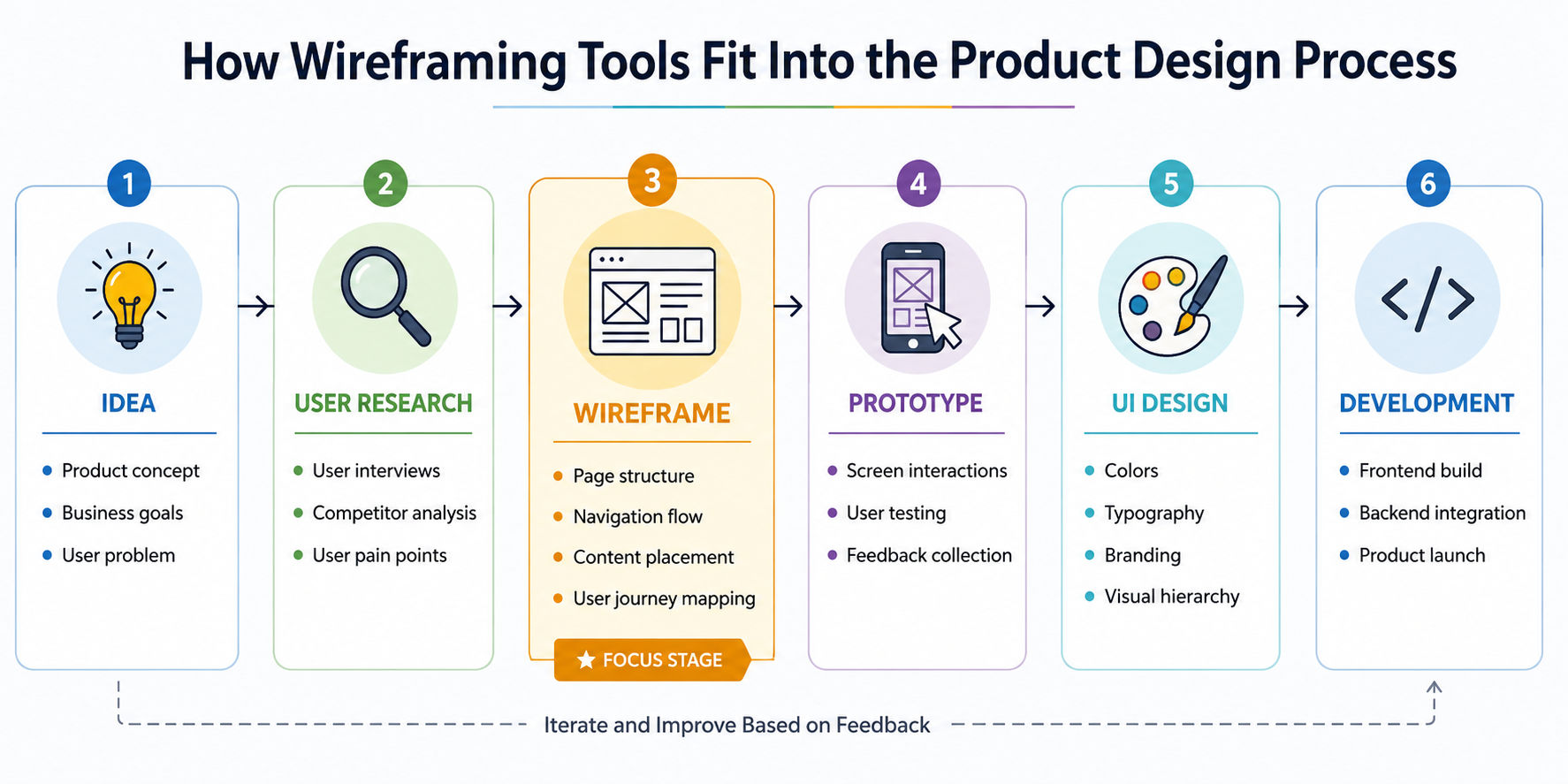
Wireframes sit between research and design. They help teams organize content, validate layouts, and identify usability issues before investing time in visual design or development. A clear wireframe often prevents expensive revisions later in the product lifecycle.
Free Courses
There are dozens of options. These are the ones that actually get used by real teams.
Tool |
Key Features |
Best For |
Pros |
Cons |
Pricing |
| Figma | Browser-based design, real-time collaboration, plugins, prototyping, design systems | Teams that want to create wireframes and final UI designs in one platform | Excellent collaboration, large community, generous free plan, works across devices | Advanced features may feel overwhelming for beginners | Free plan available; paid plans start at ₹1,020 /month per editor |
| Balsamiq | Low-fidelity wireframes, drag-and-drop UI elements, sketch-style layouts | Early-stage ideation and stakeholder discussions | Easy to learn, keeps feedback focused on structure, fast wireframe creation | Limited prototyping and visual design capabilities | Starts at ₹765 /month per user with a 30-day free trial |
| Miro | Infinite whiteboard, wireframing, user journey mapping, workshops, collaboration tools | Distributed teams and cross-functional projects | Great for brainstorming, supports multiple workflows, strong collaboration features | Less specialized for wireframing compared to dedicated tools | Free plan available; paid plans start at ₹680 /month per member |
| Whimsical | Wireframes, flowcharts, mind maps, documentation in one workspace | Solo designers and small teams | Clean interface, quick setup, minimal learning curve | Fewer advanced design and prototyping features | Free plan available; Pro plan starts at ₹850 /month per user |
| Axure RP | Advanced prototyping, conditional logic, dynamic content, interactive workflows | Enterprise UX projects and complex applications | Handles sophisticated interactions, detailed user testing, strong documentation support | Steep learning curve, higher pricing | Starts at ₹2,125 /month per user |
| Adobe XD | Wireframing, UI design, prototyping, Adobe Creative Cloud integration | Designers already using Adobe products | Familiar interface, integrates with Adobe ecosystem, all-in-one workflow | Smaller community and plugin ecosystem compared to Figma | Included with Creative Cloud subscriptions |
Also read: Top 20 Product Manager Tools in 2025: Best Product Management & Analytics Tools
Recommended Courses to upskill
Explore Our Popular Courses for Career Progression
IIIT Bangalore
Executive Diploma in Machine Learning and AI360° Career Support
O.P.Jindal Global University
MBA from O.P.Jindal Global UniversityLive Case Studies and Projects
Don't want to pay? You don't have to, at least not at the start.
Tool |
Free Plan Limits |
Best Use Case |
| Figma | 3 projects, unlimited personal files | Full design workflow |
| Whimsical | 4 boards per workspace | Quick wireframes and flows |
| Miro | 3 editable boards | Team workshops and UX mapping |
| Pencil Project | Fully free, open source | Offline desktop wireframing |
| draw.io | Fully free, browser-based | Simple wireframes and diagrams |
Pencil Project and draw.io don't get talked about much, but they're worth knowing. Both are wireframe design tool-free options that work without subscriptions. They're not as polished as Figma or Balsamiq, but for a freelancer watching costs or a student learning the process, they're solid.
Also read: 12 Best UI UX Designer Tools: Choosing the Right Software for Your Projects
No single platform works for everyone. The right choice depends on project complexity, team size, and workflow requirements. Before planning to take a wireframe tool, ask yourself these questions instead.
Who are you designing with?
If it's just you, pick whatever feels fast. If you're collaborating, you need something with real-time multiplayer or easy sharing. Figma and Miro handle that well.
How complex are your interactions?
Simple screen layouts don't need Axure. A form-heavy enterprise app probably does.
Where does the wireframe go next?
If a developer is picking up the design file, a tool with component libraries and auto-layout, like Figma, reduces handoff friction. If the wireframe is just for internal sign-off, even Balsamiq or a whiteboard works.
One practical note. Don't choose based on what sounds most professional. Choose based on what your team will actually use. The best wireframing tool is the one that gets opened.
Also Read: The Ultimate Guide to Becoming a Mobile App Developer in 2025
Start with Figma. It's free, widely documented, and the skills you build transfer directly to professional work. The community has thousands of free wireframe templates, UI kits, and tutorial resources.
When you open it for the first time, don't try to build a full app. Pick one screen, one flow. A login page. A homepage. Get comfortable placing shapes, using frames, and grouping elements before you touch anything more advanced.
You'll make bad wireframes at first. But that’s okay, as wireframing is a thinking tool as much as a design tool. Once you're comfortable, explore Whimsical for flows or Balsamiq for rough sketching. Different tools push your thinking in different directions, and that's worth experiencing early.
Quick Recommendation
Use Case |
Recommended Tool |
| Best overall wireframe design tool | Figma |
| Best for beginners | Balsamiq |
| Best free wireframe tool | Figma Free Plan |
| Best for collaboration workshops | Miro |
| Best for fast wireframing | Whimsical |
| Best for enterprise UX projects | Axure RP |
| Best for Adobe users | Adobe XD |
Getting the tool right is only part of it. Common mistakes that people make when working with wireframe tools:
People mix these up constantly. A wireframe shows structure. A prototype simulates behaviour. They're different things, even when built in the same tool. Some tools handle both, Figma and Axure, especially. But understanding the difference helps you communicate clearly with your team about what stage you're in and what kind of feedback you need.
Aspect |
Wireframing |
Prototyping |
| Detail level | Low to medium | Medium to high |
| Purpose | Layout and flow | Interaction and testing |
| Speed | Fast to create | Takes more time |
| Tools | Balsamiq, Whimsical, Figma | Figma, Axure, InVision |
| Feedback type | Structure and content | Usability and flow |
Also Read: How to Become a Successful Web Designer: Key Skills, Expert Tips, and Career Insights
Wireframing tools play a critical role in product design. They help teams organize ideas, validate user flows, reduce costly revisions, and communicate requirements clearly before development begins.
Whether you're a student learning UX design, a startup building an MVP, or an enterprise managing large digital products, the right wireframe design tool can save significant time and effort. Start with your project goals, evaluate collaboration needs, and choose a platform that matches your team's workflow. The best wireframing tools aren't necessarily the most expensive. They're the ones your team will actually use consistently.
Ready to start your journey? Book a free consultation with upGrad today to find the best path for your career.
Most beginners can learn the basics of a wireframe design tool within a few hours. Creating effective wireframes takes longer because it involves understanding user flows, content hierarchy, and usability principles. Consistent practice on real projects usually delivers noticeable improvement within a few weeks.
Yes. Many modern tools to create wireframes are designed for non-designers. Product managers, startup founders, marketers, and developers often use wireframing software to communicate ideas. Templates, drag-and-drop components, and pre-built UI elements make the process accessible even for first-time users.
Using real content whenever possible leads to better results. Placeholder text can hide layout issues, content overflow, or weak messaging. Even rough drafts of headlines, buttons, and descriptions help teams understand whether a design works in practical situations before development begins.
Low-fidelity wireframes focus on structure and layout using simple shapes and placeholders. High-fidelity wireframes add realistic content, spacing, and interface details. Teams often begin with low-fidelity versions to explore ideas quickly before investing time in more detailed designs.
Many free wireframe tools are suitable for freelancers, students, and even small businesses. Tools like Figma and Miro offer generous free plans with collaboration features. Larger teams may eventually need paid plans for advanced permissions, version control, and design system management.
Yes. Developers use wireframes to understand screen layouts, functionality, and user flows before coding begins. A well-structured wireframe reduces ambiguity, minimizes revisions, and creates a shared understanding between designers, developers, and stakeholders throughout the project lifecycle.
The number depends on project size and complexity. A simple landing page may need only one or two wireframes, while an e-commerce website could require dozens. Focus on key user journeys rather than trying to wireframe every possible screen immediately.
For most students, yes. A wireframe design tool free plan usually includes the core features needed to learn layout design, user flows, and collaboration basics. Many UX professionals actually started their careers using free versions before moving to premium plans.
Teams should move to UI design once the structure, navigation, and user flow have been validated. If stakeholders are still debating page layouts or functionality, it's usually too early. Solving structural issues first prevents unnecessary redesign work later.
AI-powered features can generate layouts, suggest components, and organize content structures. However, they can't replace user research or product thinking. The strongest results still come from combining AI assistance with human judgment, testing, and an understanding of user needs.
Wireframing is most effective when combined with UX research, information architecture, user journey mapping, and basic visual design principles. Learning these complementary skills helps you create wireframes that solve real user problems instead of simply arranging interface elements on a screen.
971 articles published
We are an online education platform providing industry-relevant programs for professionals, designed and delivered in collaboration with world-class faculty and businesses. Merging the latest technolo...
Get Free Consultation
By submitting, I accept the T&C and
Privacy Policy
Top Resources
Certification
3 Months
Certification
6 Months
O.P. Jindal Global University
Masters in International Accounting and Finance (Accredited by ACCA, UK)Master's Degree
12 Months