Technical SEO Checklist: Everything You Need to Audit and Fix
By upGrad
Updated on Jun 03, 2026 | 8 min read | 1.78K+ views
Share:

All courses
Certifications
More
By upGrad
Updated on Jun 03, 2026 | 8 min read | 1.78K+ views
Share:
Table of Contents
A technical SEO checklist is a structured set of checks you run on a website to confirm it's crawlable, indexable, fast, and structurally sound. It doesn't cover keywords or backlinks. It covers everything that happens before content even gets a chance to rank.
This blog walks you through every major area of a technical SEO audit. Whether you're a marketer running your first site review or a developer trying to close gaps before a launch, you'll find a clear, actionable breakdown here.
Explore upGrad's Digital Marketing programs to develop job-ready skills in technical SEO, SEO strategy, SEM, website analytics, keyword research, and performance marketing.
Most websites lose organic traffic not because of weak content, but because of broken foundations. Crawl errors, slow load times, duplicate URLs, missing canonical tags are the silent killers that push pages down in search results. A solid technical SEO checklist helps you find and fix exactly these issues before they compound.
Google's crawlers don't read websites the way humans do. They follow links, parse code, check server responses, and decide what to index. If your site has crawl blocks, broken redirects, or pages that load in 8 seconds, that traffic loss is entirely technical, and a content rewrite won't fix it.
You don't need to write code to run a technical SEO audit checklist. You need to know what to look for, which tools to use, and what to hand off to a developer. That's the intent of this checklist.
Free Courses
A technical SEO checklist isn't just a list of tasks. It's a framework for identifying the technical issues that prevent search engines from crawling, indexing, and ranking your content effectively.
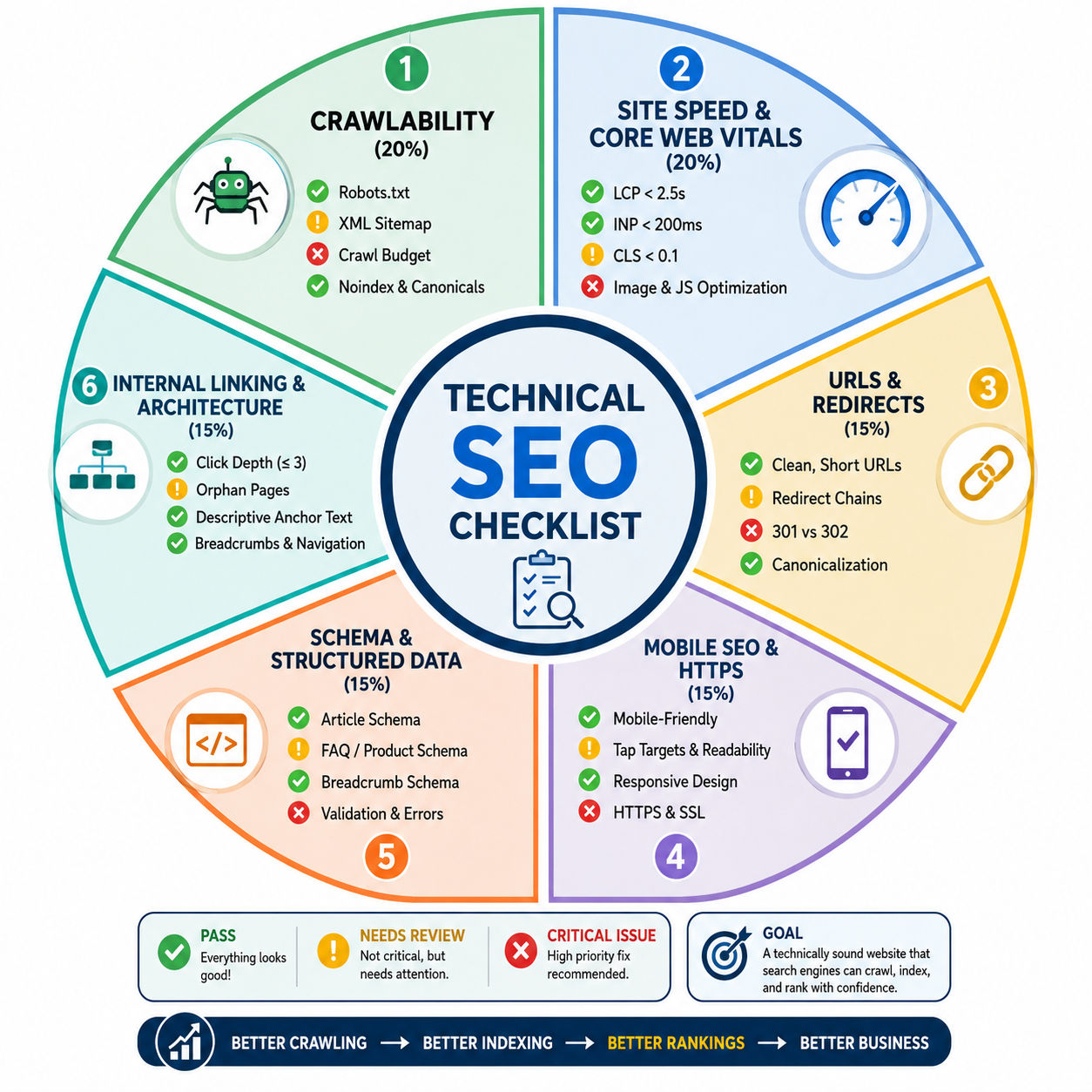
This is where most audits should start. If a page can't be crawled, nothing else matters.
Technical SEO Element |
What to Check |
Why It Matters |
Common Mistake |
| Robots.txt | Review yourdomain.com/robots.txt, check blocked directories, and test rules in Google Search Console. | Controls which parts of your website search engines can crawl. Incorrect settings can prevent important pages from being discovered. | Blocking important folders such as /blog/ or /products/ or accidentally using staging-site rules on the live website. |
| XML Sitemap | Submit the sitemap to Google Search Console, include only canonical and indexable URLs, and remove broken or noindex pages. | Helps search engines discover pages faster and understand site updates. | Using outdated sitemaps, including duplicate URLs, paginated pages, or URLs that shouldn't be indexed. |
| Crawl Budget | Review Crawl Stats in Google Search Console and identify low-value URLs consuming crawl resources. | Important for large websites where Google cannot crawl every page on each visit. | Allowing thin pages, parameter URLs, faceted navigation pages, or infinite-scroll URLs to consume crawl budget. |
| Noindex Tags | Audit pages regularly to confirm only intended pages contain the noindex directive. | Prevents valuable pages from being excluded from Google's index. | Leaving noindex tags on important pages after site migrations, redesigns, or content updates. |
| Canonical Tags | Verify that canonical tags point to the preferred version of a page and use self-referencing canonicals where appropriate. | Helps consolidate ranking signals and prevents duplicate content issues. | Canonical tags pointing to incorrect URLs, redirecting pages, or unrelated content. |
Speed isn't just a user experience metric. Google uses it as a ranking signal, and it directly affects bounce rates.
Audit Area |
What to Review |
Recommended Benchmark / Action |
Why It Matters |
| Google PageSpeed Insights | Real-user performance data and lab test results | Use it as the primary speed auditing tool | Identifies real-world loading and user experience issues affecting rankings. |
| GTmetrix | Waterfall reports and page loading sequence | Analyze large files and slow-loading resources | Helps pinpoint exactly what's slowing down page performance. |
| Chrome DevTools | Render-blocking resources, JavaScript, and network requests | Diagnose technical performance bottlenecks | Useful for identifying issues that impact page rendering and responsiveness. |
| Largest Contentful Paint (LCP) | Loading speed of the main page content | Under 2.5 seconds | Measures how quickly users can see the primary content on a page. |
| Interaction to Next Paint (INP) | Responsiveness after user interactions | Under 200ms | Indicates how quickly a page responds to clicks, taps, and keyboard inputs. |
| Cumulative Layout Shift (CLS) | Visual stability during page loading | Under 0.1 | Prevents unexpected page movements caused by images, ads, or font loading issues. |
| Image Optimization | Image size, format, and compression | Use WebP and compress images before uploading | Large images are often the biggest contributor to slow page loads. |
| JavaScript Optimization | Unnecessary or render-blocking scripts | Defer non-critical JavaScript | Reduces loading delays and improves user interaction speed. |
| Content Delivery Network (CDN) | Geographic distribution of website assets | Implement a CDN for global audiences | Delivers content from servers closer to users, reducing load times. |
| Caching & Compression | Browser caching and server-side compression | Enable browser caching and GZIP/Brotli compression | Reduces file transfer size and improves repeat visit performance. |
| Unused CSS & JavaScript | Redundant code loading on pages | Remove unused CSS and JS files | Minimizes page weight and improves loading efficiency. |
Clean URLs are easier to crawl and easier for users to understand. Messy URL structures create duplicate content problems that compound over time.
Technical SEO Area |
What to Check |
Best Practice |
Common Issue to Avoid |
| URL Structure | URL format, readability, and consistency | Keep URLs short, lowercase, descriptive, and separated with hyphens. Remove dates from blog URLs if content will be updated regularly. | Long URLs, unnecessary parameters, uppercase letters, and date-based URLs that become outdated over time. |
| URL Parameters | Query strings and filtered URLs | Minimize URL parameters where possible and use clean URLs for important pages. | URLs like ?page=2 or tracking parameters creating duplicate content and indexing issues. |
| Redirect Chains | Multi-step redirects between pages | Redirect old URLs directly to the final destination with a single 301 redirect. | Page A → Page B → Page C chains that waste crawl budget and slow page access. |
| Redirect Loops | Circular redirect paths | Test redirects regularly using tools such as Screaming Frog or Ahrefs. | Infinite loops that prevent both users and search engines from accessing content. |
| 301 vs 302 Redirects | Redirect status codes | Use 301 redirects for permanent URL changes and review old temporary redirects periodically. | Leaving 302 redirects in place when the move is actually permanent. |
| Canonicalization | Multiple versions of the same page | Select one preferred URL version and redirect all alternatives to it. | Having HTTP and HTTPS, www and non-www, or trailing slash and non-trailing slash versions indexed simultaneously. |
| Canonical Tags | Implementation of rel="canonical" | Use canonical tags on parameter-based or near-duplicate pages and implement self-referencing canonicals where appropriate. | Canonical tags pointing to incorrect pages, redirecting URLs, or unrelated content. |
| Domain Consistency | Preferred domain version | Standardize one version of the site and maintain consistency across all internal links and redirects. | Search engines discovering multiple versions of the same page and splitting ranking signals. |
Also read: A Complete Guide to Crafting an Impactful Digital Marketing Strategy
Audit Area |
What to Check |
Best Practice |
Common Issues |
| Mobile-Friendly Test | Test pages using Google's Mobile-Friendly tools and mobile browser previews | Verify that pages render correctly across different screen sizes and devices | Pages that appear fine on desktop but break, overlap, or become difficult to navigate on mobile screens |
| Text Readability | Font size, spacing, and content visibility | Users should be able to read content without zooming or horizontal scrolling | Small fonts, cramped layouts, and content extending beyond the screen width |
| Tap Targets | Buttons, navigation links, and interactive elements | Maintain adequate spacing between clickable elements for easy tapping | Buttons and links placed too close together, causing accidental clicks |
| Hidden Mobile Content | Tabs, accordions, expandable sections, and navigation menus | Ensure important content remains accessible and visible on mobile devices | Critical content hidden behind elements that fail to load or display correctly on smaller screens |
| Responsive Design | Layout adaptability across devices and resolutions | Use responsive design that adjusts automatically to different screen sizes | Fixed-width layouts that break on narrow screens such as 375px mobile devices |
| HTTPS Implementation | Site-wide security protocol usage | All website pages should load exclusively through HTTPS | Some pages still loading via HTTP, creating security and trust issues |
| Mixed Content Issues | Images, scripts, and other resources loaded on HTTPS pages | Serve all assets through HTTPS connections | HTTPS pages loading images, scripts, or stylesheets from HTTP sources |
| SSL Certificate Status | Certificate validity, expiry date, and configuration | Maintain an active SSL certificate and monitor renewal dates | Expired or improperly configured SSL certificates causing browser warnings |
Structured data doesn't directly boost rankings, but it unlocks star ratings, FAQs, breadcrumbs, product prices in search results. That increases click-through rates.
Schema Type |
Where to Implement |
Primary Benefit |
Validation Method |
| Article Schema | Blog posts, guides, news articles, and long-form content | Helps search engines understand article details such as headline, author, and publication date | Test using Google's Rich Results Test and check Search Console Enhancements |
| FAQ Schema | Pages containing question-and-answer sections | Improves content understanding and may qualify pages for enhanced search result displays | Validate with Rich Results Test and Schema Markup Validator |
| Product Schema | E-commerce product pages | Provides details such as pricing, availability, ratings, and product information to search engines | Use Rich Results Test to verify eligibility for product-rich results |
| Breadcrumb Schema | Category pages and multi-level website structures | Helps search engines understand site hierarchy and improves navigation in search results | Validate using Schema Markup Validator and Search Console |
| Organization Schema | Homepage and company information pages | Provides business details such as company name, logo, contact information, and social profiles | Check implementation through Rich Results Test and Search Console reports |
| Website Schema | Homepage and main website entity pages | Helps search engines understand the overall website and brand entity | Verify markup using Schema Markup Validator and Search Console |
| Rich Results Test | Post-implementation validation | Confirms whether schema markup qualifies for rich results in Google Search | Run page URLs through Google's Rich Results Test |
| Schema Markup Validator | Technical schema validation | Identifies syntax errors, missing properties, and markup issues | Test URLs or code snippets using Schema Markup Validator |
| Google Search Console Enhancements | Ongoing monitoring and troubleshooting | Highlights schema warnings, errors, and enhancement opportunities | Review the Enhancements section regularly for new issues |
Do read: How To Become a Google Ads Specialist: A Step-by-Step Guide
Good site architecture isn't just about user experience. It tells Google which pages are most important and helps distribute link authority across the site.
Internal Linking & Architecture Check |
What to Review |
Best Practice |
Why It Matters |
| Click Depth | Number of clicks required to reach important pages | Keep key pages within three clicks of the homepage | Helps search engines discover and crawl important content more efficiently |
| Orphan Pages | Pages with no internal links pointing to them | Identify orphan pages using Screaming Frog and add relevant internal links | Orphan pages receive little crawl attention and often struggle to rank |
| Internal Link Distribution | How links are spread across the site | Link strategically to high-value pages from relevant content and category pages | Passes authority throughout the website and highlights important pages |
| Anchor Text Optimization | Text used within internal links | Use descriptive anchor text such as "Technical SEO audit guide" instead of generic phrases like "Click here" | Helps search engines understand the topic and context of linked pages |
| Navigation Structure | Website menus and page hierarchy | Maintain a logical, easy-to-follow navigation structure | Makes it easier for users and search engines to understand site organization |
| Breadcrumb Navigation | Presence and accuracy of breadcrumb trails | Add breadcrumbs to all internal pages and keep paths consistent with URL structure | Improves user navigation and reinforces site hierarchy for search engines |
| Breadcrumb Structure | Alignment between breadcrumbs and URLs | Ensure breadcrumb paths accurately reflect the site's architecture | Prevents confusion and creates a clear content hierarchy |
| Breadcrumb Schema | Structured data implementation for breadcrumbs | Implement breadcrumb schema markup on applicable pages | Helps Google display breadcrumb paths directly in search results |
| SSL Security Testing | Overall HTTPS and SSL configuration health | Regularly audit security settings using SSL testing tools | Weak encryption, configuration errors, or low SSL security ratings |
Must read: 25+ Proven SEO Strategies to Master On and Off Page SEO Techniques
Digital Marketing Courses to upskill
Explore Digital Marketing Courses for Career Progression
MICA Executive Alumni Status
Here's a one-page version so that you can use this to track your audit:
Category |
Check |
Status |
| Crawlability | Robots.txt reviewed | |
| Crawlability | XML sitemap submitted | |
| Crawlability | Crawl budget reviewed | |
| Indexability | Noindex tags checked | |
| Indexability | Canonical tags in place | |
| Speed | PageSpeed score reviewed | |
| Core Web Vitals | LCP under 2.5s | |
| Core Web Vitals | CLS under 0.1 | |
| URLs | No redirect chains | |
| URLs | Consistent canonical version | |
| Mobile | Mobile-friendly test passed | |
| Security | HTTPS on all pages | |
| Security | No mixed content | |
| Schema | Structured data validated | |
| Architecture | No orphan pages | |
| Architecture | Breadcrumbs implemented |
Also read: What is SEO Content Writing? A Beginner’s Guide to Writing for Search Engines
Running a technical SEO audit checklist once isn't enough. Sites change constantly. New pages get added, developers push updates, CMS plugins introduce new redirects, and then suddenly something that worked last month does not anymore. So, you have to update everything and keep a record of it.
Schedule a basic audit every quarter. Use Google Search Console's coverage report as your ongoing early warning system. When something drops in traffic, and there's no obvious content reason, start with the technical layer.
The goal isn't a perfect score on every tool. It's a site that Google can crawl cleanly, index accurately, and rank with confidence.
Technical SEO is the foundation that everything else, like content, links, and authority, sits on.
Must read: 25+ Proven SEO Strategies to Master On and Off Page SEO Techniques in 2025
A technical SEO checklist becomes much easier when supported by the right tools.
Popular SEO Tool options include:
Each tool highlights different technical issues. Combining insights from multiple sources usually provides a more complete picture.
Focus on fixing issues that affect crawling, indexing, user experience, and page performance first.
Also read: 28+ Top Free SEO Tools in 2025: Key Advantages and Application
A strong technical SEO checklist helps search engines access, understand, and rank your content more effectively. Start with crawlability, indexing, site architecture, and HTTPS. Then move into page speed, mobile optimization, structured data, and advanced auditing tasks.
Technical SEO isn't a one-time project. Websites change constantly. New pages are added, plugins update, migrations happen, and technical issues emerge. Regular audits help you catch problems early and protect your organic visibility before rankings begin to decline.
Ready to start your journey? Book a free consultation with upGrad today to find the best path for your career.
Technical SEO improvements rarely produce instant results. Google needs time to recrawl affected pages, process changes, and reassess rankings. Small fixes such as correcting noindex tags may show results within days, while larger changes involving site structure or Core Web Vitals can take several weeks or months.
A website audit reviews multiple aspects of a site, including content, design, UX, and conversions. A technical SEO audit checklist focuses specifically on crawlability, indexability, site performance, structured data, redirects, and other technical factors that influence search engine visibility and rankings.
Yes. Many websites recover lost rankings simply by fixing technical issues. Resolving crawl errors, improving page speed, correcting canonical tags, and removing indexation problems can help existing content perform better because search engines can access and understand it more effectively.
Large websites often struggle with orphan pages, crawl budget waste, faceted navigation, parameter-driven URLs, and outdated redirects. These issues may not be visible to users but can significantly reduce crawl efficiency and prevent important pages from being indexed consistently.
Neither should be viewed in isolation. Backlinks help build authority, but technical SEO provides the infrastructure that allows pages to be crawled and indexed correctly. A page with strong backlinks can still struggle if technical barriers prevent search engines from accessing it properly.
Start with pages that generate the most organic traffic, leads, or revenue. High-value pages usually offer the fastest return from technical improvements. Fixing indexing, speed, or mobile usability issues on these pages often delivers more impact than auditing low-priority content first.
A technical SEO checklist for the non technical marketer should focus on sitemap health, indexing reports, broken links, page speed reviews, mobile usability, and crawl errors. These areas can be monitored without coding knowledge and often reveal major issues affecting search performance.
Yes, if handled incorrectly. URL changes without proper 301 redirects can lead to broken links, lost rankings, and reduced organic traffic. Before changing URL structures, create a redirect mapping plan and verify that all old URLs point directly to their new destinations.
Core Web Vitals should be reviewed at least monthly, especially after website updates, redesigns, or plugin installations. Performance issues often emerge gradually as new scripts, images, tracking tools, and third-party integrations are added to the site over time.
Not necessarily every type of schema. The most effective approach is implementing schema that matches your content. Blog-heavy websites benefit from Article schema, e-commerce stores benefit from Product schema, and content hubs often gain value from FAQ and Breadcrumb schema.
Many teams focus on achieving perfect tool scores instead of fixing issues that affect crawling and indexing. A site with a PageSpeed score of 85 and clean indexation often performs better than a site scoring 100 while suffering from crawl blocks, redirect chains, or canonical errors.
1011 articles published
We are an online education platform providing industry-relevant programs for professionals, designed and delivered in collaboration with world-class faculty and businesses. Merging the latest technolo...
Get Free Consultation
By submitting, I accept the T&C and
Privacy Policy
Level Up Your Digital Marketing Career Today!
Top Resources
MICA
Advanced Certificate in AI-Powered Digital Marketing & Communication from MICAMICA Executive Alumni Status
Certification
5 Specialisation
Classroom
4 Months
Certification
2 Months