n8n AI Agent: Complete Tutorial to Build Smart AI Workflows
By Sriram
Updated on Jul 14, 2026 | 12 min read | 4.34K+ views
Share:

All courses
Certifications
More
By Sriram
Updated on Jul 14, 2026 | 12 min read | 4.34K+ views
Share:
Table of Contents
Key Takeaway
This blog walks you through everything you need to know about an n8n AI agent. You will understand how it works, why it has become popular, and how it differs from traditional automation. You will also learn about the n8n AI agent builder, explore the building blocks of an intelligent workflow, and see how these concepts come together before creating your own agent. By the end of this guide, you will have a solid foundation for building, customizing, and expanding AI-powered workflows for real-world business use cases.
If topics like AI agents, designing intelligent workflows, automating business processes, and integrating large language models with real-world applications interest you, upGrad's Agentic AI Programs can help you develop the practical skills to build, deploy, and scale production-ready AI agents with confidence.
Agentic AI Courses to upskill
Explore Agentic AI Courses for Career Progression
IIIT Bangalore
EPGP in Applied AI and Agentic AIIIIT Bangalore
Executive Diploma in Machine Learning and AI360° Career Support
An n8n AI agent is an intelligent workflow built inside n8n that can understand instructions, make decisions, use external tools, and perform tasks automatically. Unlike traditional automation, which follows a fixed sequence of predefined steps, an AI agent can analyze information, choose an appropriate action, and adapt its responses based on the context it receives.
Think of it as combining the reasoning ability of a large language model with the automation capabilities of n8n. Instead of simply moving data from one application to another, the agent can interpret requests, retrieve information, interact with APIs, and complete multi step tasks with little human intervention.
This flexibility makes the n8n AI agent builder an attractive choice for developers, startups, and businesses that want to automate complex workflows without having to build everything from scratch.
Also Read: What is an AI Agent and How do they Work?
Every n8n AI agent workflow follows a simple but powerful process. The workflow begins with an event, processes the request via an AI model, determines the required actions, and then performs them using connected tools or applications.
A Typical Workflow of the n8n AI Agent
Step |
What Happens |
| Trigger | The workflow starts from a webhook, chat message, email, form, or scheduled event. |
| AI Processing | A language model interprets the user's request and understands the intent. |
| Decision | The AI determines whether it needs external information or tools. |
| Tool Execution | The workflow interacts with APIs, databases, documents, or third party applications. |
| Response | The AI generates a final response or completes the requested task. |
Because the workflow is visual, you can easily understand how information flows from one step to the next. This is one of the biggest reasons why an n8n AI agent tutorial is often recommended for beginners entering the world of AI automation.
Traditional Automation |
n8n AI Agent |
| Follows predefined rules | Understands natural language |
| Performs repetitive actions | Makes contextual decisions |
| Requires manual logic for every scenario | Uses AI reasoning to handle many scenarios |
| Best for simple, predictable workflows | Suited to dynamic business processes |
For example, a traditional workflow can forward every support email to a human agent. An AI agent can read the email, search internal documentation, draft a personalized reply, escalate urgent cases, update the CRM, and notify a human only when necessary, resulting in faster responses and less manual work.
Also Read: Types of Agents in AI: A Complete Guide to How Intelligent Agents Work
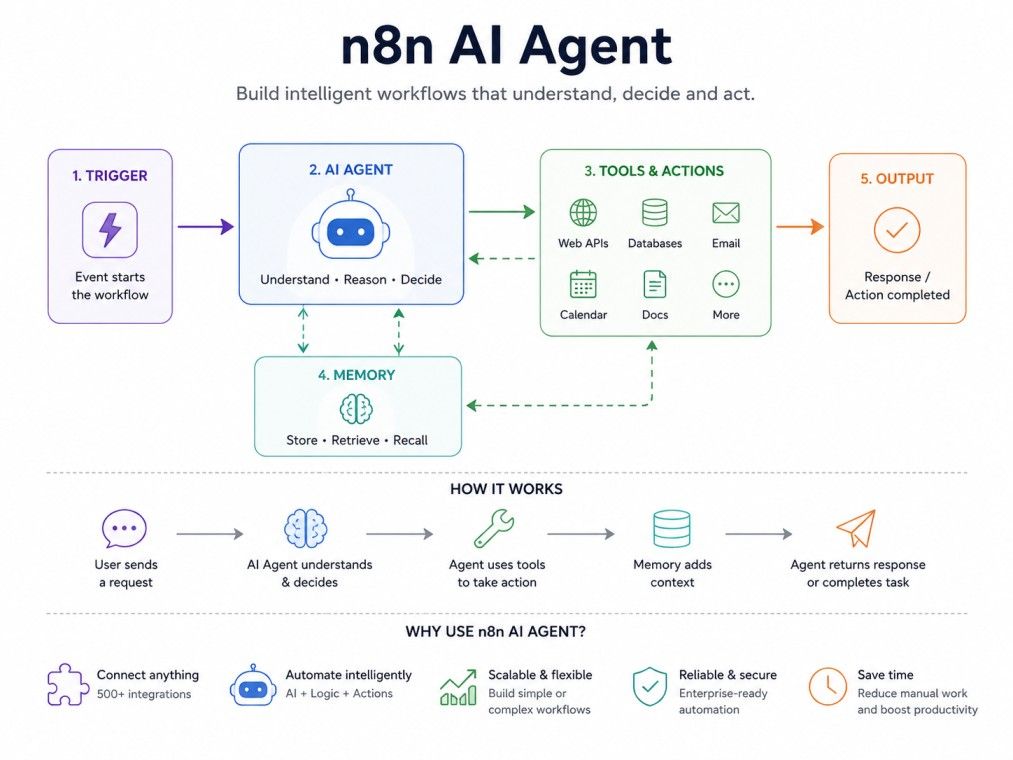
Demand for intelligent automation has grown as businesses move beyond workflows that simply move data, toward systems that understand requests and act on them independently. n8n has become a popular platform for this because it combines a visual builder, broad integrations, and flexible AI support in one place:
Most n8n AI agents share the same building blocks, regardless of what they're used for.
Trigger: The event that starts the workflow: a webhook request, chat message, form submission, scheduled run, incoming email, or new database record.
AI model: It is the reasoning engine. It interprets the prompt, understands intent, and decides what information or tools it needs. This is where tasks that once required human judgment, such as summarizing, answering, analyzing, and deciding, are automated.
Memory: Allows the agent to recall earlier interactions rather than treating every message as new. If a customer asks about an order and later requests an update, memory lets the agent know which order they are referring to.
Memory Type |
Purpose |
| Short-term memory | Stores information during the current conversation |
| Long-term memory | Saves information across multiple conversations |
| External database | Retrieves customer history or business records |
| Vector database | Stores and searches semantic information |
Tools: What lets the agent act, not just answer. Searching documents, sending emails, updating CRM records, creating calendar events, and calling APIs are all typical tool actions. This is the key distinction between a chatbot and an agent: a chatbot describes what should happen, an agent makes it happen.
APIs: The connective tissue between the workflow and the rest of your business systems (CRM, inventory, ticketing, reporting). Since n8n supports hundreds of integrations, you can connect existing applications rather than rebuild them.
Together, these components form layers: users submit requests via a chat, form, or app; the workflow engine routes and manages execution; the AI model reasons about the request; memory maintains context; tools and APIs perform and connect actions; and the output layer delivers the final result.
Take your skills further with upGrad's Executive Post Graduate Programme in Applied AI and Agentic AI from IIITB. The program covers AI fundamentals, agentic AI, large language models, prompt engineering, RAG, AI workflows, and real world projects to help you build job ready expertise and advance your career in AI.
Once you understand the core components, building your first n8n AI agent becomes a straightforward process that follows a series of well-defined steps.
1. Prepare your environment
You'll need an n8n account or self-hosted installation, an API key for your language model, and a clear, narrow goal. A question-answering assistant is a good first project.
2. Create a new workflow and add a trigger
Common choices are a chat trigger, webhook, schedule, form submission, or email trigger — whichever event should kick off the workflow.
3. Connect your AI model
Add the AI node, enter your API credentials, select a model, and configure the prompt and expected response format. At this point the agent can already understand requests and generate responses.
4. Add memory
This turns isolated messages into a continuous conversation — the agent can remember previous questions, personalize responses, and avoid asking users to repeat themselves.
5. Add tools and external services
Connect the CRM, email platform, database, or internal API so the agent can actually complete tasks rather than just describe them, for example, creating a calendar event instead of telling the user to do it.
6. Test thoroughly
Run varied prompts, not just one happy-path scenario. Check whether the agent picks the right tools, produces accurate output, handles missing or unexpected input, and fails gracefully when something goes wrong.
7. Deploy and monitor
Once live, watch for slow responses, failed API calls, incorrect reasoning, missing context, and user feedback; automation like this is never really "finished." It's refined over time.
A company receiving hundreds of daily support requests builds an AI agent instead of routing everything to a human queue:
The entire sequence runs in seconds, and unlike a standard chatbot, the agent completes business tasks rather than just answering questions.
The same pattern (understand → retrieve → decide → act → update) shows up across other common uses: email assistants, sales qualification, HR onboarding, invoice processing, research assistants, and internal help desks. Only the connected tools and business logic change.
You don't need to build every workflow from scratch. A few templates cover most common needs:
Template |
Best For |
| Customer Support Agent | Answering questions, searching docs, escalating issues |
| Content Assistant | Drafting outlines, social posts, summaries, and emails |
| Sales Assistant | Qualifying leads, updating CRM records, scheduling follow-ups |
| Knowledge Assistant | Answering natural-language questions from internal documents |
| Research Assistant | Collecting and summarizing information |
| HR Assistant | Resume screening and onboarding |
Even if none of these match your use case exactly, they're a faster starting point than an empty canvas, and templates can be combined as your needs grow.
As automation needs grow, a single agent handling everything can become hard to manage. A multi-agent workflow assigns specialized responsibilities to separate agents that hand off work to one another. For example, a request to "prepare a sales report" might be split like this:
Agent |
Responsibility |
| Coordinator | Understands the request and assigns tasks |
| Data | Collects information from databases and APIs |
| Analysis | Reviews and summarizes the data |
| Report | Produces the final document |
| Notification | Sends the result to the user |
This modular approach makes debugging easier (each agent has one job), improves scalability, and keeps individual workflows simpler to maintain.
It's worth the added complexity when a project involves multiple business systems, large data volumes, or several independent processes; for smaller projects, a single agent is usually enough.
Both help build AI-powered applications, but they target different needs. n8n uses a visual, drag-and-drop builder with built-in connectors, making it beginner-friendly and quick to deploy for business automation.
LangGraph is a code-first Python framework that offers finer control over reasoning, state management, and custom agent behavior at the cost of a steeper learning curve.
Choose n8n if you want to build quickly, connect multiple business applications, and let non-developers contribute.
Choose LangGraph if your project needs advanced, highly customized reasoning or research-grade control that a visual builder can't easily express. Neither is universally better. The right choice depends on your team's technical depth and the complexity of the task.
The terms are often used interchangeably, but they aren't the same thing. A chatbot is built primarily for conversation; an AI agent makes decisions and completes actions on the user's behalf.
Consider a customer asking: "Can you change my delivery address and send me the updated invoice?" A traditional chatbot would explain the steps required. An n8n AI agent can verify the customer's identity, update the address, generate a new invoice, email it, and update the CRM, thereby completing the task rather than issuing instructions.
Use a chatbot to answer FAQs or provide basic information. Use an AI agent when the workflow needs to access business systems, perform multiple actions, or automate a complete process end-to-end.
Agent isn't responding: check for invalid API credentials, a missing or misconfigured trigger, a disabled workflow, or a broken AI model connection. Start with the execution logs.
Memory isn't working: confirm the memory node is actually connected, that session data is being stored, and that you haven't exceeded context limits.
Responses are inaccurate: this is usually a prompt problem, not a model problem. Write more specific instructions, remove unnecessary complexity, and break large tasks into smaller steps.
API calls are failing: check API keys, authentication settings, required headers, request format, and rate limits.
A structured debugging habit helps across all of these: test one node at a time, validate every API response, use realistic sample data, and keep a record of what you changed and when.
Not every automation needs AI. A traditional workflow is often enough for simple, predictable tasks. An AI agent earns its complexity when the process involves understanding language, making decisions, or coordinating multiple systems.
Customer support, internal knowledge lookup, content creation, sales qualification, document analysis, research, onboarding, and email automation are all good candidates.
The approach is accessible to developers and non-developers alike. Automation engineers, data and product teams, technical founders, and business analysts can all build useful workflows starting from templates, even with limited coding experience.
An n8n AI agent pairs the reasoning ability of modern language models with the flexibility of workflow automation, understanding requests, pulling in information, and completing real tasks rather than just responding to prompts. The most effective way to learn is hands-on: start with a small, single-purpose workflow, test it thoroughly, and layer in memory, tools, and additional agents as your needs grow.
Want to get started with Agentic AI? Speak with an expert for a free 1:1 counselling session today.
Yes. One of the biggest advantages of the n8n AI agent builder is its visual workflow interface. Most common automations can be created by connecting nodes instead of writing code. Basic programming knowledge is helpful for advanced customization but is not required for getting started.
An AI workflow follows predefined automation steps that may include AI features. An n8n AI agent goes further by understanding context, making decisions, choosing tools, and adapting its actions based on the user's request instead of following only fixed rules.
Yes. OpenAI is one of the most commonly used integrations in an n8n AI agent workflow. After adding your API credentials, the workflow can use language models to understand prompts, generate responses, summarize information, and automate many business tasks.
Yes. n8n AI agent templates provide ready made workflows that demonstrate how different nodes work together. Beginners can study these examples, make small modifications, and gradually build custom automation without starting from an empty workflow.
Memory allows an AI agent to remember previous interactions and maintain conversation context. Instead of treating every request as new, the workflow can deliver more accurate, personalized, and natural responses across longer conversations.
Absolutely. Businesses use n8n AI agent workflows to automate customer support, document processing, sales operations, HR tasks, internal knowledge management, and many other repetitive processes that benefit from AI driven decision making.
Focus on writing clear prompts, testing multiple scenarios, improving workflow logic, and connecting reliable data sources. Regular monitoring and refinement will produce better results than relying solely on the AI model.
An n8n AI agent can interact with APIs, databases, CRM systems, cloud storage, email services, calendars, spreadsheets, and many other applications. These integrations allow the agent to perform real business actions instead of simply generating text.
Yes. Multi agent workflows allow different AI agents to specialize in separate responsibilities such as data collection, analysis, reporting, or notifications. This approach improves organization, scalability, and workflow maintenance for larger automation projects.
Yes. Many organizations use n8n in production because it supports visual workflow design, extensive integrations, flexible deployment, monitoring, and scalable automation. Proper testing and security practices are important before deploying any production workflow.
The best approach is to complete a beginner friendly n8n AI agent tutorial, build a simple workflow, connect an AI model, and experiment with templates. Starting small makes it easier to understand the platform before creating more advanced automation.
724 articles published
Sriram K is a Senior SEO Executive with a B.Tech in Information Technology from Dr. M.G.R. Educational and Research Institute, Chennai. With over a decade of experience in digital marketing, he specia...
Speak with AI & ML expert
By submitting, I accept the T&C and
Privacy Policy