Gradle vs Maven: Differences, Performance, and Which Build Tool Should You Choose?
By Rahul Singh
Updated on Jul 01, 2026 | 10 min read | 4.58K+ views
Share:

All courses
Certifications
More
By Rahul Singh
Updated on Jul 01, 2026 | 10 min read | 4.58K+ views
Share:
Table of Contents
Gradle and Apache Maven are the two most widely used build automation tools for Java development. Both automate tasks such as dependency management, compilation, testing, and packaging, but they differ in how they define and execute builds. Maven uses a convention-based XML configuration, while Gradle relies on flexible Groovy or Kotlin-based build scripts and a task-driven execution model.
This blog compares Gradle vs Maven in terms of architecture, performance, features, dependency management, and real-world use cases. You'll also learn how each tool works and which one is the better choice for your next Java project.
Want to build smarter software with AI? Explore upGrad's Artificial Intelligence Courses to gain practical skills in machine learning, generative AI, and real-world AI application development.
Popular upGrad Programs
The table below gives a quick overview of Gradle vs Maven in short before jumping into each:
Factor |
Gradle |
Maven |
| Configuration language | Groovy or Kotlin DSL | XML |
| Learning curve | Steeper | Easier for beginners |
| Build speed | Faster with caching | Slower on large builds |
| Performance | Strong, incremental | Moderate |
| Flexibility | High, task based | Limited, lifecycle based |
| Dependency management | Flexible resolution | Strict, predictable |
| Plugin ecosystem | Large and growing | Mature and extensive |
| Community | Strong, Android driven | Long standing enterprise base |
| Android support | Native and default | Not used |
| Spring Boot support | Fully supported | Fully supported |
| Enterprise adoption | Growing | Widely established |
| Multi-module support | Efficient with caching | Supported but slower |
| IDE compatibility | Excellent in IntelliJ and Android Studio | Excellent across most IDEs |
| CI/CD compatibility | Strong, wrapper based | Strong, plugin based |
| Best suited for | Android, large or complex builds | Enterprise, standard Java projects |
Also Read: Master the Top 30 CI/CD Interview Questions Today
Free Courses
Maven is an open-source build automation and project management tool developed by the Apache Software Foundation. Released in 2004, it introduced a standardized way to build Java applications using XML-based configuration.
Maven follows the principle of Convention over Configuration. Instead of requiring developers to define every build step, it provides standard project structures and predefined build lifecycles.
Maven reads a configuration file called pom.xml.
This file defines:
When you execute a Maven command, Maven:
Also Read: Java Language History: Why Java Is So Popular and Widely Used Today
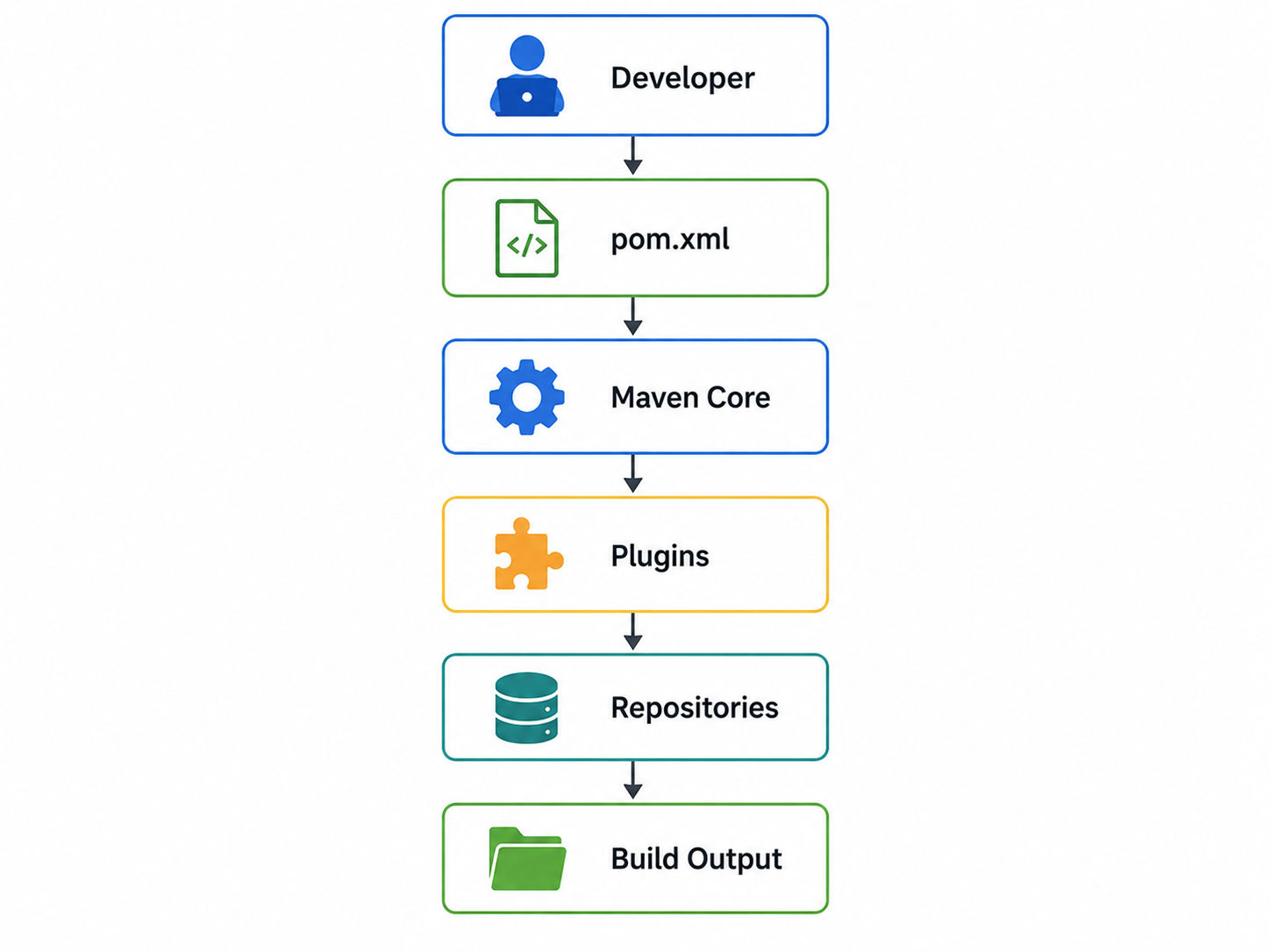
Maven builds run through fixed phases such as validate, compile, test, package, verify, install, and deploy. Each phase runs in order, and you cannot skip ahead without skipping the steps before it.
Also Read: HTML Vs XML: Difference Between HTML and XML[2026]
Recommended Courses to upskill
Explore Our Popular Courses for Career Progression
IIIT Bangalore
Executive Diploma in Machine Learning and AI360° Career Support
O.P.Jindal Global University
MBA from O.P.Jindal Global UniversityLive Case Studies and Projects
Gradle is an open-source build automation tool introduced in 2012. It combines Maven's dependency management with Ant's flexibility while offering significantly faster builds through incremental compilation, build caching, parallel execution, and the Gradle Daemon.
Unlike Maven, Gradle uses Groovy DSL or Kotlin DSL, making build scripts shorter and more expressive.
Also Read: Top 10 Java Frameworks Powering Modern Application Development
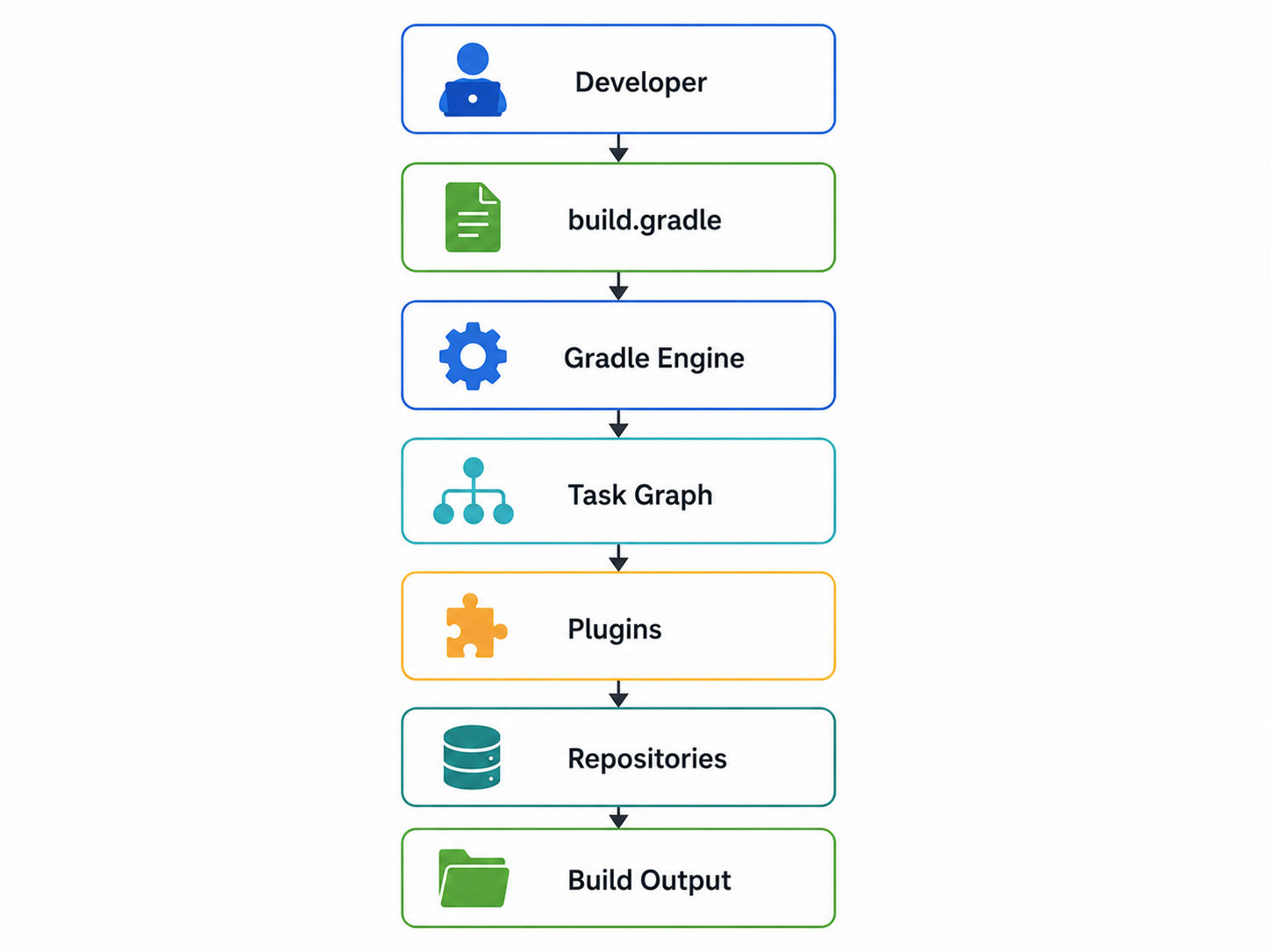
Every action in Gradle is a task, and tasks can depend on other tasks. Gradle analyzes this graph before running anything, so it knows exactly what needs to execute and what can be skipped or run in parallel.
Also Read: 35+ Android Projects with Source Code You MUST Try in 2026 (Beginner to Final-Year)
Also Read: What Do Software Engineers Do? Roles, Responsibilities & Career Scope
Both tools follow a similar high level flow, even though the internals differ.
Maven runs this as a fixed sequence of lifecycle phases. Gradle builds a task graph first, then executes only the tasks that are actually required, skipping anything unaffected by recent changes.
Want to go beyond build automation and develop intelligent software systems? Advance your AI expertise with upGrad's Ex. Diploma in Machine Learning & AI with MLOps, Gen AI & Agentic AI and IIM Kozhikode Strategic AI for Business Professionals – Leadership for an AI-First World.
Both Maven and Gradle follow a similar directory structure, making it easy to switch between the two. The main difference lies in their configuration files and build output directories rather than how source code is organized. Understanding these structures helps you navigate projects, manage resources, and maintain consistent builds.
project/
│── src/
│  ├── main/
│  │   ├── java/
│  │   └── resources/
│  └── test/
│      ├── java/
│      └── resources/
│── pom.xml
└── target/Folder |
Purpose |
| src/main/java | Application source code |
| src/test/java | Unit tests |
| resources | Configuration files |
| target | Generated build files |
| pom.xml | Build configuration |
Also Read: Artificial Intelligence Subjects: Everything You Need to Know Before Enrolling
project/
│── src/
│  ├── main/
│  │   ├── java/
│  │   └── resources/
│  └── test/
│      ├── java/
│      └── resources/
│── build.gradle
│── settings.gradle
│── gradlew
│── gradlew.bat
└── build/File |
Purpose |
| build.gradle | Build script |
| settings.gradle | Project configuration |
| gradlew | Linux/macOS wrapper |
| gradlew.bat | Windows wrapper |
| build | Generated output |
The project structures are very similar. The biggest difference lies in their configuration files and build directories.
Also Read: Artificial Intelligence Tools: Platforms, Frameworks, & Uses
Subscribe to upGrad's Newsletter
Join thousands of learners who receive useful tips
Looking at code examples is one of the easiest ways to understand the difference between Gradle and Maven. Although both tools perform the same build tasks, they use different configuration styles and commands. The examples below compare their syntax for defining dependencies, build scripts, and common operations.
<dependencies>
   <dependency>
       <groupId>org.springframework.boot</groupId>
       <artifactId>spring-boot-starter-web</artifactId>
   </dependency>
</dependencies>dependencies {
implementation 'org.springframework.boot:spring-boot-starter-web'
}dependencies {
implementation("org.springframework.boot:spring-boot-starter-web")
}Task |
Maven |
Gradle |
| Clean | mvn clean | gradle clean |
| Build | mvn package | gradle build |
| Test | mvn test | gradle test |
| Install | mvn install | gradle publishToMavenLocal |
| Run | mvn spring-boot:run | gradle bootRun |
The right build tool depends on your project's requirements, team size, and development workflow. While both Maven and Gradle support a wide range of Java applications, each performs better in certain scenarios. The table below helps you choose the most suitable option for different project types.
Project Type |
Recommended Tool |
Why |
| Android apps | Gradle | Native and required by Android Studio |
| Spring Boot | Either | Both are fully supported and well documented |
| Enterprise Java | Maven | Predictable structure fits large teams |
| REST APIs | Either | Depends on team familiarity |
| Microservices | Gradle | Faster builds help with frequent deployments |
| Libraries | Either | Both publish easily to Maven Central |
| Monorepos | Gradle | Caching and parallelism scale better |
| Multi-module projects | Gradle | Faster incremental builds |
| Cloud-native applications | Gradle | Better suited to fast, frequent builds |
| Legacy Java applications | Maven | Often already built around Maven's structure |
Both tools work well in modern CI/CD setups.
Build reproducibility matters most in CI, and both tools support it through their wrapper scripts, which lock the exact build tool version used across machines. Build caching in Gradle can meaningfully cut down CI run times, especially on repeated pipeline runs.
There is no single winner in the Gradle vs Maven debate. The right choice depends on your project size, team experience, performance requirements, and level of customization.
Reader Type |
Suggested Tool |
| Beginner | Maven, easier to understand at first |
| Student | Maven, simpler for learning core concepts |
| Java developer | Either, depends on project needs |
| Android developer | Gradle, it is the required standard |
| Enterprise team | Maven, unless build speed is a bottleneck |
| DevOps engineer | Gradle, for caching and pipeline speed |
| Startup | Gradle, for flexibility as the codebase grows |
| Large organization | Either, based on existing tooling and team skill |
Migrating from Maven to Gradle is straightforward for most Java projects because Gradle supports Maven repositories and dependency formats.
Also Read: Top 5 Machine Learning Models Explained For Beginners
Run both build systems side by side for a short period if possible. Compare artifact outputs, test results, and build times to confirm the migration did not introduce regressions.
Also Read: Machine Learning Studio: Complete Beginner's Guide
Action |
Maven Command |
Gradle Command |
| Build | mvn compile | gradle build |
| Clean | mvn clean | gradle clean |
| Test | mvn test | gradle test |
| Package | mvn package | gradle assemble |
| Install | mvn install | gradle publishToMavenLocal |
| Publish | mvn deploy | gradle publish |
| Dependency tree | mvn dependency:tree | gradle dependencies |
| Skip tests | mvn install -DskipTests | gradle build -x test |
| Run application | mvn spring-boot:run | gradle bootRun |
| Generate reports | mvn site | gradle check |
Choosing between Gradle vs Maven depends on your project requirements rather than which tool is "better." Maven offers a standardized, beginner-friendly approach with predictable builds, while Gradle provides greater flexibility and faster performance for modern applications.
If you're starting your Java journey, Maven is an excellent place to begin. As your projects grow or require advanced customization, Gradle becomes a powerful option. Learning both tools will prepare you for a wide range of software development roles and real-world projects.
Want personalized guidance on AI and upskilling? Speak with an expert for a free 1:1 counselling session today.
Maven uses a fixed lifecycle and XML configuration, while Gradle uses a flexible task graph with Groovy or Kotlin scripts. This makes Gradle generally faster and more customizable, while Maven stays more predictable and beginner friendly.
Maven is usually easier for beginners because of its fixed lifecycle and simple XML structure. Gradle offers more power but requires learning Groovy or Kotlin scripting basics before you can customize builds confidently.
Build tools automate compiling, testing, packaging, and dependency management. Without them, developers would need to handle these steps manually, which is slow, repetitive, and much more likely to introduce mistakes across a growing codebase.
Yes, you can learn Gradle directly without prior Maven knowledge. That said, understanding Maven's lifecycle concepts can make it easier to grasp why Gradle's task based model exists and what problems it solves.
Yes, Maven remains widely used, especially in enterprise Java environments. Its stability, mature plugin ecosystem, and predictable structure keep it a strong choice for large, long-running projects that value consistency over raw speed.
Gradle is generally faster, especially on large or repeated builds, thanks to incremental compilation, parallel task execution, and caching. For small projects, the speed difference between Gradle and Maven is often barely noticeable.
Gradle only runs tasks affected by recent changes, reuses cached build outputs, and can execute independent tasks in parallel. Maven's fixed lifecycle typically runs more steps by default, even when little has actually changed.
Yes, Gradle can pull dependencies from Maven Central and other Maven style repositories without any issue. This makes switching between the two tools easier since your existing dependency sources usually still work.
Both Gradle and Maven fully support Spring Boot projects. The choice usually comes down to team preference, since Spring Initializr generates working starter projects for either build tool with equal ease.
Gradle is the required and default build tool for Android Studio. There is no practical alternative for Android development, so any Android project will use Gradle regardless of team preference.
Only if build speed or flexibility is causing real problems. Migration takes effort, and Maven's stability often outweighs the benefits for teams that are not hitting performance limits with their current setup.
98 articles published
Rahul Singh is an Associate Content Writer at upGrad, with a strong interest in Data Science, Machine Learning, and Artificial Intelligence. He combines technical development skills with data-driven s...
Get Free Consultation
By submitting, I accept the T&C and
Privacy Policy
Top Resources
Certification
3 Months
Certification
6 Months
O.P. Jindal Global University
Masters in International Accounting and Finance (Accredited by ACCA, UK)Master's Degree
12 Months