• Home
  • Blog
  • MBA
  • Confluence vs Jira: Key Difference, Meaning, Features, Advantages & Disadvantages

Confluence vs Jira: Key Difference, Meaning, Features, Advantages & Disadvantages

By upGrad

Updated on Sep 09, 2026 | 10 min read | 1.79K+ views

Share:

Key Highlights

  • Jira is a project management and issue tracking software. Teams use this to plan, track, and manage their work.
  • Confluence is a workspace for teams that allows groups to create, organize, and share project documents.
  • With the help of Jira, teams can track what they have to do at work, and through Confluence teams can share information with each other.
  • In this blog, you will learn what are the key differences between Confluence and Jira. Their features, advantages, disadvantages, and when to use each tool.

Take the next step toward career growth with MBA programs that help you build strong business, management, leadership, and decision-making skills.

Confluence vs Jira: The Key Differences

Understanding the key difference matters because picking the wrong tool can create problems. Like trying to track sprint tasks in a wiki page, or writing a detailed spec inside a ticket comment. Knowing the difference between Confluence and Jira will help you choose right tool for you:

Feature

Jira

Confluence

Primary Purpose Track and manage work items Create and organize documentation/ knowledge
Key Features
  • Issue tracking
  • Scrum & Kanban boards
  • Backlog management
  • Custom workflows
  • Sprints
  • Rich page editor
  • Page templates
  • Real-time collaboration
  • Page tree/hierarchy
Main unit Issue/ticket Page
Best for Tasks, bugs, tickets, sprints Docs, meeting notes, plans, guides
Users Developers, PMs, support teams Teams across the organization
Workflow Strong: statuses, assignments, boards Limited; focused on content collaboration
Agile support Excellent (Scrum/Kanban) Not its primary purpose
Reporting Burndown charts, dashboards, issue reports Page/content organization and collaboration
Example “Fix login bug by Friday” “How the login system works”

As both are the products of Atlassian, they shared platform-level features like

  • Single sign-on & shared user management
  • Cross-linking (Jira ↔ Confluence)
  • support Marketplace apps

Also read: What is Project Management Process: Phases and Life Cycle

Free Courses

Explore courses related to MBA
Introduction to Ratio Analysis
4.86K+ learners
5 hrs of learning
How to be a Successful Business Analyst
24.59K+ learners
1 hrs of learning
Introduction to Design Thinking
13.27K+ learners
2 hrs of learning

What is Jira?

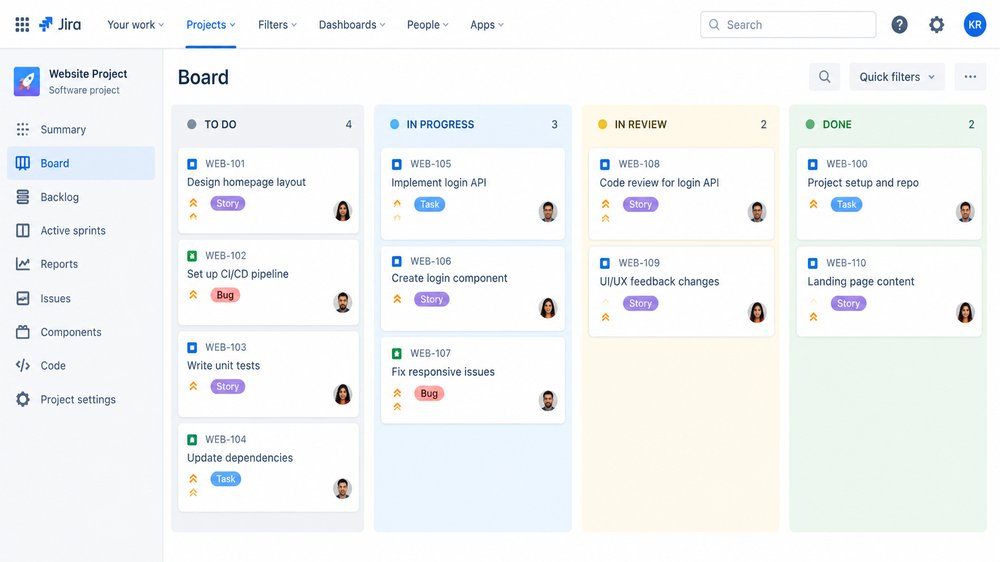
Jira is a software development tool used for work-tracking and project management. It was launched in 2002 by Atlassian. In Jira, everything is connected to an issue (also known as ticket). An issue is a single piece of work like
  • A task 
  • A bug
  • A story (common in Agile)
  • An epic (large body of work made up by multiple tasks)
  • A substack (small piece of larger issue)
Jira-style Kanban board showing a workflow with four columns: To Do, In Progress, In Review, and Done, containing project task cards.

Which Teams Use Jira

Jira is associated with software teams doing Agile/Scrum development, but it is also used by:

  • Marketing teams (campaign tracking)
  • HR (onboarding workflows)
  • Operations/IT (service requests, incident tracking)

Now, Jira is offered as Cloud (hosted by Atlassian). The server was discontinued in 2024, and the Data Center is being phased out by March 2029. So, Atlassian is pushing everyone toward Cloud.

Advantages of Jira

The following are some of the benefits of Jira: 

1. Best for Tracking and Visibility: 

  • Every issue is captured as a ticket, for clear visibility. Like who is working on which issue, when it will be completed, what else issue they are facing in between, etc. 
  • The managers and stakeholders can check the status of projects, without conducting any meetings.

2. Highly Customizable: 

  • The fields can be changed as per the work requirements of different teams. 
  • It is not only useful for software development, but marketing, HR, IT, and other business teams can also use it.

3. Specific Search and Filtering: 

  • JQL lets you build very specific queries. Like if you want to know all high-priority bugs assigned to a specific person, opened in the last 7 days, you can add filters and check data. 

4. Automation Saves Manual Work:

  • Automate repetitive actions, such as auto assigning tasks, status updates, notifications.

Disadvantages of Jira

The following are the disadvantages of Jira:

  • Difficult learning curve for new users, especially non-technical people
  • Gets slow and cluttered when over-customized with too many fields and workflows
  • Requires dedicated admin overhead to manage permissions and configurations properly
  • Feels unintuitive and developer-centric for marketing, HR, or business teams
  • Costs add up quickly at scale with Marketplace apps and higher tiers
  • Default notification settings can flood inboxes and Slack with updates
  • Rigid workflows can slow teams down with unnecessary status transitions
  • Busy, cluttered UI that some users find hard to navigate
  • Forced Cloud migration pressure as Data Center is phased out by 2029
  • Overkill for small teams doing simple task tracking
  • Creates vendor lock-in once workflows and integrations are deeply embedded

Also read: Introduction to Scrum

MBA Courses to upskill

Explore MBA Courses for Career Progression

Become interview ready with Career Services

Master's Degree12 Months
Master's Degree18 Months

What is Confluence?

Confluence is a documentation and collaboration tool launched by Atlassian in 2004. It is like a workplace wiki, where teams write, organize, and share knowledge with each other. Page is everything in Confluence in can contain:

  • Rich text (headings, bullet points, tables, images)
  • Embedded files, videos, and code snippets
  • Macros (embedded live content, like a Jira issue list, a table of contents, or a status badge)
  • Links to other Confluence pages or external tools

How Content is Organized in Confluence

The content is organized using using these three ways:

  • Spaces: The top-level container. It is created per team, department, or project. Each space has its own permissions and structure.
  • Page tree/hierarchy: Within a space, pages can be organized under other pages (like folders and subfolders).
  • Templates: These are pre-built page formats for common needs like meeting notes, product requirements docs (PRDs), project plans, decision logs, and more.

Advantages of Confluence

Confluence offers several advantages and these are as follows:

  • Keep all documents in one place and let multiple people edit the same page at the same time.
  • Page hierarchy and spaces keep content organized and easy to navigate.
  • Version history tracks changes and allows reverting to older versions.
  • Macros add functionality like tables of contents, status badges, and embedded content.
  • Easy to use for non-technical teams.
  • Whiteboards help in visual brainstorming and creating diagrams along with written docs.
  • Space- and page-level permissions allow sensitive content to be restricted.
  • Scales well from small teams to large organizations with many departments.
  • Shared login and user management with Jira when on the same Atlassian site.

Disadvantages of Confluence

Some of the Confluence disadvantages are as follows:

  • As content grows, the search becomes tough to find the right page
  • Content can become outdated if pages aren't regularly reviewed
  • Steep learning curve for advanced features like macros and complex page layouts
  • Costs add up at scale with premium tiers and Marketplace add-ons
  • Limited flexibility compared to dedicated tools for specific needs 
  • Performance can lag on large instances with thousands of pages
  • Forced Cloud migration pressure as Data Center is phased out by 2029
  • Duplicate or conflicting content can pile up if teams don't follow naming/structure conventions

Also read: Top Project Management Case Studies with Real-World Solutions 2026

What to Choose - Jira or Confluence?

It is not necessary that you have to choose between Confluence and Jira. Most teams use both tools because they solve different problems. Here are some points that will help you decide which tool you should choose.

Choose Jira If You Need To: 

  • Track tasks, bugs, or work items with teams
  • Run Agile sprints, Scrum, or Kanban boards
  • Know the status of tasks at any given moment
  • Manage a software development or IT support workflow
  • Report on progress (burndown charts, velocity, backlogs)

Choose Confluence If You Need To:

  • Write and store documentation, specs, or knowledge
  • Take and organize meeting notes
  • Create a wiki or knowledge base for your teams or company
  • Document the decisions, and processes
  • Collaborate on written content in real time

Most Teams Use Confluence and Jira Together

A workflow for using the both looks like:
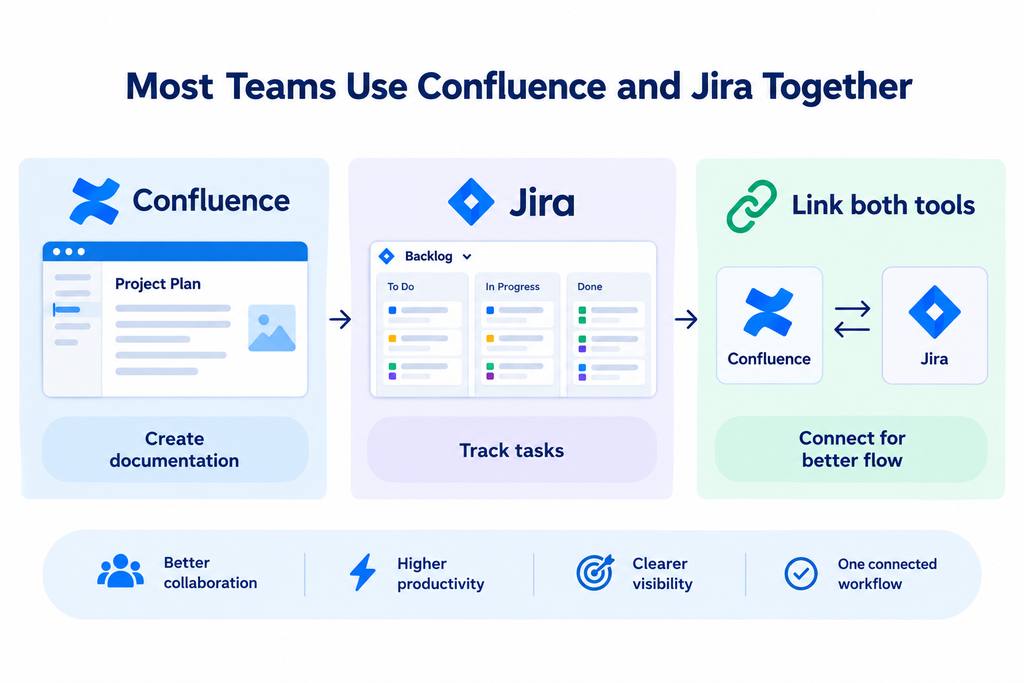
  • Write the feature spec or plan in Confluence
  • Create the actual tasks or tickets in Jira
  • Link the Jira tickets back to the Confluence page for context
  • As tickets move through Jira, the Confluence page can show live status via embedded links
Infographic showing how Confluence and Jira work together for documentation, task tracking, collaboration, productivity, and workflow visibility.

Also read: 10 Most Popular Type of Management Style

Conclusion

Confluence and Jira are designed to work for different purposes. Teams use these tools together to communicate better across departments on planning and execution.  Also, it does not mean the tools depend on each other. Organizations can link both of them to a workflow, or use each one independently. It totally depends on the needs of an organization.

Ready to start your journey? Book a free consultation with upGrad today to find the best path for your career. 

Frequently Asked Questions (FAQs)

1. Is Confluence included with Jira?

No. Confluence and Jira are separate Atlassian products. Depending on your plan, they may need to be purchased or subscribed to separately.

2. Can Confluence and Jira be used by small teams?

Yes. Small teams can use either tool based on their needs. However, teams should consider whether they need all the features available, as simpler tools may be sufficient for basic workflows.

3. Do Confluence and Jira require coding knowledge?

No. Both tools can be used without coding knowledge. Most common tasks, such as creating tickets, pages, boards, and documentation, can be performed through their user interfaces.

4. Can non-technical teams use Confluence and Jira?

Yes. Although Jira is popular among software teams, both Confluence and Jira can be used by business teams for planning, collaboration, documentation, and work management.

5. Can Confluence and Jira integrate with other tools?

Yes. Both tools support integrations with third-party applications and Atlassian Marketplace apps, allowing teams to connect their existing tools and workflows.

6. Is Jira only used for software development?

No. Jira can be adapted for different types of work. Teams can use it for project tracking, operational processes, and other structured workflows.

7. Can Confluence be used as an internal company wiki?

Yes. Confluence can serve as a central internal wiki where organizations store company policies, processes, guides, FAQs, and other shared information.

8. Can you migrate data between Confluence and Jira?

Jira issues and Confluence pages are different types of content, so they are not typically migrated directly from one tool to the other. However, teams can move or import data into each product using supported migration and import options.

9. Do Confluence and Jira offer mobile access?

Yes. Both tools can be accessed on mobile devices, allowing team members to view and work with information while away from their desktop.

10. What should a new team set up first: Jira or Confluence?

It depends on the team's immediate need. If the team first needs to document processes and plans, start with Confluence. If it needs to organize and track active work, start with Jira.

11. Can a company use only Jira or only Confluence?

Yes. Organizations can use Jira independently for work tracking or Confluence independently for documentation. Using both is optional and depends on the organization's workflow.

upGrad

959 articles published

We are an online education platform providing industry-relevant programs for professionals, designed and delivered in collaboration with world-class faculty and businesses. Merging the latest technolo...

Speak with MBA expert

+91

By submitting, I accept the T&C and
Privacy Policy

From MBA to Dream Job - Explore Our Alumni Success Stories

Top Resources

Recommended Programs

OPJ Logo

O.P.Jindal Global University

MBA from O.P.Jindal Global University

Live Case Studies and Projects

Master's Degree

12 Months

upGrad Logo

upGrad

MBA from Woolf & UGNXT

100% ECTS credits

Master's Degree

15 Months

GGU Logo

Golden Gate University

MBA from Golden Gate University

#1 Program for Working Professionals

Master's Degree

13 Months