Chart on Artificial Intelligence: Types, Examples, and How to Create
By Sriram
Updated on Jun 24, 2026 | 8 min read | 2.68K+ views
Share:

All courses
Certifications
More
By Sriram
Updated on Jun 24, 2026 | 8 min read | 2.68K+ views
Share:
Table of Contents
Artificial intelligence is changing how businesses, students, researchers, and professionals do their work. As AI systems get more complex, visual representations help to make things simpler and information easier to grasp. A chart on artificial intelligence can take complicated AI data, processes and relationships and turn them into clear and easy-to-understand visual insights. We use these tools to better understand artificial intelligence and make it more accessible.
In this guide, you will learn what an AI chart is, why it matters, different types of AI charts, and how to create one effectively. We will also explore practical examples, common tools, and best practices to help beginners understand and use AI visualizations with confidence.
Enroll Artificial Intelligence Courses today from upGrad and master the technology behind them with hands-on, industry-aligned AI programs.
Popular AI Programs
A chart about intelligence is a picture that helps us understand AI better. It can be a graph, a diagram, or a dashboard.
These charts show us things like:
You can find these charts in places. For example, hospitals use them to track how well AI helps with diagnoses.
Financial companies use them to watch for fraud. Marketing teams use them to see how customers behave. Whenever AI is used, someone is likely to create a chart to understand it better.
Also Read: Artificial Intelligence Tools: Platforms, Frameworks, & Uses
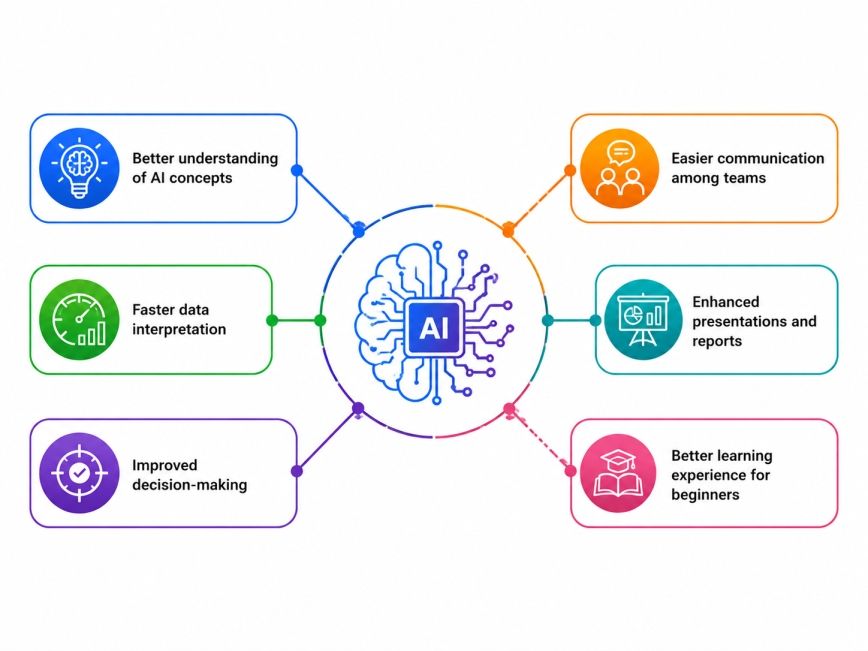
Artificial intelligence often involves large datasets and complex processes. Charts help simplify these elements.
Key benefits include:
Also Read: Understanding the Key Elements of AI
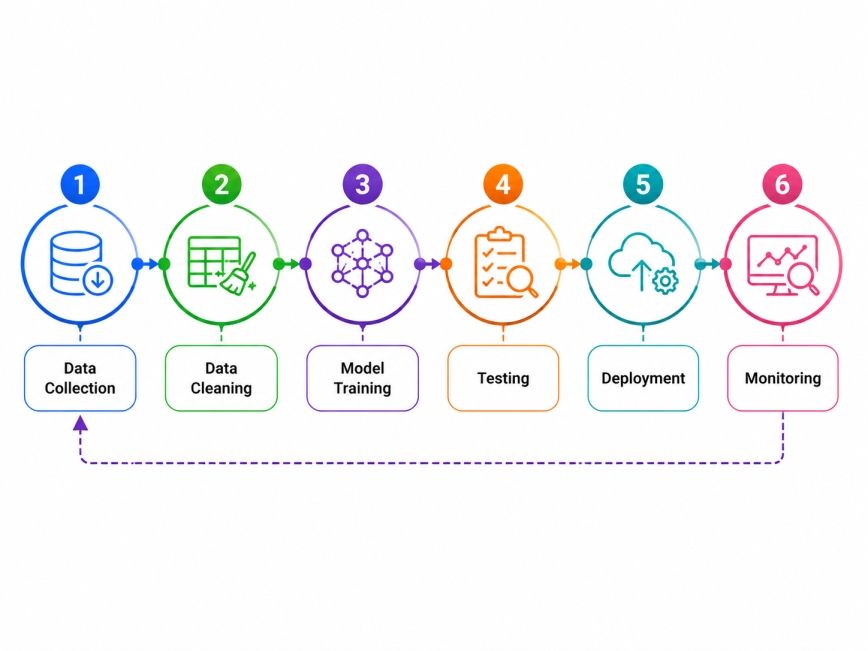
This kind of visualization helps people who are interested in the project to see how the AI systems work from the beginning to the end.
A basic AI workflow chart may include:
Free Courses
Not all charts are the same. Some are better than others. Choosing one can make things confusing. Here is a simple breakdown:
Example: Data → Training → Testing → Deployment
Example applications:
AI Model |
Accuracy |
| Model A | 88% |
| Model B | 92% |
| Model C | 95% |
Which model performed better? How do three different algorithms stack up on speed? Bar charts answer those questions cleanly.
Line charts are built for showing change over time; anything with a "before and after" story belongs here.
Work well to show how a whole is divided up.
They are often used to show:
They are one of the most recognizable AI visuals.
Benefits include:
These are more technical but invaluable for explaining deep learning.
A typical diagram includes:
They use color intensity to surface patterns.
Common applications:
Also Read: Artificial Intelligence Subjects: Everything You Need to Know Before Enrolling
Chart Type |
Best For |
| Flowchart | AI process explanation |
| Bar Chart | Performance comparison |
| Line Chart | Trend analysis |
| Pie Chart | Distribution analysis |
| Decision Tree | Classification logic |
| Heat Map | Pattern detection |
| Neural Network Diagram | Deep learning visualization |
Use Case |
Purpose |
| Education | Explain AI concepts visually |
| Business | Track AI performance metrics |
| Healthcare | Analyze patient predictions |
| Finance | Monitor fraud detection models |
| Marketing | Measure customer behavior patterns |
| Research | Present AI findings clearly |
AI Courses to upskill
Explore Artificial Intelligence Courses for Career Progression
A well-designed chart on artificial intelligence can often communicate information more effectively than several pages of written content.
Choosing the right chart type is critical because the effectiveness of a chart on artificial intelligence depends on how well it matches the underlying information.
You should consider using a chart when:
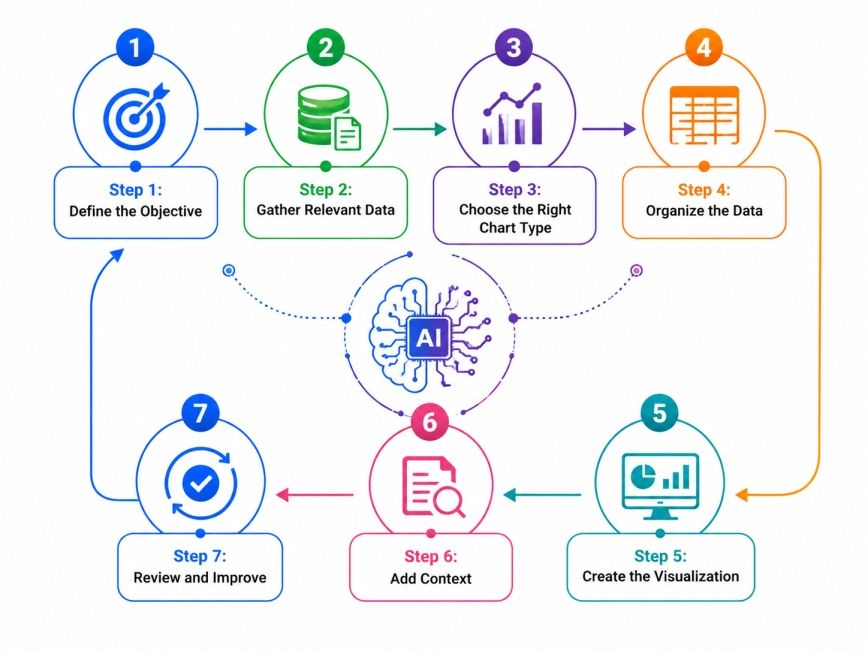
Many beginners assume AI charts require advanced technical knowledge. Making an artificial intelligence chart is not that hard when you do things in a logical order.
If you follow these steps, you can make an intelligence chart that is correct, useful, and easy to understand which is what you want from an artificial intelligence chart.
Clear objectives lead to better chart design.
Start by asking:
Collect accurate and reliable information. Poor data quality can lead to misleading visualizations.
Examples include:
Match your goal with the chart format.
Objective |
Recommended Chart |
| Show trends | Line chart |
| Compare results | Bar chart |
| Explain workflow | Flowchart |
| Display proportions | Pie chart |
| Explain AI logic | Decision tree |
Structure your information before creating visuals.
Best practices:
There are certain platforms that make it easy to make a chart on artificial intelligence without advanced coding skills.
Popular tools include:
Context helps readers understand the information quickly.
Always include:
Before publishing:
Suppose a company wants to compare three AI models.
The process would be:
The difference between a chart and a confusing one often comes down to how it is designed. Effective AI visualizations are good because they are clear, relevant, and easy to use.
1.Keep It Simple
Avoid unnecessary complexity. Focus only on information that supports the objective.
2. Use Clear Labels
Readers should immediately understand:
3. Maintain Consistent Formatting
Consistency improves readability.
Use:
4. Highlight Key Insights
Draw attention to important findings through:
5.Avoid Data Overload
When you have a lot of information, it can overwhelm the readers. A simple chart is usually a lot better than one that has a lot of details. The clean chart is easier to look at and understand, so it performs better than a detailed chart.
AI in Healthcare
Hospitals use charts to visualize:
AI in Finance
Financial institutions rely on charts for:
AI in Marketing
Marketing teams use AI charts to analyze:
Also Read: Applications of Artificial Intelligence and Its Impact
Mistake |
Impact |
| Too many colors | Visual confusion |
| Missing labels | Poor interpretation |
| Wrong chart selection | Misleading conclusions |
| Excessive data | Reduced readability |
| Inaccurate data | Incorrect insights |
Subscribe to upGrad's Newsletter
Join thousands of learners who receive useful tips
A chart on artificial intelligence is a really good way to make AI concepts and AI data easier to understand. The important thing is to pick a chart to put the AI data in order and make sure it is easy to see what is going on rather than trying to make it too complicated.
As more people start using AI in different fields, being able to make and understand charts on artificial intelligence will become a very useful skill. If you want to make a chart on intelligence you should start by knowing what you want to show choose a type of chart that works well for artificial intelligence and focus on showing people insights, about artificial intelligence that they can see right away.
Want to explore more about, chart on artificial intelligence? Book your free 1:1 personal consultation with our expert today.
To make a chart in artificial intelligence, first identify the information you want to present. Collect and organize the relevant data, choose an appropriate chart type, and use visualization tools such as Excel, Tableau, or Power BI. Finally, add labels and review the chart for accuracy and clarity.
The seven commonly discussed stages of AI include reactive machines, limited memory AI, theory of mind AI, self-aware AI, artificial narrow intelligence, artificial general intelligence, and artificial superintelligence. Some stages exist today, while others remain theoretical concepts under research.
An AI chart is a visual representation of artificial intelligence concepts, workflows, data, performance metrics, or model outputs. It helps users understand complex information more easily through graphs, diagrams, dashboards, or flowcharts.
An AI diagram visually explains how artificial intelligence systems function. It may show machine learning pipelines, neural network structures, decision trees, or data processing workflows to simplify technical concepts for broader audiences.
Bar charts and line charts are usually the most effective options. Bar charts compare multiple models side by side, while line charts help show how performance changes over time across different training cycles or model versions.
Yes. Many modern visualization tools provide drag-and-drop interfaces that require little or no coding knowledge. Beginners can use platforms like Excel, Canva, Tableau, or Google Sheets to create professional-looking AI charts quickly.
AI charts are widely used in healthcare, finance, retail, manufacturing, education, and marketing. Organizations rely on these visualizations to understand trends, monitor performance, and communicate AI-driven insights to stakeholders.
Flowcharts help explain AI workflows in a simple and logical sequence. They show how data moves through collection, processing, training, testing, and deployment stages, making complex systems easier to understand.
Popular tools include Microsoft Excel, Google Sheets, Tableau, Power BI, Lucidchart, and Canva. These platforms support different visualization styles and allow users to make a chart on artificial intelligence with minimal technical expertise.
AI dashboards combine multiple charts and metrics into a single interface. They provide a broader view of performance and often update in real time, whereas standard charts typically focus on a single dataset or metric.
Yes. Many AI-powered analytics platforms can analyze datasets and recommend or generate visualizations automatically. These tools help users identify patterns, save time, and create charts without manually designing every element.
730 articles published
Sriram K is a Senior SEO Executive with a B.Tech in Information Technology from Dr. M.G.R. Educational and Research Institute, Chennai. With over a decade of experience in digital marketing, he specia...
Speak with AI & ML expert
By submitting, I accept the T&C and
Privacy Policy
Top Resources
Master's Degree
18 Months
Executive Diploma
12 Months
IIIT Bangalore
Executive Programme in Generative AI & Agentic AI for LeadersIndia’s #1 Tech University
Dual Certification
5 Months