What is LangSmith? A Beginner's Guide to the Tool
By Sriram
Updated on Jul 28, 2026 | 16 min read | 4.41K+ views
Share:

All courses
Certifications
More
By Sriram
Updated on Jul 28, 2026 | 16 min read | 4.41K+ views
Share:
Table of Contents
Quick Overview
In this blog, we will learn what LangSmith is, how it works, and what it is used for. We will cover its core features like tracing, evaluation, and monitoring, walk through its relationship with LangChain and answer the most common questions people search for.
If topics like debugging LLM applications, tracking AI agent performance, and building production-ready systems with proper observability interest you, upGrad's Agentic AI Programs can help you develop the practical skills to build, monitor, and scale AI agents with confidence.
Agentic AI Courses to upskill
Explore Agentic AI Courses for Career Progression
IIIT Bangalore
EPGP in Applied AI and Agentic AIIIIT Bangalore
Executive Diploma in Machine Learning and AI360° Career Support
LangSmith is a platform built by the LangChain team to help developers build, test, debug, and monitor applications powered by large language models. Think of it as an observability and evaluation layer that sits alongside your LLM app, showing you exactly what your model is doing at every step.
It is a tool that makes LLM applications less of a black box. Instead of guessing why a chatbot gave a strange answer or why a retrieval step failed, you can open LangSmith and see the full trace of what happened.
At its core, LangSmith does four things well:
LangSmith is not an AI model itself. It does not generate text or answer questions. It is a developer tool, a platform that wraps around your existing LLM application, whether that app uses OpenAI, Anthropic, open source models, or a mix of providers. You bring the model, LangSmith gives you visibility into how it performs.
It is also framework agnostic in principle, though it works most smoothly with LangChain, since both are built by the same team.
That said, you do not need to use LangChain to use LangSmith. You just need an LLM application you want to trace and evaluate.
In short, if you are searching for what is LangSmith because you keep hitting bugs you cannot explain in your AI app, this is the tool built for exactly that problem.
Also Read: What is LangChain Used For?
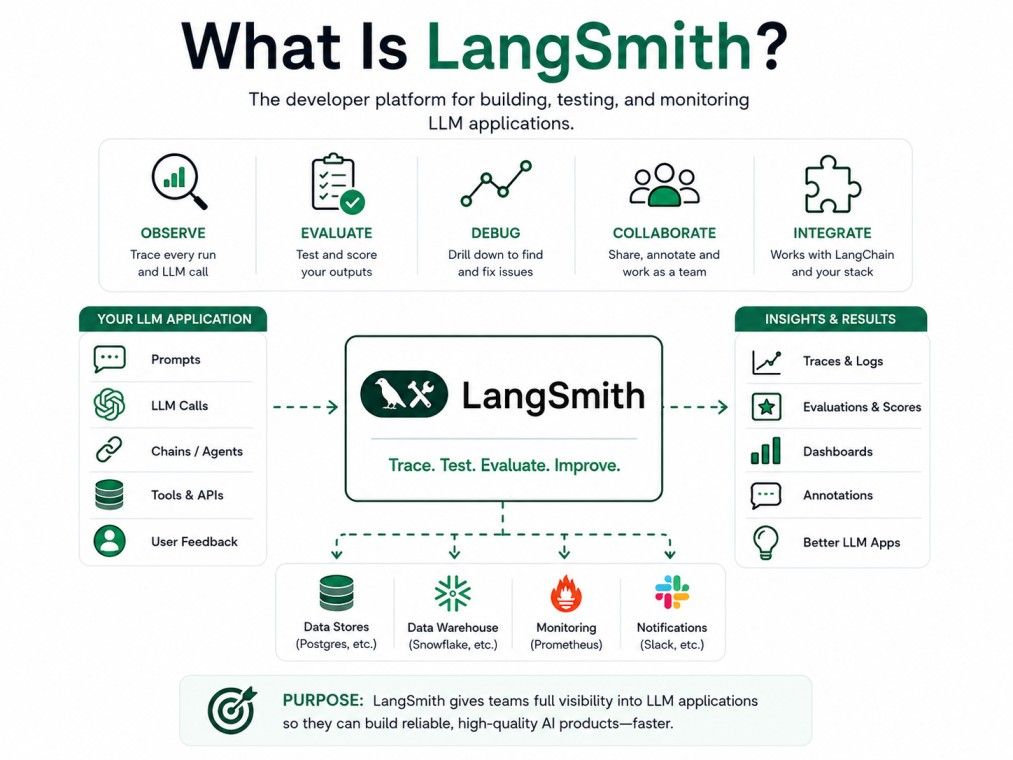
A lot of confusion around LangSmith comes from its close ties to LangChain. They share a name, a company, and a lot of the same audience, but they are not the same thing. Understanding this relationship early will save you a lot of confusion later.
Understanding what is LangSmith versus what is LangChain is the first thing most beginners get confused about.
LangChain is a framework. It gives you building blocks like chains, agents, prompt templates, and memory to actually construct your LLM application.
LangSmith is not a framework. It is an observability platform that watches what your application does once it is built.
Here is a simple way to think about it:
Tool |
What it is |
What it does |
| LangChain | Development framework | Helps you build LLM apps |
| LangSmith | Observability platform | Helps you trace, test, and monitor those apps |
No. This is one of the most common misconceptions. LangSmith works with any LLM application, including ones that do not use LangChain at all.
You can call the LangSmith SDK directly from a plain Python or JavaScript app and start logging traces.
That said, if your app is already built with LangChain, integrating LangSmith is much simpler. A few lines of setup, including a LangSmith API key, and your traces start flowing automatically.
The LangChain team designed it this way on purpose, so developers already in their ecosystem get the smoothest experience.
If you are new to both tools, a reasonable starting point is to build your app in LangChain first, then layer LangSmith on top once you need visibility into how it behaves.
The IIM Kozhikode Strategic AI for Business Professionals program in partnership with upGrad is built for turning technical know-how into real business impact. It helps you move from working with AI tools to leading AI strategy, decisions, and teams at a business level.
Once you understand what is LangSmith at a basic level, the natural next question is how it actually works day to day. The short version is that LangSmith sits quietly in the background, recording what your application does, and gives you a dashboard to review it.
1. Setting LangSmith Up
To start using LangSmith, you generate a LangSmith API key from your account dashboard. You add this key, along with a project name, to your application's environment variables.
Once that is in place, LangSmith automatically starts capturing traces without you needing to rewrite your application logic.
2. Debugging
When something goes wrong in an LLM app, the cause is rarely obvious. Maybe the retrieval step pulled the wrong documents. Maybe the prompt template had a typo. Maybe the model just hallucinated.
LangSmith lets you open a specific run and see every intermediate step, so you can pinpoint exactly where things broke down instead of guessing.
3. Testing
Before pushing changes live, you can run your application against a set of test inputs inside LangSmith.
This helps you catch regressions early, especially when you tweak a prompt or swap a model and want to make sure nothing broke.
4. Evaluating
LangSmith lets you score model outputs against expected answers, either automatically using built-in evaluators or manually through human review.
This is useful when you need to measure accuracy, relevance, or tone across many examples at once.
5. Monitoring
Once your app is in production, LangSmith tracks live performance. You can watch metrics like latency, error rates, and token usage, and get alerted when something looks off.
Now that we have covered what is LangSmith and how it works, let's look at the features that make it stand out. Beyond the core workflow, LangSmith comes with a handful of specific features that make it genuinely useful for day to day development.
1. Datasets
You can build and store datasets of example inputs and expected outputs directly inside LangSmith. These datasets become the foundation for your testing and evaluation runs.
Instead of manually checking outputs every time you make a change, you run your app against the dataset and instantly see what passed or failed.
2. Prompt Management
LangSmith includes a prompt hub where you can version, store, and iterate on prompts. This matters more than it sounds.
Prompts change constantly during development, and without version control, it is easy to lose track of what worked and what did not. LangSmith keeps a history so you can compare versions side by side.
3. Observability and Monitoring
This is the feature most people associate with LangSmith. Every run of your application gets logged as a trace, showing each step, the time it took, and the tokens it used.
You can filter traces by project, tag, or time range, which is helpful when you are debugging a specific issue reported by a user.
Here is a quick look at what LangSmith offers at a glance:
Feature |
What it helps with |
| Tracing | Seeing every step of an LLM call |
| Datasets | Storing test cases for evaluation |
| Prompt hub | Versioning and managing prompts |
| Evaluation | Scoring outputs automatically or manually |
| Monitoring | Tracking live app performance |
| Annotations | Adding human feedback to specific runs |
Together, these features cover most of what a developer needs to move an LLM application from a rough prototype to something reliable enough for real users.
Once you know what is LangSmith capable of, it helps to weigh its strengths against its limitations. Like any tool, LangSmith has clear strengths and a few limitations worth knowing before you commit to it.
None of these challenges are dealbreakers for most teams, but they are worth factoring in, especially if you are working with sensitive data or a tight budget.
A common follow-up to what is LangSmith is how much it costs. LangSmith offers a tiered pricing structure, so smaller projects and solo developers are not locked out.
The free tier gives you enough to explore the platform and run small projects. It includes a limited number of traces per month, which is usually plenty for testing or personal projects.
Paid tiers scale based on trace volume, seats, and additional features like extended data retention and team collaboration tools. Pricing details change periodically, so it is worth checking LangSmith's official pricing page for exact current numbers before budgeting for a larger project.
As a rough guide:
Plan type |
Best for |
| Free | Individual developers, small tests |
| Plus | Small teams, growing projects |
| Enterprise | Large teams, production-scale apps |
Once you know what is LangSmith and what it offers, it helps to see how it stacks up against alternatives. LangSmith is not the only observability tool for LLM apps. Depending on your stack and needs, a few alternatives are worth knowing about.
LangFuse is an open source alternative that offers similar tracing and evaluation features. The main difference is that LangFuse can be self hosted, which appeals to teams with strict data control requirements.
LangSmith, on the other hand, offers a more polished experience out of the box, particularly if you are already using LangChain.
Other tools in this space include Helicone, Arize Phoenix, and general purpose LLM logging tools built into platforms like Datadog.
Each has its own strengths, some lean more toward cost tracking, others toward deep evaluation workflows.
The competitive landscape here is still young. Most alternatives focus on one piece of the puzzle, either tracing or evaluation, while LangSmith tries to cover the full lifecycle.
This makes it a strong default choice if you want one tool instead of stitching several together.
Also Read: Difference Between LangGraph and LangChain
Part of understanding what is LangSmith means seeing where it fits in the wider LangChain ecosystem. LangSmith does not exist in isolation. It is part of a broader set of tools built around LangChain, and knowing how they fit together helps clarify where LangSmith sits.
You do not need any of these to use LangSmith, but if you are already deep in the LangChain ecosystem, they tend to work well together.
Another part of understanding what is LangSmith is knowing whether it is open source. This is a common question, and the answer is a bit nuanced.
LangSmith itself is not fully open source. It is a hosted, commercial product, though it does offer a generous free tier for smaller use cases.
LangChain, the framework, is open source, which sometimes leads people to assume LangSmith is too.
If open source and self hosting are non-negotiable for your team, LangFuse is a closer fit.
If you are fine with a hosted service and want the smoothest LangChain integration, LangSmith remains the stronger option.
Also Read: Top 10 Agentic AI Frameworks to Build Intelligent AI Agents in 2026
Now that we have answered what is LangSmith and what it does, let's look at who actually uses it. LangSmith fits a wide range of people building with LLMs, not just large engineering teams.
Individual developers use LangSmith to debug their applications faster, especially when working with complex chains or agents that have many moving parts.
Teams that need to measure model quality at scale use LangSmith's evaluation tools to score outputs against benchmarks or human-reviewed criteria.
Retrieval augmented generation apps are notoriously hard to debug because failures can come from the retrieval step, the prompt, or the model itself. LangSmith traces show you exactly where the failure happened.
Anyone who has spent hours trying to figure out why a chatbot gave a weird answer knows how valuable a clear trace can be. LangSmith turns that guesswork into a straightforward review process.
Since prompts are versioned and testable, LangSmith is a natural fit for anyone iterating heavily on prompt design and wanting to measure the impact of each change.
Beyond these specific cases, LangSmith is used across chatbots, internal tools, customer support automation, and content generation pipelines, basically anywhere an LLM is doing real work.
Also Read: NLP Chatbot: Architecture, Models, and Applications
Once the question of what is LangSmith is settled, the next step is actually trying it out. Getting started with LangSmith takes just a few steps.
From there, you can explore datasets, set up evaluations, and configure monitoring alerts as your project grows. The official documentation covers framework-specific setup in more detail if you run into edge cases.
Also Read: Agentic RAG Architecture: A Practical Guide for Building Smarter AI Systems
LangSmith is a platform that gives you eyes inside your LLM application, showing you what happens between the prompt and the response. It helps you debug faster, test more reliably, and monitor your app once it is live.
Whether you are building a simple chatbot or a complex multi-agent system, the moment your LLM app leaves the demo stage, tools like LangSmith stop being optional and start being genuinely useful.
Want to get started with Agentic AI? Speak with an expert for a free 1:1 counselling session today.
Yes, LangSmith has a free tier that covers a limited number of traces per month. It is enough for individual developers or small projects to explore the platform. For higher usage or team features, you will need to move to a paid plan.
Yes, you can. LangSmith works with any LLM application, not just ones built with LangChain. You will need to manually add tracing calls to your code, but the platform itself is framework agnostic.
You get a LangSmith API key from your account dashboard after signing up. Once generated, you add it to your application's environment variables to start sending traces to your LangSmith project automatically.
Yes, LangSmith works with OpenAI, Anthropic, Google models, and most other LLM providers. It does not care which model you use, it only tracks how your application calls and processes the responses.
LangChain is a framework used to build LLM applications. LangSmith is a separate platform used to trace, test, and monitor those applications once they are running. They work well together but serve different purposes.
LangSmith logs prompts and outputs, which can include sensitive information depending on your use case. Review your data handling policies and check LangSmith's data retention and security settings before logging anything confidential.
Yes, LangSmith includes a prompt hub where you can version and test different prompt variations. This makes it easier to track what changes actually improved your model's output over time.
LangSmith monitors live traffic and flags errors, latency spikes, and failed runs as they happen. You can set up alerts so your team knows about issues before users start reporting them.
Yes, LangSmith is beginner friendly, especially if you are already using LangChain. The dashboard is straightforward, and the free tier lets you learn the platform without any financial commitment.
A trace in LangSmith is a recorded log of everything that happened during a single run of your application, including every prompt, model call, and intermediate step, laid out in order for you to review.
Yes, paid LangSmith plans support multiple team members working on the same project. This allows teams to share traces, review each other's evaluations, and collaborate on debugging together.
695 articles published
Sriram K is a Senior SEO Executive with a B.Tech in Information Technology from Dr. M.G.R. Educational and Research Institute, Chennai. With over a decade of experience in digital marketing, he specia...
Speak with AI & ML expert
By submitting, I accept the T&C and
Privacy Policy