Top 9 SEO Audit Tools Checklist for 2026
By upGrad
Updated on Sep 13, 2026 | 9 min read | 4.36K+ views
Share:

All courses
Certifications
More
By upGrad
Updated on Sep 13, 2026 | 9 min read | 4.36K+ views
Share:
Table of Contents
Key Highlights
Want to build in-demand skills like SEO, content marketing, and paid advertising? Enroll in our Digital Marketing Courses and start your journey toward a career in digital marketing today.
When it comes to finding the best SEO audit tool in the market, Semrush shows up almost every time. You can do all the on page and technical SEO checks with its SEO site audit module.
Semrush assigns a health score to your site including issues as per the severity like errors, warnings, and notices. So, you can fix errors accordingly without getting drowned in multiple flagged items.
Other than basic crawling, Semrush does Core Web Vitals data. This shows how your pages perform on speed and user experience metrics that Google uses for ranking. Also, it checks international SEO elements. Hreflang tag errors are one example. These are often missed by simpler SEO tools.
Biggest Advantages of Semrush:
Best for: Teams looking for one platform that can handle audits, keyword tracking, and competitor research together.
Disadvantage: It can be tough for beginners to learn. Also, if you are just looking for a simple crawl for a website, Semrush SEO audit report can be complicated.
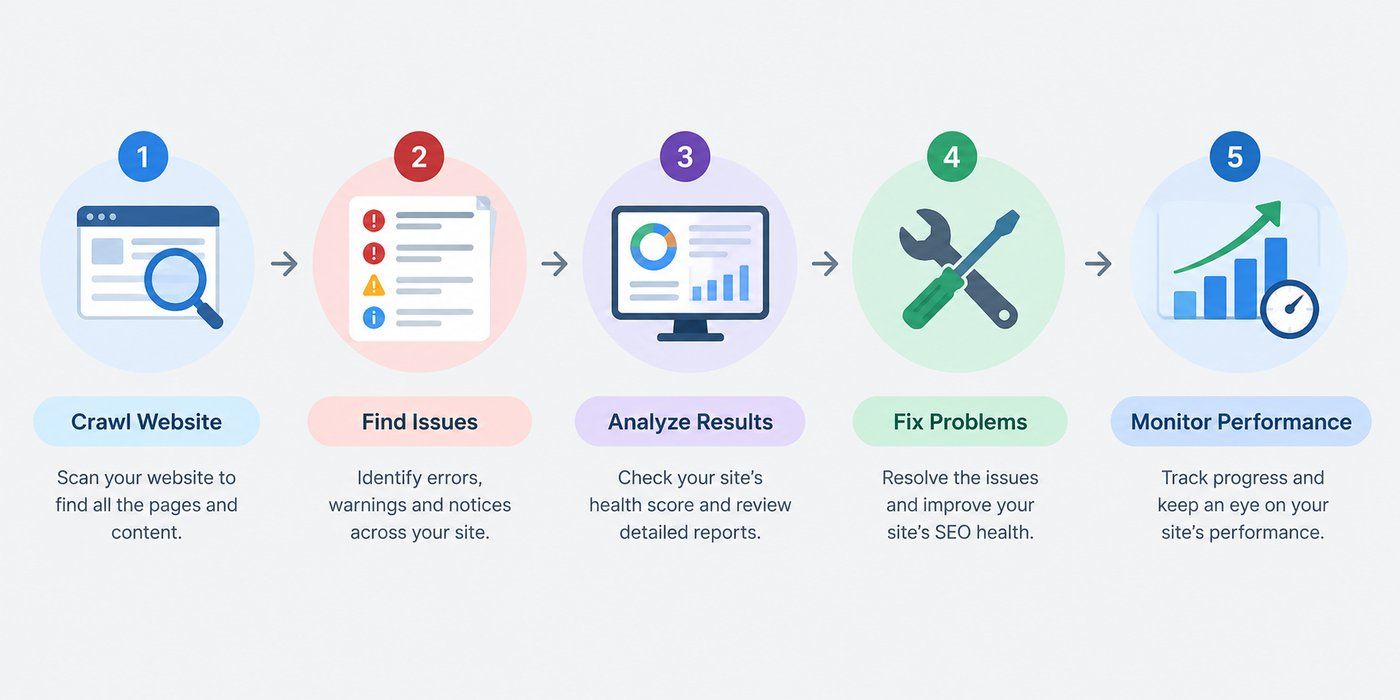
Website SEO Audit Workflow
Free Courses
In the SEO industry, Ahrefs is known for its backlink data because it has one of the largest link databases. Over time, it expanded into a full search engine optimization platform. SEO Site Audit is now one of its core features.
It crawls your website the same way a search engine bot does. It has 170 predefined SEO issues and it checks your website for all these issues. Each flagged issue includes an explanation. It also includes guidance on how to fix it. This is helpful for teams without a dedicated technical SEO expert.
Key issues the audit checks for include:
One useful feature is the visual site structure map. It shows how your pages connect through internal links. This makes it easy to spot orphaned pages. Ahrefs also tracks a website's health score. Score updates after every crawl. You can watch it improve or decline over time.
For large sites, the crawler performs better. It can handle thousands of SEO page audit without slowing down. It is the best SEO audit tool if you have bigger websites with complex structures.
Disadvantages of Ahrefs
Digital Marketing Courses to upskill
Explore Digital Marketing Courses for Career Progression
MICA Executive Alumni Status
Screaming Frog is different from all the tools in the list. It is not a cloud-based platform, it is a desktop application that you can download on your computer. It gives you full control over how and when you crawl your website.
It crawls the website URL by URL similar to search engine bot. SEOs have relied on it for years because of how precise and customizable it is.
Data a crawler extracts include:
Advantages of Screaming Frog SEO Spider:
Disadvantages of Screaming Frog
Also read: SEO Benefits: Why Search Engine Optimization Matters in 2026
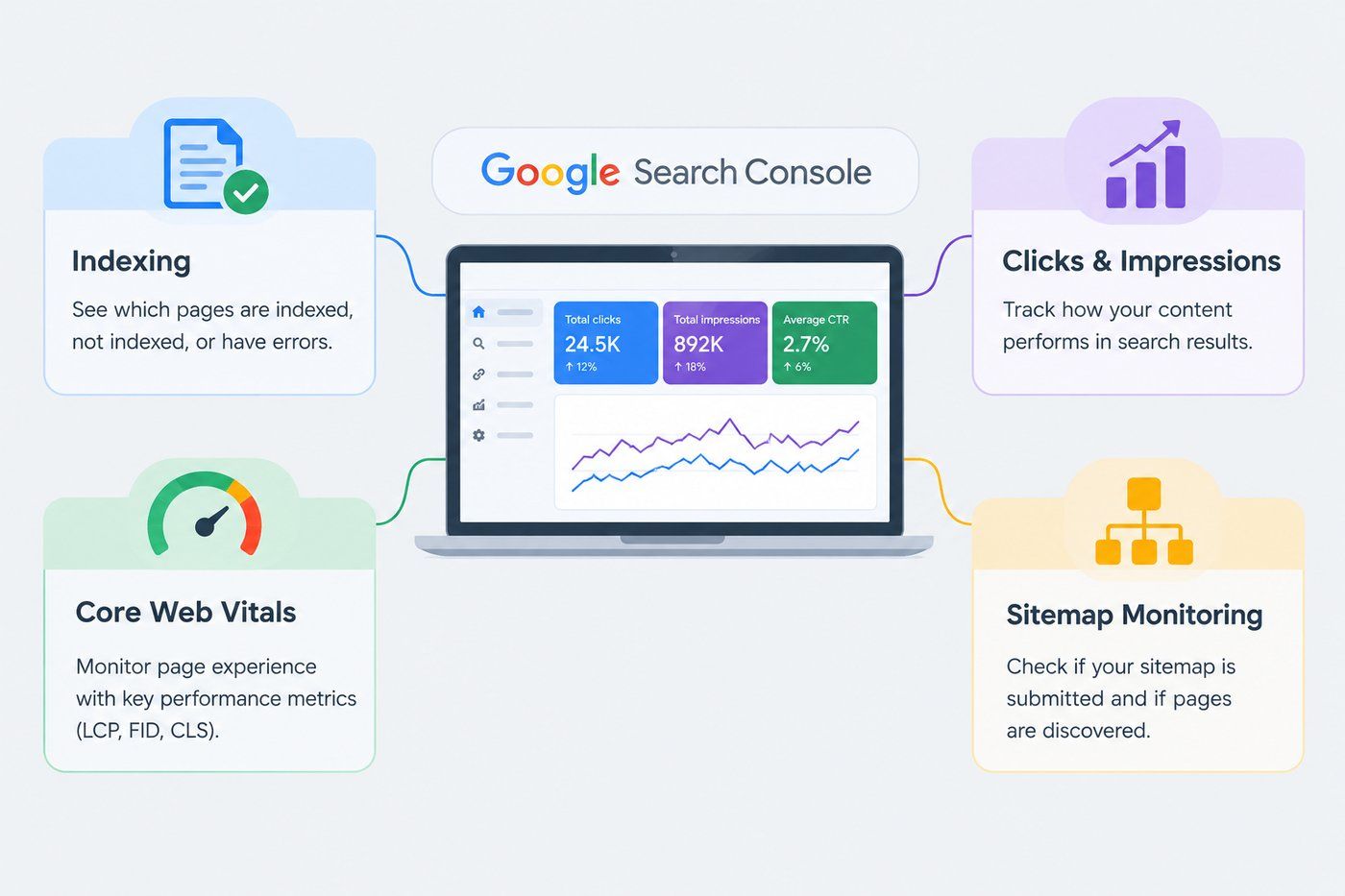
Why look for a third-party crawler's guess about your indexing status when Google will give you a complete report about it. It is a free SEO audit tool, it is built by Google, and it shows you the site exactly as the search engine sees it, not as an outside tool interprets it.
The Coverage report is the main feature. It tells you which pages are indexed and which are excluded. Also, it can share the exact reason why. The reason could be a stray noindex tag, a canonical pointing elsewhere, or a crawl error nobody noticed.
Other than this, there is a performance report (no other tool will provide you this). It pulls actual click and impression data straight from Google's search results, showing which queries bring traffic and how rankings shift over time. No other tool has access to this data.
Some other features of the tool are:
Budget is never an excuse to skip this one. Every website should have it connected from day one.
Sitebulb follows a different approach than most crawlers. It does not give you a raw spreadsheet of errors, it explains each error in detail, why it happened, why it is important to resolve, and how to fix it. It is best for teams who do not have dedicated technical SEO people.
Visuals are where Sitebulb stands out. It generates interactive diagrams of the site's internal link structure, crawl depth, and how authority flows between pages. A table of broken links means little to a non-technical client. A visual map of their site's structure, with the problem areas highlighted, tends to land much better.
Few important things about sitebulb:
Agencies tend to like Sitebulb for client reporting, since the explanations and visuals do a lot of the communication work automatically. Enterprise teams auditing very large sites, though, may find the desktop version slower than fully cloud-native tools built for scale.
Want to build a career in digital marketing? Explore upGrad's Advanced Certificate in AI-Powered Digital Marketing and Communication, MICA, and learn how AI is reshaping digital marketing.
SE Ranking is a budget-friendly SEO audit tool. It crawls your site and looks for around 120 technical and on-page factors. It creates groups of findings like crawlability, HTML tags, redirects, and duplicate content. Then gives you an overall health score that updates with each re-crawl.
Also, you can schedule automated audits (daily, weekly, or monthly) and audit reports will be sent directly to your mail. With this practice, you can catch new issues early instead of waiting for a manual check.
A few other useful details:
It is best for small businesses and freelancers. But for enterprises, its ranking keyword and backlink database is smaller, so in depth competitive research cannot be done.
Also read: SEO Optimization Tips: Tips , Tactics & Tricks
If you want a basic SEO audit report in seconds, you must try SEOptimer. It is well-known for speed and simplicity instead of in-depth audit. To run a single check, there is no need to login, which makes it a popular choice for quick snapshots.
Also, report format is the main USP (unique selling point). Everything is scored out of 100 and broken into sections, so a beginner can also understand where the site stands.
Most of the agencies use SEOptimer for lead generation. They embed the audit tool on their own website and let the prospects run a free scan of their site. Then use the result as a conversation for a sales pitch.
A few notable features:
It does not offer a deep, crawl-based analysis. It checks individual pages well, but it is not designed to map out site-wide architecture or crawl thousands of URLs in one pass.
Moz is available in the market before any other tool exists. Still, its site crawl feature has a dependable technical SEO audit tool.
It checks your website against Moz’s own set of technical best practices. In the report, it will give you an explanation of each issue with a suggested fix. So, this makes the tool fit for people who are new in technical SEO.
One important feature of Moz is Page Optimization scoring. In this, it grades individual pages and shares the reason behind the low rank on search engine results. It is a mix of on-page optimization and technical SEO audit.
Important things about Moz:
Morningscore does not follow a generic approach for SEO audit, it turns SEO into a game.
It does not show a flat dashboard with complex numbers, instead it presents SEO tasks as quests, levels, tasks and treasure maps that will show your progress. All of this is built around real SEO fundamentals.
Some important features of Morningscore:
The Morningscore tool is best for:
Also read: What is SEO in Digital Marketing: Importance, Types & Benefits
Choosing a right SEO audit tool depends on the size of your website and how much depth you want in auditing. If you are looking for an all-in-one platform with audits, keyword and competitor research, go with Semrush or Ahrefs. For page-by-page technical data auditing, choose Screaming Frog and Sitebulb. Google Search Console is free and you should connect it to your website.
If budget is your concern, SE Ranking and Moz Pro is best because it offers solid audits at a lower cost. SEOptimer works well for quick, client-facing snapshots, and Morningscore is good for beginners who want guidance without a steep learning curve.
Ready to build a career in digital marketing? Book a free consultation call with our experts and find the right program to help you get there.
An SEO audit is a structured review of a website's technical setup, on-page elements, and search visibility. It uncovers issues that may be preventing a site from ranking or getting indexed properly.
This depends on site size and the number of issues found. A small site's audit might take an hour to review, while larger sites with hundreds of flagged issues can take a full day or more to go through properly.
Basic audits are manageable without expert help, especially with beginner-friendly tools. However, interpreting complex technical issues, like crawl budget problems or JavaScript rendering errors, often benefits from someone with hands-on SEO experience.
Very small sites with a handful of pages can often get by with basic checks. Once a site grows past a few hundred pages, or has a complex structure with multiple subdomains, a more advanced crawler becomes more practical for catching issues at scale.
Cross-checking results across two tools is a common practice. Crawlers can occasionally flag false positives, so verifying critical issues, like an indexing problem, directly through Google Search Console adds a layer of confidence.
Prioritize issues that block indexing or crawling entirely, such as accidental noindex tags or blocked resources. After that, focus on site-wide problems like broken links or duplicate content before moving to smaller, page-level fixes.
Yes, though e-commerce sites often need extra attention to things like faceted navigation, duplicate product pages, and pagination. Tools with strong crawl customization, such as Screaming Frog, are useful for handling these larger, more complex structures.
Most standard SEO audit crawlers only check for duplicate content within your own site. Detecting content duplicated elsewhere on the web usually requires a separate plagiarism or content-matching tool.
Yes, several tools flag mobile usability problems, such as text that's too small, clickable elements placed too close together, or content wider than the screen. This is especially useful since Google primarily uses mobile-first indexing.
A manual audit involves a person reviewing a site by hand, checking things like content quality and user experience alongside technical factors. Tools automate the technical detection process but still benefit from manual review for context and strategic decisions.
Yes, audit results reflect a site's condition at the time of the crawl. Since websites change frequently through new content, updates, or broken links, audits should be re-run regularly rather than treated as a one-time task.
966 articles published
We are an online education platform providing industry-relevant programs for professionals, designed and delivered in collaboration with world-class faculty and businesses. Merging the latest technolo...
Get Free Consultation
By submitting, I accept the T&C and
Privacy Policy
Level Up Your Digital Marketing Career Today!
Top Resources
MICA
Advanced Certificate in AI-Powered Digital Marketing & Communication from MICAMICA Executive Alumni Status
Certification
5 Specialisation
Classroom
4 Months
Certification
2 Months