On-Page SEO Guide: Practical Tips, Factors & Checklist
By upGrad
Updated on Sep 01, 2026 | 10 min read | 3.4K+ views
Share:

All courses
Certifications
More
By upGrad
Updated on Sep 01, 2026 | 10 min read | 3.4K+ views
Share:
Table of Contents
Key Highlights
Learn the skills you need to succeed in marketing. Our digital marketing courses cover SEO, content marketing, content strategy, paid ads, and other relevant domains. Take the step and build the skills that employers are looking for.
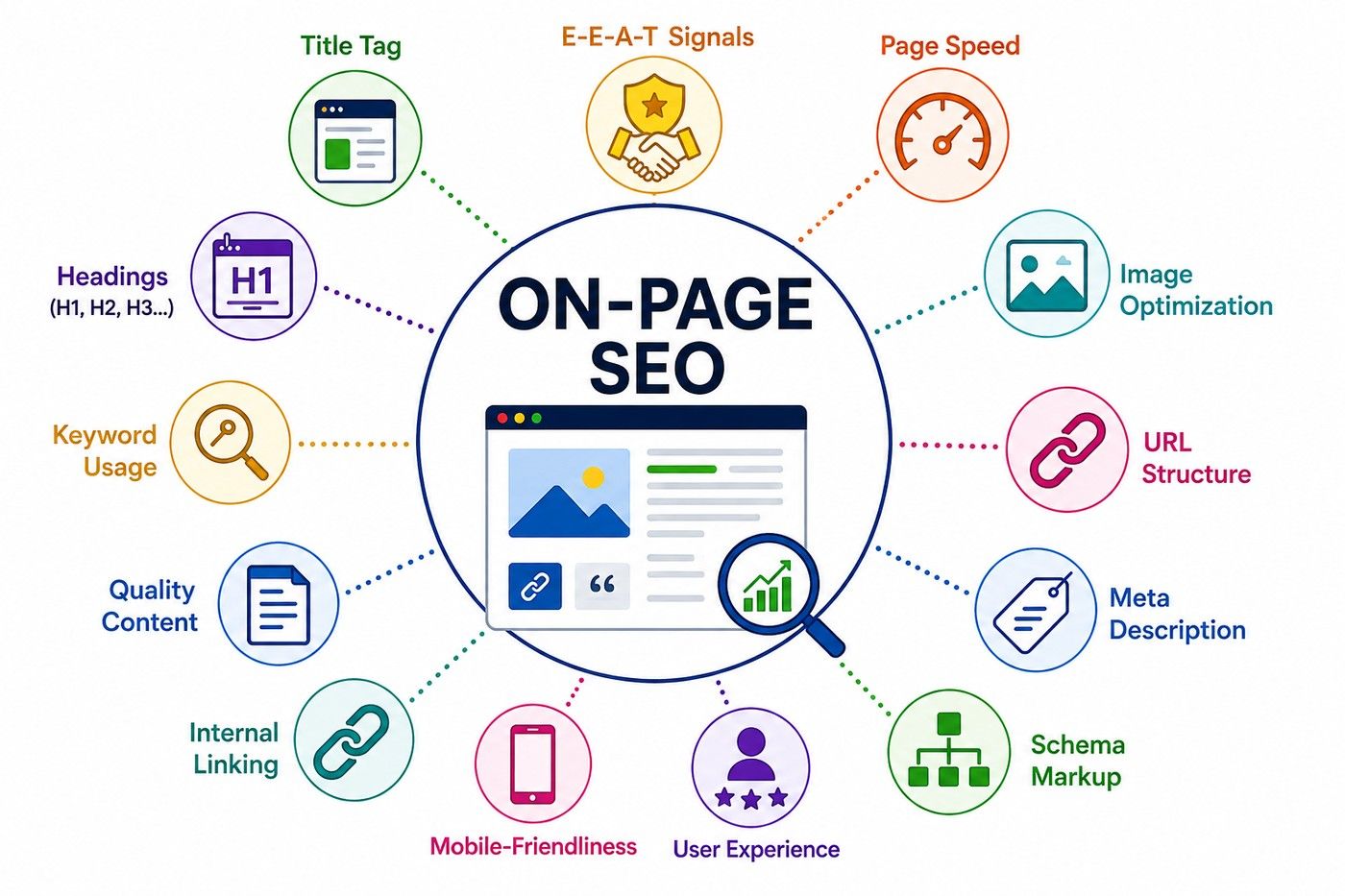
On-page SEO is a practice of optimizing web pages to rank higher on search engines and get cited on AI platforms (like AI Overviews). Changes in web pages are also made to improve user experience.
Some common on-page SEO practices are like adding new content to the existing content, making title tags clear, using headings (H1, H2, H3, H4, and so on), adding relevant internal links, images, and more.
On-page SEO is different from off-page SEO (backlinks, guest posts, local citations) and technical SEO (like site speed, crawlability, indexing, mobile-friendliness).
Doing on-page SEO is important if you want to improve your ranking and visibility for both search engines and users. Some other important points are:
Also read: 25+ Proven SEO Strategies to Master On and Off Page SEO Techniques
Free Courses
Both on-page SEO and off-page SEO are parts of search engine optimization, but they focus on different areas. In on-page SEO you can work on the elements of your website while in off-page SEO you have to work on activities, outside your website for improving authority and reputation.
Basis |
On-Page SEO |
Off-Page SEO |
| Main Focus | Content, keywords, headings, title tags, URLs, images, and internal links | Backlinks, guest posts, brand mentions, and local citations |
| Control | You have direct control over most activities | You have less direct control over external activities |
| Main Goal | Help search engines understand your content and improve the user experience | Build website authority, trust, and reputation |
| Examples | Making the structure of the content better, adding keywords, internal links, and more | Earning backlinks, sending content for guest posting, getting brand mentions, and building citations |
| Tools Used | Google Search Console, Semrush, Ahrefs, and Yoast SEO | Semrush and Ahrefs are commonly used to analyze backlinks, referring domains, competitor link profiles, and other external SEO signals. |
Also read: What is SEO in Digital Marketing? A Beginner's Guide
Digital Marketing Courses to upskill
Explore Digital Marketing Courses for Career Progression
MICA Executive Alumni Status
These factors highlight the main areas you should focus on to boost your website’s search visibility, improve content quality, and make the overall user experience better. These are on-page SEO best practices 2026
A title tag is an HTML element that tells search engines and users about the page. For example if the page is about digital marketing techniques, then title tag could be: Best Digital Marketing Techniques to Follow in 2026.
To optimize title tag, follow these tips:
2. Meta Description
The meta description is a summary of a whole web page that you have written. It is shown after the title tag. Meta description does not help in rank improvement, but it definitely improves the click-through rate. So, write a clear summary and tell the users directly what the web page is about.
The URL (Uniform Resource Locator) should be clear and descriptive to tell search engines and users what the page is about.
Comparison example
Similar to meta description, URL is not a defined factor in ranking. But it helps with crawlability and click-through rate. To optimize the URL, follow these points:
Header tags are H1, H2, H3, H4, and so on. These tags are the HTML elements used to structure a page's content. This makes content navigation easy for users and improves engagement.
These are the ways to optimize header tags:
In keyword placement, you add your targeted keyword naturally to the content and HTML elements. Do not add keywords stuffing to avoid feeling spammy. Just use the primary and secondary keywords several times; you can use variations also.
You have definitely heard of this line; content is the king. Search engines prioritize content that writes exactly about the intent of the query, and not just writing the keywords. Here's what content quality should have:
In internal links you connect all the relevant pages; this helps search engines to find the new or hidden pages. This way you help weaker pages by adding them to strong pages. For topical relevance, internal linking is a must. This also helps in keeping visitors for long on the site by guiding them to more useful content.
In image optimization, you make sure that images are lightweight, so the page doesn’t take too much time to load. Otherwise, the user will go to another site.
Alt text is a short description added to an alt attribute in an image's HTML code.
Readability is an important factor of on-page SEO; it shows how easy your text is to read. Because of low bounce rate and more time spent by users on the page, search engines favor this type of content.
How your page will look and function on mobile devices; it includes both phones and tablets. It is important because Google uses mobile-first indexing, which means it crawls and ranks the mobile versions first. Its key elements are:
Schema Markup is a type of structured data code added to a webpage HTML for understanding the content and context. Its common types are:
E-E-A-T stands for Experience, Expertise, Authoritativeness and Trustworthiness. It helps Google judge how good and reliable content is. To show E-E-A-T signals, follow these points:
Also read: What Is SEO Marketing? A Beginner’s Guide to Boosting Website Rankings
On-page SEO refers to the elements you control directly on a webpage and regularly checking these on-page SEO elements ensures that your pages are optimized before you invest time in content promotion or link building. These are some methods you can follow to check the status of your webpages:
This is the simplest method because you can confirm whether core SEO elements are present on the webpage or not by just looking at raw HTML. Run the command (Ctrl+U / Cmd+Option+U) on view page source and look for:
Google has its tools. Since Google is the search engine you are working with, its free tools provide accurate and direct information about how your web pages are doing and how people are viewing them. These SEO tools are:
Instead of checking page source manually every time, with the help of extensions, on-page elements can be checked in one single click. If this is the best way if you are auditing multiple pages.
The tools can identify that all elements are available, but only a human can read and tell whether the content matches the search intent or not.
If you don’t have time for an on-page SEO audit and just want a quick gut-check on one page, ask yourself:
Also read: Digital Marketing Tutorial: Step-by-Step Guide to Becoming an Expert
Subscribe to upGrad's Newsletter
Join thousands of learners who receive useful tips
While auditing content, you go through all the things you have shared, check what is performing well, and what needs to change or revamp, or completely remove. Below is the quick on-page SEO checklist to do so:
Also read: What is SEO Content Writing: Strategy, Tools, & Tips
On-page SEO is an ongoing process in which you improve your site for both search engines and the users by using on-page SEO optimization techniques. For users, you make the content easy to understand and navigate. For search engines, you improve internal links, title tags, meta description, keyword placement, mobile experience, and more.
Your work of SEO does not end when you publish the page. Google changes its guideline more often, so it is essential to check and refresh your content. First, change the pages which drive more traffic to the business; on these pages you can improve organic traffic. Then you can add these pages to low-traffic pages to improve their visibility and guide users towards more relevant content.
Ready to start your journey? Book a free consultation with upGrad today to find the best path for your career.
There is no fixed time for results. It might take weeks or even months before you see any real change. It also depends on the website, competition, content quality, and how frequently search engines crawl the page.
Yes. Updating outdated information, improving the content, addressing gaps, and making the page more useful can help an existing page perform better. However, results depend on the quality of the changes and the level of competition.
Sometimes. If an existing page already has traffic, backlinks, or search visibility, improving it may be more useful than creating another page covering the same topic.
Keyword cannibalization happens when multiple pages on the same website compete for similar search queries or search intent. This can make it harder for the right page to gain visibility.
Both matter, but the content should primarily be useful and understandable to the intended audience. SEO elements should support the content rather than make it difficult or unnatural to read.
It can’t rank in the short term. A new website can focus on specific topics, create genuinely useful content, understand its audience well, and build relevance gradually instead of trying to compete for every broad keyword immediately.
There's no fixed rule, but a common approach is reviewing high-traffic pages every 3 to 6 months. Also, doing a full site-wide pass annually. Pages tied to fast-moving topics, such as pricing, trends, and statistics, may need more frequent touch-ups than evergreen content.
Yes, clear structure, well-organized headings, direct answers near the top of the page, and credible sourcing all make it easier for AI systems to parse and cite your content. The same fundamentals that help traditional rankings, such as clarity, accuracy, and structure, tend to help AI visibility too.
Search engines don't penalize content just because it is written by AI. What matters is whether the final content is accurate, original, and well-structured. Thin or generic AI output without human review or added expertise is what tends to underperform.
Yes. Browser-based checks, viewing page source, and Google's own free tools, such as Search Console, PageSpeed Insights, and Rich Results Test, cover most of what you need to audit and improve on-page elements. Paid tools like Ahrefs or Semrush simply add convenience and scale for larger sites.
Focus each page around one primary keyword, then naturally weave in a handful of closely related secondary keywords or variations. Trying to rank one page for too many unrelated terms usually dilutes its focus and can lead to keyword cannibalization across your own site.
1141 articles published
We are an online education platform providing industry-relevant programs for professionals, designed and delivered in collaboration with world-class faculty and businesses. Merging the latest technolo...
Get Free Consultation
By submitting, I accept the T&C and
Privacy Policy
Level Up Your Digital Marketing Career Today!
Top Resources
MICA
Advanced Certificate in AI-Powered Digital Marketing & Communication from MICAMICA Executive Alumni Status
Certification
5 Specialisation
Classroom
4 Months
Certification
2 Months