Methods in Java: A Complete Guide from Basics to Advanced
By Rahul Singh
Updated on Jun 02, 2026 | 10 min read | 4.67K+ views
Share:

All courses
Certifications
More
By Rahul Singh
Updated on Jun 02, 2026 | 10 min read | 4.67K+ views
Share:
Table of Contents
A method in Java is a named block of code that performs a specific task when called. Methods help organize programs into smaller, manageable sections, making code easier to read, maintain, and reuse.
By using methods, developers can avoid writing the same logic multiple times. This improves code efficiency, reduces redundancy, and supports the development of scalable Java applications.
In this blog, you will learn everything about methods in Java. We will start from what a method is, move through types, parameters, and return values, and then cover advanced topics like method overloading, method overriding, abstract methods, and string methods.
Build practical AI and ML skills with upGrad’s Artificial Intelligence Courses. Learn machine learning, generative AI, and emerging technologies while working on real-world projects.
Popular upGrad Programs
A method in Java is a block of code that performs a specific task. You define it once and can call it as many times as you need. This is the core idea behind reusable code.
Think of a method like a recipe. You write the steps once. Whenever you want to cook that dish, you just follow the recipe instead of figuring it out from scratch every time.
returnType methodName(parameters) {
   // code to execute
   return value;
}

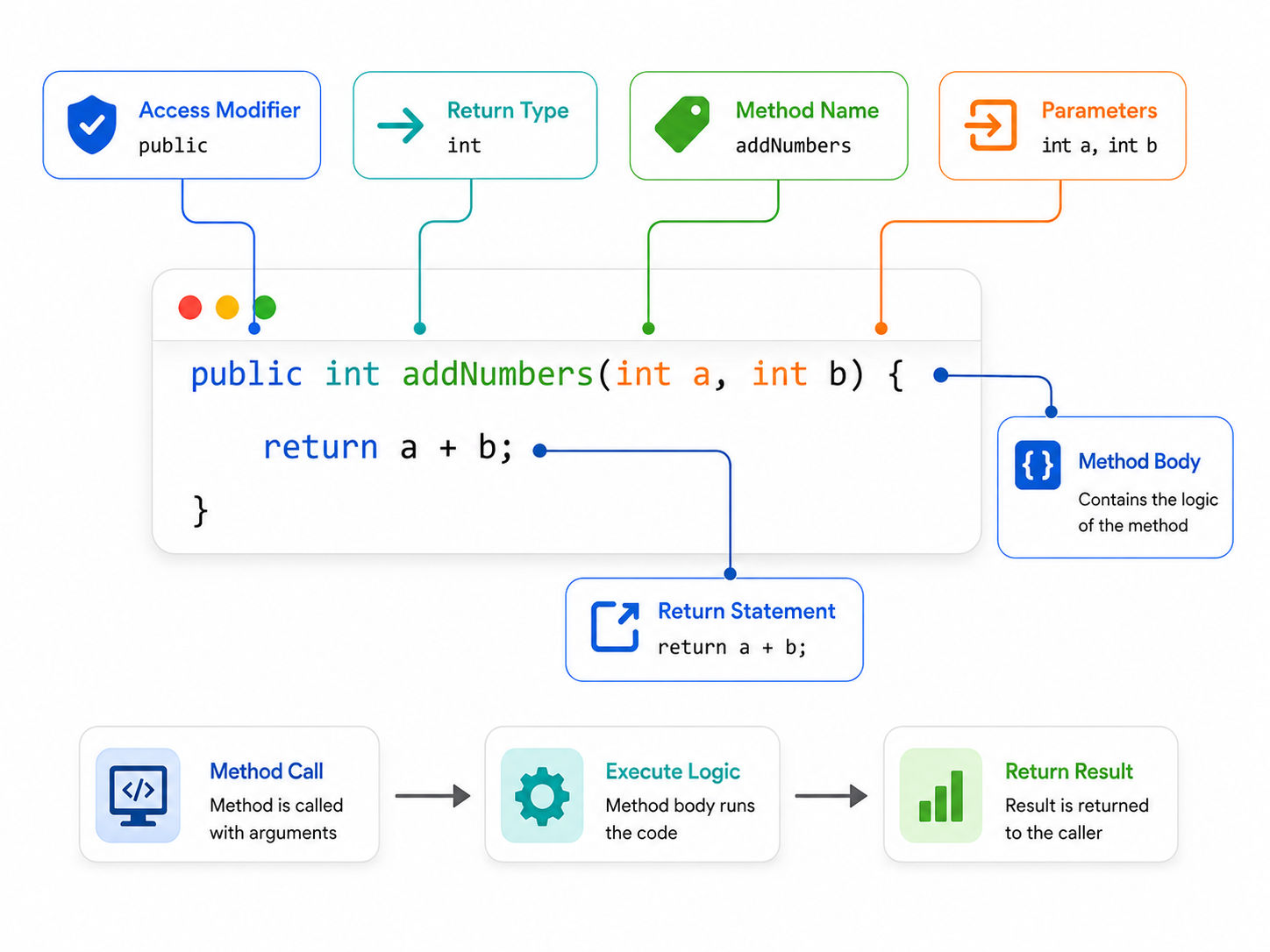
Here is a simple example:
public int addNumbers(int a, int b) {
   return a + b;
}
Breaking this down:
Method Type |
Description |
| Built-in methods | Already provided by Java (like Math.sqrt(), System.out.println()) |
| User-defined methods | Created by you for your specific logic |
| Static methods | Belong to the class, not an object. Called without creating an instance |
| Instance methods | Belong to an object. You need to create an object first |
| Abstract methods | Declared without a body. Must be implemented in a subclass |
Methods can take zero or more parameters. They can return a value or return nothing (void).
// No parameters, no return value
public void greetUser() {
   System.out.println("Hello, welcome to upGrad!");
}

// Parameters with a return value
public String getFullName(String firstName, String lastName) {
   return firstName + " " + lastName;
}
A void method does not return anything. It just performs an action. If you specify a return type like int or String, the method must return a value of that type using the return keyword.
Understanding this foundation makes everything else much easier to grasp.
Also Read: Strings in JAVA: Concepts, Examples, and Best Practices
Free Courses
Method overloading in Java means defining multiple methods with the same name but different parameters. This is one of the simplest forms of polymorphism in Java.
You can overload a method by changing:
public class Calculator {

   public int add(int a, int b) {
       return a + b;
   }

   public double add(double a, double b) {
       return a + b;
   }

   public int add(int a, int b, int c) {
       return a + b + c;
   }
}
All three methods are named add. Java decides which one to call based on what you pass in.
Calculator calc = new Calculator();
calc.add(2, 3);          // calls first method, returns 5
calc.add(2.5, 3.5);      // calls second method, returns 6.0
calc.add(1, 2, 3); // calls third method, returns 6Also Read: Types of Polymorphism in Java [Static & Dynamic Polymorphism with Examples]
Changing only the return type does not count as overloading. This will cause a compile error:
public int multiply(int a, int b) { return a * b; }
public double multiply(int a, int b) { return a * b; }  // ERROR
Method overloading and method overriding in Java are often confused. They are very different concepts. Overloading happens at compile time (also called static polymorphism). Overriding happens at runtime (dynamic polymorphism). We will cover overriding next.
Also Read: Polymorphism in OOP: What is It, Its Types, Examples, Benefits, & More
Recommended Courses to upskill
Explore Our Popular Courses for Career Progression
IIIT Bangalore
Executive Diploma in Machine Learning and AI360° Career Support
O.P.Jindal Global University
MBA from O.P.Jindal Global UniversityLive Case Studies and Projects
Method overriding in Java happens when a subclass provides its own version of a method that already exists in the parent class. The method name, return type, and parameters must be exactly the same.
class Animal {
   public void makeSound() {
       System.out.println("Some generic animal sound");
   }
}

class Dog extends Animal {
   @Override
   public void makeSound() {
       System.out.println("Woof!");
   }
}

class Cat extends Animal {
   @Override
   public void makeSound() {
       System.out.println("Meow!");
   }
}
 Animal myDog = new Dog();
Animal myCat = new Cat();

myDog.makeSound();  // prints: Woof!
myCat.makeSound();  // prints: Meow!
Even though both variables are declared as Animal, Java calls the correct version at runtime. This is called runtime polymorphism.
Feature |
Method Overloading |
Method Overriding |
| Where it occurs | Same class | Parent and subclass |
| Parameter list | Must be different | Must be identical |
| Binding time | Compile time | Runtime |
| Return type | Can differ | Must match (or be covariant) |
| Keyword used | None required | @Override recommended |
| Purpose | Multiple behaviors for same name | Specialized behavior in subclass |
Also Read: Overloading vs Overriding in Java
An abstract method in Java is a method that has no body. It is declared using the abstract keyword. The method signature is there, but the actual implementation is left to the subclass.
It sounds strange at first. But consider this: you are designing a base class called Shape. Every shape has an area, but calculating the area of a circle is completely different from calculating the area of a rectangle.
You want to enforce that every subclass must implement getArea(), but you cannot write a meaningful default version. An abstract method solves this perfectly.
abstract class Shape {
   abstract double getArea();  // No body

   public void display() {
       System.out.println("Area: " + getArea());
   }
}

class Circle extends Shape {
   double radius;

   Circle(double radius) {
       this.radius = radius;
   }

   @Override
   double getArea() {
       return Math.PI * radius * radius;
   }
}

class Rectangle extends Shape {
   double width, height;

   Rectangle(double width, double height) {
       this.width = width;
       this.height = height;
   }

   @Override
   double getArea() {
       return width * height;
   }
}Both abstract classes and interfaces can define abstract methods in Java. The difference is that a class can implement multiple interfaces but can only extend one abstract class. Use an abstract class when you want to share code between closely related classes. Use an interface when you are defining a contract that unrelated classes can follow.
Abstract methods are the foundation of a good object-oriented design. They force a clear contract between the parent and the child, making large codebases easier to manage.
Also Read: Explore Abstract Method and Class in Java: Learn Rules to Streamline Your Code
String methods in Java are some of the most frequently used tools in everyday programming. Java's String class comes loaded with built-in methods for manipulating text.
Method |
What It Does |
Example |
| length() | Returns number of characters | "hello".length() returns 5 |
| charAt(index) | Returns character at given index | "hello".charAt(1) returns 'e' |
| substring(start, end) | Extracts part of a string | "hello".substring(1, 3) returns "el" |
| toUpperCase() | Converts to uppercase | "hello".toUpperCase() returns "HELLO" |
| toLowerCase() | Converts to lowercase | "HELLO".toLowerCase() returns "hello" |
| trim() | Removes leading/trailing spaces | " hi ".trim() returns "hi" |
| replace(old, new) | Replaces characters or substrings | "hello".replace("l", "r") returns "herro" |
| contains(text) | Checks if a string contains another | "hello".contains("ell") returns true |
| equals(other) | Compares two strings for equality | "hello".equals("hello") returns true |
| split(delimiter) | Splits string into an array | "a,b,c".split(",") returns ["a","b","c"] |
| indexOf(char) | Returns position of first match | "hello".indexOf("l") returns 2 |
| isEmpty() | Checks if string is empty | "".isEmpty() returns true |
| startsWith(prefix) | Checks if string starts with a value | "hello".startsWith("he") returns true |
public class StringDemo {
   public static void main(String[] args) {
       String name = "  upGrad Learner  ";

       String cleaned = name.trim();
       System.out.println(cleaned);             // upGrad Learner
       System.out.println(cleaned.toUpperCase()); // UPGRAD LEARNER
       System.out.println(cleaned.length());      // 14
       System.out.println(cleaned.contains("Learner")); // true
       System.out.println(cleaned.replace("Learner", "Developer")); // upGrad Developer
   }
}
Also Read: String Methods Python
Many beginners make this mistake:
String a = "hello";
String b = "hello";

if (a == b) { ... }      // Unreliable in many cases
if (a.equals(b)) { ... } // Always correct
Always use .equals() to compare string values. The == operator checks if both variables point to the exact same object in memory, not whether the text is the same.
String methods in Java are well-documented in the official Java API. Spending time with them early on will save you hours of writing manual text-processing logic later.
Also Read: Strings in C++: Key Functions and Methods Explained
Subscribe to upGrad's Newsletter
Join thousands of learners who receive useful tips
This distinction trips up many beginners. Understanding it makes your code cleaner and more logical.
A static method belongs to the class itself, not to any object. You call it directly on the class.
public class MathUtils {
   public static int square(int n) {
       return n * n;
   }
}

// Call without creating an object
int result = MathUtils.square(5);  // returns 25
Use static methods when:
An instance method belongs to an object. You must create an instance of the class first.
public class BankAccount {
   private double balance;

   public BankAccount(double initialBalance) {
       this.balance = initialBalance;
   }

   public void deposit(double amount) {
       this.balance += amount;
   }

   public double getBalance() {
       return this.balance;
   }
}

BankAccount account = new BankAccount(1000);
account.deposit(500);
System.out.println(account.getBalance());  // 1500.0
Use instance methods when the behavior depends on the specific state of an object.
Methods in Java are not just a syntax feature. They are the way you structure logic, enforce design patterns, and write code that is maintainable over time.
Start small. Write simple methods for your own programs, practice overloading and overriding, and gradually explore abstract classes and interfaces. The more you code, the more natural these concepts become.
Want personalized guidance on AI and upskilling? Speak with an expert for a free 1:1 counselling session today.
In Java, all functions are called methods because they must be defined inside a class. Java is a purely object-oriented language and does not support standalone functions like Python or JavaScript. So the term "method" and "function" are often used interchangeably in Java, but technically, everything in Java is a method.
A Java method can only return one value directly. However, you can work around this by returning an array, a list, or a custom object that holds multiple values. For example, you can create a class with two fields and return an instance of it from your method.
The Java compiler will throw an error if a non-void method does not return a value. Every code path in the method must lead to a return statement. If even one branch might skip a return, the code will not compile.
The this keyword refers to the current object. Inside an instance method, this is used to access the instance variables of the object that called the method. It is especially helpful when a parameter name conflicts with an instance variable name.
Yes, abstract methods in Java can have parameters just like regular methods. You define the method signature including any parameters in the abstract class. The subclass that implements the method must use the same parameter list in its implementation.
No. Changing only the return type does not constitute method overloading in Java. The parameter list must differ. If you try to define two methods with the same name and same parameters but different return types, the Java compiler will throw a compilation error.
A method can be overridden at every level of the inheritance chain. If Class B extends Class A and overrides a method, Class C can extend Class B and override it again. Each override replaces the parent's version at that level in the hierarchy.
Method chaining is when you call multiple methods on the same object in a single line, each returning the object itself. It is common with string operations and builder patterns. For example: " hello ".trim().toUpperCase().replace("HELLO", "JAVA") chains three string methods in sequence.
No. Static methods cannot be overridden in Java. If you define a static method with the same name in a subclass, it is called method hiding, not overriding. The method that runs depends on the reference type at compile time, not the actual object type at runtime.
A varargs method accepts a variable number of arguments of the same type. You define it using three dots after the type, like int... numbers. Inside the method, varargs behaves like an array. It is useful when you do not know in advance how many arguments the caller will pass.
Most string methods in Java will throw a NullPointerException if you call them on a null reference. For example, calling null.length() crashes the program. Always check if a string is null before calling methods on it, or use Objects.isNull() to guard against it safely.
96 articles published
Rahul Singh is an Associate Content Writer at upGrad, with a strong interest in Data Science, Machine Learning, and Artificial Intelligence. He combines technical development skills with data-driven s...
Get Free Consultation
By submitting, I accept the T&C and
Privacy Policy
Top Resources
Certification
3 Months
Certification
6 Months
O.P. Jindal Global University
Masters in International Accounting and Finance (Accredited by ACCA, UK)Master's Degree
12 Months