Errors in Python: Types, Causes, and How to Fix Them
By upGrad
Updated on Jul 21, 2026 | 1.52K+ views
Share:

All courses
Certifications
More
By upGrad
Updated on Jul 21, 2026 | 1.52K+ views
Share:
Table of Contents
Key Takeaway
This blog breaks down every major type of error you'll face, shows you the difference between an error and an exception, and walks through real fixes for the mistakes beginners hit most often.
Explore upGrad's Machine Learning programs to build practical skills in Python programming, debugging, exception handling, software development, system design, Agile methodologies, software testing, SDLC, and AI-powered application development through hands-on projects and industry-focused learning.
Popular upGrad Programs
An error in Python is any problem that stops your code from running as expected. It could happen before execution, during execution, or quietly, without stopping anything at all.
Python checks your code in stages. First it parses the syntax. Then it runs the code line by line. Errors can show up at either stage, and each stage produces a different kind of failure.
Here's the basic lifecycle:
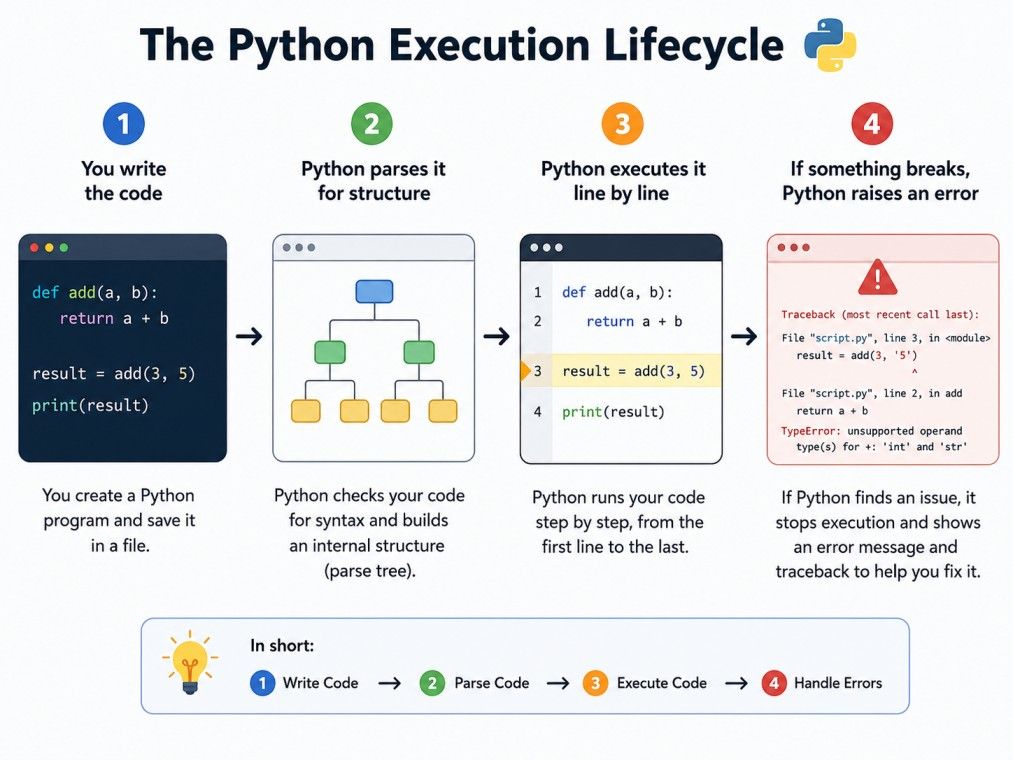
Understanding where an error occurs tells you a lot about how to fix it.
Learn more: benefits of learning python.
Free Courses
Python errors fall into three broad categories. Each behaves differently, and each needs a different fix.
These happen before your code even runs. Python's parser reads your file and finds something that doesn't follow the language's grammar rules.
Common causes include:
A related and very common one is the indentation error in Python. Python relies on indentation to define code blocks, unlike languages that use curly braces. If your spacing is inconsistent, even by one space, Python throws an IndentationError and refuses to run.
These occur while the program is executing. The syntax is fine. The logic looks fine. But something goes wrong when the code actually runs, like dividing by zero or accessing a file that doesn't exist. A file not found error in Python is a classic runtime error. It happens when your code tries to open a file at a path that doesn't exist, or when the filename has a typo.
This is the trickiest category. Your code runs without crashing, but it gives you the wrong result. There's no traceback to guide you here. You have to test your logic manually to catch it.
A semantic error in Python usually falls into this bucket too. The syntax is valid, and the program runs, but the meaning of what you wrote doesn't match what you intended.
Also Read: Career Opportunities in Python: Everything You Need To Know
Recommended Courses to upskill
Explore Our Popular Courses for Career Progression
IIIT Bangalore
Executive Diploma in Machine Learning and AI360° Career Support
O.P.Jindal Global University
MBA from O.P.Jindal Global UniversityLive Case Studies and Projects
People use errors and exceptions in python interchangeably, but they is difference between error and exception in python. This is one of the most searched questions on the topic, and it deserves a clear answer.
An error is the general term for anything that goes wrong. An exception is a specific kind of error, one that Python can catch and handle using try and except blocks.
So what's the actual difference between an error and an exception in Python? Every exception is technically an error, but not every error is an exception. Syntax errors, for instance, can't be caught with try-except because they happen before your code runs at all.
Feature |
Error |
Exception |
| Definition | Any problem during execution or parsing | A specific error object Python can catch |
| Can be handled | Not always | Yes, with try-except |
| Example | SyntaxError | ValueError, KeyError |
Think of exceptions as a subset of errors. All exceptions are errors but not all errors are exceptions.
Explore upGrad's Executive Diploma in Machine Learning & AI with IIIT Bangalore to build practical skills in Python, machine learning, deep learning, NLP, Generative AI, Agentic AI, MLOps, model deployment, and AI application development through hands-on projects and industry-relevant capstone experiences.
Some errors show up again and again, no matter how experienced you are. Here's a quick reference for the ones you'll see most.
Error |
Typical Cause |
Quick Fix |
| NameError | Using a variable before defining it | Define the variable first |
| TypeError | Mixing incompatible data types | Convert types explicitly |
| ValueError | Passing an invalid value to a function | Validate input before use |
| IndexError | Accessing an index that doesn't exist | Check the length first |
| KeyError | Looking up a missing dictionary key | Use .get() instead of direct access |
| ModuleNotFoundError | Importing a package that isn't installed | Run pip install for the package |
| IndentationError | Inconsistent spacing in code blocks | Use consistent tabs or spaces |
A list index out of range error in Python happens when you try to access an item at a position that doesn't exist in the list. If your list has 5 items, index 5 doesn't exist. Python counts from zero, and forgetting that trips up a lot of beginners.
A module not found error in Python is different from an ImportError, though the two get confused often. It usually means the package genuinely isn't installed in your environment, not just misspelled in your import line.
If you're solving problems on competitive coding platforms, you've probably seen an NZEC error in Python too. NZEC stands for Non Zero Exit Code. It's not a Python-specific error. It's a signal from the judge that your program exited abnormally, often because of an unhandled exception, an infinite loop, or bad input handling.
Do read: Variables and Data Types in Python [An Ultimate Guide for Developers]
Python already includes many built-in exceptions. Still, they don't always describe the exact problem your application encounters. That's where custom exceptions become useful.
Imagine you're building a banking application. A withdrawal that exceeds the account balance isn't a ValueError or a TypeError. It's a business rule violation. Creating a custom exception makes the code easier to understand and maintain.
A custom exception is just a class that inherits from Python's Exception class.
class InsufficientBalanceError(Exception):
   pass
You can raise it whenever the condition occurs.
class InsufficientBalanceError(Exception):
   pass

balance = 5000
withdraw = 7000

if withdraw > balance:
   raise InsufficientBalanceError("Insufficient account balance.")
Output
InsufficientBalanceError: Insufficient account balance.
You can also handle it like any other exception.
try:
   balance = 5000
   withdraw = 7000

   if withdraw > balance:
       raise InsufficientBalanceError("Insufficient account balance.")

except InsufficientBalanceError as error:
   print(error)
Creating custom exceptions makes sense when:
Don't create a custom exception for every small issue. If a built-in exception already describes the situation accurately, use it instead. Clear code is almost always better than clever code.
Also read: Python Developer Salary in India
An exception tells you what went wrong but a traceback tells you where it went wrong.
Many beginners panic when they see a long traceback because it looks complicated. In reality, you usually need only a few lines to find the source of the problem.
Consider this example.
def divide(a, b):
   return a / b

def calculate():
   result = divide(20, 0)
   print(result)

calculate()
Output
Traceback (most recent call last):
 File "main.py", line 7, in <module>
   calculate()
 File "main.py", line 5, in calculate
   result = divide(20, 0)
 File "main.py", line 2, in divide
   return a / b
ZeroDivisionError: division by zero
A traceback contains several useful pieces of information.
Traceback Part |
What It Tells You |
| File name | Which file caused the error |
| Line number | Where Python found the problem |
| Function calls | The sequence of executed functions |
| Exception type | The kind of error raised |
| Error message | Why the exception occurred |
Start reading from the bottom.
The last line usually contains the exception name and the reason for the failure. Then move upward to locate the exact line that triggered it.
Suppose you're working on a project with dozens of files. A traceback saves hours because it shows the execution path instead of forcing you to search manually.
Here's a simple approach.
Once you build the habit of reading tracebacks carefully, debugging becomes much less intimidating.
Python gives you a structured way to deal with problems instead of letting your whole program crash. That structure is the try-except block.
try:
   result = 10 / 0
except ZeroDivisionError:
   print("You can't divide by zero.")
finally:
   print("This runs no matter what.")
Here's what each part does:
Beginners often wrap everything in one giant try block. Don't do that. It hides the real source of the problem, and you'll waste time guessing where things went wrong.
Must Read: Python Interview Questions
Debugging is a process, and once you get used to it, most errors take minutes instead of hours to fix.
Start here:
A traceback can look intimidating at first, especially when it's long. But it's really just a map showing the exact path your code took before it failed. Once you know how to read it, it stops being scary.
Errors in Python aren't obstacles. They're feedback. Every syntax error, every runtime crash, every quiet logical bug is Python telling you something specific about your code.
Learn to read tracebacks. Learn the difference between an error and an exception. Get comfortable with try-except blocks, and build the habit of testing edge cases before you ship anything. That combination will save you more debugging time than any single trick on this list.
Ready to start your journey? Book a free consultation with upGrad today to find the best path for your career.
A ModuleNotFoundError usually means Python is using a different interpreter or virtual environment than the one where the package was installed. Verify the active Python version, check your virtual environment, and confirm the package is installed using pip list before running your code again.
A file not found error in Python occurs when the specified file path or filename is incorrect, or the file doesn't exist in the expected location. Check the current working directory using os.getcwd(), verify the filename, and use absolute paths if your project structure changes frequently.
A list index out of range error in Python happens when you try to access an element beyond the available indexes. Before accessing a list item, check its length with len() or iterate directly over the list instead of manually using indexes whenever possible.
An NZEC error in Python stands for Non-Zero Exit Code. It isn't a Python exception but a status returned by online coding judges when your program terminates unexpectedly. It's often caused by unhandled exceptions, invalid input handling, recursion limits, or runtime crashes.
A semantic error in Python occurs when code is syntactically correct but doesn't perform the intended task. In practice, it's often treated as a logical error because the program executes successfully while producing incorrect or unexpected results that require careful testing to identify.
Python uses indentation to define code blocks, making the code more readable and consistent. If the indentation is missing or inconsistent, Python raises an IndentationError before execution begins. Using four spaces consistently and avoiding mixed tabs and spaces helps prevent this issue.
No. Use try-except only for operations that are genuinely expected to fail, such as reading files, processing user input, or making network requests. Overusing exception handling can hide programming mistakes and make debugging more difficult than checking conditions beforehand.
Start by reading the traceback from the bottom up. If the final lines reference your own files, the issue is likely in your code. If the traceback points to a third-party package, review how you're calling that library before assuming it's a library bug.
Instead of memorizing every exception, learn how errors and exceptions in Python work together. Focus on reading tracebacks, understanding common exception messages, and practising with small code examples. Over time, recognizing patterns becomes much easier than remembering individual error names.
Knowing the difference between error and exception in Python helps you decide whether a problem must be fixed before execution or handled during runtime. Syntax errors require code corrections, while exceptions can often be caught, logged, and managed without terminating the program.
Yes. Modern editors and IDEs such as Visual Studio Code, PyCharm, and static analysis tools like Pylint or Flake8 can identify syntax issues, unused variables, import problems, and style violations before execution. These tools reduce debugging time by catching many common mistakes early.
1320 articles published
We are an online education platform providing industry-relevant programs for professionals, designed and delivered in collaboration with world-class faculty and businesses. Merging the latest technolo...
Get Free Consultation
By submitting, I accept the T&C and
Privacy Policy
Top Resources
Certification
3 Months
Certification
6 Months
O.P. Jindal Global University
Masters in International Accounting and Finance (Accredited by ACCA, UK)Master's Degree
12 Months