App Store Optimization Checklist: How to Improve App Visibility and Downloads
By upGrad
Updated on Nov 05, 2026 | 9 min read | 2.36K+ views
Share:

All courses
Certifications
More
By upGrad
Updated on Nov 05, 2026 | 9 min read | 2.36K+ views
Share:
Table of Contents
Key Highlights
Want to grow apps with ASO and paid campaigns? Explore upGrad’s digital marketing courses to build practical skills in SEO, user acquisition, content and data analysis.
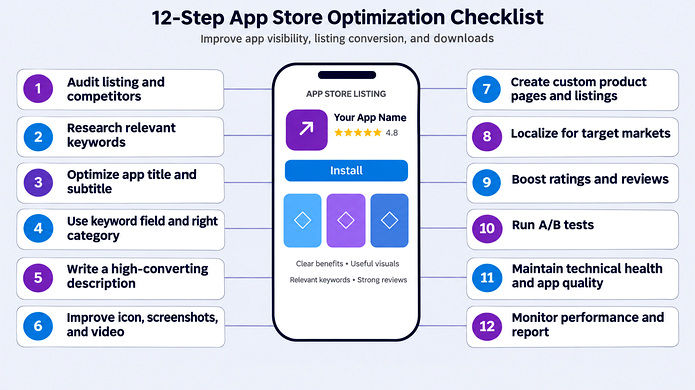
App store optimization (ASO) is the process of improving your app’s visibility in app stores. It also improves how many visitors turn into downloads. ASO has two goals: get found, then get installed.
If your app doesn’t show up in search, people can’t download it. If it shows up but the page looks weak, they scroll past.
That’s why this guide is a checklist. Each step will optimize one problem of your app.
Free Courses
Both Google Play and Apple store use algorithms to decide which apps appear for a search. Your job is to match what those algorithms reward.
The algorithm asks two questions:
You improve both with ASO.
The store reads your title, subtitle, keyword field, and description. Where you place a keyword matters. The title carries the most weight in both stores.
Ranking strength is how well your app performs. Two apps can be equally relevant. The one with stronger performance ranks higher. You need both. A perfect keyword with a weak app won’t rank. A great app with the wrong keywords won’t be found.
Apple and Google don’t publish their full formulas for ranking. But these signals help in rank better:
ASO keeps shifting. These are the changes worth knowing:
Must read: Mobile App Marketing: A Step-by-Step Guide To Become an Expert
Digital Marketing Courses to upskill
Explore Digital Marketing Courses for Career Progression
MICA Executive Alumni Status
The two stores reward similar things, but the fields you can edit are different. That means some checklist steps change depending on the store.
Here is the quick comparison.
Element |
Apple App Store |
Google Play |
| Title | 30 characters | 30 characters |
| Subtitle / short description | 30-character subtitle | 80-character short description |
| Hidden keyword field | Yes, 100 characters | No |
| Long description | Not indexed for keywords | Indexed, up to 4,000 characters |
| Keyword repetition | No value | Helps, if natural |
| Screenshots in search | Shown for all searches | Mostly for branded searches |
| Backlinks | Not a ranking factor | Can help |
| Built-in A/B testing | Product Page Optimization | Store Listing Experiments |
This is a core part of the guide. Follow each step in the given order, here is a quick tip before you start the app store optimization.
Change one or two things per update cycle. If you change everything at once, you won’t know what worked.This is part 1 of 3, covering steps 1 to 4.
Don’t change anything yet. First, see where you stand. Start with your competitors. Sort them into three groups:
Then audit your own metadata.
Build a wide list of keyword research. Think about how real users describe their problem. Use their words, not your internal terms. Pull ideas from:
That last source is underused. Paid search shows which terms lead to real installs, not just impressions. Then narrow the list. Filter each keyword on four things, relevance, search volume, competition, and conversion potential.
The title is the strongest text signal on both stores. Both give you 30 characters. Use them well.
A good title does two jobs. It names your app, and it tells people what it does. Users should understand your app from the name alone.
On iOS, add a second keyword and a clear benefit in the subtitle. On Google Play, the short description plays this role. It gives you 80 characters.
This step applies mainly to Apple. Google Play has no separate keyword field. The keyword field gives you 100 characters that users never see, but Apple indexes it.
Follow these rules:
The description works very differently in each store. This is one of the most missed differences in ASO.
On Google Play, the long description helps you rank.
On the App Store, the description is only for conversion.
Explore the MICA Advanced Certificate in AI-Powered Digital Marketing and Communication by upGrad and develop practical skills in AI-powered marketing, campaign planning, and app store optimisation.
The users spend about three seconds on a listing. They judge it before reading a word. So your visuals need to work fast.
Not every visitor wants the same message. Custom pages let you match your listing to the visitor.
Localization means adapting your listing for each market. It is not just a translation.
Translating your English metadata word for word is often the first thing teams try, and the first thing that fails. People in other countries search differently. The keywords, the competitors, and the habits are all different.
Don’t localize everything at once.
Ratings do two jobs. They help your ranking, and they help people decide to install. A weak rating hurts both.
Apps below 4.0 stars can see tap-through and download rates fall by up to about 50%. Above 4.0, the differences are smaller. Also a steady flow of new reviews can matter more than the exact score. Recent reviews carry more weight than old ones.
Do not guess things about the app, do A/B testing as it will tell you what actually works.
Both stores have free testing tools:
Both stores care about what happens after the install. Retention and stability now count more than they used to. A great listing can’t fix a buggy app.
Checklist for Technical Health
For monitoring and reporting, track these core metrics.
Also read: How to Build Successful Marketing Strategy in 20 Minutes
ASO is not a one-time thing, because rankings can move. So, the apps that grow repeat one cycle: research, update, measure, and adjust. Below are some tasks that you should do weekly, monthly, and quarterly.
Weekly (about 30 minutes)
Monthly
Quarterly
Below is a table that shows a timeline to get results based on the changes you make.
What you change |
Typical time to results |
| Icon and screenshots | 2-4 weeks |
| Keywords and metadata | 4-8 weeks |
| Compounding organic growth | Month 2-3 onward |
You can start ASO with free tools. Paid tools save time once you manage more keywords, markets, or tests.
Both stores give you data and testing at no cost.
The limit: native tools show your own app. They don’t show competitor keywords or search volume.
ASO tools are divided into five types
Checklist step |
Tool type |
What it does |
| Audit | Market research tools | Track competitor keywords, metadata, and creatives |
| 2. Keyword research | Keyword research tools | Suggest keywords, show volume, difficulty, and your rankings |
| Creatives, A/B tests | Testing tools | Test icons and screenshots, sometimes before launch |
| Reviews | Review management tools | Monitor, sort, and reply to reviews at scale |
| Monitoring | Reporting tools | Combine store data into dashboards |
Also read: How to Optimise Landing Pages for Better Conversions
Both stores now use AI to understand what people mean, not just what they type. Here is what that means for your ASO.
Apple and Google now read user intent. “Budget planner” and “expense tracker” may point to the same need.
AI assistants are starting to influence which apps get recommended. The rules are still unclear, so watch this space rather than build a strategy on it. Keeping your listing clear, accurate, and consistent helps either way.
AI also speeds up ASO work: finding keyword gaps, grouping reviews, and drafting metadata ideas. Keep a person in charge and check every suggestion against store rules and real user language.
Conclusion
App store optimization helps people find your app and gives them a reason to install it. You do that by improving your keywords, your listing, and your app’s quality.
Use the checklist as your base. Audit first, then work through keywords, title, description, visuals, localization, reviews, testing, and technical health. Track your results as you go.
Keep three things for optimization, do one or two updates per cycle, creative changes can show results in weeks, fix the app, not just the listing.
Start small. Pick the weakest part of your listing today and improve that. Then repeat the cycle every month.
Book a one-on-one consultation with upGrad counsellors to get personalized guidance on selecting the best course for your career.
SEO ranks web pages in search engines. ASO ranks app listings inside the App Store and Google Play, using fixed fields like a keyword field. The two overlap, since your website can build awareness for your app.
Yes, you can start alone with free native tools and this checklist. Workload grows with more markets, tests, and paid campaigns. A vendor, recommends a dedicated ASO owner once you scale. Judge that against your own workload.
Yes. Games rely on generic keywords like “puzzle game” more than branded searches. Gameplay video matters more, screenshots are often landscape, and rankings shift faster, so games usually need quicker updates and more creative testing.
They might. Paid installs can lift organic velocity for keywords in your metadata. But if you already rank in the top five, paying for that keyword may just buy installs you’d get free.
Often, yes. Competitors can bid on your brand name, and their ad would appear above your organic listing. Branded searches convert at roughly 60-80%, so defending your brand is cheap insurance, not growth spend.
Mostly, yes. Search Engine Journal says terms like “app store marketing” and “mobile app SEO” refer to the same practice: improving your listing to earn more visibility and downloads. Paid ads are a separate channel but work best alongside ASO.
Yes. All paid traffic lands on your store page. If that page converts better, more clicks become installs, which lowers your cost per install. Test your page before scaling ad spend.
On Google Play, often yes. Google’s machine learning understands synonyms, related terms, misspellings, and slang, so apps can rank for terms missing from their metadata. Still, target priority keywords directly instead of relying on this.
It can. Your website can send visitors straight to your store page and build awareness and authority for your app. Deep linking and app indexing in Google search results can help too.
Launch date, price point, and a star rating without review volume don’t affect App Store ranking. Apple doesn’t publish its full formula, so treat this as informed observation, not official rules.
Do keyword research before launch. Early performance data can shape how stores rank you, so some teams run a short paid push. Also, advises new apps to reply to every review and ask for ratings earlier.
1347 articles published
We are an online education platform providing industry-relevant programs for professionals, designed and delivered in collaboration with world-class faculty and businesses. Merging the latest technolo...
Get Free Consultation
By submitting, I accept the T&C and
Privacy Policy
Level Up Your Digital Marketing Career Today!
Top Resources
MICA
Advanced Certificate in AI-Powered Digital Marketing & Communication from MICAMICA Executive Alumni Status
Certification
5 Specialisation
Classroom
4 Months
Certification
2 Months