12 AI Tools for Teachers to Simplify Lesson Planning, Quizzes and Grading
By upGrad
Updated on Nov 03, 2026 | 5 min read | 24.35K+ views
Share:

All courses
Certifications
More
By upGrad
Updated on Nov 03, 2026 | 5 min read | 24.35K+ views
Share:
Table of Contents
Quick Insights:
Want to learn more about AI tools? Explore top Artificial Intelligence courses with hands-on projects, AI tools, university programs, and career support as well.
Popular AI Programs
Teachers can spend less time on routine tasks and more time supporting students if they use AI tools. From preparing lesson plans to creating quizzes and checking assignments, different platforms offer features for different teaching needs.
List of AI tools for teachers:
| AI Tool | Best For | Main Use |
| ChatGPT | Lesson planning | Drafting lesson plans and teaching materials |
| MagicSchool AI | Teaching resources | Creating worksheets and classroom activities |
| Google Gemini | Content creation | Developing lesson ideas and learning materials |
| Canva for Education | Visual learning | Designing presentations and worksheets |
| Brisk Teaching | Teaching support | Creating resources and providing feedback |
| Eduaide.AI | Lesson preparation | Developing learning activities and resources |
| Diffit | Differentiated learning | Adapting reading materials to different levels |
| Quizizz | Student assessments | Creating interactive quizzes |
| Kahoot! | Classroom engagement | Running quiz-based activities |
| Curipod | Interactive teaching | Creating activities that encourage participation |
| Gradescope | Assignment grading | Reviewing and grading student work |
| QuestionWell | Question generation | Creating questions from learning materials |
What teachers can do:
Example: Ask ChatGPT to prepare a 40-minute science lesson with three questions at the end.
Know: What is ChatGPT?
Key features:
Example: A teacher can enter a subject, grade level, and topic to create a lesson plan or worksheet.
Note: Its tools are mainly based on US education standards. Indian teachers can add their own syllabus outcomes when creating resources.
Key features:
Example: Teachers can enter a topic and grade level to create a lesson outline, then prepare a quiz based on it.
Key features:
Example: A teacher can turn a lesson outline into presentation slides or create a one-page revision sheet for students.
Explore IIT Kharagpur’s Executive Post Graduate Certificate in AI-Native Software Engineering program and learn about building intelligent, AI-powered systems.
Key features:
Example: Brisk in Google Docs can be used to give feedback on a student's essay and edit it before sharing.
Read: How to Learn Artificial Intelligence
Key features:
Example: Eduaide.AI can help to prepare a lesson activity, create an assessment, and draft feedback based on a rubric.
Key features:
Example: Teachers can use one article to create reading passages at different levels for students in the same class.
Note: Reading levels are approximate. Review the content before sharing it with students.
Key features:
Example: A teacher can enter a science chapter and generate a quiz for students to complete as homework.
Note: Quizizz was renamed as Wayground in 2025 but many teachers still know it as Quizizz.
Also Read: Career Change at 40 Without Starting Over
Key features:
Example: To create a short quiz at the beginning of a lesson to check what students remember from the previous class.
Key features:
Example: Teachers can start a lesson with a word cloud to find out what students already know about the topic.
Key features:
Example: To upload scanned test papers, review groups of similar answers, and apply the same grading criteria to each group.
Note: Gradescope is generally accessed using a school or institutional licence.
Key features:
Example: Teachers can enter a chapter topic, generate questions, and export them to Kahoot! for a classroom quiz.
Note: QuestionWell generates questions but does not conduct the quiz itself.
Also Explore: Advanced Artificial Intelligence Courses
Free Courses
Many AI tools for teachers offer free plans or free access for teachers. These plans can have support for basic tasks like preparing lesson plans, creating worksheets, and generating quiz questions. However, some features have usage limits and some require educator verification or a school account.
| AI Tool | Free Access | Key Limitations |
| ChatGPT | Free plan | Usage limits. ChatGPT for Teachers is free only for verified US K-12 educators. |
| Canva for Education | Free for eligible educators | Available to verified primary and secondary educators. |
| MagicSchool AI | Free plan | Some features require a paid plan. |
| Brisk Teaching | Free plan | Some features may have limits. |
| Quizizz (Wayground) | Free access | Advanced features may require payment. |
| Google Gemini | Available in Google Classroom with a school Workspace for Education account | Requires an eligible school account for Classroom integration. |
| Eduaide.AI | Free plan | Limited resource generations each month. |
| Diffit | Free plan | Some features require a paid plan. |
| Curipod | Free plan | Usage limits apply. |
| QuestionWell | Free plan | Monthly generation limits apply. |
Also Explore: Top Free AI Courses with Certificate
What can teachers do with free plans?
Important points to consider:
Must Read: 5 Significant Benefits of Artificial Intelligence
AI Courses to upskill
Explore Artificial Intelligence Courses for Career Progression
AI tools can help teachers manage different classroom tasks, from preparing teaching materials to checking student work. Here are some practical ways teachers can use them.
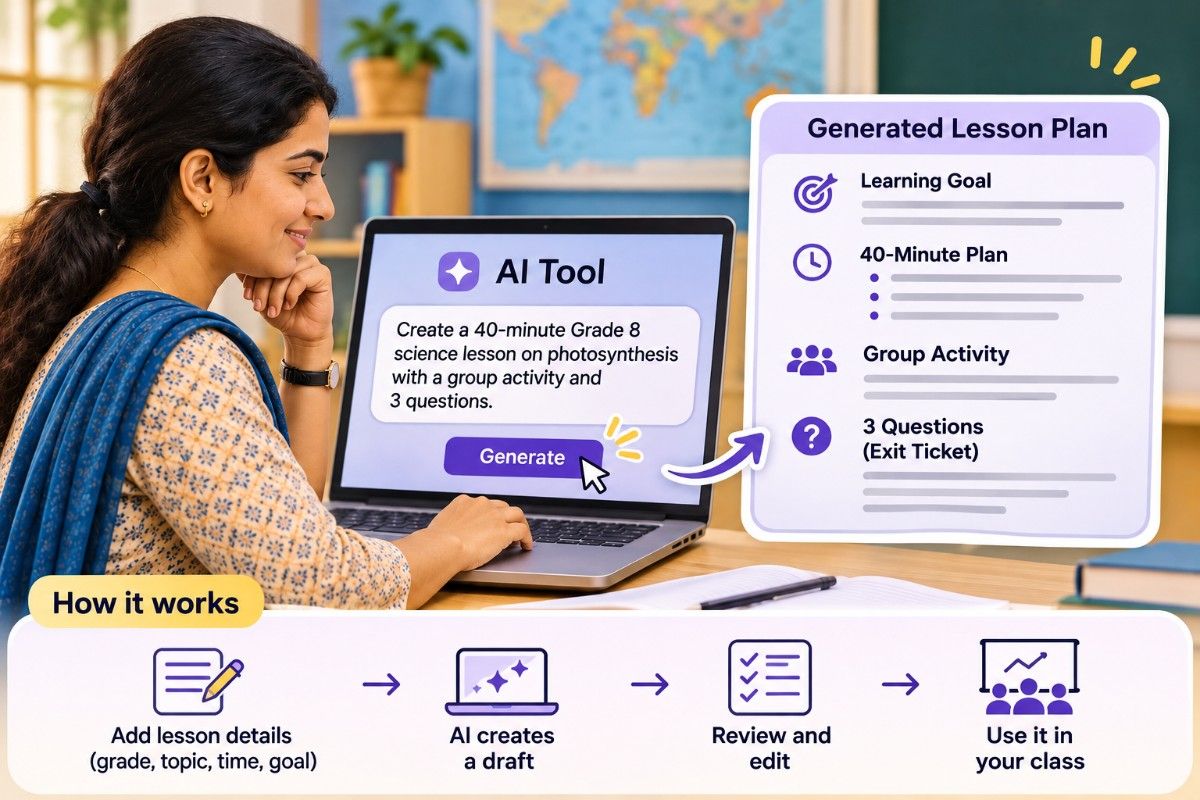
Teachers can enter their grade level, topic, learning objectives, and available time to prepare a lesson plan.
Tools: ChatGPT, Gemini, MagicSchool AI, Eduaide.AI, Canva, and Diffit.
Example: Create a 40-minute Grade 8 science lesson on photosynthesis with a short introduction, a group activity, and three questions to check student learning.
To create questions from chapters, notes, or learning objectives. They can choose question types, set difficulty levels, and prepare answer keys.
Tools: QuestionWell, Wayground (Quizizz), and Kahoot!
Example: Generate 10 multiple-choice questions from a chapter, review the answers, and add a few questions of your own.
AI tools can help teachers review student work, group similar answers, and prepare feedback based on grading rubrics.
Tools: Brisk Teaching and Gradescope.
Example: Use Brisk to draft comments on student writing or Gradescope to group similar answers when checking test papers. Review the suggestions before assigning final grades.
Teachers can use AI to add polls, word clouds, drawing activities, and quiz games to their lessons. Student responses can also help teachers understand which topics need more attention.
Tools: Curipod, Kahoot!, and Wayground (Quizizz).
Example: Start a lesson with a word cloud to check what students already know, or use a short quiz to revise a previous topic.
Dive Deeper: Top 10 Uses of Artificial Intelligence
Choosing an AI tool depends on what you teach and which tasks you want to do with more ease. Keep these factors in mind before selecting a tool.
Start with the task that takes most of your time.
Conclusion:
Teachers do not need to use all 12 AI tools at once. Start with one tool for lesson planning, such as ChatGPT, Gemini, or MagicSchool AI, and another for quizzes, such as Wayground or QuestionWell.
You can also add a tool for a specific need, such as Brisk Teaching for feedback or Diffit for reading materials at different levels. Choose tools that save time and suit your classroom needs. Always review AI-generated content before sharing it with students.
You can contact our experts to learn about courses, tools in AI and also get personalized guidance if you want to learn more about AI.
More Similar Reads:
AI can help teachers prepare:
Teachers can use these drafts and make changes instead of starting from scratch.
Some popular AI tools for teachers include ChatGPT, MagicSchool AI, Google Gemini, Canva for Education, Brisk Teaching, Eduaide.AI, Diffit, Quizizz (Wayground), Kahoot!, Curipod, Gradescope and QuestionWell.
Yes. Many tools offer free plans or free access, including ChatGPT, Canva for Education, MagicSchool AI, Brisk Teaching, Wayground, Eduaide.AI, Diffit, Curipod and QuestionWell. Some features may have usage limits. Gemini is also available in Google Classroom for schools using Google Workspace for Education.
Most of the tools listed in this blog can be used in India. These include ChatGPT's free plan, Canva for Education, MagicSchool AI, Diffit, Wayground, Curipod, Brisk Teaching and Eduaide.AI. ChatGPT for Teachers, however, is only available to verified K–12 teachers in the US.
Yes. ChatGPT, Gemini, MagicSchool AI and Eduaide.AI can create lesson plan drafts. Teachers can enter the:
They can then review and edit the plan to match their syllabus.
Teachers can use:
Yes. QuestionWell, Wayground and Kahoot! can create quiz questions from a topic, text or PDF. Gemini can also draft quizzes that teachers can export to Google Forms. Check the questions and answers before sharing them with students.
Gradescope helps teachers group similar answers and grade them together. Brisk Teaching and Gemini can help prepare feedback on student work. Teachers should review the work and decide the final grades.
Yes. Diffit can adapt reading material for different reading levels. Gemini and MagicSchool AI can help teachers prepare different versions of an assignment to suit their students' learning needs.
Yes. Teachers can use:
Yes. Teachers can use ChatGPT to prepare:
No. AI tools can help teachers prepare materials and save time on routine tasks. However, they can make mistakes and cannot replace a teacher's understanding of students and their learning needs.
Safe-use reminder: Always check AI-generated content before using it in class. Avoid entering students' names, marks or other personal details into AI tools.
1340 articles published
We are an online education platform providing industry-relevant programs for professionals, designed and delivered in collaboration with world-class faculty and businesses. Merging the latest technolo...
Speak with AI & ML expert
By submitting, I accept the T&C and
Privacy Policy
Top Resources
Master's Degree
18 Months
Executive Diploma
12 Months
IIIT Bangalore
Executive Programme in Generative AI & Agentic AI for LeadersIndia’s #1 Tech University
Dual Certification
5 Months