What is the Difference Between Database and Database Management System (DBMS)
By upGrad
Updated on Sep 23, 2026 | 9 min read | 3.47K+ views
Share:

All courses
Certifications
More
By upGrad
Updated on Sep 23, 2026 | 9 min read | 3.47K+ views
Share:
Table of Contents
Key Highlights
Take your programming skills further and open doors to careers in data science, AI, and more. Check out our Online Data Science Courses and start building your future today!
Popular Data Science Programs
Database and DBMS are the two terms that are used interchangeably, but they are two different things. Below are some points that show difference between database and database management system:
Parameter |
Database |
DBMS |
| Definition | A structured set of data stored electronically | A software system that manages databases |
| Purpose | Stores and organizes information | It can create, retrieve, update, and delete data |
| Data handling | Data sits in tables, files, or records | Provides tools and commands to interact with that data |
| Structure | Can be relational, non relational, hierarchical, and more | Built to support one or more database structures |
| User interaction | Users don't interact with it directly | Users interact through queries, forms, or applications |
| Language used | Doesn't require any query language | Uses languages like SQL to perform operations |
| Data redundancy | Can have duplicate or repeated data | Reduces redundancy through normalization and constraints |
| Backup and recovery | No built in backup mechanism | Offers backup, recovery, and rollback features |
| Concurrent access | Cannot manage multiple users on its own | Handles multiple users accessing data at the same time |
| Examples | A set of files or a collection like employee records | MySQL, Oracle, SQL Server, MongoDB, PostgreSQL |
Also read: Career in Data Science: Jobs, Salary, and Skills Required
Free Courses
A database is an organized collection of data. This data can be a list of names, phone numbers, sales records, details of the students, or something else. The data is present in tables and tables have rows and columns. This presentation is used so finding information becomes easy.
In a database the data cannot change itself. If you want data to be changed on its own, you need a DBMS. Let’s understand this with an example, there is a notebook that has information, but it cannot flip its own pages, for that you need someone, that someone is DBMS.
A database has some built-in characteristics that make it useful for storing and organizing data. These are the features a database offers:
Databases are available in our day to day life and some of the examples are as follows:
Like any system for storing information, a database comes with its own set of strengths and limitations. Check both sides of database below:
Want to build a stronger foundation in data before mastering DBMS concepts? Check out the Executive Post Graduate Certificate Programme in Data Science & AI from IIITB, India's #1 Post Graduate Certificate in Data Science & AI, designed to make you a true Data Pro.
Data Science Courses to upskill
Explore Data Science Courses for Career Progression
IIIT Bangalore
Executive Post Graduate Certificate in Data Science & AIPlacement Assistance
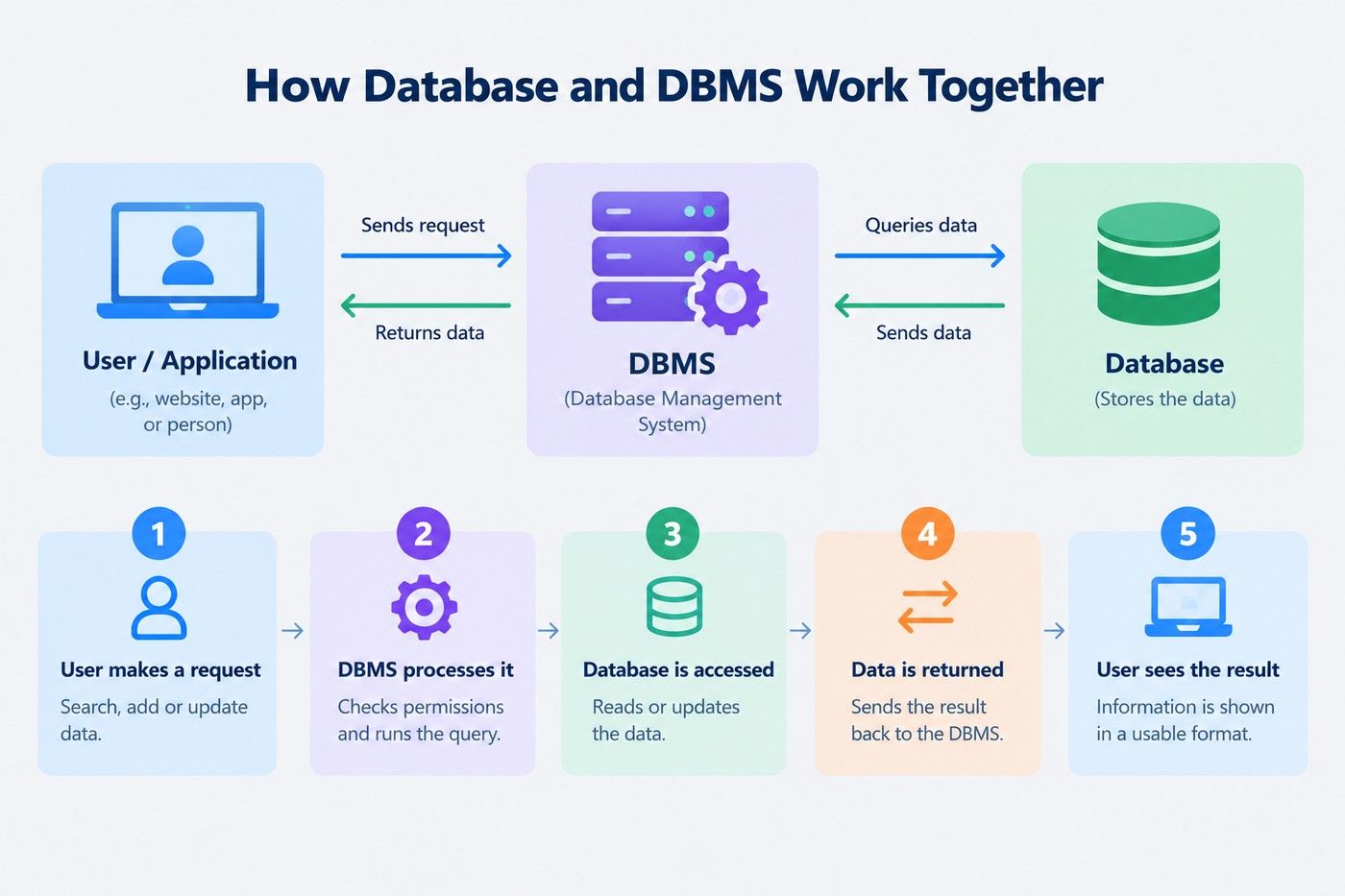
A DBMS is software that helps you when you work with databases. You can add new data, search any information, make changes in existing data with the help of DBMS.
Let’s understand this with the notebook example, where a notebook cannot flip its own pages. A DBMS can read the notebook, add information, find a specific page, and also find the errors.
Without DBMS, the database is just there because no one can easily use it.
The following are the features of DBMS that make it a better choice for managing data:
DBMS software has multiple types depending on the data it handles. Some of the softwares are:
The following are the advantages and disadvantages of a database management system:
Also read: Top 25+ DBMS Project Ideas for Students in 2026 [With Source Code]
Asking the difference between database and database management system is not correct to ask, because they both work together. To figure this out which one do you need for your data, check the points below:
A basic database is required, if you are storing a short list of things, like your contacts, a to-do list, or a small inventory. You can use a spreadsheet or a simple organized file for this. No need to use full DBMS for something this small.
This is where a DBMS actually starts to matter. Once your records keep piling up, like customer info or sales numbers, keeping it accurate manually gets tough. A DBMS helps keep everything sorted and easy to update as things grow.
If more than one person or app needs to use the same data at once, you need a DBMS. It lets multiple people read or update the data at the same time without messing things up for each other.
When you know that your data will grow in the future, set up DBMS software early. It is easier than trying to move a big messy data into a proper system later on.
Also read: The Future of Data Science in India: Opportunities, Trends & Career Scope
Test how well you understand the difference between database and database management system.
1. Which of these best describes a database?
a) Software used to manage data
b) An organized collection of data
c) A programming language for queries
d) A type of computer hardware
Answer: b) An organized collection of data
A database is simply the organized data itself, like records, files, or tables. It doesn't do anything on its own.
2. What is the main job of a DBMS?
a) To physically store paper records
b) To design computer hardware
c) To create, access, and manage data in a database
d) To replace the need for a database entirely
Answer: c) To create, access, and manage data in a database
A DBMS is the software layer that lets you add, update, search, and delete data stored in a database.
3. Which of the following is an example of a DBMS, not a database?
a) A list of customer orders
b) MySQL
c) A collection of employee records
d) A student's marksheet
Answer: b) MySQL
MySQL is software used to manage databases, which makes it a DBMS. The other options are just examples of stored data.
4. Why can't a database function well without a DBMS?
a) Because a database cannot store any data at all
b) Because a database has no way to add, search, update, or secure its own data
c) Because a database is a type of hardware
d) Because a DBMS is required to create the internet
Answer: b) Because a database has no way to add, search, update, or secure its own data
A database just holds data passively. It needs a DBMS to actually interact with, protect, and manage that data.
5. When do you specifically need a DBMS rather than just a simple database?
a) Only when storing a very small personal contact list
b) When multiple users or applications need to access the same data at once
c) Never, a database always works fine on its own
d) Only when the data will never grow in size
Answer: b) When multiple users or applications need to access the same data at once
A DBMS becomes essential when data grows, needs security, or must be accessed by multiple users or programs at the same time.
Also read: Database Management System Notes
Conclusion
The difference between database and database management system is simple, a database is a place where you have stored data in an organized way. On the other hand, DBMS is a software that helps you manage that data. Because without DBMS it will be tough for an individual to manage a big database.
You do not need to choose one, in most cases you need both. Whether you are managing a small project or handling a large amount of data, you require both for better decisions.
Want personalized guidance on AI and upskilling? Speak with an expert for a free 1:1 counselling session today.
Neither, exactly. SQL is a language used to communicate with a DBMS. You use SQL to write commands that tell the DBMS what to do, like fetching or updating data.
No. A DBMS is built to manage data, so it needs a database to actually function. Without any data to manage, a DBMS has nothing to do.
Excel is closer to a simple database, since it stores data in rows and columns. It isn't a full DBMS because it lacks things like advanced security, multi-user handling, and automatic backup features.
No. Some DBMS types, like relational ones, store data in tables and use SQL. Others, like NoSQL systems, handle data in different formats and are built for different needs, such as speed or scalability.
No. Small businesses, individual developers, and even personal projects use DBMS software. Lightweight options like SQLite are commonly used in mobile apps and small tools.
Basic use often requires some familiarity with query languages like SQL, but many DBMS tools also offer visual interfaces that make it easier for beginners to manage data without deep coding knowledge.
Technically, yes. A simple file or spreadsheet with organized data can be considered a basic database. But without any software to manage it, tasks like searching, updating, or securing that data become difficult.
Most DBMS software includes backup and recovery features to help restore lost or corrupted data. However, the extent of recovery depends on how often backups were taken and how the system was configured.
Not exactly. Cloud storage is mainly for saving files, while a DBMS is built specifically to organize, manage, and retrieve structured data efficiently, often with added features like security and multi-user access.
Yes. A single DBMS can often handle several separate databases, allowing you to keep different sets of data organized within the same system.
For many roles, especially in software development, data analysis, or backend engineering, understanding how databases and DBMS work is considered a fundamental and valuable skill.
981 articles published
We are an online education platform providing industry-relevant programs for professionals, designed and delivered in collaboration with world-class faculty and businesses. Merging the latest technolo...
Speak with Data Science Expert
By submitting, I accept the T&C and
Privacy Policy
Start Your Career in Data Science Today
Top Resources
Executive Diploma
12 Months
Master's Degree
18 Months
Bootcamp
6 Months