Database Management System Notes
By Sriram
Updated on Aug 23, 2026 | 11 min read | 4.3K+ views
Share:

All courses
Certifications
More
By Sriram
Updated on Aug 23, 2026 | 11 min read | 4.3K+ views
Share:
Table of Contents
Key Highlights
Ready to strengthen your database and technical skills? Explore upGrad’s data science online training and build practical expertise in data, analytics, and technology for a future-ready career.
Popular Data Science Programs
A database management system is software that helps users store, organize, update, and retrieve data. It keeps information structured, making it easier to access and manage than separate files.
Take a college database as an example. It may store student names, courses, attendance, marks, and fee details. Without a DBMS, finding or updating specific records can become time-consuming.
A DBMS acts as a link between users, applications, and the database. When a user makes a request, the system processes it and returns the required information.
These two terms aren't interchangeable.
A database is a collection of organized data. A DBMS is the software used to manage that data.
Database |
DBMS |
| Stores organized data | Manages stored data |
| Contains records and structures | Provides tools to access those records |
| Doesn't manage itself | Controls data operations |
| Contains the actual information | Provides the environment for managing it |
This distinction is one of the first things beginners should understand when studying database management system notes.
The process starts when a user or application sends a request. The DBMS interprets the request, checks permissions, finds the required information, and returns the result.
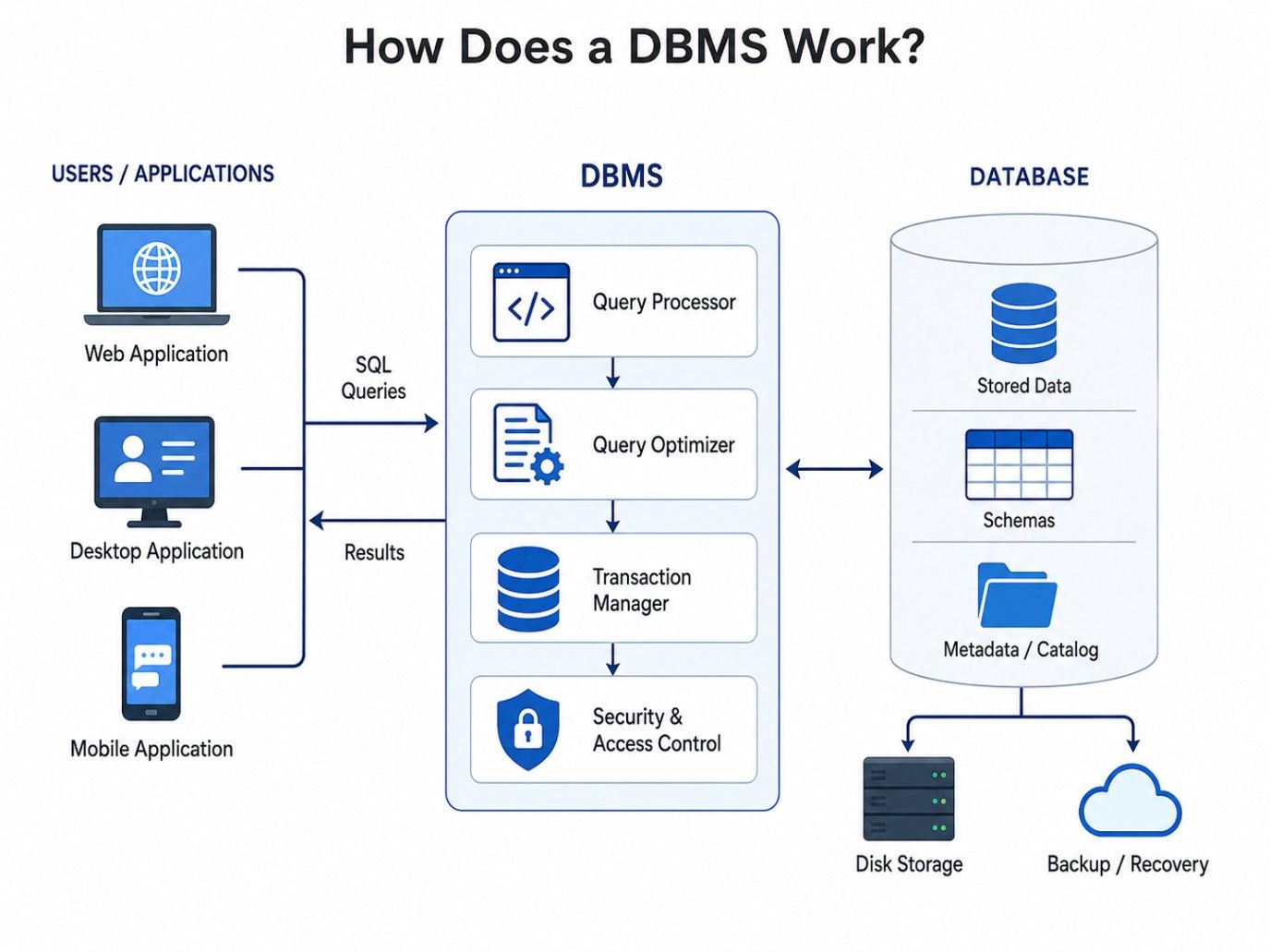
For example, a teacher might request the marks of students who scored above 80. The DBMS processes the query and retrieves only the matching records instead of making the teacher search through every entry manually.
That sounds simple. Behind the scenes, though, the system handles storage, security, indexing, transactions, and data consistency.
Free Courses
The features of DBMS explain why organizations use database software instead of relying only on ordinary files and folders. A good system doesn't just store information. It also controls how that information is accessed, changed, and protected.
A DBMS can restrict access to sensitive information. Different users can receive different permissions based on their responsibilities.
For example, a student might view marks but shouldn't be allowed to change them. An administrator could have permission to update academic records.
Data integrity means keeping information accurate and consistent. Rules such as primary keys, foreign keys, and constraints help prevent invalid records from entering the database.
If a student ID must be unique, the database can reject another record using the same ID.
Changes to the way data is stored don't always require changes to the applications that use it. That's a useful feature when databases grow or their internal structures change.
Data independence also connects closely with database management system architecture because different levels separate user views from physical storage.
Duplicate data creates problems. If the same customer's address appears in five different places, changing it everywhere becomes difficult.
A well-designed DBMS reduces unnecessary duplication by organizing information into related tables.
Multiple authorized users can access the same database. A bank, for example, might allow employees and applications to access customer information while applying different permissions.
A DBMS can support backup and recovery processes when data is accidentally deleted or a system fails.
That's especially useful for systems where losing information would cause serious operational problems.
Multiple users might access the same records at once. A DBMS controls these operations so that simultaneous changes don't unnecessarily corrupt or overwrite information.
This is one reason DBMS software is useful in banking, e-commerce, education, and other systems with many users.
Ready to build future-ready skills in cybersecurity and AI? Explore upGrad’s IIT Delhi – Certificate Programme in Cybersecurity & AI and gain practical knowledge to tackle real-world digital security challenges with confidence.
Data Science Courses to upskill
Explore Data Science Courses for Career Progression
IIIT Bangalore
Executive Post Graduate Certificate in Data Science & AIPlacement Assistance
The functions of a database management system describe the actual work performed by the software. These functions aren't limited to storing information. They cover everything from defining database structures to controlling access and handling transactions.
Let's break them down.
A DBMS allows users to define tables, fields, relationships, and other database structures. SQL commands such as CREATE and ALTER are commonly used for this purpose.
For example, a college might create a Student table with fields such as Student_ID, Name, Course, and Email.
The system stores information and retrieves it when users request it. Users don't need to know exactly where individual records sit on a storage device.
They can ask for information using supported database commands, while the DBMS handles the underlying process.
Read: Data Science Career Growth
Users need to add, modify, and remove information. DBMS software supports operations such as INSERT, UPDATE, and DELETE.
For example, when a student's phone number changes, an authorized user can update the existing record rather than creating another one.
Security is another major function. The DBMS can authenticate users and control what each user is allowed to access.
A finance employee might access payment records, while another employee might only see customer contact details.
A transaction represents a logical unit of database work. A bank transfer is a useful example.
Money should be deducted from one account and added to another as one reliable operation. If something fails halfway through, the DBMS needs to handle the transaction correctly.
A DBMS supports mechanisms that help restore information after failures, accidental deletion, or other problems.
The exact recovery approach depends on the database system and its configuration.
When several users access the same information simultaneously, the DBMS coordinates their operations.
Without proper control, one user's update could overwrite another's change. That's a practical problem, not just a textbook concept.
The components of DBMS work together to create a complete database environment. Understanding them makes the rest of the topic easier because you'll see where users, software, data, and procedures fit into the system.
A DBMS environment commonly includes the following components.
Hardware includes computers, storage devices, servers, and network equipment used to run and access the database.
A small application might use a single computer. A large organization could have database servers connected to many client systems.
Software includes the DBMS itself, operating system, database applications, and supporting programs.
Examples of DBMS software include MySQL, PostgreSQL, Oracle Database, and Microsoft SQL Server.
Data is the central resource being managed. It can include customer details, transactions, product records, employee information, or student records.
The DBMS organizes this information according to the database design.
Procedures are the rules and instructions used to operate and maintain the database. They can cover backup schedules, security practices, data entry, recovery, and system maintenance.
Users need a way to communicate with the database. SQL is the most widely known language for working with relational databases.
Commands can retrieve information, create structures, modify records, or control permissions.
Different people interact with DBMS in different ways.
User |
Main responsibility |
| Database administrator | Manages security, performance, backup, and database operations |
| Developer | Builds applications that interact with databases |
| End user | Uses applications or interfaces to access information |
| Database designer | Plans tables, relationships, and database structures |
These components don't operate separately. They form one working environment in which people and applications interact with stored information.
Read: Big Data Architects Salary in India: For Freshers & Experienced
The types of database management systems differ mainly in how they organize and represent data. Choosing a particular model depends on the structure of the information, relationships between records, application requirements, and the way users need to access data.
The main types are explained below.
A hierarchical DBMS organizes data in a tree-like structure. Each parent can have multiple child records, creating a clear hierarchy.
This model works well when relationships naturally follow a parent-child pattern. However, complex relationships can make the structure difficult to manage.
A network DBMS allows records to have more flexible relationships than a simple hierarchy. A record can connect with multiple other records.
This makes the model suitable for complex relationships, although it can be harder for beginners to understand and maintain.
A relational DBMS stores data in tables made up of rows and columns. Relationships between tables are created using keys.
This is the model most learners encounter when studying SQL. For example, a college database could contain separate Student, Course, and Enrollment tables. A Student could connect records between these tables.
An object-oriented DBMS stores information using objects and concepts associated with object-oriented programming.
It can be useful for applications that work heavily with complex objects rather than simple rows and columns.
NoSQL systems use models such as documents, key-value pairs, columns, or graphs instead of relying only on traditional relational tables.
They're commonly associated with applications that need flexible data structures or particular approaches to handling large and varied datasets.
Type |
Basic structure |
Common strength |
| Hierarchical | Tree | Parent-child relationships |
| Network | Linked records | Complex relationships |
| Relational | Tables | Structured data and SQL |
| Object-oriented | Objects | Complex application data |
| NoSQL | Documents, graphs, key-value, or columns | Flexible data models |
Read: What Is Data Science? Courses, Basics, Frameworks & Careers
Database management system architecture describes how users, applications, the DBMS, and stored data are organized. It also explains how different levels of the database system separate what users see from how information is physically stored.
Architecture matters because a database isn't just a collection of tables sitting somewhere.
The three-level architecture separates database views into three layers.
Level |
What it represents |
| External level | What individual users or applications see |
| Conceptual level | The overall logical structure of the database |
| Internal level | How data is physically stored |
The external level is concerned with user views. A student can view grades and attendance, an administrator may be able to view additional information.
The conceptual level is the complete logical structure (tables, relationships, constraints).
The internal level is about physical storage, indexes, files, and other implementation details.
This separation allows for data independence.
In a two-tier architecture, a client application communicates directly with the database server.
A desktop application could send a request to the database server, which processes it and returns the result.
It's straightforward, but large applications can require more separation.
A three-tier architecture adds an application layer between the client and database.
The basic flow is: Client → Application Server → Database Server
This structure is common in web applications. The client sends a request to the application, the application handles the required logic, and the database server manages stored information.
Architecture |
Structure |
Typical use |
| One-tier | Client and database in one environment | Local applications |
| Two-tier | Client → Database | Client-server applications |
| Three-tier | Client → Application → Database | Web and enterprise applications |
The choice isn't simply about using the newest architecture. A small local application doesn't need the same structure as a large web platform.
Read: How to Become a Data Scientist
A database schema describes the structure of a database. It defines elements such as tables, fields, relationships, and constraints.
An instance refers to the actual data stored in the database at a particular point in time.
For example, a Student table might have a fixed structure containing Student_ID, Name, and Course. The records inside that table can change every day.
That's the difference between structure and current data.
Logical data independence means changes to the logical database structure don't necessarily require changes to every external user view or application.
For example, adding a new field to a database might not affect an application that doesn't use that field.
Physical data independence separates applications from physical storage details.
An administrator might change how data is stored or indexed without requiring users to change the way they access the information.
This separation is one of the key reasons database management system architecture is useful.
Also Read: 7 Common Data Science Challenges
Managing large amounts of data manually gets difficult quickly. A DBMS keeps information organized, secure, and easier to access.
For example, an online store needs to manage customers, products, orders, payments, and inventory. A DBMS connects this information and lets multiple users access it safely.
It’s useful in banks, hospitals, universities, airlines, and many other systems. The main goal is simple: store data properly, find it quickly, and keep it accurate.
If you're preparing for an exam, these database management system pdf notes topics can help you revise the core concepts without going through lengthy technical material again.
Concept |
Simple meaning |
| Database | Organized collection of data |
| DBMS | Software that manages databases |
| Schema | Structure of a database |
| Instance | Data stored at a particular time |
| Primary key | Uniquely identifies a record |
| Foreign key | Connects related tables |
| Normalization | Organizes data to reduce unnecessary duplication |
| SQL | Language used to work with relational databases |
| Transaction | Logical unit of database operations |
| Data independence | Separation between data structure or storage and applications |
Database management system notes make DBMS concepts easier to learn and revise. Start with the basics, then move to features, functions, components, types, and architecture.
These database management system pdf notes also help you understand key topics such as SQL, keys, schemas, normalization, and transactions. A DBMS ultimately helps store, manage, secure, and retrieve data efficiently.
Ready to start your journey? Book a free consultation with upGrad today to find the best path for your career
Seven commonly discussed DBMS categories are hierarchical, network, relational, object-oriented, document-oriented, key-value, and column-oriented systems. They differ mainly in how they structure and retrieve information. The best option depends on the application's data format, relationship complexity, scalability needs, and performance expectations.
A database management system is a software layer that helps applications and users work with stored information without directly handling the underlying storage. It provides tools for organizing data, executing queries, controlling access, maintaining reliability, and recovering information when something goes wrong.
DBMS notes are available through university portals, course platforms, institutional repositories, and educational websites. Before downloading, check whether the material covers the topics you need, such as SQL, database design, normalization, transactions, indexing, and security. Prefer legitimate resources instead of unauthorized copies.
DBMS is a software system used to create, manage, and access organized collections of data. Its types are distinguished by their underlying data model, such as relational, hierarchical, network, object-oriented, document, key-value, and column-based approaches. Each is suited to different application requirements.
DBMS notes are compact learning resources that bring important database concepts together for study or revision. They may include data models, SQL commands, keys, normalization, transactions, indexing, database architecture, and security. Good notes explain how concepts connect rather than simply listing definitions.
Five important DBMS functions are storing and retrieving information, controlling who can access it, maintaining data accuracy, coordinating simultaneous operations, and supporting backup and recovery. These capabilities allow applications to work with shared data while reducing the risk of unauthorized changes or accidental loss.
DBMS is the broader category of software used to manage databases, whereas an RDBMS follows the relational approach. In an RDBMS, information is organized into related tables and connections between datasets can be represented through keys. This makes relational systems particularly useful for structured business applications.
SQL is important because it gives users a practical way to communicate with relational databases. Instead of manually locating stored records, users can specify what information they need, modify selected data, create structures, and control permissions through SQL statements.
Normalization is a database design technique that organizes information across related structures instead of unnecessarily repeating the same details. It can make updates safer and reduce inconsistencies. Designers usually apply different normal forms depending on the application's data relationships and operational requirements.
Indexing creates an additional structure that helps a database locate particular records more efficiently. It can significantly improve search performance when queries frequently filter or sort using indexed fields. However, indexes also require storage and maintenance, so adding too many can increase the cost of data changes.
A transaction is a group of related database operations treated as one logical piece of work. For example, transferring money involves updating more than one account. The DBMS coordinates such operations so that a failure midway does not leave the database in an unintended state.
730 articles published
Sriram K is a Senior SEO Executive with a B.Tech in Information Technology from Dr. M.G.R. Educational and Research Institute, Chennai. With over a decade of experience in digital marketing, he specia...
Speak with Data Science Expert
By submitting, I accept the T&C and
Privacy Policy
Start Your Career in Data Science Today
Top Resources
Master's Degree
18 Months
Executive Diploma
12 Months
Bootcamp
6 Months