Types of Database Management System
By Sriram
Updated on Aug 24, 2026 | 15 min read | 7.03K+ views
Share:

All courses
Certifications
More
By Sriram
Updated on Aug 24, 2026 | 15 min read | 7.03K+ views
Share:
Table of Contents
Key Highlights
Ready to strengthen your database and technology skills? Explore upGrad’s data science online training and build practical skills for a data-driven career.
Popular Data Science Programs
If you're learning DBMS, the first thing to understand is that databases don't all handle information in the same way. The types of database management system are built around different ways of storing and linking data. The main types are relational, hierarchical, network, object-oriented, NoSQL, and multi-model databases.
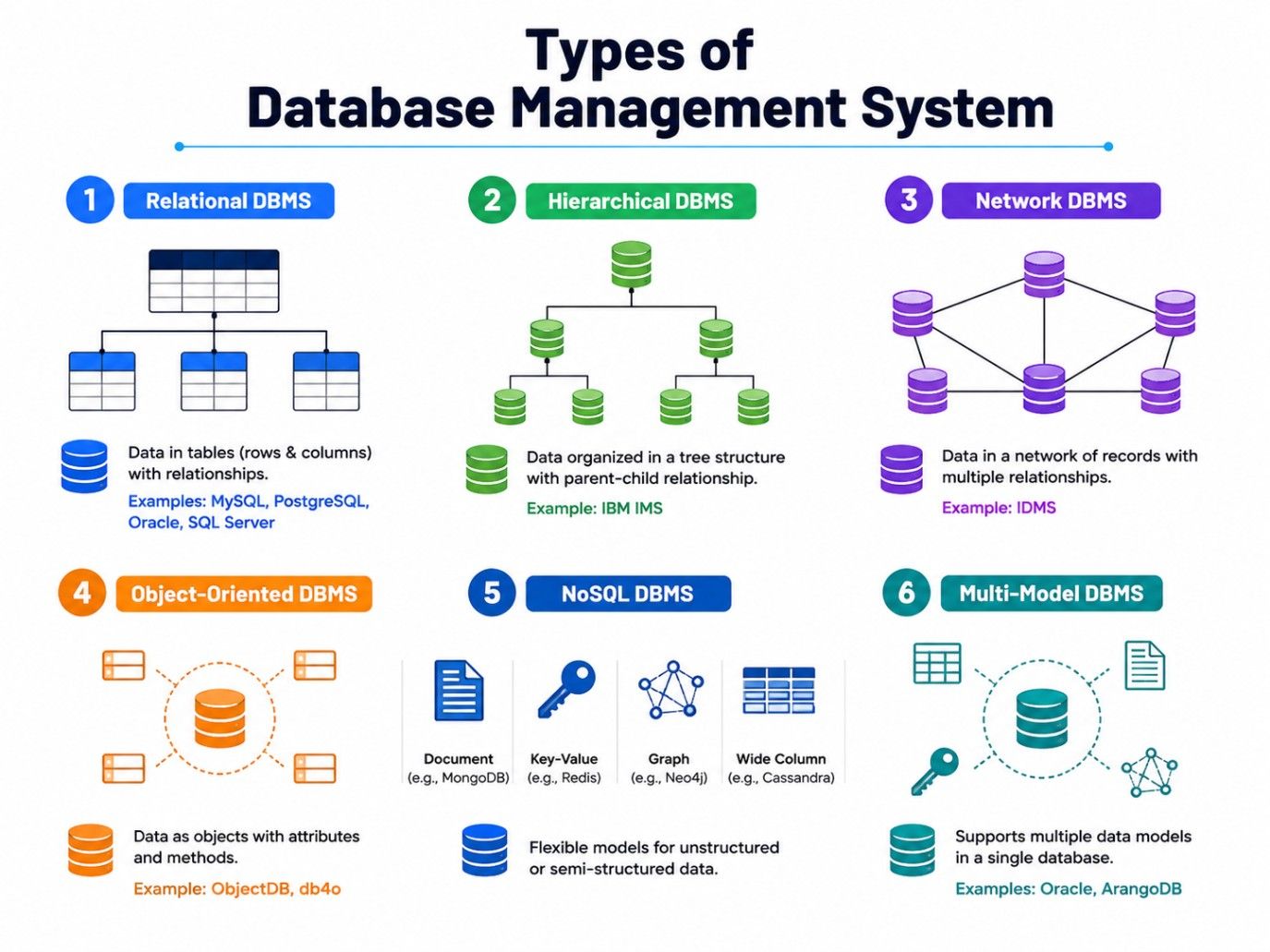
The major types are:
Each model suits different requirements. A relational system works well with structured records, while NoSQL databases suit applications with flexible or specialised data needs.
When exploring the types of database management system with examples, you should also consider how an application stores and accesses information. A database management system is a type of software that handles these operations between applications and stored data.
A relational DBMS stores data in tables with rows and columns. Tables can be connected using keys.
An online store can have separate tables for customers and orders.
Syntax
CREATE TABLE Customers (
Customer_ID INT PRIMARY KEY,
Name VARCHAR(50)
);
CREATE TABLE Orders (
Order_ID INT PRIMARY KEY,
Customer_ID INT,
FOREIGN KEY (Customer_ID) REFERENCES Customers (Customer_ID)
);
Examples- MySQL, PostgreSQL, Oracle Database, and Microsoft SQL Server.
2. Hierarchical Database Management System
A hierarchical DBMS stores data in a tree-like structure, where each record follows a parent-child relationship.
Syntax
Company
├── Sales
│ ├── Employee 1
│ └── Employee 2
└── Marketing
├── Employee 3
└── Employee 4
This model works well when data follows a fixed hierarchy.
Example- IBM IMS.
3. Network Database Management System
A network DBMS allows records to have multiple relationships. Unlike a hierarchical model, one record can be connected to several other records.
Syntax
Student ─── Enrolled In ─── Course
│ │
└──── Course A ────────────┘
└──── Course B
Here, one student can take multiple courses, and each course can have multiple students.
An object-oriented DBMS stores information as objects, similar to object-oriented programming.
Syntax
Object: Car
{
Model: "Sedan",
Year: 2026,
Engine: "Petrol",
Price: 1200000
}
This approach is useful for engineering, scientific, multimedia, and simulation applications.
Read: What Is Data Science? Courses, Basics, Frameworks & Careers
NoSQL databases can store information as documents, key-value pairs, graphs, or wide-column records.
Syntax
{
"customer_id": 101,
"name": "Rahul",
"city": "Bengaluru",
"orders": 5
}
Examples include MongoDB, Redis, Neo4j, and Apache Cassandra.
A multi-model DBMS supports multiple data models within one database platform.
Example
Customer Data → Relational Model
Product Details → Document Model
Product Connections → Graph Model
This can be useful when an application needs different ways to store and access its data.
| DBMS Type | How Data Is Stored | Example |
| Relational | Tables | MySQL |
| Hierarchical | Tree structure | IBM IMS |
| Network | Connected records | IDMS |
| Object-oriented | Objects | Object DB |
| NoSQL | Documents, key-value, graphs, columns | MongoDB |
| Multi-model | Multiple models | ArangoDB |
Free Courses
A database management system (DBMS) acts as a bridge between users or applications and the database. It receives a request, processes it, finds the required data, and sends the result back.
The basic workflow is: User/Application → Query → DBMS → Database → Result
Behind this simple flow, the DBMS handles several important tasks, including data storage, query processing, transaction management, and access control.
The DBMS stores data based on the database model being used. For example, relational databases organise data into tables, while document databases use documents and graph databases store connected entities.
The DBMS manages how data is stored and retrieved, so users do not have to deal with the underlying storage details.
Applications use queries to request data from a database. In relational databases, SQL is commonly used to retrieve, add, update, or delete records.
For example, an online store might need to find all orders placed by a particular customer.
SELECT *
FROM Orders
WHERE Customer_ID = 101;
The DBMS processes the query, finds the matching records, and returns the results. It may also use indexes to find data faster instead of checking every record.
A transaction groups related database operations so they are handled together.
Consider a bank transfer
Account A → Deduct ₹1,000
Account B → Add ₹1,000
Both operations need to succeed. If one fails, the DBMS can roll back the transaction to help keep the database consistent.
A DBMS controls who can access or modify data. Administrators can assign permissions based on users and roles.
For example
Employee → View customer details
Manager → View + Update records
Admin → Full database access
This helps protect sensitive information and prevents unauthorised changes.
After processing the request, the DBMS retrieves the required information and sends it back to the application or user.
For example,
User: Find customer orders
↓
DBMS: Processes the query
↓
Database: Provides matching records
↓
DBMS: Returns the results
A DBMS handles the work between an application and its stored data. It stores information, processes queries, manages transactions, controls access, and returns results while helping keep the database organised and consistent.
Upskill with upGrad’s Executive Post Graduate Certificate in AI-Native Software Engineering and learn modern AI-driven development practices to stay ahead in the evolving tech landscape.
Data Science Courses to upskill
Explore Data Science Courses for Career Progression
IIIT Bangalore
Executive Post Graduate Certificate in Data Science & AIPlacement Assistance
The advantages of a database management system become clear when compared with storing data in separate files. A DBMS keeps information organised in one controlled environment, making it easier to access, update, secure, and recover.
A database management system is a type of software that helps organisations reduce duplicate data, maintain consistency, control access, and support multiple users.
1. Reduced Data Redundancy
A DBMS helps reduce unnecessary duplication. For example, instead of storing a customer's address in several files, related information can be organised and reused through database relationships.
2. Improved Data Security
A DBMS lets administrators control who can view, add, or change data. Different users can have different permissions, which helps protect sensitive customer, employee, and business information.
3. Better Data Consistency
A DBMS uses rules such as primary keys, foreign keys, and constraints to keep data accurate and consistent. This reduces the chances of invalid or conflicting records.
Also Read: 20 Most Common SQL Query Interview Questions & Answers [For Freshers & Experienced]
4. Easy Backup and Recovery
Hardware failures, accidental deletion, or software problems can put data at risk. Backup and recovery features help restore information when something goes wrong. Regularly testing backups also ensures they actually work when needed.
5. Supports Multiple Users
A DBMS allows multiple users and applications to work with the same database at the same time. Concurrency controls help prevent users from accidentally interfering with each other's changes.
6. Easier Data Management
Instead of handling scattered files, organisations can manage information through a central system. This makes searching, updating, and maintaining data more efficient.
Also Read: DBMS vs. RDBMS: Understanding the Key Differences, Features, and Career Opportunities
The features of a database management system help it store, retrieve, protect, and manage data efficiently. A database management system is a type of software that brings these functions together, so applications do not have to handle storage and data operations on their own.
Key features include:
A DBMS stores and organizes data in structures such as tables, documents, graphs or key-value records. Users can create, update and manage these structures using database commands and tools
Query processing allows users and applications to find or modify specific data. Relational databases commonly use SQL to filter records, join tables, and update information.
Data integrity keeps information accurate and consistent. Features such as primary keys, foreign keys and constraints help prevent duplicates or invalid data.
Transaction management handles related database operations as a single unit. For example, an online payment may update an order, payment record, and inventory together. If something fails, the DBMS can prevent incomplete changes.
A DBMS allows multiple users to access data at the same time while controlling conflicting changes. This helps maintain consistent results when several operations happen together.
Backup and recovery features help restore data after failures or accidental changes. Depending on the DBMS, this may include backups, transaction logs, snapshots, and point-in-time recovery.
Access control defines what users can view or change. Permissions and roles allow organisations to restrict sensitive data and give users only the access they need.
Also Read: Top 10 Data Modeling Tools You Must Know
Choosing among the types of database management system isn't just about picking the most popular product. Start with the application's data, then look at transactions, queries, expected usage, security requirements, and the team's ability to operate the system.
Ask these questions first.
Consider Your Data Structure
Start with the data itself. Structured records usually fit relational databases, while flexible documents, key-value data, or complex connections may suit NoSQL systems.
Consider Transaction Requirements
If your application handles payments, orders, or other critical operations, choose a DBMS with reliable transaction support. It should ensure that related operations are completed together and help prevent incomplete or inconsistent data when something goes wrong.
Consider Performance and Scale
Look at users, data volume, and query frequency. Don't choose a complex database for a workload that doesn't need it.
Consider Development and Maintenance
Your team's skills matter too. Also check hosting, backups, security, cost, and migration needs.
For example, an e-commerce app may favour a relational DBMS for orders and payments, while a social platform may use different database models for posts, relationships, and activity data.
The types of database management systems vary in how they store data, build relationships, and handle queries. Relational, hierarchical, network, object-oriented, NoSQL, and multi-model systems each fit different needs.
A banking application may need structured tables and strong transactions, while a social platform may rely on flexible data models. Before choosing a DBMS, look at your data, workload, security needs, performance, and maintenance effort. The best choice is the one that fits the application, not simply the most popular option.
Ready to start your journey? Book a free consultation with upGrad today to find the best path for your career
A DBMS gives users and applications a controlled way to store, retrieve, update, and manage information. It can also handle permissions, transactions, concurrent access, backup, and recovery, depending on the platform. This makes shared data easier to manage than separate files.
A relational database is a practical starting point for beginners because tables, relationships, and SQL are relatively easy to visualise and widely used. MySQL and PostgreSQL are popular learning choices, while the concepts you learn can transfer to many other relational database platforms.
No. SQL is a language used to communicate with relational databases. A DBMS is the software that stores and manages the information. SQL provides commands that let users create structures, retrieve records, modify data, and perform other database operations.
Yes. MongoDB is a database management system that uses a document-oriented model. It stores records as documents rather than organising every record into traditional relational tables. Its flexible document structure can suit applications where records don't always contain the same fields.
SQL databases usually organise structured information into related tables and commonly use SQL for queries. NoSQL databases use models such as documents, key-value pairs, graphs, or wide columns. The better choice depends on data structure, transaction requirements, query patterns, and application needs.
Banking applications commonly require structured data, reliable transactions, strong consistency, security, concurrency controls, and recovery capabilities. Relational database systems are widely suited to these requirements. Large financial organisations can also use different database technologies for separate applications, analytics, caching, and specialised workloads.
A database model describes how information is organised and how relationships between records are represented. Relational models use tables, hierarchical models use parent-child structures, and graph models represent entities and their connections. Document, key-value, and wide-column models use other approaches.
Relational databases work well for structured information and applications that need clear relationships and reliable transactions. SQL is also widely supported and taught, which makes development and administration easier for many organisations. Their mature tooling and established practices are another practical reason for their continued use.
Yes. An application can use different databases when separate workloads have different requirements. For example, a system could use a relational database for transactions, a key-value store for caching, and a graph database for relationship-based recommendations. This approach adds complexity, so there should be a clear reason.
A primary key is a field or combination of fields that uniquely identifies each record in a relational table. For example, a customer ID can distinguish one customer from another even when both have the same name. Primary keys also help establish relationships between tables.
Consider your data structure, transaction requirements, query patterns, expected data volume, performance needs, security controls, backup strategy, development skills, hosting costs, and maintenance requirements. You should also consider future changes because migrating a database later can require significant application and data conversion work.
730 articles published
Sriram K is a Senior SEO Executive with a B.Tech in Information Technology from Dr. M.G.R. Educational and Research Institute, Chennai. With over a decade of experience in digital marketing, he specia...
Speak with Data Science Expert
By submitting, I accept the T&C and
Privacy Policy
Start Your Career in Data Science Today
Top Resources
Master's Degree
18 Months
Executive Diploma
12 Months
Bootcamp
6 Months