Stock Inventory Management System: Features, Types & Project Ideas
By upGrad
Updated on Oct 13, 2026 | 6 min read | 2K+ views
Share:

All courses
Certifications
More
By upGrad
Updated on Oct 13, 2026 | 6 min read | 2K+ views
Share:
Table of Contents
Want to build a career in management? Explore our Management Programs from top institutes, you can build strong skills and learn from experienced faculty and certified project managers.
Popular Management Programs
A stock inventory management system helps businesses track their products, storage locations, and stock movements. It keeps stock records up to date. A stock inventory management system uses software and tools to track raw materials, unfinished goods, and finished products. Pharmacies, furniture makers, and online stores use it to manage their stock.
An inventory management system helps businesses avoid stock shortages, excess stock, and record errors.
Key benefits include:
It also helps sales, purchasing, and finance teams work with the same stock information.
Free Courses
A stock inventory management system records stock movements, updates stock levels, and helps businesses know when to order more items. Here is how the process works.
The system records every time stock comes in, goes out, or moves to another location. Each record includes details such as the item code (SKU), quantity, date, time, location, and order or invoice number.
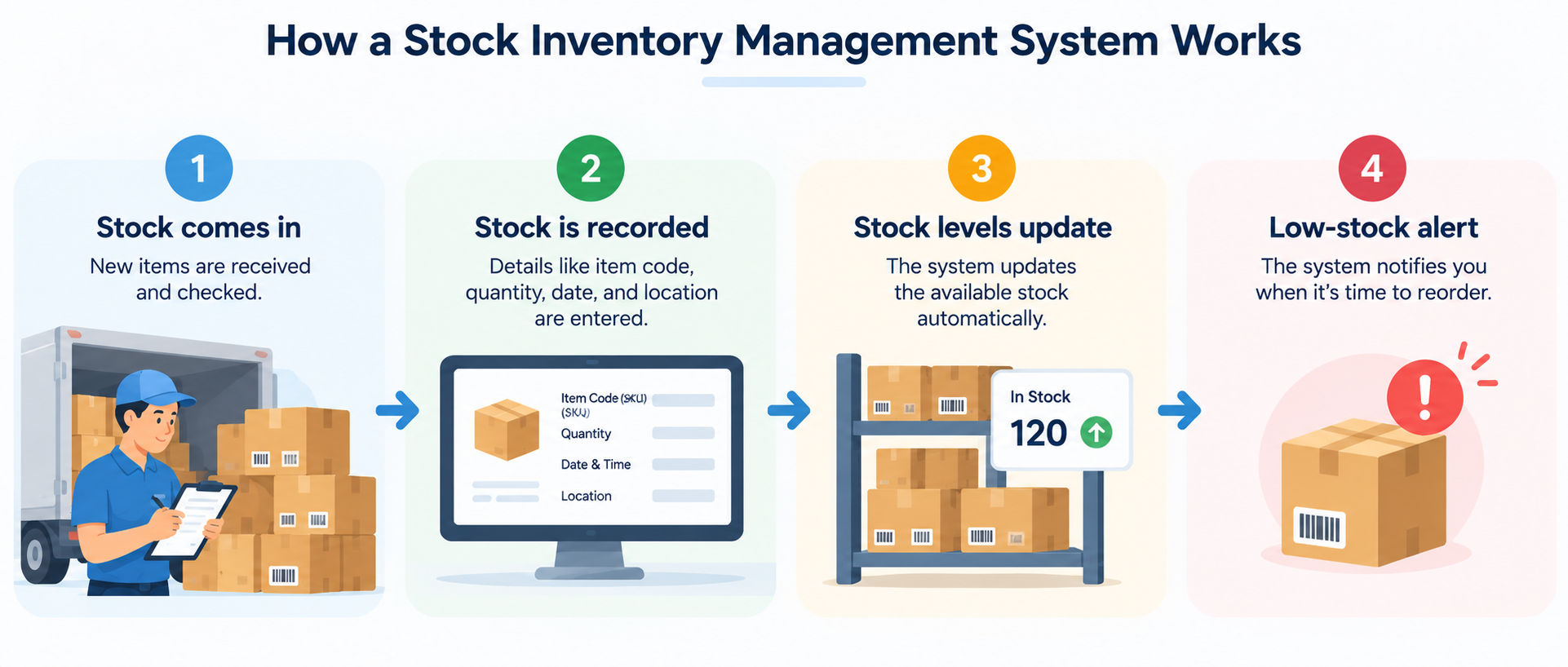
The process usually follows these steps:
The system updates stock levels by adding received items, subtracting issued items, and recording other changes.
Stock level formula:
On-hand stock = Opening stock + Stock received − Stock issued ± Adjustments
Adjustments include damaged, expired, returned, or incorrectly counted items. Recording these changes helps businesses keep accurate stock records.
Two common methods for calculating stock value are:
Businesses should also count physical stock regularly and compare it with system records. If the numbers do not match, they should update the records and note the reason.
A stock inventory management system helps businesses know when to order more items. The reorder point is the stock level at which a new order should be placed.
Reorder point = (Average daily usage × Lead time in days) + Safety stock
Example: A business sells 20 units daily, takes 4 days to receive new stock, and keeps 70 extra units as safety stock.
Reorder point = (20 × 4) + 70 = 150 units
When stock reaches 150 units, the system sends a low-stock alert or prepares a purchase order.
Businesses can keep more safety stock for popular items or when deliveries are often delayed. They can keep less for slow-selling or costly items. Reorder levels should be reviewed regularly as demand and delivery times change.
Helpful Guide: 6 Types of Supply Chain Models To Know
Management Courses to upskill
Explore Management Courses for Career Progression
IIIT-B & IIM, Udaipur
Chief Technology Officer & AI Leadership ProgrammeA stock inventory management system helps businesses track products, manage orders, and keep stock records updated. Here are its key features.
Real-time tracking updates stock records whenever items come in or go out. Staff can check available, reserved, and incoming stock.
| Stock detail | What it means |
| Available stock | Items ready to sell |
| Reserved stock | Items kept for confirmed orders |
| Incoming stock | Items ordered but not yet received |
| Stock in transit | Items moving between locations |
The system can also track batch numbers, expiry dates, and serial numbers. These details help manage product recalls, check expiry dates, and track costly items such as laptops. An activity log records who changed stock details and when.
Barcode and QR code scanning helps staff record stock without entering product details by hand.
These tools save time and reduce mistakes when receiving, picking, and counting items.
This feature helps businesses manage supplier and customer orders in one place.
| Purchase orders | Sales orders |
| Store supplier details | Store customer order details |
| Track incoming deliveries | Reserve stock for confirmed orders |
| Compare ordered, received, and billed quantities | Track unavailable items |
| Update stock when goods arrive | Record backorders until stock arrives |
The system can update stock records automatically when goods arrive or orders are delivered. This reduces repeated data entry.
Inventory reports help businesses track sales, find unsold items, and identify stock losses.
Useful reports include:
Some systems also let managers schedule email reports or export data to CSV files.
This feature helps businesses track stock across different shops, warehouses, and storage areas. It shows the quantity available at each location and records stock transfers.
For example, if one shop runs out of a product, staff can check whether another branch has it. They can then move the stock instead of placing an unnecessary order.
The system can also limit each team's access to its own location while allowing head office to view stock across all branches.
Also Read: What is Supply Chain Analytics? Why is it Important?
Inventory management systems differ in how they track and update stock. The right system depends on the business size, number of products, and stock needs.
A perpetual inventory system updates stock records whenever a sale, delivery, or return takes place. It helps businesses track stock levels and the cost of goods sold.
Key points:
Staff should still count physical stock regularly to find errors, damage, or missing items.
A periodic inventory system updates stock records at set times, such as monthly or yearly. Staff count the items and use opening stock, purchases, and closing stock to calculate the cost of goods sold.
| Advantages | Limitations |
| Easy to set up | Records are not updated after every sale |
| Needs little technology | Shortages may go unnoticed |
| Works for a few products | Stock counting can interrupt daily work |
Best for: Small shops with few products and slow-selling stock.
A manual inventory system uses paper registers, stock cards, or spreadsheets to track stock. Staff enter and update the details themselves.
It is a low-cost option, but records can become difficult to manage as the number of products grows. Errors may occur, and automatic low-stock alerts are usually not available.
Best for: Startups, home businesses, and small projects with limited stock.
A barcode-based inventory system uses printed codes to identify products or storage locations. Staff scan these codes to record stock coming in, going out, or moving between locations.
What businesses need:
Scanning saves time and reduces typing errors. This system is useful for warehouses, supermarkets, pharmacies, and other businesses that handle many items.
A cloud-based inventory management system runs on online servers and can be accessed through a web browser or mobile app. It lets teams at different locations use the same stock records.
Main advantages:
Before choosing a system, check its backup and security options, whether you can export your data, and what happens when the internet stops working.
Best for: Growing businesses, companies with multiple locations, and teams working from different places.
The right stock inventory management system software helps businesses manage stock, orders, and daily tasks. Choose software based on your needs, budget, and plans for growth.
Before choosing software, check for these key features:
Follow these five steps:
Choose software that your team can use easily and that meets your current needs while allowing room for growth.
Also Read: What is SaaS: A Beginner’s Guide to Software as a Service
Here are seven stock inventory management system project ideas, from beginner to advanced. You can choose one based on your skills and use it for a college project or portfolio.
Level: Beginner
Build a simple app to add products, track stock coming in and going out, and check available quantities.
Features to include:
What you will learn: How to track stock changes and keep product records updated.
Level: Beginner to Intermediate
Create a system for a retail shop that connects sales with stock records. When a bill is made, the available stock should decrease automatically.
Features to include:
You can also test how the system handles cancelled bills and partial returns.
Level: Intermediate
Build a system that uses barcodes or QR codes to identify products. Staff can scan codes to record deliveries, sales, and stock counts.
Features to include:
What you will learn: How to connect scanning tools with a product database and record stock faster.
Level: Intermediate to Advanced
Create a system to track stock across warehouses, shelves, and storage bins. Staff should be able to find items and record stock transfers.
Features to include:
Advanced feature: Use the first-expired-first-out (FEFO) method to select items that expire sooner.
Level: Intermediate
Build a system that checks stock levels and alerts users when items fall below their reorder levels.
Features to include:
What you will learn: How to schedule automatic checks and send notifications.
Level: Advanced
Build an online inventory system where different businesses can manage their stock separately. Each business should have its own users, records, and access settings.
Features to include:
What you will learn: How to build and manage a secure online application.
Related blog: Cloud-Based Inventory Management
Level: Intermediate to Advanced
Create a system that shows sales and stock data through charts and tables. Users should be able to filter reports by date.
Features to include:
What you will learn: How to analyse sales data, create reports, and present information clearly.
Interested in learning management skills in detail? Then, upGrad’s management essentials certification program is the perfect choice for you.
You can build a stock inventory management system in four steps: plan the features, choose the tools, design the system, and test it.
First, decide who will use the system and what they need to do.
For example:
Start with basic features, such as product records, stock movements, and one report. Also, decide how products will be counted (pieces, boxes, or kilograms) and who can approve stock changes.
Choose tools that match your skills. A database stores product details, stock records, and order information.
Skill level |
Tools |
Database |
| Beginner | Python with Flask or Django and basic HTML | SQLite |
| Intermediate | Node.js with Express or PHP with Laravel, plus React or Vue | MySQL or PostgreSQL |
| Advanced | Java with Spring Boot or Django REST, plus React | PostgreSQL |
Tip: Start with tools you understand. You can add more features as your skills improve.
Plan how the system will store information. These are the main database tables:
| Table | Information stored |
| Products | Product name, SKU, price, and reorder level |
| Suppliers and customers | Contact and payment details |
| Locations | Shops and warehouses |
| Stock movements | Product, quantity, movement type, user, and date |
| Purchase and sales orders | Order details and items |
| Users | Login details, roles, and permissions |
Important: The system should calculate current stock from stock movement records. Users should not change the total directly. Add database indexes to help find records faster.
Next, plan four main screens:
Keep the screens simple, with large buttons and fewer fields.
Build the system one part at a time:
Use version control to track code changes and sample data to test the system.
Test these important areas:
Before finishing, prepare a short user guide and set up regular data backups.
Final Thoughts
The best stock inventory management system is one your team can use regularly. Keeping stock records accurate depends on updating them every time stock comes in or goes out. Whether you choose existing software or build your own system, start with a manageable set of features. Test it with real stock, fix any problems, and add more features as your needs grow.
Want to start your project management journey? Book a free consultation with upGrad today to find the best path for your career.
Small businesses may only need basic inventory management.
Yes, especially when products often run out, unsold stock takes up money, or spreadsheets become hard to manage. It is also useful when managing stock across multiple shops or online stores.
Yes. They work well for small businesses with few products and users. However, they can become difficult to manage when many people update records or when you need automatic alerts and order tracking.
These methods help calculate stock costs.
FIFO and weighted average are widely accepted. LIFO is not allowed under IFRS rules. Check with your accountant before choosing a method.
It depends on the value of items and how quickly they sell.
Regular stock counts help find errors early.
Staff training and preparing stock records can take time.
Dead stock means items that have not sold for a long time.
You can reduce it by:
Common mistakes include:
A small business can start with a smartphone and a barcode scanning app.
Larger businesses may also need:
Yes. It can help students show their software development skills. To make your project stand out, include:
1025 articles published
We are an online education platform providing industry-relevant programs for professionals, designed and delivered in collaboration with world-class faculty and businesses. Merging the latest technolo...
Get Free Consultation
By submitting, I accept the T&C and
Privacy Policy
Top Resources
Certification
3 Months
Certification
6 Months
O.P. Jindal Global University
Masters in International Accounting and Finance (Accredited by ACCA, UK)Master's Degree
12 Months