Collection Interface in Java
By Sriram
Updated on Jun 09, 2026 | 7 min read | 1.89K+ views
Share:

All courses
Certifications
More
By Sriram
Updated on Jun 09, 2026 | 7 min read | 1.89K+ views
Share:
Table of Contents
The collection interface in Java is the foundation of the Java Collections Framework. It provides a standard way to store, manage, and manipulate groups of objects. Whether you're working with lists, sets, queues, or other data structures, most collection classes in Java build upon this interface.
This blog explains its purpose, hierarchy, methods, implementations, and practical examples. You'll also learn where it fits within the Collection Framework and how developers use it in real-world applications.
Explore upGrad's Data Science, AI, and Machine Learning programs to build strong Java programming skills, including the Collection Framework, data structures, Generics, object-oriented programming, and real-world application development.
Popular upGrad Programs
The java.util.Collection interface is the base interface for most of Java's data structures. It sits at the top of the hierarchy and defines the common behaviour that all collection types must support. Think of it as a contract, any class that implements it must provide working versions of the methods it declares.
It doesn't extend anything except Iterable, which means every collection in Java can be looped through using a for-each loop. That's by design.
Here's something worth knowing: Collection itself isn't directly implemented by most classes. Instead, sub-interfaces like List, Set, and Queue extend it, and then concrete classes like ArrayList, HashSet, or LinkedList implement those sub-interfaces.
Why does this matter, you may ask? Because when you write code that accepts a Collection parameter, your method works with any collection type.
Here are the key characteristics of this interface
Consider a simple scenario. You're building a student management system. New students join regularly, and some leave. An array would require manual resizing. A collection handles this automatically.
Must read: Collection Framework in Java: Implementation and Best Practices
Free Courses
The collection interface in Java defines a set of core methods. Every class in the hierarchy inherits these unless it overrides them.
Here's a breakdown of the primary collection interface methods in Java:
Method |
Description |
| add(E e) | Adds an element to the collection |
| remove(Object o) | Removes a specific element |
| contains(Object o) | Returns true if the element exists |
| size() | Returns the count of elements |
| isEmpty() | Checks if the collection is empty |
| clear() | Removes all elements |
| iterator() | Returns an iterator for traversal |
| toArray() | Converts the collection to an array |
| addAll(Collection c) | Adds all elements from another collection |
| removeAll(Collection c) | Removes all matching elements |
| retainAll(Collection c) | Keeps only the matching elements |
| containsAll(Collection c) | Checks if all given elements exist |
import java.util.*;

public class CollectionDemo {
    public static void main(String[] args) {
        Collection<String> names = new ArrayList<>();
        names.add("Rahul");
        names.add("Priya");
        names.add("Amit");

        System.out.println("Size: " + names.size());
        System.out.println("Contains Priya: " + names.contains("Priya"));
        names.remove("Amit");
        System.out.println("After removal: " + names);
    }
}
The output is predictable, the syntax is clean. That's what working with collection interface methods in Java looks like in practice.
One thing to note: add() returns a boolean. For List, it almost always returns true. For Set, it returns false if the element already exists. Don't assume they behave identically across implementations.
Do read: Java Tutorial: Learn Java Programming From Scratch For Beginners
Recommended Courses to upskill
Explore Our Popular Courses for Career Progression
IIIT Bangalore
Executive Diploma in Machine Learning and AI360° Career Support
O.P.Jindal Global University
MBA from O.P.Jindal Global UniversityLive Case Studies and Projects
Understanding the collection interface hierarchy in Java helps you pick the right data structure for the job. The structure looks like this:
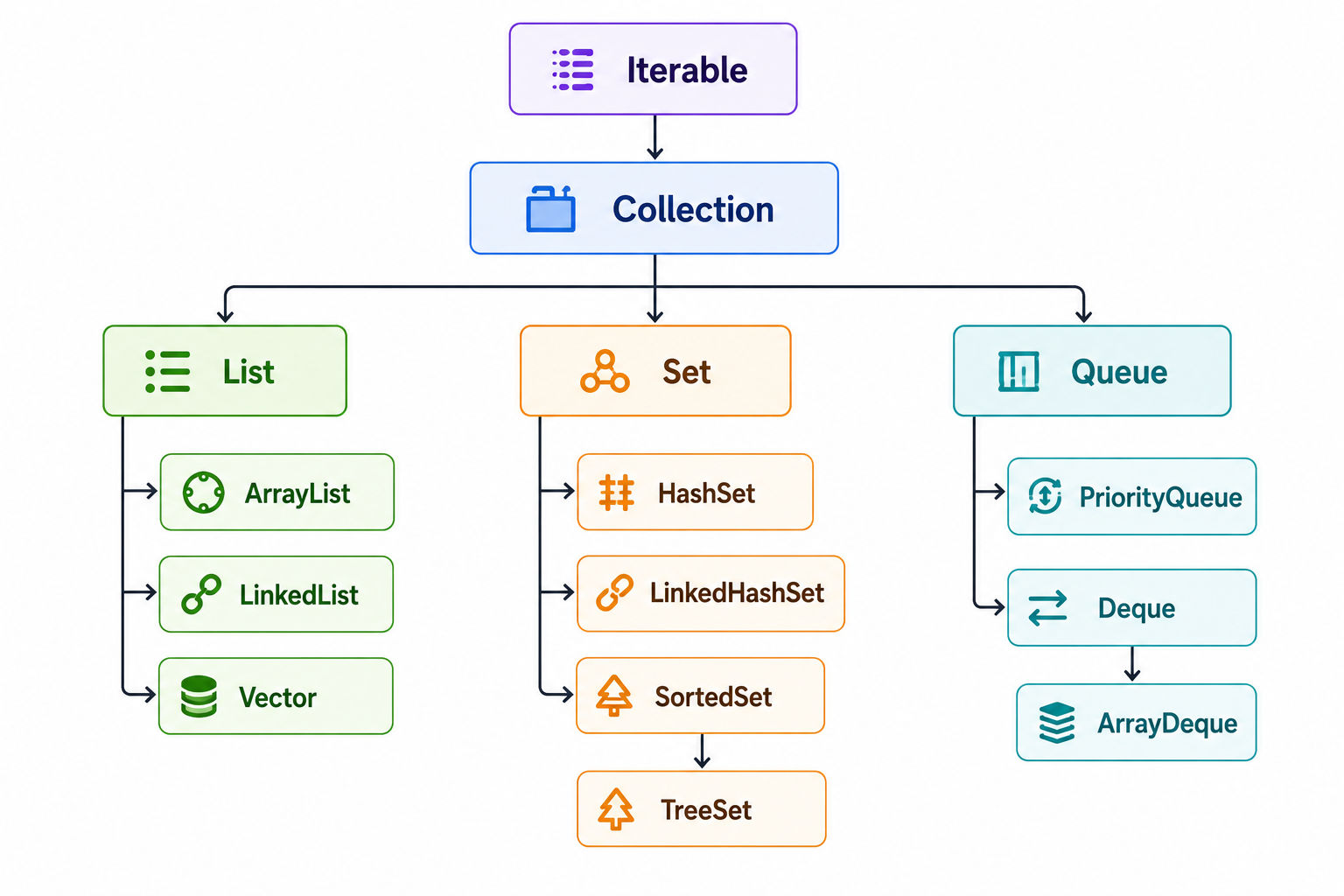
Notice that Map is not part of this hierarchy. That's a common confusion. Map is a separate interface under java.util and doesn't extend Collection. It deals with key-value pairs, which is a fundamentally different concept.
Each sub-interface takes the base contract from Collection and extends it with more specific rules:
This layered design is why the collection interface hierarchy in Java feels clean. Each level adds something specific without breaking what came before.
Also read: Exploring the 14 Key Advantages of Java: Why It Remains a Developer's Top Choice in 2025
The collection API interfaces in Java cover more ground than most developers explore early on. Here's a practical look at the most important ones:
The most commonly used. It allows duplicate values and preserves order.
java
List<Integer> scores = new ArrayList<>();
scores.add(85);
scores.add(90);
scores.add(85); // duplicate allowed
Use ArrayList when you need fast read access. Use LinkedList when you're frequently inserting or deleting from the middle.
No duplicates. That's the core rule.
java
Set<String> cities = new HashSet<>();
cities.add("Mumbai");
cities.add("Delhi");
cities.add("Mumbai"); // silently ignored
System.out.println(cities.size()); // prints 2
HashSet gives you O(1) average-time operations. TreeSet keeps elements sorted but costs O(log n) per operation.
Designed for ordered processing. Elements go in one end and come out the other.
java
Queue<String> tasks = new LinkedList<>();
tasks.offer("Task A");
tasks.offer("Task B");
System.out.println(tasks.poll()); // prints Task A
PriorityQueue doesn't follow insertion order. It processes elements based on priority. That's a subtle but important difference.
Stands for double-ended queue. You can push and pop from either end. ArrayDeque is often faster than Stack for LIFO operations.
Without hierarchy, every collection class would need separate handling. Java avoids that problem.
A method accepting a Collection object can work with:
This flexibility makes applications easier to maintain and extend.
Also read: Java Language History: Why Java Is So Popular and Widely Used Today
The collection interface methods in Java define the common operations available across collection implementations.
These methods create a consistent developer experience regardless of the underlying collection type.
Method |
Purpose |
| add() | Adds an element |
| remove() | Removes an element |
| size() | Returns element count |
| clear() | Removes all elements |
| contains() | Checks existence |
| isEmpty() | Checks if collection is empty |
| iterator() | Traverses elements |
Collection<Integer> numbers = new ArrayList<>();

numbers.add(10);
numbers.add(20);
numbers.add(30);

System.out.println(numbers.size());

numbers.remove(20);

System.out.println(numbers.contains(10));
Many developers overlook the iterator. They shouldn't.
It provides a safe way to traverse elements while maintaining compatibility across different collection implementations.
Example:
Iterator<Integer> itr = numbers.iterator();

while(itr.hasNext()) {
   System.out.println(itr.next());
} Not every collection behaves identically.
For example:
That's why understanding behavior matters more than memorizing methods.
Also read: Exploring Java Architecture: A Guide to Java's Core, JVM and JDK Architecture
Many beginners jump straight into implementation classes. Experienced developers usually start with interfaces.
Instead of:
ArrayList<String> names = new ArrayList<>(); Write:
List<String> names = new ArrayList<>(); This makes future changes easier.
Avoid raw collections.
Bad:
Collection data = new ArrayList(); Better:
Collection<String> data = new ArrayList<>(); Generics improve type safety and readability.
Ask yourself:
The answers guide your selection.
Converting collections repeatedly increases processing overhead.
Keep operations simple whenever possible.
Cleaner code often means fewer bugs.
for(String name : names) {
   System.out.println(name);
}
Readable code ages well.
Must read: Top Java Courses for 2025 – Developer Approved Picks
Not everything works the way beginners expect. Here are the real-world edge cases worth knowing:
UnsupportedOperationException If you create a collection using Arrays.asList() or List.of(), the result is fixed-size. Calling add() or remove() on it throws UnsupportedOperationException. This trips up a lot of developers.
java
List<String> fixed = List.of("A", "B", "C");
fixed.add("D"); // throws UnsupportedOperationException
ConcurrentModificationException If you modify a collection while iterating over it using a for-each loop, Java throws this. Use an Iterator and call iterator.remove() if you need to remove during iteration.
Null handling ArrayList and HashSet allow null values. TreeSet doesn't, because it uses compareTo() to sort, and null can't be compared. Know your implementation before adding null values.
equals() and hashCode() matter For Set and Map, correct element lookup depends on properly overriding equals() and hashCode() in your custom objects. Forget this, and duplicate entries sneak in.
These aren't obscure edge cases. They come up regularly in production code.
The collection interface in Java forms the backbone of the Java Collections Framework. It provides a standard approach for storing and managing groups of objects while supporting flexibility, scalability, and code reuse.
Understanding the collection interface hierarchy in Java, learning the most important collection interface methods in Java, and knowing how collection API interfaces in Java connect to implementation classes will make your Java code cleaner and more efficient. Once you grasp these fundamentals, working with ArrayList, HashSet, LinkedList, TreeSet, and other collections becomes much easier.
Ready to start your journey? Book a free consultation with upGrad today to find the best path for your career.
Although both are part of the Java Collections Framework, they solve different problems. Collection stores individual elements, while Map stores key-value pairs. A Collection focuses on managing groups of objects, whereas a Map is designed for fast lookup using unique keys. That's why Map doesn't belong to the collection interface hierarchy in Java.
Most developers start with ArrayList because it's simple to understand and widely used in real applications. Once you're comfortable with adding, removing, and iterating elements, learning HashSet and LinkedList becomes much easier. Understanding these three implementations builds a strong foundation for working with collection API interfaces in Java.
Using interfaces makes code more flexible and easier to maintain. For example, declaring a variable as List instead of ArrayList allows you to switch implementations later without changing most of your code. This approach is widely used in enterprise applications and follows Java's object-oriented design principles.
Most collection implementations automatically increase their internal storage when needed. For example, ArrayList creates a larger internal array and copies existing elements into it. While this process is efficient, repeated resizing can impact performance when handling very large datasets.
Collections provide optimized data structures for different use cases. HashSet offers fast searches, PriorityQueue helps manage ordered tasks efficiently, and ArrayList provides quick element access. Choosing the right structure often has a bigger impact on performance than writing complex optimization logic.
Generics provide compile-time type checking and reduce runtime errors. Instead of storing mixed object types in a collection, developers can restrict the collection to a specific data type. This improves code readability, makes debugging easier, and eliminates many unnecessary type-casting operations.
Many beginners select a collection without considering the application's requirements. They often use ArrayList for every scenario, even when uniqueness, sorting, or frequent insertions are more important. Understanding the strengths of each collection type leads to cleaner code and better performance.
Yes. Java collections are heavily used in banking systems, e-commerce platforms, healthcare software, and cloud applications. Their standardized design, predictable behavior, and extensive API support make them reliable for managing everything from small datasets to millions of records.
Java Streams allow developers to process collection data using a functional programming style. You can filter, sort, transform, and aggregate elements without writing complex loops. Streams work with most collection API interfaces in Java and help produce cleaner, more readable code.
Collections aren't always the best choice. If the number of elements is fixed and known in advance, arrays may offer lower memory overhead and slightly better performance. Collections become more useful when data size changes dynamically or when advanced operations are required.
Interviewers often focus on real-world usage rather than definitions. Common questions include differences between ArrayList and LinkedList, HashSet versus TreeSet, how collection interface methods in Java work internally, fail-fast iterators, Generics, and the collection interface hierarchy in Java. Practical examples usually matter more than memorized theory.
727 articles published
Sriram K is a Senior SEO Executive with a B.Tech in Information Technology from Dr. M.G.R. Educational and Research Institute, Chennai. With over a decade of experience in digital marketing, he specia...
Get Free Consultation
By submitting, I accept the T&C and
Privacy Policy
Top Resources
Certification
3 Months
Certification
6 Months
O.P. Jindal Global University
Masters in International Accounting and Finance (Accredited by ACCA, UK)Master's Degree
12 Months