Membership Operator in Python: Complete Guide with Examples
By Rahul Singh
Updated on Jun 03, 2026 | 7 min read | 2.75K+ views
Share:

All courses
Certifications
More
By Rahul Singh
Updated on Jun 03, 2026 | 7 min read | 2.75K+ views
Share:
Table of Contents
The membership operator in Python is used to check whether a value exists within a sequence or collection. It is one of the simplest yet most useful operators in Python because it helps you quickly verify the presence or absence of elements in strings, lists, tuples, sets, and dictionaries.
In this blog, you will learn exactly what the membership operator in Python is, how it works, where to use it, and what mistakes to avoid. You will find real code examples, tables, and tips that take you from complete beginner to someone who can use this operator confidently in real projects.
Ready to go beyond algorithms and start building real-world AI solutions? Explore upGrad’s Artificial Intelligence Courses to learn machine learning, generative AI, and cutting-edge technologies through hands-on projects and practical applications.
Popular AI Programs
The membership operator in Python checks whether a value is present inside a sequence or collection. It returns either True or False based on whether the item exists.
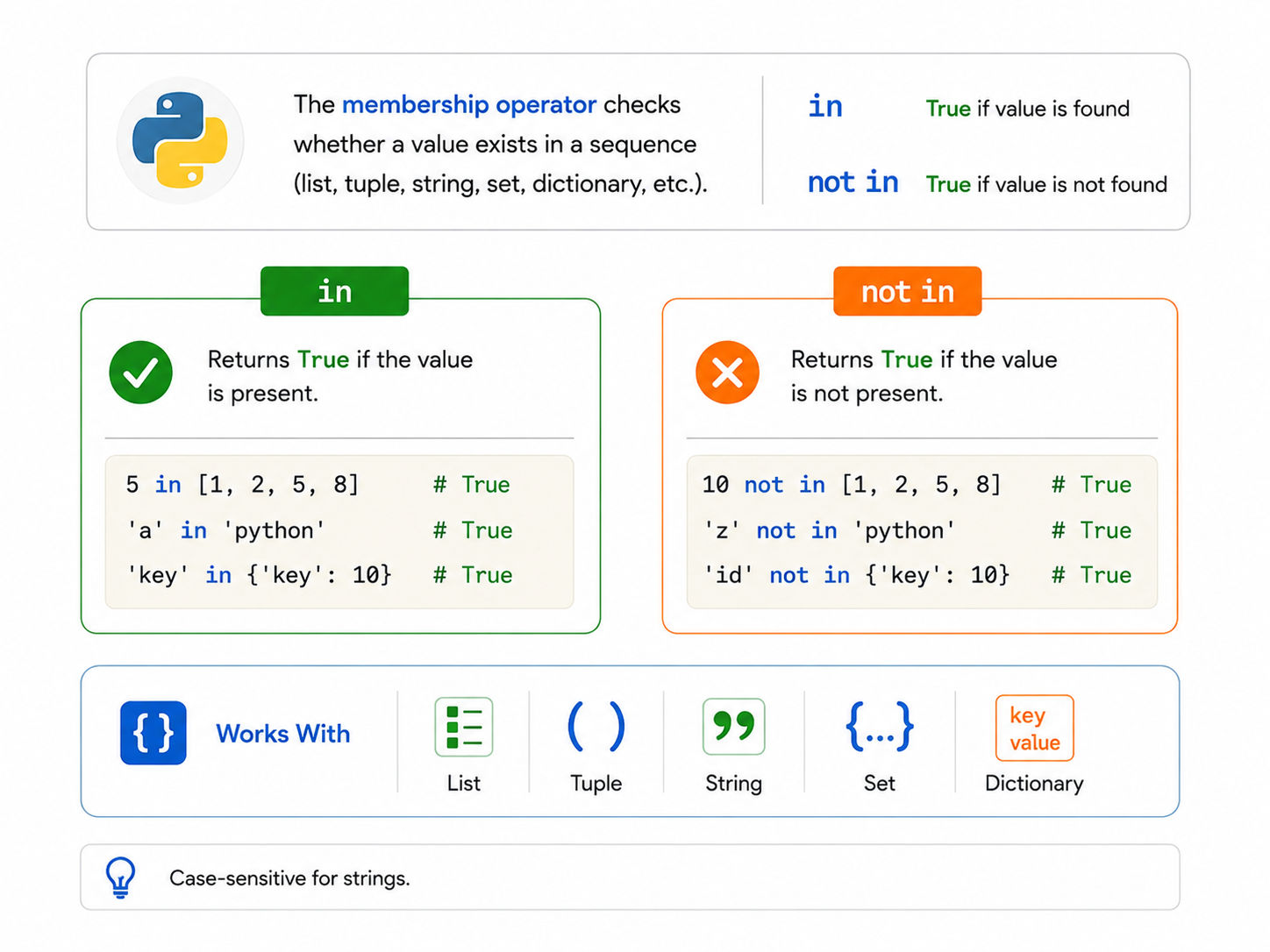
Python has two membership operators:
Operator |
What It Does |
| in | Returns True if the value is found in the sequence |
| not in | Returns True if the value is NOT found in the sequence |
These operators work with most Python data structures: strings, lists, tuples, sets, and dictionaries.
value in sequence
value not in sequence
That is literally the whole syntax. No function calls. No loops needed. Just one readable line.
fruits = ["apple", "banana", "mango"]

print("apple" in fruits)      # True
print("grape" in fruits)      # False
print("grape" not in fruits)  # True
Python reads this almost like plain English. That is one of the reasons why the membership operator in Python is so popular even among beginners.
Free Courses
The membership operator in Python behaves slightly differently depending on the data structure. Let's walk through each one.
With strings, in checks for a substring, not just a single character.
sentence = "Python is fun"

print("Python" in sentence)    # True
print("java" in sentence)      # False
print("is" in sentence)        # True
print("IS" in sentence)        # False (case-sensitive)
Important: String membership checks are case-sensitive. "python" and "Python" are treated as different values.
Also Read: String Methods Python
This is the most common use case. You check if an element exists in a list.
numbers = [1, 2, 3, 4, 5]

print(3 in numbers)      # True
print(10 in numbers)     # False
print(10 not in numbers) # True
Lists allow duplicate values and maintain order, so in scans through each element until it finds a match.
Tuples behave exactly like lists when using the membership operator.
colors = ("red", "green", "blue")

print("red" in colors)     # True
print("yellow" in colors)  # False
Sets are unordered collections with no duplicates. Membership checks on sets are actually faster than on lists because of how sets are internally structured (using hash tables).
primes = {2, 3, 5, 7, 11}

print(7 in primes)   # True
print(9 in primes)   # False
For large collections where you frequently check membership, a set is more efficient than a list.
With dictionaries, the in operator checks keys by default, not values.
student = {"name": "Rohan", "age": 21, "city": "Delhi"}

print("name" in student)    # True
print("Rohan" in student)   # False (it's a value, not a key)
print("Rohan" in student.values())  # True
To check values, use .values(). To check key-value pairs, use .items().
Also Read: 4 Built-in Data Structures in Python: Dictionaries, Lists, Sets, Tuples
AI Courses to upskill
Explore Artificial Intelligence Courses for Career Progression
Knowing the syntax is one thing. Knowing when and how to actually use it is what makes you productive. Here are the real-world situations where the membership operator in Python comes in handy.
valid_roles = ["admin", "editor", "viewer"]
user_role = input("Enter your role: ")

if user_role in valid_roles:
   print("Access granted")
else:
   print("Invalid role")
This is a clean way to validate user input without writing long if-elif chains.
Also Read: Cross Validation in Python: Everything You Need to Know About
blocked_users = ["spam123", "bot456", "troll789"]
username = "spam123"

if username not in blocked_users:
   print("Welcome!")
else:
print("You are blocked.")required_keys = ["name", "email", "phone"]
form_data = {"name": "Priya", "email": "priya@example.com"}
for key in required_keys:
if key not in form_data:
print(f"Missing field: {key}")Output: Missing field: phone
registered_emails = {"a@x.com", "b@x.com"}
new_email = "a@x.com"

if new_email in registered_emails:
   print("Email already registered")
else:
   registered_emails.add(new_email)
print("Registered successfully")vowels = "aeiou"
word = "python"
for letter in word:
if letter in vowels:
print(f"{letter} is a vowel")
else:
print(f"{letter} is a consonant")Also Read: Python for Loop
Understanding when and how to use the membership operator efficiently can save you a lot of time, especially when working with large datasets.
Data Structure |
in Operator Time Complexity |
| List | O(n) scans each element |
| Tuple | O(n) scans each element |
| String | O(n) scans characters |
| Set | O(1) average uses hash table |
| Dictionary (keys) | O(1) average uses hash table |
Key takeaway: If you are doing frequent membership checks on large data, use a set or dictionary instead of a list or tuple. It is significantly faster.
big_list = [i for i in range(100000)]
big_set = set(big_list)

# Checking membership
print(99999 in big_list)  # Slower
print(99999 in big_set)   # Much faster
Also Read: Time Complexity Explained: Why It Matters in Algorithm Design?
Mistake 1: Checking values in a dictionary without .values()
data = {"city": "Mumbai"}
print("Mumbai" in data)         # False (wrong)
print("Mumbai" in data.values()) # True (correct)
Mistake 2: Forgetting case sensitivity in strings
text = "Hello World"
print("hello" in text)  # False
print("hello" in text.lower())  # True
Mistake 3: Using in with non-iterable types
print(5 in 5) # TypeError: argument of type 'int' is not iterableYou can only use in with sequences and collections, not with plain integers or floats.
Also Read: Data Structures & Algorithms in Python: Everything You Need to Know in 2026
Students often confuse the membership operator with comparison or identity operators. Here is a clear side-by-side view.
Operator Type |
Operators |
What It Checks |
| Membership | in, not in | Is value present in a sequence? |
| Comparison | ==, !=, <, > | Are two values equal or different? |
| Identity | is, is not | Do two variables point to the same object? |
a = [1, 2, 3]
b = [1, 2, 3]

print(1 in a)    # True — membership check
print(a == b)    # True — comparison (same values)
print(a is b)    # False — identity (different objects in memory)
The membership operator in Python only cares about whether a value is present, not about object identity or equality between two variables.
Also Read: Understanding Binary Search Time Complexity: All Cases Explained
Subscribe to upGrad's Newsletter
Join thousands of learners who receive useful tips
The membership operator in Python, in and not in, is one of the simplest yet most powerful tools available in the language. It makes your code readable, reduces unnecessary loops, and works across all major Python data structures.
Whether you are validating input, filtering data, or building logic flows, the membership operator in Python will keep showing up. The more you use it, the more natural it feels.
Want personalized guidance on AI and upskilling? Speak with an expert for a free 1:1 counselling session today.
The membership operator in Python is used to check whether a value exists within a sequence or collection. Python provides two membership operators: in and not in. Both return a boolean value, either True or False.
in returns True when the specified value is found in the given sequence. not in does the opposite and returns True when the value is absent. For example, 5 in [1, 2, 5] is True, while 5 not in [1, 2, 5] is False.
Yes. When used with strings, the in operator checks for substrings. For example, "cat" in "concatenate" returns True. The check is case-sensitive, so "Cat" and "cat" are treated as different substrings.
Yes, but by default it checks only keys. To check values, you need to use in dict.values(). To check for specific key-value pairs, use in dict.items(). This is a common source of confusion for beginners.
Sets and dictionary keys give O(1) average time complexity for membership checks because they use hash tables internally. Lists and tuples require O(n) time since Python scans each element. For large-scale lookups, always prefer sets.
Yes, and it is quite useful. For example, [x for x in data if x in valid_set] filters only the elements that are present in valid_set. This is a clean and Pythonic approach to filtering data.
Python will raise a TypeError: argument of type 'int' is not iterable. The membership operator requires an iterable on the right side, such as a list, string, tuple, set, or dictionary. It does not work with plain numeric values.
Yes, string membership checks in Python are case-sensitive. "hello" in "Hello World" returns False. To do a case-insensitive check, convert both strings to the same case using .lower() or .upper() before the comparison.
Absolutely. not in is very useful for validation. You can check if a required key is missing from a dictionary, if a username is not in a blocked list, or if an entered value is not among the allowed options. It makes validation logic clean and readable.
The == operator checks if two values are equal. The membership operator checks if a value exists within a collection. For example, "a" == "apple" is False, but "a" in "apple" is True because the character a is part of the string apple.
The in operator checks only the top-level elements of a list. If you have a nested list like [[1, 2], [3, 4]], then 1 in [[1, 2], [3, 4]] returns False because 1 is not a direct element of the outer list. To search inside nested lists, you need a custom loop or a flattened version of the list.
98 articles published
Rahul Singh is an Associate Content Writer at upGrad, with a strong interest in Data Science, Machine Learning, and Artificial Intelligence. He combines technical development skills with data-driven s...
Speak with AI & ML expert
By submitting, I accept the T&C and
Privacy Policy
Top Resources
Master's Degree
18 Months
Executive Diploma
12 Months
IIIT Bangalore
Executive Programme in Generative AI & Agentic AI for LeadersIndia’s #1 Tech University
Dual Certification
5 Months