CTA Full Form in Digital Marketing: Meaning, Types, Examples, and Importance
By Sriram
Updated on Aug 11, 2026 | 7 min read | 7.12K+ views
Share:

All courses
Certifications
More
By Sriram
Updated on Aug 11, 2026 | 7 min read | 7.12K+ views
Share:
Table of Contents
Key Highlights
Ready to turn CTAs into real marketing results? Explore upGrad’s Digital Marketing Course Online and learn how to create effective campaigns that drive clicks, engagement, and conversions.
CTA stands for Call to Action in digital marketing. It refers to a prompt that encourages a user to take a specific action. This action could involve clicking a link, signing up for a service, downloading a resource, making a purchase, subscribing to an email list, or contacting a business.
A CTA can appear as text, a hyperlink, button, banner, image, or another visual element. For example, an online course page might use “Enroll Now”, while an ecommerce website may use “Buy Now”.
In simple terms, a CTA tells users what to do next after they interact with digital content.
In marketing, CTA stands for Call to Action. The term is used for a message or visual prompt designed to encourage a desired response from the audience.
For example:
A CTA gives users a clear next step instead of leaving them to decide what to do after viewing an ad, webpage, email, or social media post. This makes CTAs an important part of guiding users through digital experiences.
1. Guides Users Toward the Next Step
A clear CTA tells users what action they can take next. For example, “Read the Full Guide” directs a reader toward additional information.
2. Increases User Engagement
CTAs encourage users to interact with content instead of simply viewing it. Actions can include clicking, subscribing, downloading, sharing, or exploring another page.
3. Generates Leads
CTAs such as “Get a Free Quote”, “Download the Guide”, or “Book a Demo” can encourage prospects to provide their contact details.
4. Supports Conversions
A CTA can move users toward a desired outcome, such as completing a purchase, registering for an event, or submitting a form.
5. Improves the Customer Journey
By showing users a logical next step, CTAs can make navigation and interactions more straightforward throughout the customer journey.
Want to go beyond CTAs and understand how data and AI shape digital marketing? Explore the IIIT-B & IIMU Chief Data and AI Officer Programme Online by upGrad and develop skills to make smarter, data-driven business decisions.
Free Courses
CTAs can serve different purposes depending on the marketing objective, audience, and stage of the customer journey.
Quick overview :
Type of CTA |
Example |
Primary Purpose |
| Lead Generation | Get a Free Quote | Generate leads |
| Sales | Buy Now | Drive purchases |
| Subscription | Subscribe Now | Build subscribers |
| Content | Download the Guide | Encourage downloads |
| Engagement | Learn More | Increase engagement |
| Social Media | Follow Us | Build an audience |
1. Lead Generation CTA
These CTAs encourage users to provide information or start a conversation. Examples include “Get a Free Quote” and “Book a Demo.”
2. Sales CTA
Sales CTAs encourage users to purchase a product or service. “Buy Now” and “Order Today” are common examples.
3. Subscription CTA
These prompts encourage users to subscribe to newsletters, services, or other recurring content. Examples include “Subscribe Now” and “Join Our Newsletter.”
4. Content CTA
Content-focused CTAs encourage users to access additional resources, such as ebooks, guides, reports, or articles. “Download the Guide” is one example.
5. Engagement CTA
These CTAs encourage users to explore or interact with content. Examples include “Learn More,” “Read More,” and “Explore Now.”
6. Social Media CTA
Social media CTAs encourage actions such as following an account, visiting a profile, or engaging with content. Examples include “Follow Us” and “Learn More.”
Do read: How To Become a Google Ads Specialist: A Step-by-Step Guide
Digital Marketing Courses to upskill
Explore Digital Marketing Courses for Career Progression
MICA Executive Alumni Status
The right CTA can make digital content more actionable by giving users a clear next step. From websites and emails to social media and ecommerce pages, each channel may require a different CTA based on its purpose.
1.Website CTA
Get Started or Contact Us
These can direct website visitors toward a service, signup page, contact form, or other relevant destination.
2. Email Marketing CTA
Shop Now or Explore the Collection
Email CTAs can encourage subscribers to visit a website, explore products, or access an offer
3. Social Media CTA
Learn More or Follow Us
These can encourage users to visit a website or engage with a brand's social presence.
4. Blog CTA
Read the Complete Guide or Explore Related Topics
Blog CTAs can guide readers toward useful supporting content.
5. E-commerce CTA
Add to Cart or Buy Now
These CTAs help move shoppers toward purchasing a product.
6. Education CTA
Download Brochure or Apply Now
Educational websites can use these CTAs to encourage prospective students to explore programs or begin an application.
Also read: What Is SEO Marketing and Why It Matters
How to Create an Effective CTA?
An effective CTA should clearly communicate the action you want users to take. It should be easy to understand, relevant to the content, and aligned with the user's needs. A well-written CTA removes confusion and gives users a clear reason to take the next step.
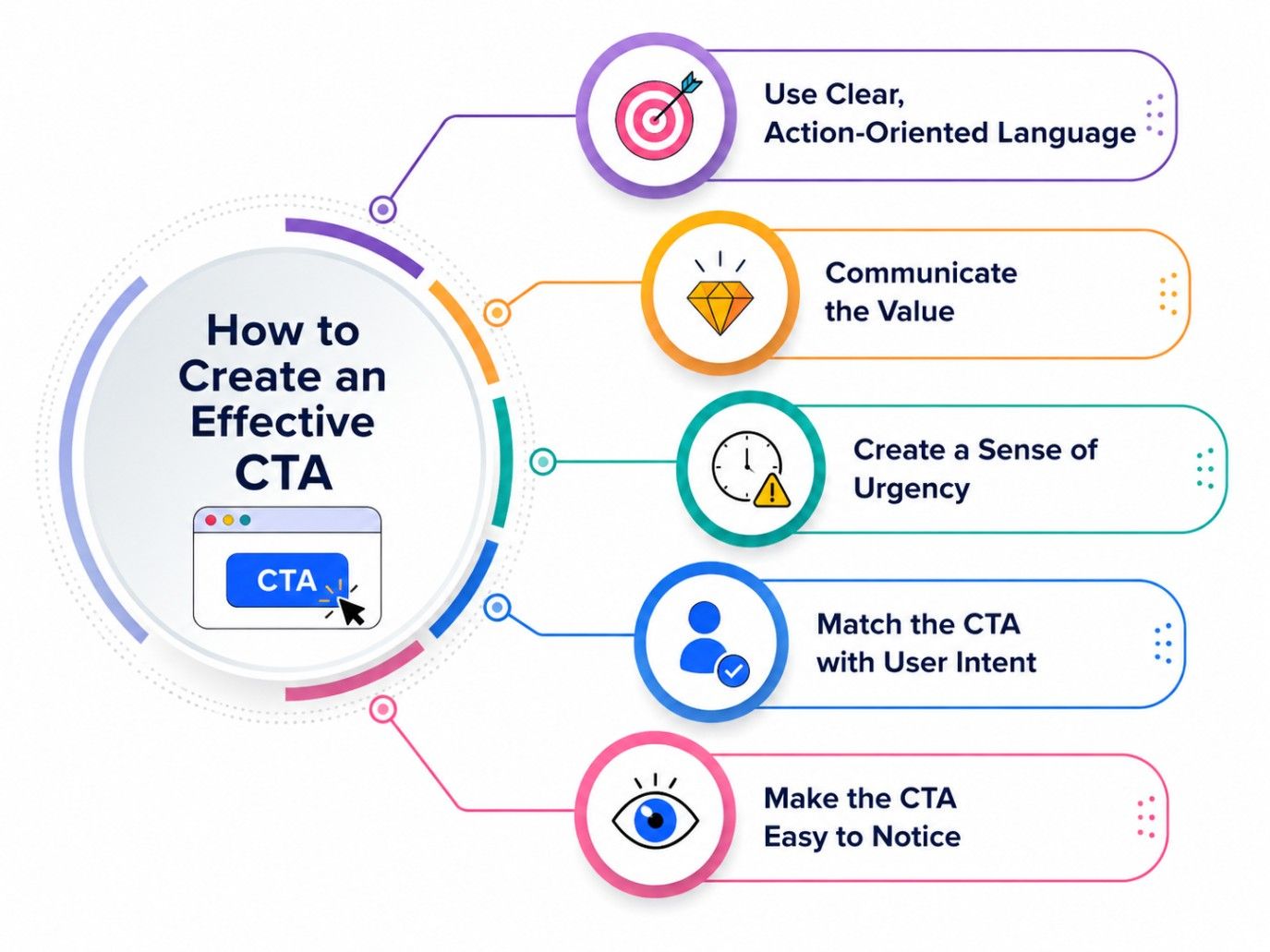
Use direct and specific words such as Get, Buy, Download, Start, Explore, Learn, or Register. Action-oriented language tells users exactly what to do. Avoid vague phrases like “Click Here” when possible, and choose wording that clearly describes the action and expected outcome.
A CTA should show users what they can gain by taking the recommended action. Instead of simply asking them to click, explain the benefit. For example, “Download the Free Guide” tells users what they will receive, making the CTA more useful and compelling.
Urgency can encourage users to act sooner when there is a genuine reason to do so. Phrases such as “Enroll Today,” “Limited Time Offer,” or “Register Before Seats Fill” can create urgency. However, avoid artificial urgency that may reduce user trust.
The CTA should reflect what users are likely to want at that stage of their journey. Someone reading an informational blog may prefer “Learn More,” while a visitor comparing products may be ready for “Buy Now” or “Get a Quote.”
A CTA should be visually distinct and simple to interact with. Use readable text, sufficient spacing, clear placement, and a design that works well across devices. On mobile screens especially, the CTA should be easy to see, understand, and tap without difficulty.
Also read : Starting A Career In Digital Marketing: All You Need To Know
A CTA and a CTA button are related but not exactly the same thing.
A CTA refers to the desired action or the prompt encouraging that action. A CTA button is a clickable interface element commonly used to present that prompt.
CTA |
CTA Button |
| Refers to the desired action or prompt | A clickable UI element |
| Can appear as text, a link, image, or button | Usually appears as a clickable button |
| Example: “Download the Guide” | A button displaying “Download the Guide” |
For example, “Download the Guide” is the CTA. When that phrase appears inside a clickable button, the button is the interface element used to deliver the CTA.
So, every CTA does not have to be a button, although buttons are one of the most common ways to present CTAs.
Must read: 15 Best Keyword Research Tools for 2025
CTA and CTR are different digital marketing concepts.
CTA stands for Call to Action. It is the prompt that encourages a user to take an action, such as clicking, signing up, purchasing, or downloading.
CTR stands for Click-Through Rate. It is a performance metric that measures the percentage of users who click a link or clickable element after seeing it.
For example, “Download Now” can be a CTA, while the percentage of users who click that CTA can contribute to the measured CTR.
In short:
CTA = the prompt that encourages action
CTR = a metric used to measure clicks
CTR is commonly calculated as:
CTR = (Clicks ÷ Impressions) × 100
The two are connected, but they should not be used interchangeably.
CTA, or Call to Action, is an essential part of digital marketing that guides users toward a specific action. Whether the goal is to generate leads, drive sales, increase engagement, or encourage downloads, the right CTA makes the next step clear. Using simple, relevant, and action-oriented CTAs can create a smoother user experience and support better marketing outcomes.
Ready to start your journey? Book a free consultation with upGrad today to find the best path for your career.
CTA stands for Call to Action. It is a prompt that encourages users to take a specific action, such as signing up, making a purchase, downloading content, subscribing, or learning more. CTAs can appear as buttons, links, text, images, or other visual elements.
CTA and CTR describe different aspects of digital marketing. A CTA is the prompt that encourages an action, while CTR, or Click-Through Rate, measures how often people click a link or clickable element compared with the number of times it was shown.
A CTA example is “Book a Demo” on a software company's website. Other examples include “Start Free Trial,” “Get a Quote,” “Reserve Your Seat,” and “Request a Callback.” The most suitable CTA depends on what the audience needs and the action the business wants to encourage.
In CRM, a CTA can refer to an action that encourages a prospect or customer to move to the next stage of an interaction. Examples include “Schedule a Call,” “Follow Up,” “Renew Now,” or “Contact Sales.” Its purpose depends on the customer relationship or sales process.
In lead generation, a CTA encourages a visitor to provide information or begin a conversation with a business. Common examples include “Get a Free Quote,” “Book a Consultation,” “Download the Report,” and “Request a Demo.” The action typically connects to a form or lead-capture process.
A CTA is relevant when it reflects what the user is likely ready to do at a particular stage. Someone discovering a brand may prefer an informational action, while an interested prospect may be ready to request pricing, schedule a demo, or begin registration.
Yes, a page can contain multiple CTAs when users have different relevant actions available. However, the actions should support the page's main objective rather than compete for attention. A primary action can be emphasized while secondary actions provide useful alternatives for visitors who are not ready to convert.
A CTA in email marketing is the part of an email that directs subscribers toward a specific action. It can encourage readers to shop, register, read an article, download a resource, or visit a webpage. Effective email CTAs should connect naturally with the email's main message.
Choose a CTA based on the audience's needs, familiarity with the brand, and expected level of commitment. A new visitor may respond to “Explore Solutions,” while an existing customer may be more receptive to “Upgrade Now” or “Renew Membership.”
A CTA is the prompt that encourages someone to take an action, while a conversion is the completed action that meets a defined marketing objective. For example, “Sign Up” can be the CTA, while successfully completing the registration form can count as the conversion.
Marketers can evaluate a CTA by comparing the action it generates with the campaign objective. Depending on the goal, useful indicators may include clicks, completed forms, registrations, purchases, downloads, or qualified leads. Testing different wording and presentation can also reveal which CTA performs better.
730 articles published
Sriram K is a Senior SEO Executive with a B.Tech in Information Technology from Dr. M.G.R. Educational and Research Institute, Chennai. With over a decade of experience in digital marketing, he specia...
Get Free Consultation
By submitting, I accept the T&C and
Privacy Policy
Level Up Your Digital Marketing Career Today!
Top Resources
MICA
Advanced Certificate in AI-Powered Digital Marketing & Communication from MICAMICA Executive Alumni Status
Certification
5 Specialisation
Classroom
4 Months
Certification
2 Months