Bilinear Interpolation: Formula, Examples, Applications and Comparisons
By Sriram
Updated on Jul 16, 2026 | 11 min read | 7.15K+ views
Share:

All courses
Certifications
More
By Sriram
Updated on Jul 16, 2026 | 11 min read | 7.15K+ views
Share:
Table of Contents
Key Highlights:
This blog explains what bilinear interpolation is, how it works, its formula, and a simple example. You'll also learn its role in image processing, image resizing, real-world applications, comparisons with other interpolation methods, and when to use it.
Mastering ML concepts like bilinear interpolation lays the groundwork for machine learning. Explore upGrad's Machine Learning courses and take the next step toward building predictive models and AI-powered applications.
Popular AI Programs
Bilinear interpolation is a mathematical method used to estimate an unknown value within a two-dimensional (2D) grid using the four nearest known data points. Instead of copying the nearest value, it calculates a new value based on the distance from each surrounding point, producing smoother and more accurate results.
Unlike linear interpolation, which works in one dimension, bilinear interpolation performs interpolation in both the horizontal and vertical directions. This makes it especially useful for applications such as image resizing, computer graphics, and other tasks that require smooth transitions between data points.
Digital systems frequently encounter missing or intermediate values.
For example:
Without interpolation, these systems would produce rough or jagged results.
That's why bilinear interpolation in image processing has become a standard technique. It balances image quality and computational speed, making it suitable for everyday applications where fast processing matters.
Although their names sound similar, they solve different problems.
Linear Interpolation |
Bilinear Interpolation |
| Works in one dimension | Works in two dimensions |
| Uses two known values | Uses four known values |
| Estimates along a line | Estimates inside a rectangular grid |
| Simpler calculation | Slightly more complex calculation |
| Suitable for 1D data | Commonly used for images and grids |
The additional dimension allows bilinear interpolation to generate smoother transitions across both horizontal and vertical directions.
Everything revolves around four values. Suppose an unknown point lies inside a rectangle.
The surrounding points might look like this.
Top Left |
Top Right |
| Q11 | Q21 |
| Bottom Left | Bottom Right |
| Q12 | Q22 |
Instead of selecting only one of these values, bilinear interpolation calculates how close the unknown point is to each corner.
Points that are closer receive greater influence. Points that are farther away contribute less.This weighted approach produces a balanced estimate instead of an abrupt change.
Think of mixing colors. If one color occupies most of the mixture, it has a stronger effect on the final shade. The same principle applies here, except the values being blended represent pixels or numerical measurements instead of colors.
Interpolation and extrapolation are sometimes confused.
Interpolation |
Extrapolation |
| Estimates values inside known data | Estimates values outside known data |
| Uses nearby observations | Predicts beyond available observations |
| Usually more accurate | Carries higher uncertainty |
| Common in image scaling | Common in forecasting |
Bilinear interpolation always estimates values within the known grid.
It doesn't predict values beyond the available data.
Free Courses
At first glance, the calculations behind bilinear interpolation might seem complicated.
The method follows a simple sequence of steps. It combines two linear interpolations to estimate the value of an unknown point inside a rectangle. Once you understand this sequence, the bilinear interpolation formula becomes much easier to follow.
New pixels have to be created because they weren't part of the original image. Instead of copying the nearest existing pixel, bilinear interpolation examines the four closest pixels and blends their values according to their distance from the new pixel's location.
The process happens in two stages. First, the algorithm performs interpolation along one direction, usually the horizontal axis.
Next, it repeats the interpolation along the vertical axis using the intermediate values obtained in the first step.
The result is a new value that reflects the contribution of all four neighboring points.
This gradual blending creates smoother transitions than simply selecting the nearest pixel.
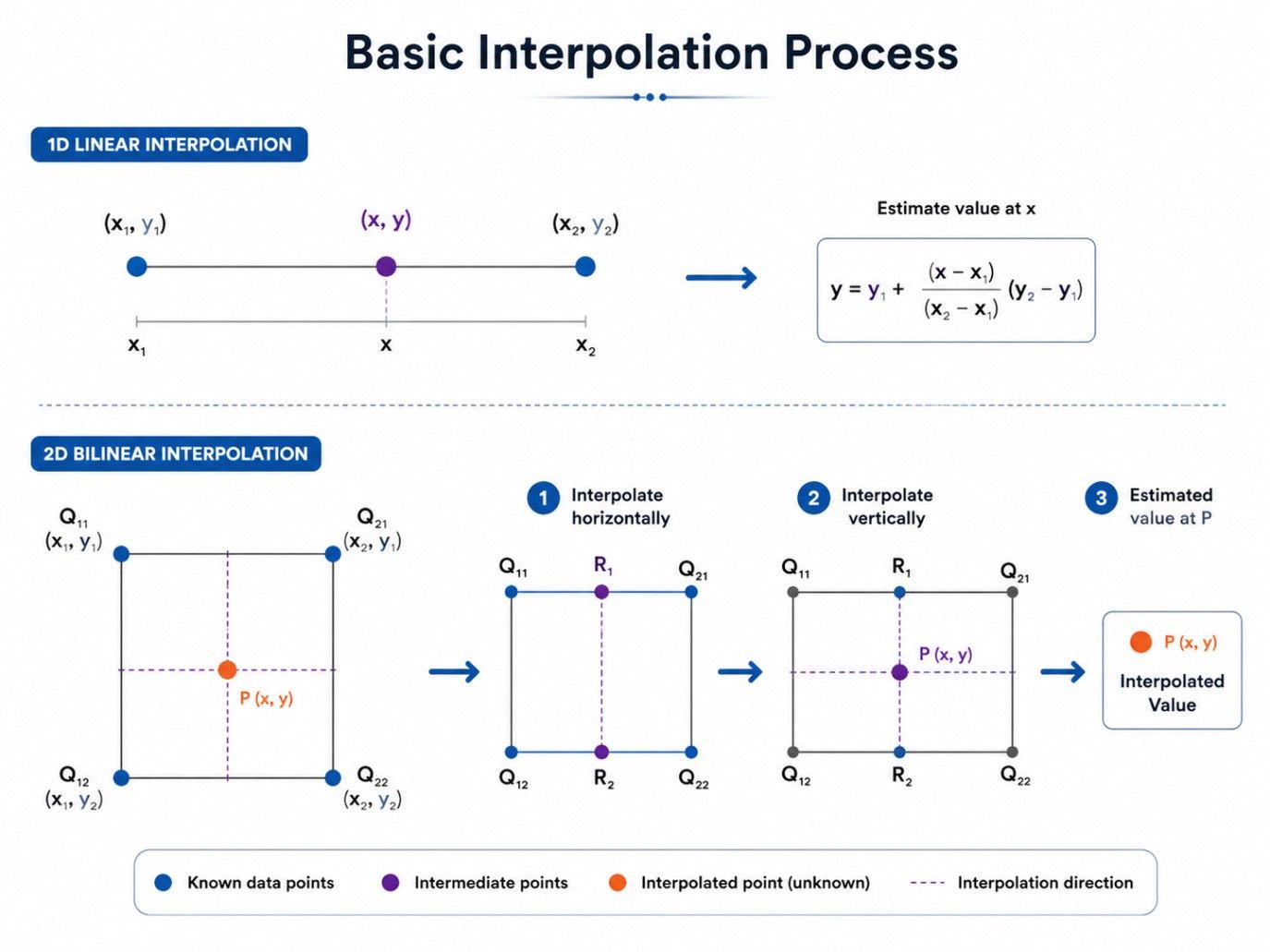
Each interpolation considers the relative distance between the unknown point and the surrounding values.
Closer values receive greater weight.Farther values influence the result less.
That weighted calculation is what makes bilinear interpolation produce smooth gradients instead of visible jumps between neighboring pixels.
Two points describe variation along a single direction. Images, maps, and grids change both horizontally and vertically. Using only two values ignores half of the available information, which often produces inaccurate estimates.
Four surrounding points provide a much better picture of the local area.Imagine standing in the middle of a room.
Looking in just one direction won't tell you everything about your surroundings. Looking in all directions gives a much clearer understanding of where you are. Bilinear interpolation applies the same principle mathematically.
This is one reason bilinear interpolation in image processing remains a preferred choice for resizing and transforming images. It produces smoother visual results without requiring excessive computational power.
In the next section, we'll break down the bilinear interpolation formula and explain exactly how each variable contributes to the final calculated value.
AI Courses to upskill
Explore Artificial Intelligence Courses for Career Progression
The idea behind bilinear interpolation is simple. The mathematics makes it precise.
The bilinear interpolation formula calculates an unknown value by combining the four nearest known values based on their distance from the target point. Instead of assigning equal importance to every point, it gives more weight to values that are closer. The result is a smooth transition across the surface.
The standard formula is written as:
f(x,y)=\frac{Q_{11}(x_2-x)(y_2-y)+Q_{21}(x-x_1)(y_2-y) +Q_{12}(x_2-x)(y-y_1)+Q_{22}(x-x_1)(y-y_1)}{(x_2-x_1)(y_2-y_1)} Each corner contributes to the final value according to its distance from the unknown point.A nearby point has a stronger influence.A farther point contributes less.
That's what creates smooth gradients instead of sudden changes.
Here's what each symbol means.
Symbol |
Meaning |
| Q11 | Top-left known value |
| Q21 | Top-right known value |
| Q12 | Bottom-left known value |
| Q22 | Bottom-right known value |
| x, y | Coordinates of the unknown point |
| x₁, x₂ | Horizontal boundaries |
| y₁, y₂ | Vertical boundaries |
The algorithm calculates how close the unknown point is to each corner. Those distances become the weights used in the calculation.
You don't have to memorize the equation.Understanding why it works is much more valuable than remembering every symbol.
Also read : What is Perceptron in Machine Learning? Beginners Guide
If the unknown point lies very close to the top-left corner, the value at Q11 should influence the result more than the other three corners.
Now imagine moving the point toward the centre.Each corner begins contributing almost equally.Move closer to another corner, and its influence increases while the others decrease.
That's exactly what the bilinear interpolation formula does. It continuously adjusts the weights according to distance, producing smooth transitions across the entire surface.
This is one reason bilinear interpolation in image processing delivers more natural-looking images than simply copying the nearest pixel.
For advanced applications, the same equation can also be written in matrix form.
Researchers and engineers often use this representation because it's easier to implement in mathematical software and graphics libraries.For most beginners, though, the standard equation is enough. Once you understand the weighted averaging process, the matrix version becomes much easier to interpret.
Step |
What Happens |
| 1 | Identify the four neighboring values |
| 2 | Measure the unknown point's position |
| 3 | Calculate horizontal interpolation |
| 4 | Calculate vertical interpolation |
| 5 | Produce the final interpolated value |
If you're writing bilinear interpolation code, this same sequence becomes the backbone of the implementation. Whether the code is written in Python, C++, Java, or another language, the mathematical logic remains the same.
Read more: Everything You Should Know About Unsupervised Learning
A good bilinear interpolation example shows how four known values work together to estimate a new value. Instead of thinking about equations, you can follow each calculation and understand how the result is produced.
Let's begin with a simple numerical example.
Suppose the four corner values are:
Position |
Value |
| Top Left (Q11) | 20 |
| Top Right (Q21) | 40 |
| Bottom Left (Q12) | 60 |
| Bottom Right (Q22) | 80 |
Now imagine the unknown point lies exactly in the center of the square.Since every corner is equally distant, each value contributes equally to the result.
The interpolated value becomes:
(20 + 40 + 60 + 80) ÷ 4 = 50
If the point moved closer to the bottom-right corner, the value would shift toward 80 because that corner would receive a larger weight.
This straightforward bilinear interpolation example demonstrates why the method creates gradual transitions rather than abrupt jumps.
Consider a small image. One pixel is missing after the image has been enlarged. Instead of copying one neighbouring pixel, bilinear interpolation blends all four values.
The surrounding pixels contain brightness values.
Pixel |
Brightness |
| Top Left | 90 |
| Top Right | 110 |
| Bottom Left | 100 |
| Bottom Right | 120 |
The new pixel fits naturally into the surrounding area.
That's why enlarged images appear smoother.This is exactly how bilinear interpolation in image processing improves visual quality during scaling operations.Without interpolation, new pixels would simply duplicate nearby values, creating jagged edges and visible blocks.
Also read : 15 Key Techniques for Dimensionality Reduction in Machine Learning
Image processing is where bilinear interpolation is used most often.Every time an image changes size, rotates, or undergoes geometric transformation, new pixel values must be generated. Those pixels don't exist in the original image, so the software has to estimate them. That's where bilinear interpolation in image processing becomes useful.
Instead of copying neighboring pixels, it calculates entirely new values that blend smoothly with the surrounding image. The difference is easy to notice.
Images resized using nearest neighbor interpolation often appear blocky.
Images resized using bilinear interpolation look softer and more natural.
Scaling changes an image's dimensions.When enlarging an image, additional pixels must be inserted between existing pixels.
Bilinear interpolation estimates those missing pixels by considering all four neighboring values.This creates smoother gradients across the enlarged image.It's one of the most common uses of bilinear interpolation in image processing.
Rotating an image creates empty pixel locations because the original pixel grid no longer aligns perfectly with the new orientation.
Interpolation fills those gaps.Without it, rotated images would contain jagged edges and missing information.Bilinear interpolation helps maintain visual continuity throughout the transformed image.
Also Read: Data Cleaning Techniques
Video games and 3D graphics rely heavily on texture mapping. Textures are stretched across objects of different sizes and shapes.
Without interpolation, surfaces would appear pixelated. Bilinear interpolation smooths texture transitions while keeping rendering fast enough for real-time applications.
Every resizing operation creates new pixel positions. Those pixels require estimated color values.
Rather than copying a single neighbor, bilinear interpolation blends four surrounding pixels into one calculated value.
That's why bilinear interpolation in image processing produces noticeably smoother images than simpler interpolation methods.
Common Image Processing Applications:
Task |
Why Bilinear Interpolation Is Used |
| Image resizing | Creates smooth new pixels |
| Digital zoom | Reduces blocky appearance |
| Image rotation | Fills missing pixel locations |
| Texture mapping | Improves surface quality |
| Medical imaging | Produces smoother visual output |
| Satellite imagery | Creates continuous image data |
Many image editing programs perform these calculations automatically.
You simply resize or rotate an image.
Behind the scenes, bilinear interpolation code computes thousands or even millions of new pixel values in fractions of a second. That hidden process is what makes modern image editing feel smooth and responsive.
Also Read: How to Learn Machine Learning - Step by Step
Subscribe to upGrad's Newsletter
Join thousands of learners who receive useful tips
Image resizing is one of the most common applications of bilinear interpolation. Whether you're enlarging a photo, shrinking a graphic, or displaying images on different screen sizes, new pixels must be created or existing ones combined. The quality of those new pixels directly affects how the final image looks.
This is where bilinear interpolation for image resizing offers a practical balance. It produces smoother images than nearest neighbor interpolation while requiring much less processing than more advanced methods like bicubic interpolation.
When an image is enlarged, gaps appear between the original pixels.
The algorithm identifies the four nearest neighboring pixels around each new pixel location. It then calculates a weighted average based on their distance from the target position. The newly created pixel blends naturally with its surroundings instead of copying a single value.
This same approach is used by bilinear interpolation code in graphics software, image viewers, and many mobile applications.
Upscaling increases the dimensions of an image.
For example, changing an image from 800 × 600 pixels to 1600 × 1200 pixels creates many new pixel locations.
Instead of leaving empty spaces, bilinear interpolation estimates the missing values.
The result is smoother than nearest neighbor interpolation, although some fine details become softer.
Downscaling reduces image dimensions.Although fewer pixels remain, interpolation still plays a role in determining how neighboring values should be combined.
A well-implemented bilinear interpolation code helps preserve gradual color transitions and reduces harsh visual changes during resizing.
Bilinear interpolation offers a good compromise between speed and image quality.
Feature |
Bilinear Interpolation |
| Processing speed | Fast |
| Image smoothness | Good |
| Sharpness | Moderate |
| Memory usage | Low |
| Suitable for real-time applications | Yes |
If preserving every fine detail is the highest priority, bicubic interpolation usually performs better. If processing speed matters more, bilinear interpolation is often the preferred option.
Learning Interpolation is a key step in preparing high-quality image for machine learning. Take the next step with upGrad's Ex. Diploma in Machine Learning & AI with MLOps, Gen AI & Agentic AI , and build practical skills in Python, machine learning, MLOps, Generative AI, and real-world AI applications.
Choosing an interpolation method isn't just about image quality.Speed, processing power, and the intended application also matter.
The comparison between bilinear interpolation vs nearest neighbor interpolation is one of the most common questions in image processing because both methods are widely used.Nearest neighbor interpolation is extremely simple.It assigns the value of the closest existing pixel to the new location.No averaging happens. No blending occurs.
While this makes it very fast, the resulting images often appear blocky when enlarged.Bilinear interpolation takes a different approach.
Instead of relying on one pixel, it combines information from four neighboring pixels to calculate a new value. This creates much smoother transitions.
Comparison Table:
Feature |
Bilinear Interpolation |
Nearest Neighbor |
| Neighboring pixels used | Four | One |
| Image quality | Smooth | Blocky |
| Processing speed | Fast | Very Fast |
| Edge smoothness | Better | Poor |
| Computational complexity | Moderate | Low |
| Typical applications | Photography, graphics, medical imaging | Pixel art, icons, simple graphics |
For most photographs, bilinear interpolation produces noticeably better results.Color transitions become smoother. Jagged edges are reduced.Gradients appear more natural. Nearest neighbor interpolation still has value.
It preserves sharp pixel boundaries, making it useful for pixel art, retro games, icons, and low-resolution graphics where crisp edges matter more than smooth blending.
If you're working with bilinear interpolation in image processing, you'll often choose it when visual quality is more important than absolute speed.
Another common comparison is bilinear interpolation vs bicubic interpolation.Both methods estimate new pixel values, but they differ in how much surrounding information they use.Bilinear interpolation calculates the new value using four neighboring pixels.
Bicubic interpolation considers sixteen neighboring pixels.That extra information produces smoother gradients and sharper edges, but it also requires more computation.
Comparison Table :
Feature |
Bilinear |
Bicubic |
| Pixels considered | 4 | 16 |
| Processing speed | Faster | Slower |
| Image sharpness | Good | Excellent |
| Detail preservation | Moderate | High |
| Memory requirement | Lower | Higher |
| Suitable for real-time graphics | Yes | Sometimes |
Bilinear interpolation works well when:
Bicubic interpolation becomes the better option when:
Even though bicubic often produces sharper images, many everyday applications still rely on bilinear interpolation because it's considerably faster while delivering good visual quality.
Bilinear interpolation extends far beyond image editing. Any system that needs to estimate values between known data points can benefit from this technique.
Many users associate it with photo resizing, but its real-world applications are much broader. Understanding the applications of bilinear interpolation helps explain why this algorithm remains relevant across multiple industries.
This remains the most familiar application.
Software uses bilinear interpolation in image processing to:
Many photo editing applications perform these operations automatically through optimized bilinear interpolation code.
Modern graphics engines frequently resize textures before applying them to three-dimensional objects.
Interpolation helps those textures appear smooth instead of stretched or pixelated.
Games, animation software, and visualization tools all benefit from this approach.
Maps often contain measurements collected at specific locations.
Interpolation estimates values between those known points, creating continuous surfaces for elevation, rainfall, temperature, or population density.
Medical scanners generate digital images that sometimes require scaling or reconstruction.
Interpolation improves visual continuity while helping clinicians examine scans more comfortably.
Many computer vision models resize input images before analysis.
Bilinear interpolation provides a reliable method for generating those resized images while maintaining consistent pixel relationships.
Researchers frequently work with two-dimensional datasets.
Interpolation helps create smoother visual representations of weather models, fluid simulations, engineering analyses, and laboratory measurements.
Common Applications:
Industry |
Typical Use |
| Photography | Image resizing and editing |
| Computer graphics | Texture mapping |
| GIS | Surface estimation |
| Medical imaging | Image reconstruction |
| Computer vision | Input image scaling |
| Scientific computing | Data visualization |
Whether it's enlarging a family photograph or preparing satellite imagery for analysis, the applications of bilinear interpolation continue to expand because the method combines reliable quality with efficient performance.
Bilinear interpolation produces smooth results with relatively little computation. That doesn't mean it's the right solution for every situation.
Every interpolation method involves trade-offs. Knowing the limitations of bilinear interpolation helps you choose the right technique for your project instead of expecting one algorithm to solve every problem.
If image quality is your top priority, you'll quickly notice where bilinear interpolation falls short.
The biggest drawback is blurring. Because the algorithm averages four neighboring pixels, sharp edges become softer after resizing. This isn't always a problem for photographs, but it becomes noticeable in images containing text, logos, or detailed patterns.
That's one reason professional photo editors sometimes choose bicubic interpolation instead.
Fine textures don't always survive interpolation.Hair, fabric patterns, tiny symbols, and other intricate details may lose clarity because the algorithm smooths neighboring pixel values together.
If you're enlarging high-resolution photographs for printing, this limitation becomes more obvious.
Edges deserve special attention. When high-contrast regions meet, interpolation can soften the boundary between them. The transition looks smoother, but the image also appears less crisp.
For technical drawings or pixel art, this isn't usually desirable.
Bilinear interpolation estimates values. It doesn't recreate missing information.
If the original image lacks detail, interpolation can't invent it. It simply calculates the most reasonable value using nearby pixels.
That's why enlarging a very small image won't suddenly produce a high-resolution photograph.
Even good algorithms produce poor results when implemented incorrectly.
If you're writing bilinear interpolation code, watch for these common mistakes.
Small implementation errors can produce visible artifacts or inaccurate results.
Advantages vs Limitations
Advantages |
Limitations |
| Fast processing | Slight image blurring |
| Smooth gradients | Loss of fine details |
| Simple implementation | Softer edges |
| Low computational cost | Not ideal for large enlargements |
| Widely supported | Can't recover missing information |
Choosing the right interpolation method depends on your goal.
Sometimes speed matters more than perfect image quality.
Other times, preserving every detail is worth the extra computation.
Knowing when should you use bilinear interpolation makes that decision much easier.
The algorithm delivers reliable results without placing heavy demands on hardware.
Use bilinear interpolation if you need:
These situations appear in mobile apps, web applications, games, mapping software, and many image viewers.
In these cases, bicubic or more advanced interpolation techniques usually provide better results. Another interpolation method may be better if you need:
Bilinear interpolation is a widely used technique that balances speed, simplicity, and image quality. By using the four nearest known points, it creates smooth transitions in images and other two-dimensional data.
Whether you're working with image resizing, computer graphics, GIS, or medical imaging, bilinear interpolation provides reliable results for many everyday applications. While it has some limitations, it remains a practical choice when you need a good balance between visual quality and computational efficiency.
Ready to start your journey? Book a free consultation with upGrad today to find the best path for your career.
Choose bilinear interpolation when you need a balance between processing speed and image quality. It works well for everyday image resizing, graphics rendering, and map visualization where smooth results are important, but ultra-sharp detail isn't the highest priority. It's a practical option for most general-purpose applications.
No. Bilinear interpolation doesn't modify the original pixels. Instead, it calculates new values only for the pixels created during resizing or transformation. The source image remains unchanged, while the new image contains interpolated values that help produce smoother visual transitions.
Image editing software often needs to resize, rotate, or scale images quickly. Bilinear interpolation provides visually pleasing results without requiring significant computing power. This balance makes it suitable for real-time editing, mobile applications, and everyday photo processing where performance and quality are equally important.
Repeatedly enlarging an image with bilinear interpolation isn't recommended. Each resize introduces a small amount of smoothing, which gradually reduces sharpness and fine details. For better quality, it's preferable to resize from the original image whenever possible rather than enlarging an already resized version.
Yes. Bilinear interpolation works with any two-dimensional dataset arranged in a grid. Engineers, scientists, and researchers use it to estimate values in terrain models, temperature maps, fluid simulations, and measurement grids where intermediate values are needed between known data points.
It improves the appearance of resized images by creating smoother transitions between pixels. However, it doesn't increase the actual resolution or recover lost details. If the original image lacks clarity, bilinear interpolation can make it look smoother but cannot generate new visual information.
Accuracy depends on how smoothly the original data changes across the grid. When neighboring values vary gradually, bilinear interpolation performs well. If there are sudden changes, sharp edges, or complex textures, the estimated values may appear softer than the original features.
No. Bilinear interpolation is considered an efficient interpolation technique because it uses only four neighboring values for each calculation. This relatively low computational cost makes it suitable for real-time graphics, interactive applications, and systems that process large numbers of images quickly.
More advanced methods often produce sharper results but also require greater processing time and memory. Bilinear interpolation continues to be widely used because it delivers consistent image quality with faster performance, making it a practical solution for many consumer and professional applications.
Yes. Bilinear interpolation is often part of a larger image processing workflow. It may be combined with sharpening, noise reduction, color correction, or geometric transformations to improve the final output. Using multiple techniques together often produces better results than relying on interpolation alone.
Start by considering your priorities. If speed and smooth image resizing are most important, bilinear interpolation is usually a good choice. If preserving fine details is essential, bicubic or more advanced interpolation methods may be better, even though they require additional computational resources.
730 articles published
Sriram K is a Senior SEO Executive with a B.Tech in Information Technology from Dr. M.G.R. Educational and Research Institute, Chennai. With over a decade of experience in digital marketing, he specia...
Speak with AI & ML expert
By submitting, I accept the T&C and
Privacy Policy
Top Resources
Master's Degree
18 Months
Executive Diploma
12 Months
IIIT Bangalore
Executive Programme in Generative AI & Agentic AI for LeadersIndia’s #1 Tech University
Dual Certification
5 Months