7 Best Software for Project Management (2026)
By upGrad
Updated on Sep 14, 2026 | 9 min read | 3.51K+ views
Share:

All courses
Certifications
More
By upGrad
Updated on Sep 14, 2026 | 9 min read | 3.51K+ views
Share:
Table of Contents
Key Features
Explore upGrad’s Management Certification Courses to build practical knowledge and learn how to apply effective management tools and techniques in real-world business situations.
Popular Management Programs
Choosing the best software for project management just not only depends on reviews. You must do a detailed analysis of different tools available for PM in the market. To save your time, below is a table that shows the factors on which 7 project management software are compared.
Criteria |
What It Covers |
| Task & Workflow Management | Task creation, subtasks, custom statuses |
| Planning & Scheduling | Gantt charts, milestones, dependencies |
| Ease of Use | Learning curve, onboarding time |
| Customization | Custom fields, boards, automation rules |
| Collaboration | Comments, file sharing, app integrations |
| Scalability | Handles growing teams and projects |
| Pricing | Free plan, trial, entry and mid-tier cost |
| Integrations | Third-party and native app connections |
| Reporting & Dashboards | Progress tracking, workload visibility |
Also read: Project Management Tools: Features, Types & Top Picks
Free Courses
Asana is a work management and project tracking platform, teams use it to organize tasks, projects, and workflows. You can easily manage tasks because you can clearly check to whom you assigned it and do the work completed as per deadline or not. The process of tasks can be checked with different views like lists, boards (Kanban-style), timelines (Gantt-chart-style), and calendars.
How Asana Is Used in Project Management
Why Choose Asana
Management Courses to upskill
Explore Management Courses for Career Progression
IIIT-B & IIM, Udaipur
Chief Technology Officer & AI Leadership ProgrammeIIM Kozhikode
PCP in AI for Business ProfessionalsIt is a cloud based work management platform that helps you create your own tracking system without using a fixed template. For your specific workflow you can start planning with boards, columns, views, and automations.
Key Features of Monday
monday.com's main advantage is that non-technical people can set it up and customize it quickly, without needing IT support or a developer.
Jira is made by Atlassian, and it is a tool for planning work, assigning tasks, and tracking whether the tasks are done on time or not. It was actually built for software teams, but now the teams use it for project management. The core idea is to keep a clear record of every piece of work so nothing gets missed.
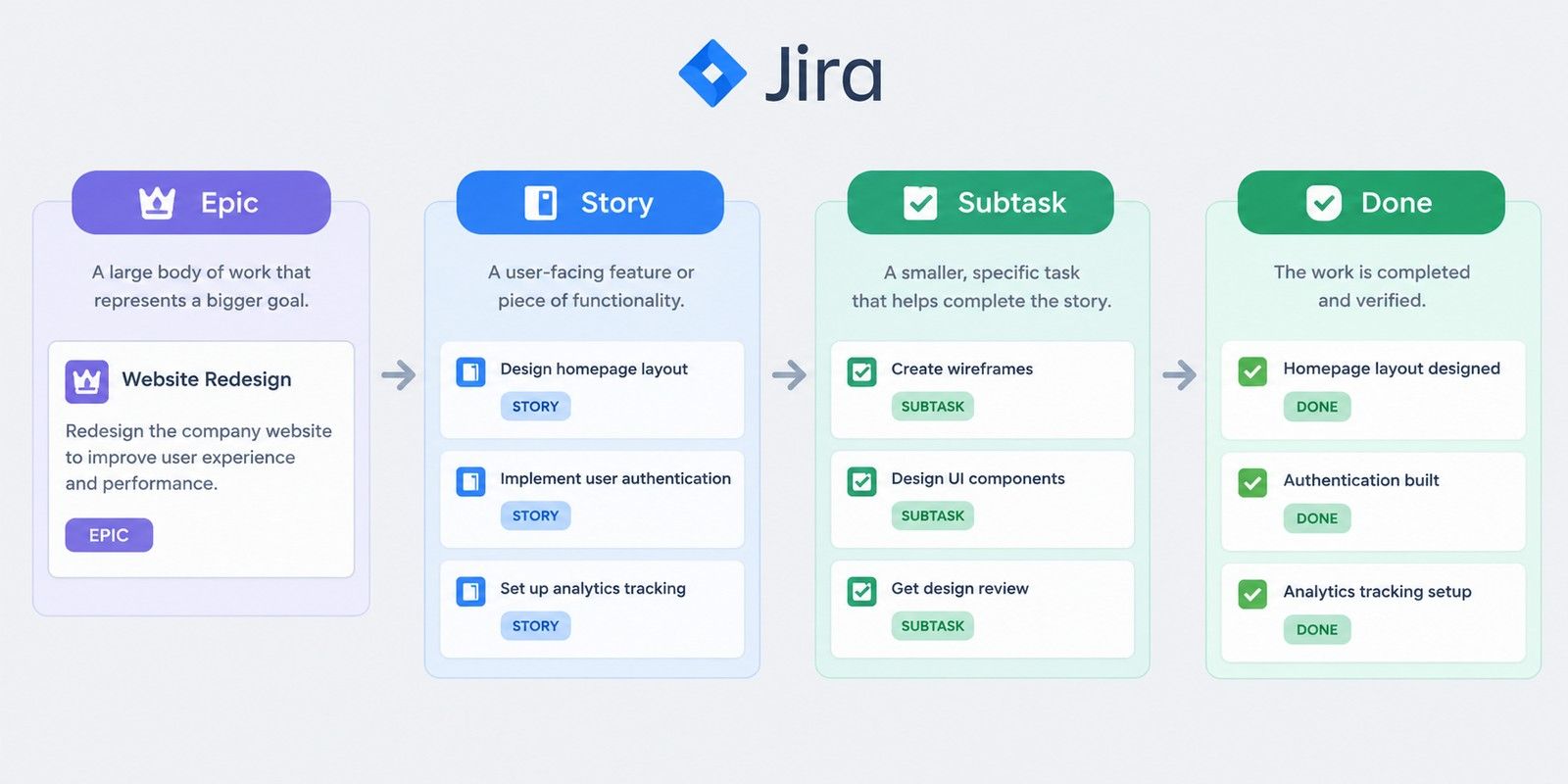
How Jira helps project managers
A project manager can take a large goal, called an epic in Jira, and break it down into smaller pieces of work, called stories. Then break those down further into subtasks that one person can complete in a set amount of time. This gives a project manager a clear view of how a big deliverable breaks down into actual assignable work.
Also, Jira lets a project manager create custom categories of work beyond just bugs and tasks, such as client requests, marketing deliverables, or operational tasks, each with its own fields to fill in. It also connects with other tools a project team might already use, such as Confluence for documentation, Slack for communication, and various reporting or automation tools.
Common criticisms from a project management perspective
Also read: Top 10 Types of Project Management Organizational Structures
ClickUp is a cloud-based tool built around one main pitch: instead of a project manager and their team juggling five or six different apps, everything lives in one place. From a project management standpoint, it covers task tracking, documentation, goal tracking, and reporting all in one place.
Core Features of ClickUp:
The following are some of the main features of ClickUp:
A project manager can create a task, assign it to someone, attach a checklist or subtasks under it. set dependencies so one task cannot start until another finishes, and define custom statuses beyond the usual To Do and Done, for example Waiting on Client or In Review.
This gives a project manager fine control over exactly how work is supposed to flow.
Use a list view for a simple task list, a board view to manage tasks in a Kanban-style workflow, a calendar view to plan schedules, a Gantt chart to track project timelines and dependencies, or a mind map to see how tasks are connected. The teams can choose the view that works best for them, and all the task information will be the same.
For higher level tracking, there are goals and dashboards, which a project manager can use to monitor OKRs, sprint progress, or build custom reports pulling from multiple projects at once. This is useful when a project manager needs to report status upward to leadership rather than just track day to day tasks.
ClickUp markets itself as a replacement for running several separate tools together, Asana, Trello, monday.com, Notion, and a dedicated time tracking app, all at once, with the pitch being one app instead of five. It tends to be popular with startups, marketing teams, agencies, and software teams that plan work in sprints.
Microsoft planner is a task management tool built into the Microsoft 365 suite. It is best for lightweight task tracking, also it uses Kanban board to organize tasks into buckets (phases, categories, stages and tasks). Then, move those buckets as the tasks move.
Core PM Features of Microsoft Planner
Where Microsoft Planner Falls Short for Heavier PM Work
Also read: Kanban Vs Scrum: Difference Between Kanban and Scrum
Trello is a project and task management tool built around the Kanban board system, visual boards with lists and cards that you move around to track progress.
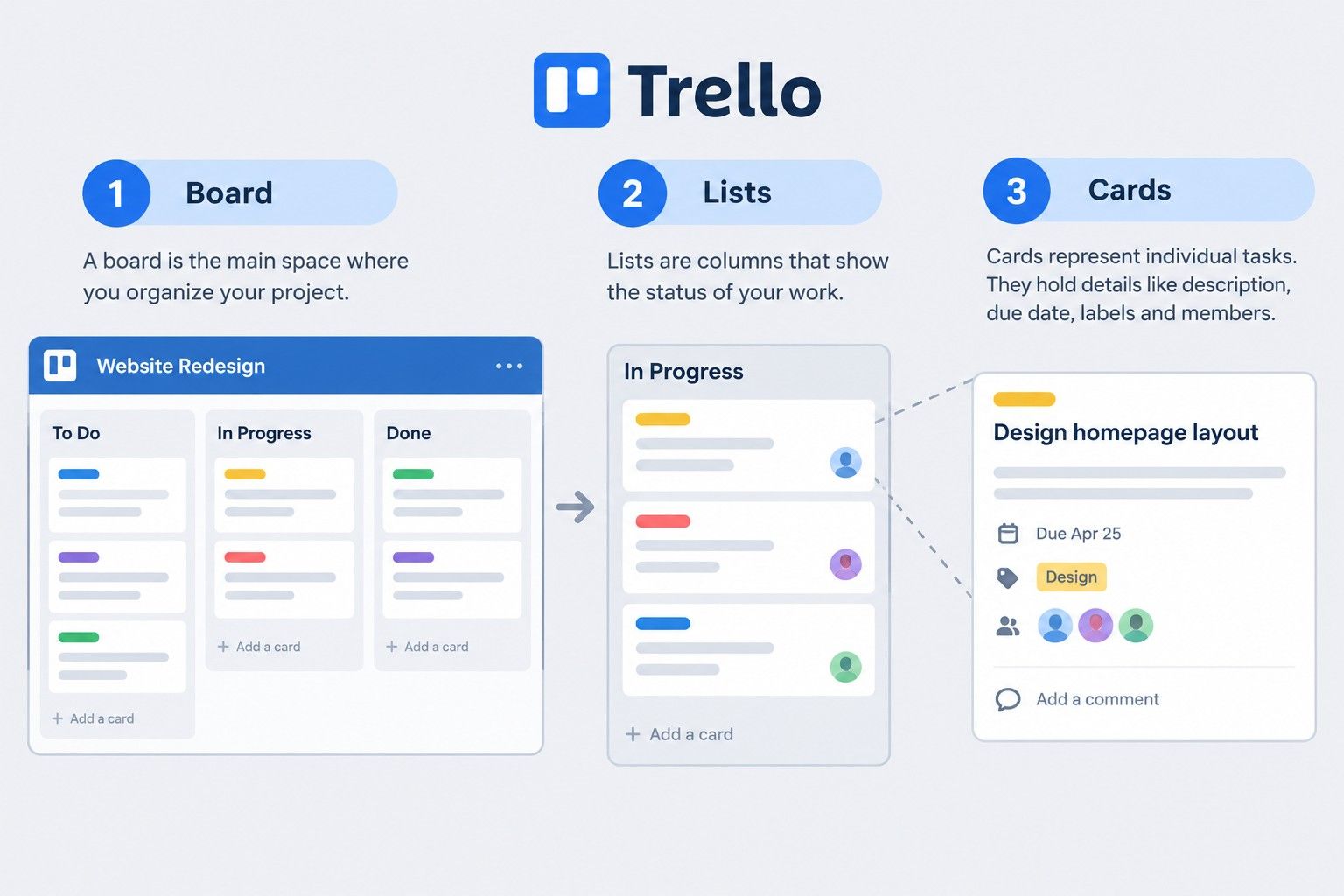
Core Structure of Trello
Why Use Trello for Project Management
Zoho Projects is a cloud-based project management tool from Zoho Corporation, aimed at helping teams plan, track, and collaborate on work. Here's a rundown of what it offers:
Key Features of Zoho Projects
Ready to build AI-powered software solutions? Explore the Executive Post Graduate Certificate in AI-Native Software Engineering and develop practical skills to stay ahead in modern software development.
Not every team fits the general tools mentioned above. Some industries need specific things, like phase-based billing, site tracking, or procurement management, that generic platforms weren't built for.
Project Management Software for Startups
Best Project Management Software for Architects
Best Project Management Software for Civil Engineers
Best Project Management Software for Interior Designers
Best Project Management Software for Marketing
Also read: 23+ Best Agile Project Management Tools for 2025: Features and Benefits
There is no one-size-fits-all pick, it depends on your team's workflow and size. Jira suits software teams running sprints. Asana and Monday work well for visual, cross-functional projects. Microsoft users can use Planner for basic tracking, and for smaller teams Trello works fine. ClickUp fits teams who are looking for an all-in-one tool, and Zoho Projects works best for those already using Zoho products.
Since most tools offer a free plan or trial, the best approach is to test two or three on a real project before committing.
Ready to start your journey? Book a free consultation with upGrad today to find the best path for your career.
Yes, many tools work well for solo users managing multiple projects or clients. Simpler platforms are usually enough for individual use, while advanced features like resource allocation and team reporting matter more for larger groups.
Several platforms offer free plans, though limits vary by provider. These usually work fine for small teams or single projects, but features like advanced automation, reporting, and storage are typically restricted until upgrading to a paid tier.
Ease of use depends on interface design and how much customization is available upfront. Tools with simple boards and minimal setup are quicker to learn, while platforms built around complex workflows usually take longer to master.
It depends on budget and complexity needs. Small businesses often prefer affordable tools with simple setup and basic task tracking, while those needing client billing or detailed budgeting may need something with more built-in business features.
Rollouts often fail due to poor adoption rather than the tool itself. Teams that skip training, keep using old habits like spreadsheets, or pick a tool that doesn't match their workflow usually struggle to stick with it.
There's no fixed number, but most teams find paid plans worthwhile once collaboration, reporting, or automation needs grow. Very small teams or solo users can often manage fine on free plans for longer.
Yes, most tools support managing several projects simultaneously through dashboards or portfolio views. This is especially useful for teams juggling overlapping deadlines, since it offers visibility across projects instead of tracking each one separately.
Task management software focuses on individual to-do items and deadlines. Project management software includes broader features like timelines, dependencies, resource allocation, and reporting, supporting entire projects rather than isolated tasks.
Most modern tools support remote work through real-time updates, comments, and notifications. The bigger factor for remote success is usually team habits and consistency, rather than any single platform having a clear advantage.
Pricing usually ranges from free to around 15 dollars per user monthly for small and mid-sized teams. Enterprise plans with advanced security, permissions, and support features generally cost more depending on team size and requirements.
Yes, many tools are designed with simple, visual interfaces that don't require technical skills. More complex platforms built around agile methods or custom workflows may need some learning before becoming fully comfortable to use.
1339 articles published
We are an online education platform providing industry-relevant programs for professionals, designed and delivered in collaboration with world-class faculty and businesses. Merging the latest technolo...
Get Free Consultation
By submitting, I accept the T&C and
Privacy Policy
Top Resources
Certification
3 Months
Certification
6 Months
O.P. Jindal Global University
Masters in International Accounting and Finance (Accredited by ACCA, UK)Master's Degree
12 Months