Top AI Tools for Students That Actually Make a Difference
By Sriram
Updated on Jun 05, 2026 | 7 min read | 1.89K+ views
Share:

All courses
Certifications
More
By Sriram
Updated on Jun 05, 2026 | 7 min read | 1.89K+ views
Share:
Table of Contents
AI tools for students are apps that use artificial intelligence to support learning, research, writing, organisation, coding, and exam prep. They help complete tasks faster, from summarising content to solving problems, making studying more efficient and manageable.
This blog covers the best AI tools for students across different study needs. You'll find clear comparisons, honest trade-offs, and practical advice on what to use and when.
Explore upGrad's Data Science, AI, and Machine Learning programs to develop practical skills in large language models (LLMs), generative AI, machine learning, model evaluation, NLP, and data-driven decision-making.
Popular AI Programs
AI tools for students have really changed the way we learn, do research, write, and manage our schoolwork. Things that used to take time can now be done in just a few minutes with the right tool. For example, AI tools can help us summarize chapters or solve coding problems. This makes AI a helpful study companion for students in schools, colleges, and universities.
The tool that is right for you depends on what's holding you back. A medical student who is getting ready for board exams needs more tools than someone who is writing a history dissertation. So, you should first figure out what is slowing you down, then choose an AI tool that can help you with that problem. AI tools for students are really useful, it can make a big difference in how we do our schoolwork.
A few things worth knowing before you start:
Here's a breakdown of tools based on what students actually struggle with.
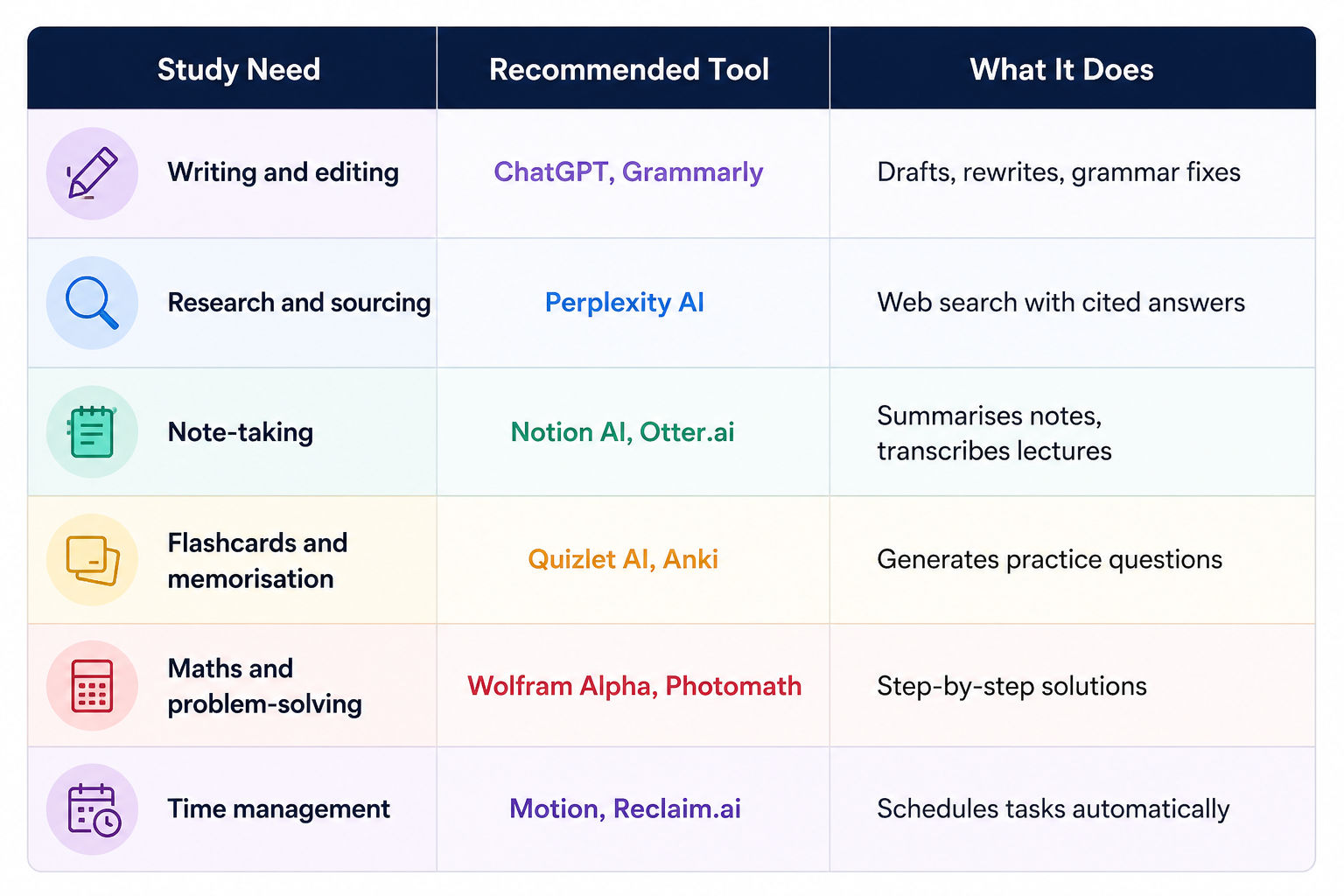
Don't build your entire workflow around one platform. Mix and match based on the task.
Free Courses
When you are looking for an answer, it can take time to search through many websites. With AI, a student can get a clear explanation, some references, a few examples and even some questions to think about afterwards, all of this within seconds. This does not mean that Artificial Intelligence replaces the process of learning for a student.
Writing is where most students first try AI. Tools like ChatGPT are the most used here. You can use it to outline an argument, rewrite a clunky paragraph, or get unstuck when you don't know how to start.
What works well:
Do read: GPT-4 vs ChatGPT: What’s the Difference?
Grammarly plugs into your browser and most writing apps. It catches grammar issues, flags unclear sentences, and suggests tone adjustments. The paid version gives better rewriting suggestions. The free version is still useful for basic proofreading.
Perplexity AI answers questions like a search engine, but gives you cited sources in the response. That's genuinely useful when you're doing research and need to verify claims quickly.
Otter.ai. writes down what people say while they are talking. You start the app and press record. It makes a written copy of what was said, and it even says who said it. After the class, you can look for words or ask Otter.ai to tell you what a part of the class was about. Otter.ai is really helpful for students who have a lot of classes to go to.
Notion AI is a tool that works inside Notion, which students use to keep themselves organised. If you have some notes that're hard to understand, you can pick out a part of them and ask Notion AI to make them clearer. Notion AI can also help you make a study plan that's easy to follow or turn a list of bullet points into something that is easy to read.
There are tools like Napkin AI or Whimsical AI that can take your notes and turn them into pictures and charts. This is really helpful when you are trying to understand something that's complicated, like a big process or system. Notion AI and these other tools can make your notes a lot easier to understand.
Quizlet has added a feature that uses artificial intelligence to create flashcards for you. You can just paste your notes or upload a document, and the AI then makes a set of questions and answers for you. This is really helpful because it saves time compared to making flashcards by hand. It works well for subjects that have a lot of vocabulary. You can use it to study more efficiently.
Khanmigo is an AI tutor from Khan Academy that uses intelligence. It does not just provide you with the answers. Khanmigo takes you through the process of reasoning and asks you questions to help guide you, and gives you a push towards finding the solution. This way of teaching, where you have to think about the answers, really helps you understand things, not just remember them for a time.
Must read: The Ultimate Guide to Gen AI Tools for Businesses and Creators
Wolfram Alpha is really useful for subjects like maths, physics and those that involve a lot of data. It can solve equations for you, show you how it got to the answer and convert units for you. Unlike some tools, Wolfram Alpha does not just make guesses when it comes to numbers. The answers it gives you are exact. You can check them to make sure they are correct.
Photomath is the mobile option for maths. Point your camera at a problem, and it reads and solves it. Useful for checking homework. Not a substitute for learning the method.
Also read: DeepSeek vs ChatGPT vs Gemini: What's The Difference and Which is Better
Motion and Reclaim.ai are AI-powered scheduling tools. You add your tasks, deadlines, and available hours. The tool makes your schedule for you and changes it when needed. Students with lots of assignments and part-time jobs can use this feature. It helps them keep track of everything.
Todoist has an AI assistant that can break large goals into smaller tasks. "Finish dissertation chapter 3 by Friday" becomes a list of daily actions you can actually execute.
Also read: 5 Significant Benefits of Artificial Intelligence [Deep Analysis]
AI Courses to upskill
Explore Artificial Intelligence Courses for Career Progression
AI offers clear advantages, but relying on it blindly creates problems.
Challenge/Consideration |
What Students Should Know |
| Accuracy Issues | AI tools can generate answers that sound correct but contain factual mistakes. Always verify important information using textbooks, academic journals, or trusted sources before using it in assignments. |
| Reduced Critical Thinking | Relying entirely on AI can weaken problem-solving and analytical skills. AI should support learning, not replace independent thinking and practice. |
| Academic Integrity Concerns | Many institutions have rules regarding AI-assisted work. Using AI to brainstorm ideas or improve writing is often acceptable, but submitting AI-generated assignments may violate academic policies. |
| Professor and Course Context Limitations | AI tools don't understand your professor's expectations, grading rubric, or course-specific requirements. Review and adapt AI-generated content before submission. |
| Privacy Considerations | Uploading personal information, research data, or unpublished work to public AI platforms may create privacy risks. Read platform policies carefully before sharing sensitive content. |
| Plagiarism Risks | AI-generated text may unintentionally resemble existing content. Students should edit, fact-check, and rewrite outputs to maintain originality and avoid plagiarism concerns. |
| Note-Taking Tool Limitations | AI-generated summaries can miss important details or context. Students should review notes carefully and not depend entirely on automated summaries. |
| Recording Restrictions | Some note-taking tools require lecture recordings, but not all instructors allow recording in class. Always seek permission before using such features. |
| Free Plan Restrictions | Many AI tools offer limited features on free plans. For example, transcription tools may restrict recording minutes, affecting long-term academic use. |
| Exam Preparation Limitations | AI can generate quizzes and revision material, but it cannot replace consistent study habits. Effective exam preparation still depends on regular practice and spaced repetition. |
| Time Management Challenges | Scheduling tools only work when students regularly update tasks and deadlines. AI can organize plans, but maintaining discipline remains the student's responsibility. |
Must read : Applications of Artificial Intelligence and Its Impact
AI in our education system is moving beyond chatbots and writing assistants. We're already seeing tools that create personalised learning paths, identify knowledge gaps, and adapt study material based on performance. Future systems will likely function more like digital tutors that understand how individual students learn.
The shift won't replace teachers. Instead, it will help students access explanations, feedback, and learning support whenever they need it. Those who learn how to use AI effectively today will likely gain an advantage in both academics and future careers.
AI tools for students are no longer optional productivity apps. They're becoming part of the modern learning process. The key is using them thoughtfully, verifying information, and balancing AI assistance with genuine understanding.
AI tools for students work when you use them with intention. They remove friction from writing, research, note-taking, and exam prep. They don't remove the need for you to think, engage, and decide.
The best approach is to pick one or two tools that solve your biggest current problem. Get comfortable with those before adding more. Start with Perplexity for research, ChatGPT for writing support, and Quizlet for revision. Build from there.
The students who benefit most from AI aren't the ones using the most tools. They're the ones using the right tools at the right time.
Ready to start your journey? Book a free consultation with upGrad today to find the best path for your career.
Most popular AI tools offer a free version with basic features. Tools like ChatGPT, Quizlet, Perplexity AI, and Otter.ai all have usable free plans. Paid upgrades unlock advanced features, but most students can start without spending anything. Check whether your university offers institutional access before paying.
No. AI tools aren't permitted during formal exams or supervised assessments. They're meant to support your learning and preparation beforehand. Using AI during an exam counts as academic misconduct in most institutions. Always follow your university's rules on permitted materials.
They can, but it depends on how you use them. Students who use AI tools to understand concepts, organise their study schedule, and improve their writing tend to see better outcomes. Students who use AI to bypass thinking or skip learning rarely benefit in the long run because the knowledge gap shows up in exams.
ChatGPT is widely used for essay writing support. It helps with outlines, rewrites, and getting unstuck. Grammarly is better for polishing finished drafts. Use ChatGPT to develop your ideas and Grammarly to clean up the language. Neither should be writing the essay for you.
For academic research, Perplexity AI has a clear advantage because it provides source citations alongside answers. That makes it easier to verify facts quickly. Google is still better for finding specific websites or resources. For initial research and quick fact-checking, Perplexity is worth using.
Yes, several tools are specifically helpful. Otter.ai helps with transcription for students who find note-taking difficult. Text-to-speech tools and AI summarisers can support students with dyslexia. Grammarly helps with written expression. Always discuss specific accommodations with your institution's disability support team as well.
Don't submit AI-generated content as your own original work. Use AI to help you understand, plan, and improve your writing. Always disclose AI use if your institution requires it. Run your work through your university's plagiarism checker before submission. Check your course guidelines before using any AI tool for assessed work.
Wolfram Alpha and Photomath are the top choices for maths and science. Khanmigo supports physics, chemistry, and maths tutoring. For coding, GitHub Copilot and ChatGPT are widely used. Wolfram Alpha is the most reliable because it computes rather than generates, so the output is accurate and verifiable.
Yes. Khanmigo is built for student learning. Quizlet AI is made for studying and revision. SciSpace (formerly Typeset) is designed for reading and analysing research papers. These purpose-built tools are often more structured than general AI tools like ChatGPT, which makes them easier to use in a study context.
It varies by student and subject. Students using AI for note summarisation, essay drafting, and scheduling report saving anywhere from 3 to 8 hours per week. The actual time saved depends on how efficiently you've set up your workflow and whether you're using the right tool for each task.
That's a fair concern. If you use AI as a crutch instead of a tool, your ability to think independently, write clearly, and solve problems can weaken. The best use of AI is to speed up tasks you already know how to do, or to learn concepts you don't understand yet. Passive consumption of AI output without active engagement tends to slow down skill development.
698 articles published
Sriram K is a Senior SEO Executive with a B.Tech in Information Technology from Dr. M.G.R. Educational and Research Institute, Chennai. With over a decade of experience in digital marketing, he specia...
Speak with AI & ML expert
By submitting, I accept the T&C and
Privacy Policy
Top Resources
Master's Degree
18 Months
Executive Diploma
12 Months
IIIT Bangalore
Executive Programme in Generative AI & Agentic AI for LeadersIndia’s #1 Tech University
Dual Certification
5 Months