MLflow Tutorial: A Complete Guide to ML Experiment Tracking and Model Management
By Rahul Singh
Updated on Jun 15, 2026 | 11 min read | 4.59K+ views
Share:

All courses
Certifications
More
By Rahul Singh
Updated on Jun 15, 2026 | 11 min read | 4.59K+ views
Share:
Table of Contents
If you are building machine learning models, you already know how messy things get. You run 50 experiments, tweak hyperparameters, try different datasets, and suddenly you have no idea which run gave you the best accuracy. That is exactly the problem MLflow solves. It gives you a clean, structured way to track everything that happens during your ML workflow.
In this MLflow tutorial, you will learn what MLflow is, how to set it up, how to track experiments using Python, how to manage and register models, and how to serve them for real-world use. Whether you are just getting started or want to go deeper into production workflows, this guide covers it all with clear Python examples along the way.
Build practical AI and ML skills with upGrad’s Artificial Intelligence Courses. Learn machine learning, generative AI, and emerging technologies while working on real-world projects.
Popular AI Programs
MLflow is an open-source platform built to manage the full machine learning lifecycle. It was created by Databricks and released in 2018. Today it is one of the most widely used tools for ML experiment tracking.
Here is what makes it worth your time:
The core problem it solves: Without MLflow, you end up with a folder full of files named model_v2_final_FINAL.pkl and no memory of what settings produced it. MLflow replaces that chaos with a structured, searchable record of every experiment you run.
Component |
What It Does |
| MLflow Tracking | Logs parameters, metrics, and artifacts per run |
| MLflow Projects | Packages ML code for reproducible runs |
| MLflow Models | Standardizes model packaging across frameworks |
| MLflow Model Registry | Centralized store to version and manage models |
You do not need to use all four at once. Most people start with Tracking and add the rest as their workflow grows.
Also Read: Docker Architecture Overview & Docker Components [For Beginners]
Free Courses
Setting up MLflow is straightforward in this MLflow tutorial. You need Python 3.7 or above and pip.
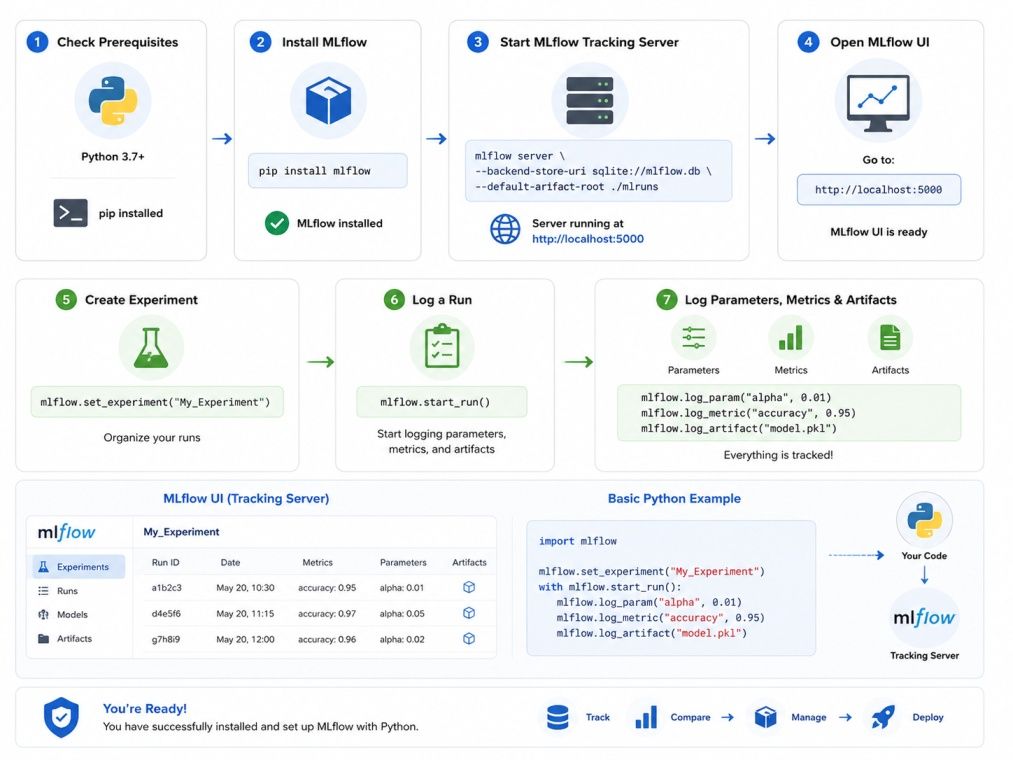
pip install mlflowTo verify the installation:
mlflow --versionYou should see something like mlflow, version 2.x.x.
Once installed, you can launch the tracking UI locally:
mlflow uiThis starts a local server at http://127.0.0.1:5000. Open it in your browser and you will see the MLflow dashboard where all your experiment runs will appear.
That is it. No databases, no cloud setup needed to get started. Everything is stored locally by default in an mlruns folder in your working directory.
Also Read: Python Libraries Explained: List of Important Libraries
AI Courses to upskill
Explore Artificial Intelligence Courses for Career Progression
This is the core skill. Once you understand MLflow tracking, everything else builds on top of it. Let us walk through a complete MLflow tutorial with Python example using scikit-learn.
import mlflow
import mlflow.sklearn
from sklearn.linear_model import LogisticRegression
from sklearn.datasets import load_iris
from sklearn.model_selection import train_test_split
from sklearn.metrics import accuracy_score

# Load data
data = load_iris()
X_train, X_test, y_train, y_test = train_test_split(
   data.data, data.target, test_size=0.2, random_state=42
)

# Start an MLflow experiment
mlflow.set_experiment("iris-classification")

with mlflow.start_run():
   # Define and train model
   C = 0.1
   max_iter = 200
   model = LogisticRegression(C=C, max_iter=max_iter)
   model.fit(X_train, y_train)

   # Evaluate
   predictions = model.predict(X_test)
   accuracy = accuracy_score(y_test, predictions)

   # Log to MLflow
   mlflow.log_param("C", C)
   mlflow.log_param("max_iter", max_iter)
   mlflow.log_metric("accuracy", accuracy)
   mlflow.sklearn.log_model(model, "logistic-regression-model")

print(f"Accuracy: {accuracy:.4f}")Function |
Purpose |
| mlflow.set_experiment() | Names the experiment group |
| mlflow.start_run() | Opens a new run to log into |
| mlflow.log_param() | Saves a single hyperparameter |
| mlflow.log_metric() | Saves a performance metric |
| mlflow.sklearn.log_model() | Saves the trained model artifact |
After running this script, open http://127.0.0.1:5000 and you will see your run listed under the iris-classification experiment. You can click into it to see all the logged values.
Instead of calling log_param and log_metric one by one, you can batch them:
mlflow.log_params({"C": 0.1, "max_iter": 200, "solver": "lbfgs"})
mlflow.log_metrics({"accuracy": 0.9667, "f1_score": 0.9660})
This keeps your code cleaner, especially when you have many hyperparameters to track.
You can save any file as an artifact, like plots or CSV outputs:
import matplotlib.pyplot as plt

# Save a plot
plt.plot([1, 2, 3], [0.8, 0.85, 0.9])
plt.title("Accuracy over epochs")
plt.savefig("accuracy_plot.png")

mlflow.log_artifact("accuracy_plot.png")
This uploads the file to your MLflow run. You can view it directly in the UI.
Also Read: Enhance Your Python Skills: 10 Python Projects You Need to Try!
Once you have tracked a few runs and found a model you like, the next step in this MLflow tutorial is registering it. The MLflow Model Registry gives you a structured way to version models and track their status through a lifecycle.
After logging a model in a run, you can register it like this:
model_uri = f"runs:/{run_id}/logistic-regression-model"
mlflow.register_model(model_uri, "IrisClassifier")
Or do it directly inside your run:
with mlflow.start_run() as run:
   mlflow.sklearn.log_model(
       model,
       "logistic-regression-model",
       registered_model_name="IrisClassifier"
)The registry lets you assign a stage to each model version:
Stage |
Meaning |
| None | Freshly registered, not reviewed |
| Staging | Being tested before production |
| Production | Live and serving predictions |
| Archived | Retired but kept for reference |
You can transition between stages using the UI or programmatically:
from mlflow.tracking import MlflowClient

client = MlflowClient()
client.transition_model_version_stage(
   name="IrisClassifier",
   version=1,
   stage="Production"
)
This is especially useful in team environments where multiple people are developing and reviewing models before any of them go live.
Also Read: What Does a Machine Learning Engineer Do? Roles, Skills, Salaries, and More
Tracking and registering models is only part of the story in this MLflow tutorial. At some point you need to serve predictions. MLflow makes this surprisingly easy.
Once a model is logged, you can serve it with a single command:
mlflow models serve -m "models:/IrisClassifier/Production" -p 5001This starts a local REST server on port 5001. You can hit it with a POST request:
curl -X POST http://127.0.0.1:5001/invocations \
 -H "Content-Type: application/json" \
 -d '{"dataframe_split": {"columns": ["f1", "f2", "f3", "f4"], "data": [[5.1, 3.5, 1.4, 0.2]]}}'
The API returns the prediction as a JSON response.
MLflow's pyfunc flavor lets you load any registered model without knowing which framework it was saved with:
import mlflow.pyfunc

model = mlflow.pyfunc.load_model("models:/IrisClassifier/Production")
predictions = model.predict(X_test)
This is powerful because your serving code does not need to change even if the underlying model framework changes from scikit-learn to XGBoost or PyTorch.
Platform |
How |
| Docker | mlflow models build-docker |
| AWS SageMaker | mlflow.sagemaker.deploy() |
| Azure ML | Via MLflow plugin |
| Kubernetes | Custom deployment with model URI |
For production setups, you typically pair MLflow with a remote tracking server (using a database backend like PostgreSQL) and cloud storage (like S3 or Azure Blob) for artifacts.
Also Read: AI/ML Engineer Job Description
One of the most useful features in MLflow is autologging. With a single line, MLflow automatically logs parameters, metrics, and models for supported libraries.
import mlflow
import mlflow.sklearn
from sklearn.ensemble import RandomForestClassifier
from sklearn.datasets import load_iris
from sklearn.model_selection import train_test_split

mlflow.sklearn.autolog()  # This one line does the heavy lifting

data = load_iris()
X_train, X_test, y_train, y_test = train_test_split(
   data.data, data.target, test_size=0.2, random_state=42
)

with mlflow.start_run():
   model = RandomForestClassifier(n_estimators=100, max_depth=3)
   model.fit(X_train, y_train)
MLflow will automatically log:
Autologging works with scikit-learn, TensorFlow, Keras, PyTorch Lightning, XGBoost, LightGBM, and Spark MLlib.
Also Read: Understanding Machine Learning Boosting: Complete Working Explained for 2025
MLflow takes the guesswork out of machine learning development. You stop wondering which model ran with which settings and start building a proper record of your work. This MLflow tutorial covered the full picture: from installation and basic tracking to model registration, deployment, and autologging.
The best way to learn is to run your next experiment inside MLflow. Even if you are just doing a quick test, log it. Over time that habit builds into a complete, searchable history of your ML projects.
If you want to go further, explore upGrad’s Artificial Intelligence Courses and gain hands-on skills in MLflow.
Want personalized guidance on Machine Learning and upskilling? Speak with an expert for a free 1:1 counselling session today.
MLflow is used to track machine learning experiments, log parameters and metrics, manage trained models through versioning, and deploy models to various platforms. It brings structure and reproducibility to the otherwise messy process of iterative ML development.
Yes, MLflow is fully open-source and free to use under the Apache 2.0 license. You can run it locally without any cost. Managed versions of MLflow are available on platforms like Databricks, which may have associated pricing depending on the tier.
Absolutely. MLflow supports TensorFlow, Keras, and PyTorch natively. You can use autologging with these frameworks or manually log metrics and models using mlflow.tensorflow.log_model() or mlflow.pytorch.log_model().
TensorBoard is primarily built for visualizing neural network training and is tightly coupled with TensorFlow. MLflow is framework-agnostic, supports model versioning through its registry, and handles deployment. MLflow is a broader MLOps tool while TensorBoard is a training visualizer.
The MLflow Model Registry is a centralized component where you can store, version, and manage trained models. It lets you assign lifecycle stages (Staging, Production, Archived) to model versions and collaborate with teammates on model review and promotion.
You can use mlflow.pyfunc.PythonModel to wrap any custom Python class as an MLflow model. Define a predict method in your class, wrap it with pyfunc, and log it like any other model. This gives you full flexibility beyond standard frameworks.
Yes. MLflow runs entirely locally by default. The tracking server, UI, and artifact store all run on your machine. You only need internet access if you configure a remote tracking server or use cloud storage for artifacts.
MLflow supports SQLite, MySQL, PostgreSQL, and Microsoft SQL Server as backend stores for the tracking server. SQLite is fine for local use. For team or production setups, PostgreSQL is the most commonly used option.
In the MLflow UI, select the runs you want to compare by checking their boxes, then click the "Compare" button. You will see a side-by-side view of all logged parameters and metrics, along with parallel coordinate plots and scatter plots for visual comparison.
Autologging is a feature that automatically captures parameters, metrics, and models without you writing any log statements. It currently supports scikit-learn, TensorFlow, Keras, PyTorch Lightning, XGBoost, LightGBM, Spark MLlib, and Statsmodels.
Yes. MLflow integrates well with CI/CD tools like GitHub Actions, Jenkins, and GitLab CI. You can trigger MLflow runs as part of automated training jobs, register models programmatically, and use the MLflow API to promote models to production only when evaluation thresholds are met.
98 articles published
Rahul Singh is an Associate Content Writer at upGrad, with a strong interest in Data Science, Machine Learning, and Artificial Intelligence. He combines technical development skills with data-driven s...
Speak with AI & ML expert
By submitting, I accept the T&C and
Privacy Policy
Top Resources
Master's Degree
18 Months
Executive Diploma
12 Months
IIIT Bangalore
Executive Programme in Generative AI & Agentic AI for LeadersIndia’s #1 Tech University
Dual Certification
5 Months