Layered Architecture of Cloud Computing: A Complete Guide to How the Cloud Is Built
By upGrad
Updated on Sep 28, 2026 | 9 min read | 2.36K+ views
Share:

All courses
Certifications
More
By upGrad
Updated on Sep 28, 2026 | 9 min read | 2.36K+ views
Share:
Table of Contents
Key Highlights
Cloud layers are the base that every AI model runs on. Build on that knowledge with upGrad's Artificial Intelligence courses in India and learn how to design, train, and launch real AI projects.
Popular AI Programs
The layered architecture of cloud computing is a way of building the cloud in stacked levels. Each layer uses the one below it and gives its services to the one above it. Every layer has its own job, such as providing hardware, sharing resources, offering development tools, or delivering ready-to-use apps.
Think of it like a building. The people on the top floor never see the foundation, pipes, or wiring, but they all depend on it. Similarly the cloud works, when you open a cloud app, you never see the servers. But your request still passes through several layers before the result shows up on your screen.
Why Cloud Computing Is Built in Layers
Must read: Cloud Computing Architecture: A Comprehensive Guide For Beginners
Free Courses
Below are the five layers of cloud computing diagram and detailed explanation of each layer:
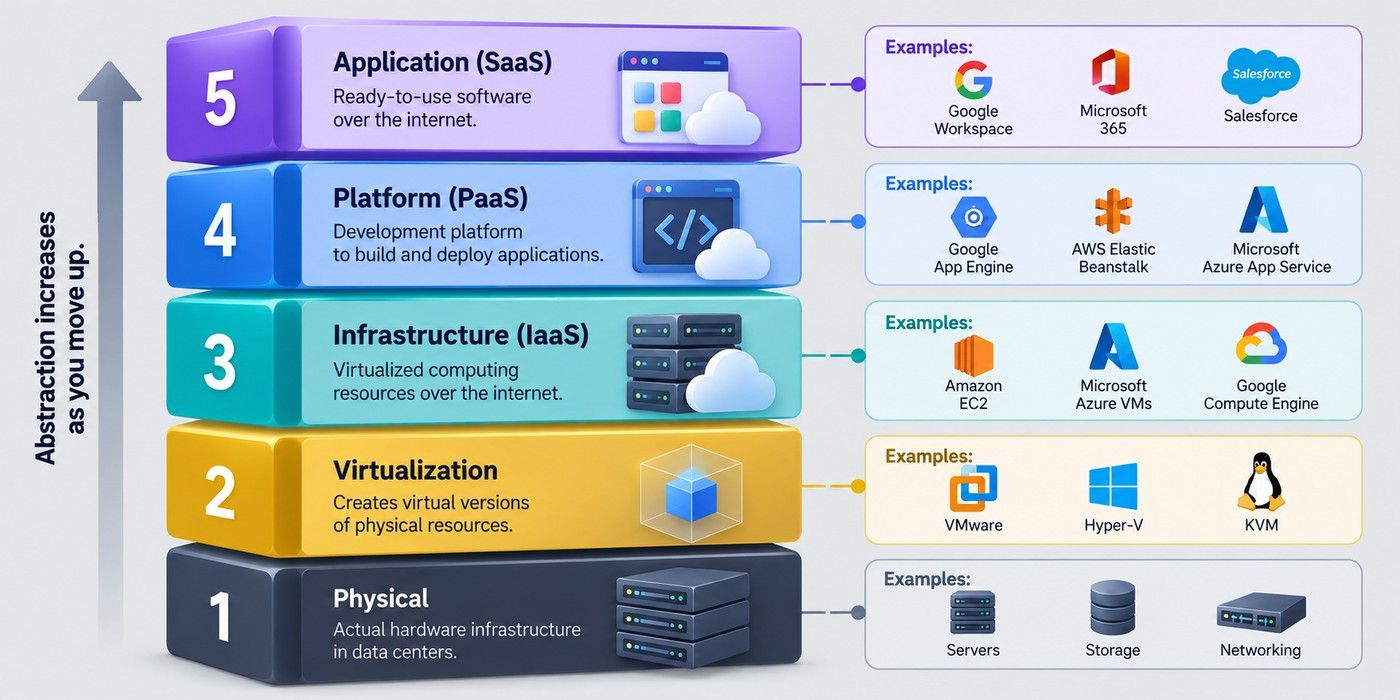
This is where the cloud actually lives. It is a network of data centers spread across the world.
Each data center holds thousands of servers. Also, it holds storage drives, switches, routers, and cables. The backup generators and batteries keep power steady and cooling systems stop the machines from overheating.
The provider owns and runs all of it. Customers never see this layer. They only see the results.
One physical server is far more powerful than most apps need. Running one app on it wastes capacity. Virtualization solves this problem.
A hypervisor is a software that runs on a physical server. It divides that one server into many smaller virtual computers, called virtual machines (VMs). Each VM works like a separate computer and it has its own operating system, memory, and storage.
Containers also work at this level. They are lighter than VMs. They share the host's operating system instead of running their own. This makes them start in seconds. Docker builds containers. Kubernetes manages them at scale.
This is the first layer that customers can use directly. You rent virtual servers, storage, and networks. You get them through a dashboard or an API.
You are in charge of the software side. You pick the operating system. You install and patch your applications. You set the firewall rules. You manage backups. The provider looks after the hardware and the hypervisor. That is the dividing line.
IaaS gives you the most control of any customer-facing layer. It also gives you the most work, but for that you need skilled staff. Some of IaaS benefits are:
Billing is usually per hour or per second. You pay for what you run. You stop paying when you shut it down.
PaaS is built for developers. You write the code. The platform runs it.
The provider manages the operating system, runtime, patches, and load balancing. It also handles scaling. If traffic grows, the platform adds capacity for you. You never log in to a server.
Most platforms include extra tools:
Teams ship faster because they skip the server work. A small team can launch an app in days.
This is the layer most people know. It is software that you open in a browser or a mobile app.
There is nothing to install. There is nothing to maintain. The provider handles updates, security patches, backups, and uptime.
You manage only your own side. That means user accounts, permissions, data, and settings.
Pricing is usually per user, per month. You can add or remove users at any time. This makes costs easy to predict.
SaaS is the fastest way to start using a tool. A team can sign up and begin work the same day. The limit is customization. You get the features the vendor built. You cannot change the code.
Cloud is the base, and AI is what runs on top of it. Our Executive Programme in Generative AI & Agentic AI for Leaders is designed for managers and leaders who want to lead AI projects and make smarter technology decisions.
AI Courses to upskill
Explore Artificial Intelligence Courses for Career Progression
The layers do not work alone. Each one depends on the layer below it and serves the layer above it. A single click in a cloud app touches all of them.
Every layer exposes a simple interface to the layer above. The upper layer does not need to know how the lower one works. It only needs to know how to ask for resources. This is called abstraction. It is the reason cloud services can grow without breaking.
Take a real example. You open Gmail and click "Send." Here is what happens behind the screen:
The response then travels back up the same path. You see "Message sent." The whole trip takes a fraction of a second. Resources flow upward. Requests flow downward.
Each layer has one main job. It also has a clear owner.
Notice the pattern. As you move up the stack, the provider takes on more work. The customer takes on less. This is called the shared responsibility model.
The model also applies to security. The provider secures the hardware and the hypervisor. The customer secures their own data, access controls, and configuration. Many cloud breaches happen because customers misconfigure their side, not because the provider fails.
This is also where the "7 layers of cloud computing" view fits. Two extra pieces sit outside the five core layers:
Also read: Top 9 Cloud Computing Examples
The layered design is the reason a cloud grows, stays online and affordable. Below are some of the benefits of layered architecture of cloud computing:
A provider can replace old hardware or update a hypervisor without touching customer apps. Each layer talks to the next through a fixed interface. As long as that interface stays the same, changes underneath go unnoticed.
Teams also find faults faster. A problem can be traced to one layer instead of the whole system.
Security controls can be placed at each level. Examples include physical access control in data centers, isolation between virtual machines, network firewalls, and user permissions in apps.
This is called defense in depth. If one control fails, the next layer still protects the data.
Virtualization lets many customers share the same hardware. Servers stay busy instead of idle. The provider spends less per customer, and prices come down.
Customers also pay only for the layer they use. A team on SaaS does not pay for server management. A team on IaaS does not pay for software it never uses.
Developers do not build servers, networks, or databases from scratch. They use what the lower layers already provide. This cuts launch time from months to days.
Layers use standard interfaces such as APIs. Tools from different vendors can connect more easily. This also helps teams that run workloads across more than one cloud.
Also read: 17+ Essential Cloud Computing Models You Should Know
No doubt, a layered architecture of cloud computing design has multiple benefits, but it also has challenges and limitations. And, these are as follows:
Security is split between the provider and the customer. The provider secures the hardware and hypervisor. The customer secures data, access, and settings.
Trouble starts when teams are unsure where their part begins. Open storage buckets, weak access rules, and unpatched servers cause many cloud breaches. Most of these are customer errors, not provider failures.
Each provider builds its own tools and APIs. The more you use them, the harder it is to leave.
This is most common at the platform layer. An app built around one provider's database or serverless tools may need a rewrite to run elsewhere. Moving large amounts of data also costs time and money.
Every layer adds a small delay, and virtualization uses some server power. Most apps never notice. High-frequency trading, real-time gaming, and heavy scientific workloads can.
More layers also make troubleshooting harder. A slow app could be caused by code, a network setting, a busy virtual machine, or a hardware fault. Customers cannot see the lower layers, so they rely on the provider's status pages and support.
Some laws require data to stay in a certain country. Teams must check where data is stored and how the provider meets standards such as GDPR, HIPAA, or India's DPDP Act.
How to reduce these risks
Also read: The Future of Cloud Computing: Future Trends and Scope
Conclusion
The layered architecture of cloud computing has five levels, physical, virtualization, infrastructure, platform, and application. Each layer does one job and hides its details from the layer above.
The bottom two layers stay with the provider, which you cannot buy or configure. The top three are sold as IaaS, PaaS, and SaaS. The higher you go, the less you manage. But you also get fewer options to customize, so you have less control. Pick your layer based on how much control you need, how skilled your team is, and how fast you must launch.
Have any questions about AI courses? Book a free consultation call with our experts and get personalized guidance on the right learning path for you.
No. The OSI model has seven layers and explains how data moves across a network. Cloud layers explain how computing resources are built and delivered. They solve different problems, though a cloud service uses both.
Three-tier architecture describes how one application is designed. Its tiers are presentation, logic, and data. Cloud layers describe the platform that the application runs on. A three-tier app can sit inside any cloud layer.
The front end is what the user touches. It includes the browser, mobile app, and client software. The back end is everything the provider runs, such as servers, storage, and management tools. The two connect over the internet.
Serverless, also called Function as a Service (FaaS), sits at the platform layer. You upload small pieces of code, and the provider runs them only when triggered. You pay per execution, not for idle servers. AWS Lambda and Google Cloud Functions are common examples.
Containers sit between the virtualization and platform layers. Some providers sell them as Containers as a Service (CaaS). You manage the containers, and the provider manages the cluster underneath. Amazon EKS and Google Kubernetes Engine are examples.
A Type 1 hypervisor runs directly on the hardware. It is faster and is used in cloud data centers. A Type 2 hypervisor runs on top of a normal operating system. It is common on personal computers for testing. VMware ESXi is Type 1. VirtualBox is Type 2.
Yes. The layers stay the same in every deployment model. What changes is who owns the hardware and who can access it. A private cloud gives one organization its own stack. A hybrid cloud links a private stack with a public one.
Not really. Every layer exists in every cloud service. You can choose which layer you work on, but the ones below it still run. A SaaS user never sees the physical layer, yet it is always there.
It extends it. Edge computing places small servers closer to users and devices. This cuts delay for tasks like video streaming and IoT sensors. The same layers apply, but the physical layer is spread across many more locations.
Yes. Providers now sell specialized services such as Database as a Service (DBaaS), Function as a Service (FaaS), and Backup as a Service. Together, they are called XaaS, or "anything as a service." Most of them sit at the platform or application layer.
It depends on the layer. Infrastructure roles need networking, Linux, and virtualization skills. Platform roles need coding, DevOps, and container knowledge. Application roles need product and security awareness. Certifications from AWS, Azure, and Google Cloud cover all three areas.
995 articles published
We are an online education platform providing industry-relevant programs for professionals, designed and delivered in collaboration with world-class faculty and businesses. Merging the latest technolo...
Speak with AI & ML expert
By submitting, I accept the T&C and
Privacy Policy
Top Resources
Master's Degree
18 Months
Executive Diploma
12 Months
IIIT Bangalore
Executive Programme in Generative AI & Agentic AI for LeadersIndia’s #1 Tech University
Dual Certification
5 Months