LinkedIn Ads for Beginners: Launch, Target and Optimize Your First Campaign
By upGrad
Updated on Nov 04, 2026 | 4 min read | 2.43K+ views
Share:

All courses
Certifications
More
By upGrad
Updated on Nov 04, 2026 | 4 min read | 2.43K+ views
Share:
Table of Contents
Key Highlights
Explore upGrad’s Digital Marketing Courses to learn about digital advertising, campaign management, audience targeting, and performance optimisation.
LinkedIn is a platform for networking where you can find professionals from almost every field. At the current time, there is hardly anyone who has not heard of LinkedIn or has not used it. This factor makes it invaluable for B2B marketers. As you can find your target audience here.
You can choose to target based on their exact job titles, industries, and company sizes you want. Then you can choose how you want to approach them with your ad. You can show your ad to them inside the feed, the inbox, or the sidebar depending on how you are targeting them.
LinkedIn Ads go through an auction. You set a budget and a bid, and LinkedIn compares your ad against others aimed at the same people. The winner gets the impression. You manage everything in Campaign Manager, named as LinkedIn Ads Manager. It's where you build audiences, upload creatives, track spend, and read reports. You'll need to create a LinkedIn Page for your company.
There is a public, searchable database of ads currently running on the platform named the LinkedIn Ads Library. You can look up your competitors and see their current ads. This gives you a chance to study them and compete with them better.
Also read: 15 Impactful LinkedIn Marketing Strategies to Enhance Your Brand and Engagement
Here are the four different types of LinkedIn Ads:
Ad Format |
Key Features |
Best Use Case |
| Sponsored Content Ads | Show up in the LinkedIn News Feed as image, video, carousel, or document ads. Appear like normal posts with a sponsored label.
|
Increase brand awareness and website traffic. |
| Sponsored Messaging Ads | Send promotions straight to LinkedIn users' inbox. | Make announcements about webinars, events, and discounts. |
| Dynamic Ads | Target ads using member profile information. | Get more followers and promote products/services. |
| Text Ads | Simple text-based ads shown on desktop. | Driving traffic and generating leads with simple ads. |
Choosing the Right LinkedIn Ad Format
Campaign Goal |
Recommended Ad Format |
Website Traffic |
Single Image or Carousel Ads |
Lead Generation |
Sponsored Content with Lead Gen Forms |
Webinar Sign-ups |
Sponsored Messaging Ads |
Page Followers |
Follower Ads |
Budget-Friendly Testing |
Text Ads |
Explore the MICA Advanced Certificate in AI-Powered Digital Marketing and Communication by upGrad and develop practical skills in AI-powered marketing, campaign planning, and performance optimisation.
Free Courses
Here is a step-by-step process to create your first LinkedIn Ads Campaign. Just follow the process along:
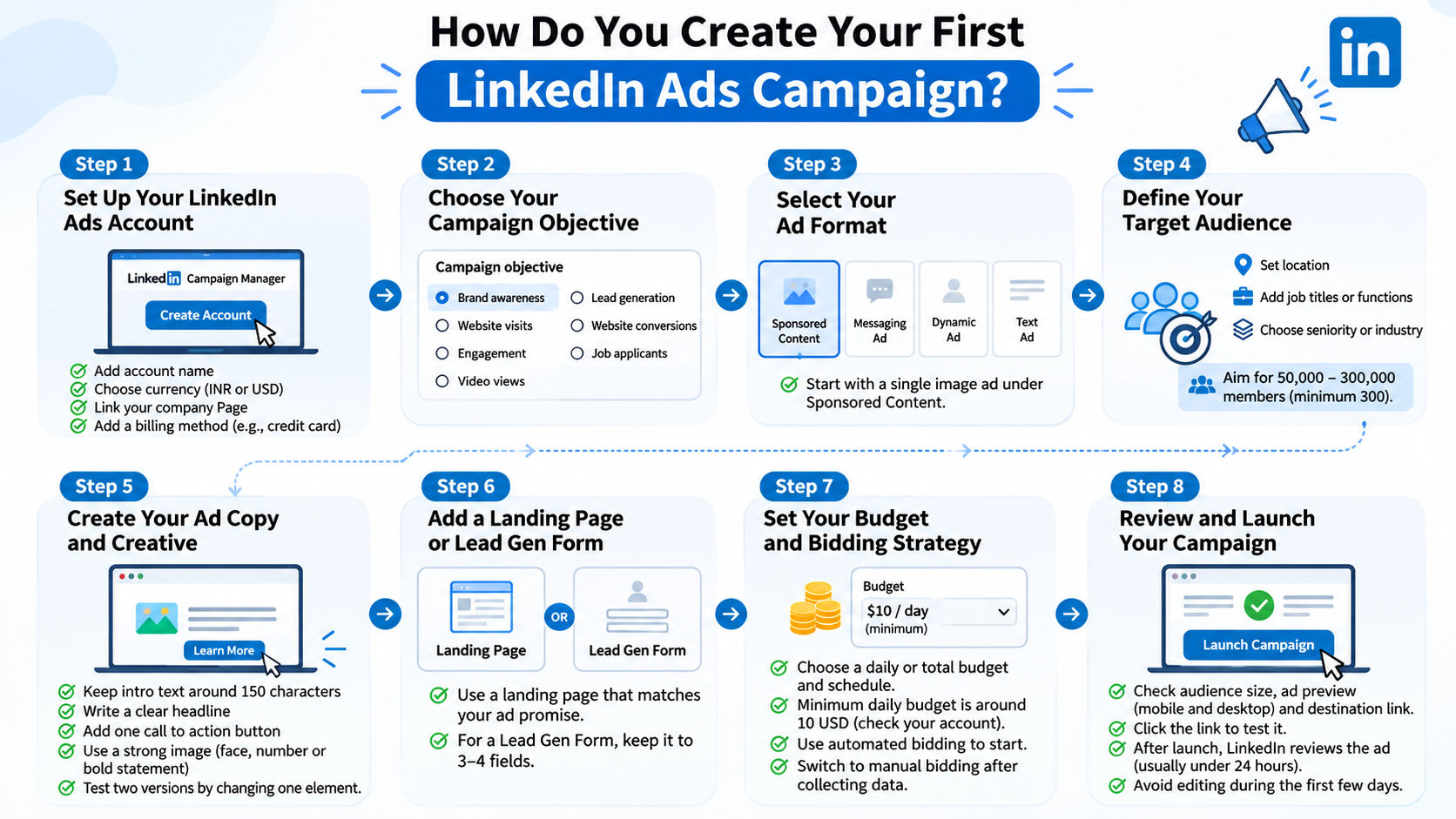
Go to Campaign Manager and Create Account. Provide an account name, select the currency type, and link the company Page. Currency once selected, cannot be changed back; so, be sure of your choice. Set up the billing information before starting out.
You will be asked by LinkedIn what you wish to accomplish. There are several objectives such as brand awareness, website visits, engagement, video views, lead generation, website conversions, and applications for jobs. Your choice of objective will determine the format and bidding strategy.
Pick any of the ad formats available. If it’s your first time running a campaign, it is wise to use the Single Image format in Sponsored Content. This format is simple, easy to understand, and provides clear metrics.
Start with your geographic location and continue to include job roles/functions, levels, or industries. Try to select audiences ranging from 50,000 to 300,000 people. LinkedIn requires a minimum of 300 people, however small audiences offer very little.
Do not overload yourself with multiple filters. Every additional filter will reduce the size of your audience drastically.
Draft an introductory text of 150 characters, as you don’t want your ad to be cut off on a mobile phone. Also, include a headline and a single call-to-action button. Use a creative with either a person’s face, some number, or an emphatic text message. Do not use any stock images.
Start testing two copies of your ad right away. Make sure you have just one difference between these two.
If you want to drive traffic to your website, the page has to correspond to the message that your advertisement carries. The ad promising a free pricing guide has to lead users to the page dedicated to this guide, not to your homepage. For a Lead Generation Form option, use no more than three or four fields.
Set up either a daily or total budgeting scheme. LinkedIn has a limit to how much money you can spend daily per campaign. As of now, the limit is approximately 10 USD or the local equivalent, so you should check the current amount in your account. Automated bidding works well for beginners, and manual bidding for advanced users.
Make sure that you have checked the audience, the preview, and the destination URL on both your desktop and mobile device. Test the URL. A broken link is a huge waste of time and money.
Once the ad is launched, LinkedIn will review it, and this will take less than 24 hours. Don’t be tempted to tweak anything for at least a couple of days after the launch.
Also Read: How Can Students Leverage LinkedIn For Better Career Opportunities?
Digital Marketing Courses to upskill
Explore Digital Marketing Courses for Career Progression
MICA Executive Alumni Status
LinkedIn ads are at higher range than the other platforms. In LinkedIn Ads, there is less chance of your money getting wasted. As your target audience is very precise. There is no specific fee for LinkedIn ads since it all depends on your goal and a number of other factors.
LinkedIn doesn't charge a setup fee. You pay only for clicks, impressions or sends, depending on your bidding choice.
That sounds expensive, and it is. But a click here is worth more when your buyers are executives. If a lead from LinkedIn closes at ten times the value of a lead from a cheaper channel, the higher cost can still make sense.
Pricing Model |
You Pay For |
Best For |
| CPC (cost per click) | Each click on your ad | Traffic and leads |
| CPM (cost per 1,000 impressions) | Views of your ad | Brand awareness |
| CPS (cost per send) | Each message delivered | Message and Conversation Ads |
| CPV (cost per view) | Each video view | Video campaigns |
Several things can affect your price and move it up or down:
There is also a timing factor. Weekdays in the morning are always busier than weekend days. This means that costs will change depending on the day. Don't assess your campaign based only on one day of data.
Be careful here, but don't go too conservative. A small budget won't give you enough data to make any conclusions. Be prepared to invest for at least 2-4 weeks before assessing results.
One method of calculating budget is by determining how many leads you would like to get. Estimate cost per lead and multiply those figures. In case of 20 leads needed and 60 USD cost per lead, your budget should be close to 1,200 USD. Consider this number approximate, as your first month will be a learning process.
Don’t allow yourself to be drained in one day by setting a daily limit on spend. Check your spending every couple of days throughout the first week. If your campaign isn’t working at all, make sure your target audience size and bid are appropriate.
Lastly, always have some budget left over to experiment with creatives.
Also Read: Top 7 Digital Marketing Examples to Inspire Your Next Campaign
Launch is the easy part. The difficult part is analyzing the figures without freaking out. Go to the reporting tab on LinkedIn Ads Manager, set your date range, and analyze some important figures before making any changes.
Let each tweak have enough time to sink in. You will not be able to tell whether you got better results because of the change made if you make too many tweaks on the same day. Make one change at a time.
Track numbers that match your objective.
Metric |
What It Tells You |
Rough Benchmark |
Impressions |
How many times your ad appeared |
Depends on budget |
Click-through rate (CTR) |
Whether your ad is relevant |
Around 0.4% to 0.6% for feed ads |
Cost per click (CPC) |
What each visit costs |
Varies by audience |
Conversion rate |
How many clicks turn into leads |
Landing page dependent |
Cost per lead (CPL) |
What each lead costs |
Compare to lead value |
Lead form completion rate |
Whether your form is too long |
Higher is better |
These benchmarks differ depending on industries. To measure conversions, install the Insight Tag and then define a conversion in Campaign Manager. Without it, you would get clicks but no information on what clicks led to sign-ups or sales.
Make an easy-to-follow weekly schedule.
Two traits distinguish a bad advertiser from a good one. First, they maintain a testing log. Maintaining a log in Excel of what has been done and how it turned out saves a lot of time afterward. Second, they check the competition. Just open the LinkedIn Ad Library, look up your competitor, and find out their offers, hook, and format. You are not plagiarizing; you are getting a feel for what the market already likes.
If after some cycles your results are still bad, go back and ask yourself whether the offer you are giving is even important for that particular market segment.
Also Read: How To Evaluate an Influencer Marketing Campaign?
Most beginners make some mistakes. Here are the common mistakes to avoid:
Conclusion
It does not have to be flawless, but it has to be limited. Set one goal, choose one target audience, run two tests and analyze the results for several weeks. After that, change only one thing in each new cycle.
Do not invest a single dollar yet – go to the LinkedIn Ads Library and choose five of your competitors. Note their offers. After that create your campaign in the LinkedIn Ads Manager and set the daily spending limit, which is acceptable for losing. This approach will provide you with much better understanding of the LinkedIn advertising than any guide can.
Ready to start your journey? Book a free consultation with upGrad today to find the best path for your career.
Yes. LinkedIn advertisements are great for beginners if one begins using LinkedIn ads with one goal, one audience and a small budget for testing. The process of setting up the advertisement will take around an hour. The learning is mostly in how to target and manage the costs, therefore one needs to keep the initial campaign very simple and evaluate it on a weekly basis.
One can use company, demographic, educational institution, employment and interest criteria. Some of the common choices are role, seniority level, industry, company size, and company location.
With Matched Audiences, you target people who have heard about your business before. It uses re-targeting via the Insight Tag, email lists, or company lists that you upload. Every list requires a minimum of 300 matched members, and they typically perform better than cold audiences.
The pricing models include cost per click, cost per thousand, cost per send, and cost per view. The type of pricing you get is dependent on the campaign goal. Beginners often use cost per click to drive traffic and leads because payment is made on a click basis.
LinkedIn requires a minimum daily budget for each campaign, which is around 10 USD or an equivalent of the local currency. These rates vary, so the actual amount that appears on Campaign Manager should be considered. In reality, you should budget yourself for enough clicks during the month for analysis.
You should expect to start getting impressions and clicks within one or two days after receiving approval. The period of time during which reliable lead information will appear is up to two to four weeks because the system needs to learn and you will require enough clicks for comparison of ads.
Reasons can be attributed to a small audience, low bid, low budget, and also ads pending review. First, start by looking at the audience size followed by checking the bid and budget settings. Make sure that the ad campaign is approved and the schedule is set.
By installing the LinkedIn Insight Tag in my website, then adding the conversion within Campaign Manager. Select what qualifies, for example, filling in a form and landing on a thank-you page. Check whether the conversion works by performing the action myself.
No. The Ads should be created using a LinkedIn Page, as the page name will be shown in each ad. It is free to create a LinkedIn Page, and it takes just a few minutes. First add a logo, tagline, and a few posts in it, as people tend to go to your page after clicking the ads.
LinkedIn takes into consideration professional details like title and company while targeting ads, whereas Facebook considers interests and behaviors in targeting. LinkedIn ads cost more per click, however, LinkedIn is the best platform for business-to-business sales. Facebook is cheaper and best suited for consumers.
Yes, but with certain limitations. The budget, schedule, bids, and audiences can be changed; the ads can be either turned on or off. However, the large-scale changes will have to start the entire learning process from scratch. Certain things cannot be changed at all, like the currency of the account.
1336 articles published
We are an online education platform providing industry-relevant programs for professionals, designed and delivered in collaboration with world-class faculty and businesses. Merging the latest technolo...
Get Free Consultation
By submitting, I accept the T&C and
Privacy Policy
Level Up Your Digital Marketing Career Today!
Top Resources
MICA
Advanced Certificate in AI-Powered Digital Marketing & Communication from MICAMICA Executive Alumni Status
Certification
5 Specialisation
Classroom
4 Months
Certification
2 Months