AI Accessibility: How Artificial Intelligence Is Making Digital Life More Inclusive
By Sriram
Updated on Jun 17, 2026 | 7 min read | 2.78K+ views
Share:

All courses
Certifications
More
By Sriram
Updated on Jun 17, 2026 | 7 min read | 2.78K+ views
Share:
Table of Contents
AI accessibility refers to using AI-powered tools and features to help people with disabilities access digital content and technology. It sits at the intersection of assistive technology and machine learning, and it's been changing what's possible for users with visual, hearing, cognitive, and motor impairments.
AI accessibility is changing how people interact with technology. It helps individuals with disabilities use websites, apps, devices, and digital services more independently. From screen readers that understand context to real-time captioning during meetings, artificial intelligence is removing barriers that once limited access.
This blog covers what AI accessibility actually means, how it works in practice, which tools are leading the way, what the real limitations are, and where things are headed.
Explore upGrad's Data Science, AI, and Machine Learning programs to build practical expertise in artificial intelligence, machine learning, natural language processing (NLP), computer vision, generative AI, and responsible AI systems that create more accessible and inclusive digital experiences.
Popular AI Programs
Technology isn't truly useful if everyone can't access it. That's where AI accessibility comes in. It refers to the use of artificial intelligence to make digital products, services, and environments easier to use for people with disabilities. These disabilities may affect vision, hearing, mobility, speech, learning, or cognition.
Traditional accessibility tools often relied on fixed rules, but AI takes things further. It can adapt, learn, and respond to different user needs in real time.
Before AI entered this space, accessibility largely depended on static solutions. Screen readers read out pre-tagged HTML. Captions were manually written. Keyboard navigation needed developers to code every interaction by hand. These solutions worked, but they required a lot of human effort and broke down quickly when content changed.
AI changed that equation.
AI accessibility uses technologies such as speech recognition, computer vision, natural language processing (NLP), and machine learning to make digital experiences easier for people with disabilities.
These systems can understand user needs, adapt content, and provide assistance in real time.
AI Technology |
How It Supports Accessibility |
| Speech Recognition | Converts spoken words into text |
| Computer Vision | Describes images, objects, and surroundings |
| Natural Language Processing (NLP) | Simplifies complex language and improves communication |
| Machine Learning | Adapts accessibility features based on user preferences |
| Real-Time Translation | Converts speech or text into different languages instantly |
Accessibility is about making sure everyone can participate in the digital world.
Activity |
Barrier |
AI Support |
| Learning | Visual or reading difficulties | Text-to-speech, image descriptions |
| Job Applications | Complex forms | Voice assistance |
| Banking | Navigation challenges | Voice navigation |
| Online Shopping | Unlabeled images | Image recognition |
| Communication | Hearing or speech barriers | Live captions, speech-to-text |
AI is helping reduce many of these barriers. Today, AI-powered tools can generate captions during live meetings, describe visual content for blind users, and help people with motor impairments interact with devices through voice commands and predictive text. Many of these features are already part of products people use every day.
The need for accessibility is significant. According to the World Health Organization, more than 1.3 billion people worldwide live with a disability, representing nearly one in six people globally.
While AI accessibility is making digital experiences more inclusive, it isn't a complete solution. AI systems can still struggle with accents, context, regional languages, or unique user needs. That's why accessible design, user testing, and human oversight remain just as important as the technology itself.
Do read: Future Scope of Artificial Intelligence in 2026 and Beyond
Free Courses
Many AI accessibility features are already integrated into everyday products. The table below highlights some widely used tools and the challenges they help address.
AI Accessibility Tool |
Supports |
Main Function |
| Google Live Caption | Hearing Impairment | Real-time captions |
| Microsoft Seeing AI | Visual Impairment | Image descriptions |
| Dragon NaturallySpeaking | Motor Impairment | Voice control |
| Proloquo2Go | Speech Impairment | Word prediction |
| Microsoft Immersive Reader | Dyslexia & Reading Difficulties | Read-aloud and text support |
Also read: Types of AI: Explained with Examples, Learning & Agents
AI Courses to upskill
Explore Artificial Intelligence Courses for Career Progression
Here's what often gets skipped in articles about this topic. AI accessibility tools have real limitations, and pretending they don't exist does a disservice to the people relying on them.
Auto-captions regularly mishandle accents, technical vocabulary, and overlapping speech. For someone who relies entirely on captions, a transcript that says "neural pathway" when someone said "neural network" matters. Errors like that create confusion, not clarity.
Image description AI can tell you there's "a person standing near a table." It can't tell you the person looks anxious, that the table is covered in legal documents, or that the setting matters for understanding a news article. Human-written alt text carries nuance that AI still struggles to match.
AI models learn from existing data. If that data doesn't include enough representation of people with disabilities, the AI won't perform as well for them. Voice recognition tools, for example, have historically been less accurate for users with speech impairments because most training data comes from non-disabled speakers.
Must read: AI Developer Roadmap: How to Start a Career in AI Development
Some organisations treat AI-generated accessibility features as a checkbox. "We added auto-captions, we're accessible." That's not how it works. Automated tools catch some issues. They miss others entirely. Real accessibility requires human testing with actual disabled users, not just an AI scan.
AI can assist people, but it shouldn't replace human-centered design. A website that relies entirely on automated accessibility fixes may still create challenges for users. Effective accessibility combines technology, testing, user feedback, and inclusive design practices.
None of this means AI accessibility isn't worth pursuing. It absolutely is. But it's worth going in with clear eyes about what the tools can and can't do right now.
Must read: How To Convert Speech to Text with Python [Step-by-Step Process]
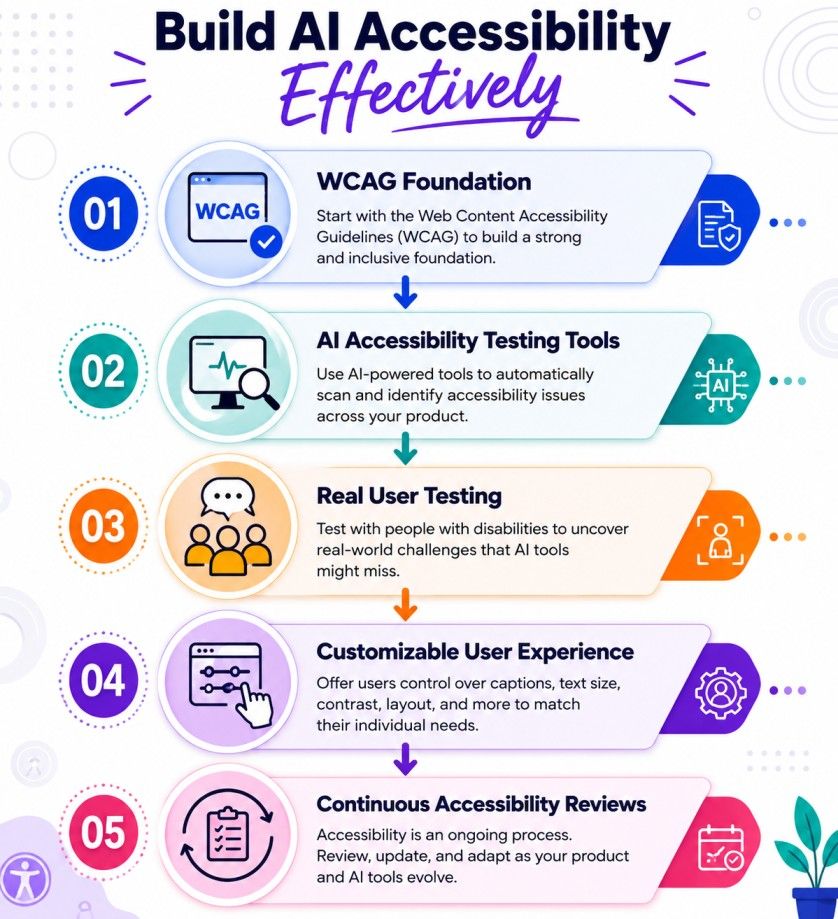
If you're building something, whether it's an app, a website, or an internal tool, here's how to think about AI accessibility practically.
Also read: Applications of Artificial Intelligence and Its Impact
India has over 26 million people living with disabilities, according to the Census data. The Rights of Persons with Disabilities Act, 2016 mandates accessibility in government digital services, but enforcement in the private sector is still inconsistent.
That said, there's genuine movement.
The National Programme on Technology Enhanced Learning (NPTEL) has added captions to many of its videos. Several Indian edtech platforms are integrating screen reader support and high-contrast modes. Tools like Microsoft Seeing AI are available in Hindi and other Indian languages, expanding reach beyond English-first users.
The gap remains large. A significant number of Indian websites still fail basic WCAG checks. Regional language support in AI accessibility tools is improving but uneven. Voice recognition accuracy in Indian English and vernacular languages has room to grow.
For students and professionals in India exploring this space, understanding AI accessibility is becoming a relevant career skill. Roles in UX research, product development, and AI ethics increasingly ask for it.
AI accessibility is helping make technology more inclusive, practical, and usable for people with diverse needs. It supports communication, learning, navigation, and independent access to digital services through tools such as speech recognition, computer vision, captioning, and adaptive interfaces.
Challenges still exist. Accuracy gaps, privacy concerns, and implementation barriers need attention. Yet the direction is clear. As artificial intelligence continues to improve, AI accessibility will play an even larger role in building digital experiences that work for everyone, not just a select few.
Ready to start your journey? Book a free consultation with upGrad today to find the best path for your career.
Traditional accessibility relies on predefined rules such as screen reader compatibility, keyboard navigation, and manually written captions. AI accessibility adds adaptive capabilities through machine learning, speech recognition, and computer vision. This allows systems to respond to user needs in real time and support more personalized digital experiences.
No. AI can identify issues, generate captions, create image descriptions, and suggest accessibility improvements, but it cannot guarantee full compliance. Human testing, accessible design practices, and adherence to WCAG standards are still required to create truly inclusive digital products.
AI uses computer vision and image recognition to describe photos, objects, documents, and surroundings. Some tools can read text from images, identify products, and explain visual elements on a webpage. This gives users more context than traditional screen readers alone can provide.
AI-generated captions have improved significantly, but they're not flawless. Accuracy can drop when speakers have strong accents, talk quickly, use technical terminology, or speak in noisy environments. For critical content such as education, healthcare, or legal communication, human review is often still necessary.
Many AI-powered reading tools simplify text, highlight key information, adjust spacing, and convert written content into speech. These features reduce cognitive load and make information easier to process. Students and professionals can often read and understand content more efficiently as a result.
The legal requirement is accessibility itself, not necessarily AI accessibility. Regulations in many countries reference accessibility standards such as WCAG. Organizations increasingly use AI tools to meet those requirements, but compliance still depends on the overall user experience rather than the technology used.
Natural language processing helps computers understand and generate human language. In accessibility, it powers features such as text simplification, speech-to-text conversion, language translation, and conversational assistants. These capabilities help users access information in formats that better suit their needs.
Yes. AI-powered translation and speech recognition tools can help users interact with content in different languages. This is particularly useful in multilingual countries where language barriers can limit access to education, government services, healthcare information, and online platforms.
The main challenges include accuracy limitations, bias in training data, privacy concerns, and inconsistent support across languages and disabilities. Some tools perform well for certain user groups but less effectively for others. Continuous improvement and user feedback remain essential.
As digital inclusion gains importance, demand is growing for professionals in accessibility testing, UX research, inclusive design, AI ethics, product management, and assistive technology development. Understanding AI accessibility is becoming a valuable skill for people working in technology and digital product teams.
The next generation of AI accessibility tools is expected to deliver more accurate image descriptions, better sign language recognition, stronger multilingual support, and personalized user experiences. As AI systems improve, accessibility features will likely become a standard part of digital products rather than optional add-ons.
730 articles published
Sriram K is a Senior SEO Executive with a B.Tech in Information Technology from Dr. M.G.R. Educational and Research Institute, Chennai. With over a decade of experience in digital marketing, he specia...
Speak with AI & ML expert
By submitting, I accept the T&C and
Privacy Policy
Top Resources
Master's Degree
18 Months
Executive Diploma
12 Months
IIIT Bangalore
Executive Programme in Generative AI & Agentic AI for LeadersIndia’s #1 Tech University
Dual Certification
5 Months