What Does Machine Learning Code Look Like?
By upGrad
Updated on Sep 30, 2026 | 8 min read | 3.47K+ views
Share:

All courses
Certifications
More
By upGrad
Updated on Sep 30, 2026 | 8 min read | 3.47K+ views
Share:
Table of Contents
Key Highlights
Ready to write machine learning code yourself? Check our AI and Machine Learning course in India and learn Python, scikit-learn, and deep learning through hands-on projects. Get mentor support, build a real portfolio, and take your first step toward an ML career.
Popular AI Programs
Machine learning code is regular Python with a library doing the heavy lifting. Most scripts follow the same order: load data, prepare it, split it, train a model, make predictions, and measure the results.
Here is a small but real example. It predicts whether a customer will leave a company, using scikit-learn.
import pandas as pd
from sklearn.model_selection import train_test_split
from sklearn.linear_model import LogisticRegression
from sklearn.metrics import accuracy_score

data = pd.read_csv("customers.csv")
X = data.drop(columns="churned")
y = data["churned"]

X_train, X_test, y_train, y_test = train_test_split(
    X, y, test_size=0.2, random_state=42
)

model = LogisticRegression()
model.fit(X_train, y_train)

predictions = model.predict(X_test)
print(accuracy_score(y_test, predictions))
This assumes the columns are already numeric. Real data rarely is, which is why cleaning takes so much room in most projects.
A few things are worth noticing here.
Also read: How to Implement Machine Learning Steps: A Complete Guide
Free Courses
Most ML scripts have five steps. I'll keep using the customer churn example, where the goal is to predict who will cancel.
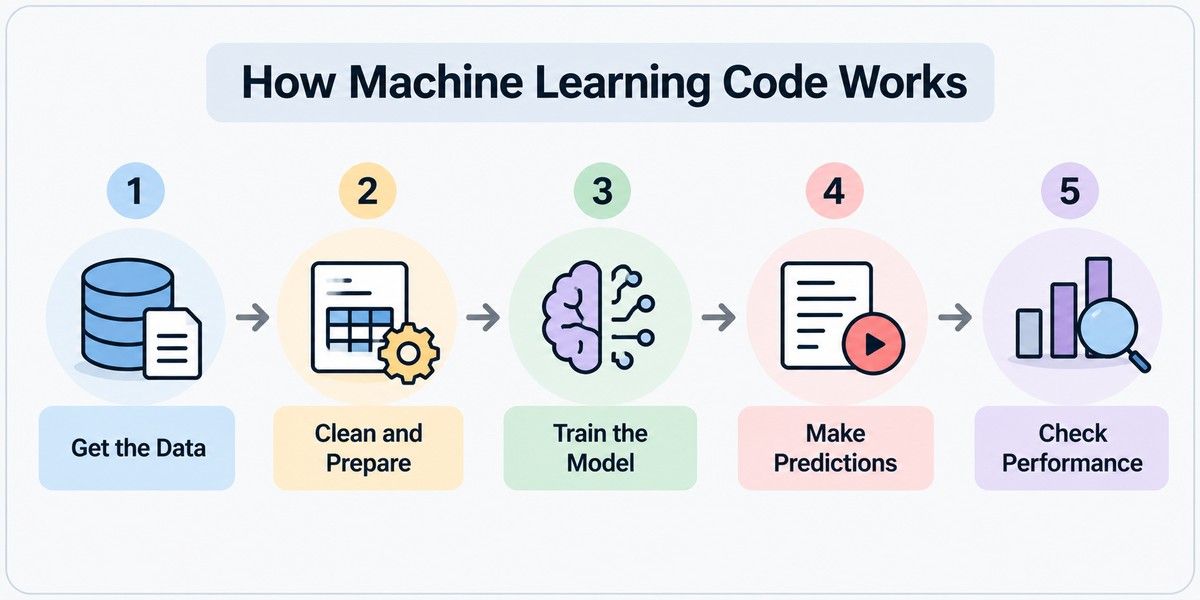
Imports come first. Then you load your file.
import pandas as pd
from sklearn.model_selection import train_test_split
from sklearn.preprocessing import StandardScaler
from sklearn.linear_model import LogisticRegression
from sklearn.metrics import classification_report

df = pd.read_csv("customers.csv")
Now look at the data before you use it.
print(df.shape)
print(df.head())
df.info()
print(df.isna().sum())
This takes a minute. It shows how many rows you have, what type each column is, and where values are missing.
A number stored as text is a common problem. It is easy to fix now and annoying to find later.
This step is usually the longest. Models can't handle blanks or text, so you clean both up.
Missing values can be dropped or filled in. Text columns, like a plan type, get turned into numbers. Numeric columns often get scaled so a column measured in thousands doesn't drown out one measured in single digits.
df = df.dropna()

X = df.drop(columns="churned")
y = df["churned"]
X = pd.get_dummies(X, drop_first=True)

X_train, X_test, y_train, y_test = train_test_split(
    X, y, test_size=0.2, random_state=42, stratify=y
)

scaler = StandardScaler()
X_train = scaler.fit_transform(X_train)
X_test = scaler.transform(X_test)
Notice the order. The split happens first. The scaler learns from the training rows only, then gets applied to the test rows.
If you scale before splitting, the test data leaks into training. That is called data leakage. It makes your final score look better than it should.
stratify=y keeps the share of churned customers the same in both sets. random_state=42 makes the split repeatable.
Look at what you are predicting. A category, like churn or no churn, needs a classifier. A number, like a price, needs a regressor.
Start with a simple model. Its score becomes your baseline.
model = LogisticRegression(max_iter=1000)
model.fit(X_train, y_train)
Training is the fit() line. The model looks at the training data and works out how much each column matters.
Settings like max_iter are hyperparameters. You choose them yourself. The model doesn't learn them.
Want to try a different model? Swap in RandomForestClassifier() and leave the rest alone. Every scikit-learn model uses the same fit() and predict() calls.
Now you give the model the test rows. It has never seen them.
preds = model.predict(X_test)
probs = model.predict_proba(X_test)[:, 1]
predict() returns a label for each customer, either 0 or 1. predict_proba() returns the chance of churn. The [:, 1] picks the column for the churn class.
The probability is often more useful. A team can call the customers with the highest risk first.
The last step is a comparison. You check the predictions against the real answers.
print(classification_report(y_test, preds))Don't rely on accuracy alone. Say only 5 in 100 customers churn. A model that always predicts "no churn" is 95% accurate. It also never finds a single customer who leaves.
The report gives you two more numbers. Precision shows how many flagged customers really left. Recall shows how many of the leavers you caught.
Regression problems use different metrics, such as MAE and RMSE.
One split can also be lucky. cross_val_score() tests the model on several splits, so you get a fairer picture. If the score is low, look at the data first. Cleaner data and better columns usually beat a fancier model.
Also read: Top 6 Machine Learning Solutions
AI Courses to upskill
Explore Artificial Intelligence Courses for Career Progression
In Python, machine learning code is short. A working model can fit in about 15 lines.
Here is a full script you can copy and run. It uses a dataset that ships with scikit-learn, so you don't need to download anything. The model predicts whether a tumor is benign or malignant.
from sklearn.datasets import load_breast_cancer
from sklearn.model_selection import train_test_split
from sklearn.pipeline import make_pipeline
from sklearn.preprocessing import StandardScaler
from sklearn.linear_model import LogisticRegression
from sklearn.metrics import accuracy_score

X, y = load_breast_cancer(return_X_y=True)

X_train, X_test, y_train, y_test = train_test_split(
    X, y, test_size=0.2, random_state=42, stratify=y
)

model = make_pipeline(StandardScaler(), LogisticRegression(max_iter=1000))
model.fit(X_train, y_train)

preds = model.predict(X_test)
print(accuracy_score(y_test, preds))
Run it and you should see an accuracy in the high 90s. That's a solid result for so little code.
Here is what to notice.
Deep learning code is longer. Libraries like PyTorch and TensorFlow need you to define the network layers and, in PyTorch's case, write the training loop yourself. I'll cover that in a later section.
Want to lead AI, not just learn about it? The Executive Programme in Generative AI & Agentic AI for Leaders from IIIT Bangalore is built for business leaders. No coding needed. Work through 20+ real enterprise cases, build a board-ready AI Leadership Execution Dossier, and earn certificates from IIIT-B and Microsoft.
You don't need many libraries to start. Six cover most of what you will see in ML code.
pandas loads and cleans tabular data. It is usually the first library in a script.
import pandas as pd

df = pd.read_csv("customers.csv")
df = df.dropna()
Its main object is the DataFrame, which works like a spreadsheet in code.
NumPy handles arrays and fast number crunching. Most other ML libraries use it under the hood.
import numpy as np

arr = np.array([1, 2, 3, 4])
print(arr.mean())
You won't always import it directly. But you will often see its arrays.
Matplotlib draws charts. Use it to explore data and plot results.
import matplotlib.pyplot as plt

plt.hist(df["age"])
plt.show()
Seaborn sits on top of it and makes common charts easier.
scikit-learn is the main library for classic machine learning. It covers models, preprocessing, and evaluation.
from sklearn.ensemble import RandomForestClassifier

model = RandomForestClassifier()
model.fit(X_train, y_train)
It works well for tabular data. Most beginners should start here.
TensorFlow is Google's deep learning library. Its Keras interface keeps model code short.
from tensorflow import keras

model = keras.Sequential([
    keras.layers.Dense(32, activation="relu"),
    keras.layers.Dense(1, activation="sigmoid"),
])
It is common in production systems and mobile deployments.
PyTorch is Meta's deep learning library. It is popular in research and in most modern AI work.
import torch.nn as nn

model = nn.Sequential(
    nn.Linear(10, 32),
    nn.ReLU(),
    nn.Linear(32, 1),
)
You write the training loop yourself, which gives you more control.
Also read: How to Learn Machine Learning – Step by Step
The five steps stay the same. What changes is the model, the target, and the metric.
Use it when the answer is a category. Spam or not spam. Churn or no churn.
from sklearn.ensemble import RandomForestClassifier
from sklearn.metrics import f1_score

model = RandomForestClassifier(random_state=42)
model.fit(X_train, y_train)

preds = model.predict(X_test)
print(f1_score(y_test, preds))Use it when the answer is a number. A house price. Next month's sales.
from sklearn.linear_model import LinearRegression
from sklearn.metrics import mean_absolute_error

model = LinearRegression()
model.fit(X_train, y_train)

preds = model.predict(X_test)
print(mean_absolute_error(y_test, preds))
The code is almost identical to classification. Only the model and the metric change.
Use it when you have no labels. You want the model to find groups on its own, such as customer segments.
from sklearn.cluster import KMeans

model = KMeans(n_clusters=3, random_state=42)
model.fit(X)

print(model.labels_)
Notice what is missing. There is no y and no train/test split. The model only sees X.
You also pick the number of clusters yourself. Scale your data first, since KMeans relies on distance.
Use it for images, text, audio, and very large datasets. This is where the code looks most different.
import torch
import torch.nn as nn

model = nn.Sequential(nn.Linear(10, 32), nn.ReLU(), nn.Linear(32, 1))
loss_fn = nn.BCEWithLogitsLoss()
optimizer = torch.optim.Adam(model.parameters(), lr=0.001)

for epoch in range(20):
    optimizer.zero_grad()
    outputs = model(X_train)
    loss = loss_fn(outputs, y_train)
    loss.backward()
    optimizer.step()
This assumes X_train and y_train are already PyTorch tensors.
Instead of one fit() call, you write a loop. Each pass does the same five things:
Real projects also feed data in small batches using a DataLoader. Keras hides the loop behind fit(), which is why many beginners start there.
Also read: 5 Breakthrough Applications of Machine Learning
Conclusion
Machine learning code is shorter than most people expect. A working model can fit in about 15 lines of Python. Almost every script follows the same path. Load the data, prepare it, train a model, predict, and evaluate.
Libraries do the heavy lifting. Only the model, target, and metric change from task to task. Most of your effort goes into the data, not the algorithm. To get started, run the tumor example in Google Colab. Then swap in a different model and see what changes.
Have doubts about your career path? Book a free consultation with our experts today.
No. Libraries like scikit-learn handle the math for you. Basic statistics and some algebra help you understand the results. You can build working models before you learn the theory.
The code itself is not hard. Most scripts use simple function calls. The harder part is understanding your data and choosing the right approach. Start with small datasets and simple models.
Python is the most popular choice. It has the biggest set of ML libraries and community support. R is common in statistics and research. Julia and C++ show up in performance-heavy work.
If you already know basic Python, you can build your first model in a few days. Getting comfortable with real projects usually takes a few months of regular practice.
Yes. Classic models run fine on a normal laptop. For heavy deep learning, free tools like Google Colab and Kaggle Notebooks give you cloud GPUs at no cost.
Regular code follows rules you write by hand. Machine learning code lets the model learn rules from examples. You spend less time writing logic and more time working with data.
Deep learning is a branch of machine learning that uses neural networks. Its code is usually longer and often needs a GPU. Classic ML code is shorter and works well on smaller, tabular datasets.
Yes. No-code tools like Google's Teachable Machine, KNIME, and DataRobot let you build models with a visual interface. They are good for quick tests. Code gives you more control and flexibility.
Yes. Once a model is trained, you can save it and load it inside an app. Many teams wrap it in a small web service, called an API, so other software can send data and get predictions back. Cloud platforms like AWS, Google Cloud, and Azure also offer ready-made hosting for this.
Overfitting happens when a model memorizes the training data and fails on new data. You see it when the training score is high and the test score is much lower. Simpler models, more data, and regularization can help.
Start with the sample datasets built into scikit-learn. Kaggle, the UCI Machine Learning Repository, and Hugging Face Datasets offer thousands more. Pick one that matches a problem you care about.
1008 articles published
We are an online education platform providing industry-relevant programs for professionals, designed and delivered in collaboration with world-class faculty and businesses. Merging the latest technolo...
Speak with AI & ML expert
By submitting, I accept the T&C and
Privacy Policy
Top Resources
Master's Degree
18 Months
Executive Diploma
12 Months
IIIT Bangalore
Executive Programme in Generative AI & Agentic AI for LeadersIndia’s #1 Tech University
Dual Certification
5 Months