Plan a Month of Content in One Sitting with Content Calendar Template
By upGrad
Updated on May 15, 2026 | 0.5k+ views
Share:

All courses
Certifications
More
By upGrad
Updated on May 15, 2026 | 0.5k+ views
Share:
Table of Contents
A content calendar template is a pre-built planning document where you schedule and track your content across different channels. It could be a spreadsheet, a table, or a tool like Notion or Trello. The format doesn't matter as much as the habit of using it.
A simple template can fix you last-minute scrambles, missed deadlines, and inconsistent posting. As it gives your content a structure and keeps your team aligned.
In this guide, you will learn what a content calendar template looks like, what to put in it, how to set one up in Google Sheets, and how to tailor it for social media platforms like Instagram.
If you want to learn other concepts of digital marketing? Check out the Digital marketing courses of upGrad.
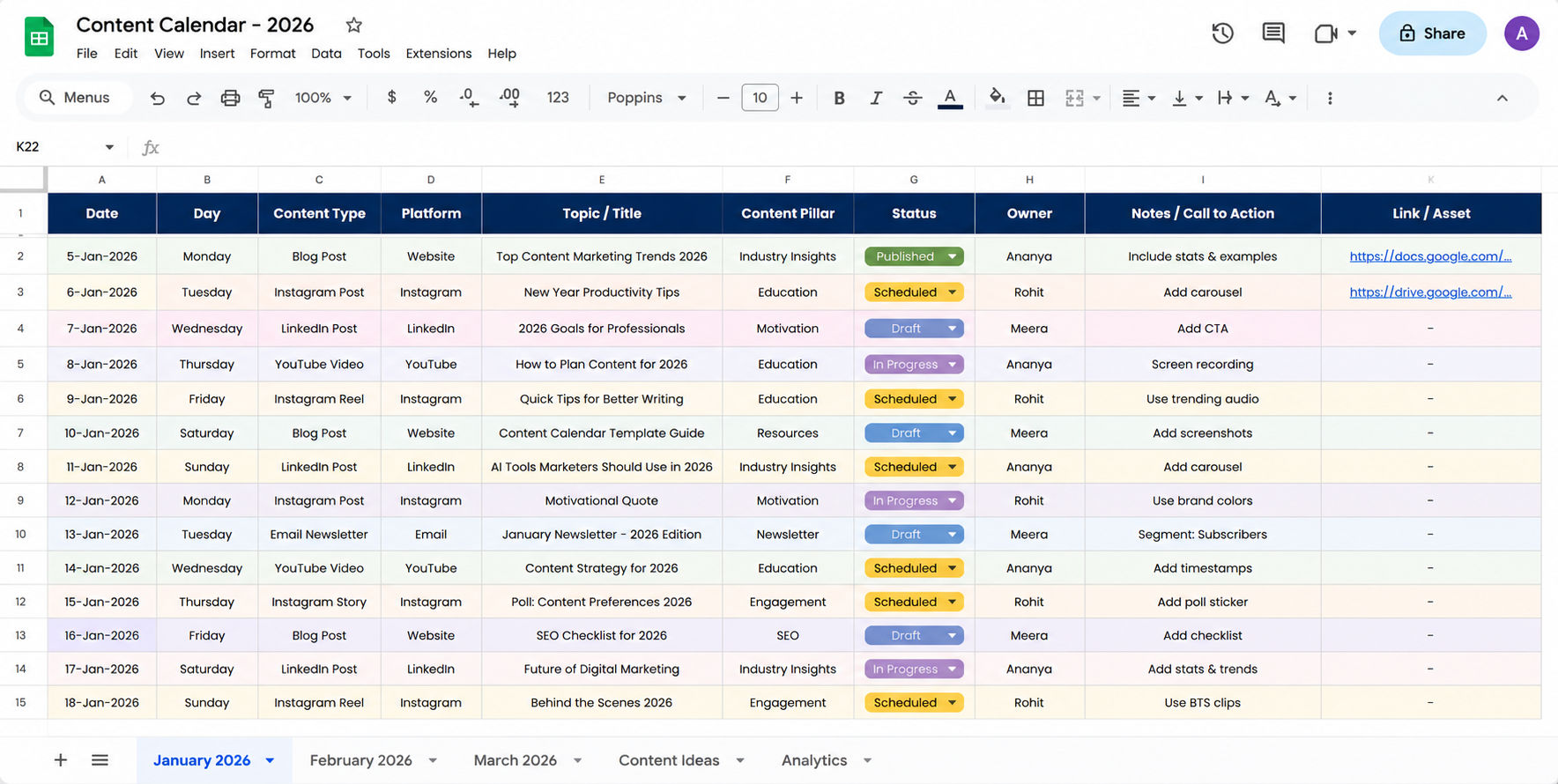
A content calendar template Google Sheets setup is one of the most popular options because it is free, easy to share, and flexible enough to customise however you want.
Here's a simple structure to get you started:
| Column | What to Fill In |
| Date | Publish or schedule date |
| Platform | Blog, Instagram, LinkedIn, etc. |
| Topic / Title | Working title or post idea |
| Content Type | Article, reel, infographic, etc. |
| Status | Draft, In Review, Scheduled, Live |
| Owner | Who is handling this piece |
| Link | URL or drive link to the draft |
These are the steps to help you create a clean and organized content calendar template in Google Sheets. Follow this process to track ideas, deadlines, publishing status, and marketing activities better.
Useful point: Use Google Sheets' dropdown feature for the "Status" and "Platform" columns. It keeps the sheet clean and makes filtering easier.
Once your base sheet is ready, you can duplicate it every month and just update the dates and topics. This saves a lot of time and keeps everything consistent.
Also read: How to Create Social Media Campaigns? 6 Steps To Create Successful Campaigns
Free Courses
A monthly content calendar template helps you zoom out and see the big picture before you execute ideas. Planning by month means you can spot gaps, avoid over-posting on one platform, and make sure your content ties back to your goals.
Here is what a solid monthly plan looks like:
The table below will help you understand how to structure your monthly content calendar template week by week, including the type of content to publish and the goal each week should focus on.
| Week | Focus | Content Types |
| Week 1 | Awareness / Education | Blog post, intro carousel, short video |
| Week 2 | Engagement / Community | Poll, Q&A, user story |
| Week 3 | Product / Service | Case study, demo video, testimonial |
| Week 4 | Recap / Promotion | Round-up post, newsletter, CTA content |
Before filling in your content calendar, answer these three questions:
Once you have those answers, filling out the template becomes much faster. You're not starting from scratch. You're building a strategy.
Digital Marketing Courses to upskill
Explore Digital Marketing Courses for Career Progression
MICA Executive Alumni Status
A social media content calendar template needs to account for the fact that every platform is different. What works on LinkedIn rarely works on Instagram. A single content piece often needs to be repurposed differently for each platform.
Here's a quick reference for platform-specific planning:
Platform |
Best Posting Frequency |
Content That Works Best |
| 4–5 times per week | Reels, carousels, stories | |
| 3–4 times per week | Articles, thought leadership, polls | |
| Twitter / X | 1–3 times per day | Short takes, threads, news commentary |
| 3–5 times per week | Videos, community posts, events | |
| YouTube | 1–2 times per week | Long-form videos, tutorials |
Your social media content calendar should include:
Planning your social media content at least one to two weeks in advance gives you time to make edits, get approvals, and avoid last-minute stress.
Also read: Social Media Marketing Free Online Course [2025]
Instagram deserves its own section because it has more content types than most other platforms. Between feed posts, reels, stories, and carousels, planning without a template quickly becomes chaotic.
An Instagram content calendar template should track:

Stories are separate from your main feed plan but should still be tracked. Many creators forget to plan stories and end up posting nothing some days, which hurts engagement.
Reminder: Don't plan content just to fill out the calendar. Every post should have a reason to exist like it's to educate, entertain, inspire, or convert.
Must read: Instagram Marketing Strategy & Key Stats for 2026
Subscribe to upGrad's Newsletter
Join thousands of learners who receive useful tips
Having a template doesn't automatically fix your content process. Here are the most common mistakes people make and how to avoid them.
1. Planning too far ahead without reviewing A calendar that's locked three months in advance can't adapt to trends or business changes. Review and update your plan every two weeks.
2. Treating the calendar as a checklist, not a strategy Filling dates does not equal a strategy. Every content piece should connect to a goal. Ask: why are we publishing this?
3. Ignoring social media analytics Your calendar should inform your future planning. If a certain type of post consistently performs well, plan more of it. If something never lands, drop it.
4. Not assigning ownership A shared calendar with no clear owner creates confusion. Every row in your template should have a name next to it.
5. Using too many tools Spreading your calendar across three apps creates friction. Pick one and stick with it. Google Sheets, Notion, or even a simple Word doc works fine for most teams.
Also read: Social Media Report Template: Complete Beginner’s Guide
A content calendar template is not just an organizational tool. It is what separates teams that create content with intention from those who are always playing catch-up. Whether you prefer a simple content calendar template, Google Sheets setup, a detailed monthly content calendar template, or a platform-specific plan for Instagram and social media. The goal is the same. Plan, stay consistent, and keep your content tied to real goals.
As content marketing and social media continue to evolve, staying updated with the latest strategies and tools becomes equally important.
Explore free online courses in digital marketing areas to strengthen your knowledge and stay aligned with current industry trends. Book a call for personalized guidance with upGrad and discover programs that match your career goals.
A content calendar template is used to plan, schedule, and track content across different platforms. It helps creators and marketers stay organized, maintain a consistent posting schedule, and align content with their broader marketing goals. It also makes collaboration easier within teams.
Yes. A content calendar template Google Sheets version is completely free and works well for most individuals and small teams. Google Sheets allows easy sharing, real-time collaboration, and can be customised to fit your workflow without any cost.
Most marketers plan content at least two to four weeks in advance. A monthly content calendar template works well because it gives you enough runway to create quality content while staying flexible enough to adapt to trends or sudden business updates.
A social media content calendar template should include the platform name, publish date, content type, caption draft, visual asset link, hashtags, and the goal of each post. You can also add a column for the person responsible and the current status of each piece.
Start with a simple spreadsheet. Add columns for content type (reel, carousel, story, static), caption, visual link, hashtags, and posting time. Plan at least one week ahead and try to vary content formats so your feed doesn't feel repetitive. Review performance weekly to improve future planning.
They are similar but slightly different in focus. An editorial calendar is typically used for long-form content like blogs and articles, while a content calendar template covers all platforms including social media, email, and video. Many teams use one combined template for everything.
Add a column for your primary keyword or SEO focus for each piece of content. This helps ensure you're not targeting the same keyword repeatedly and that your content covers a range of topics. It also helps align blog and social content around the same themes.
Google Sheets is the most accessible and widely used option. For teams that need more project management features, tools like Notion, Trello, or Asana work well. The best tool is the one your team will actually use consistently, not the most feature-rich one.
Keep a column in your template labelled "buffer" or "evergreen" where you store pre-made content ideas that can go live anytime. These act as backup posts when a planned piece falls through or when you need to replace something quickly without disrupting the schedule.
It depends on your platform and capacity. For Instagram, four to five posts per week is common. For LinkedIn, three to four works well. For a blog, one to two posts per week is sustainable for most teams. Quality matters more than volume, so only plan what you can execute well.
Yes. When you use a content calendar template to plan blog content, you can map each post to a specific keyword, track publishing frequency, and ensure you cover a range of topics without cannibalising existing content. It helps make your SEO strategy visible and actionable across your team.
1017 articles published
We are an online education platform providing industry-relevant programs for professionals, designed and delivered in collaboration with world-class faculty and businesses. Merging the latest technolo...
Get Free Consultation
By submitting, I accept the T&C and
Privacy Policy
Level Up Your Digital Marketing Career Today!
Top Resources
MICA
Advanced Certificate in AI-Powered Digital Marketing & Communication from MICAMICA Executive Alumni Status
Certification
5 Specialisation
Classroom
4 Months
Certification
2 Months