Social Media Analytics: What It Is, How It Works, and Why It Matters
By upGrad
Updated on May 07, 2026 | 9 min read | 2.45K+ views
Share:

All courses
Certifications
More
By upGrad
Updated on May 07, 2026 | 9 min read | 2.45K+ views
Share:
Table of Contents
Social media analytics is the process of collecting, measuring, analysing, and interpreting data from your social media activity to measure performance. That includes likes, shares, comments, reach, clicks, and conversions. Every time someone likes your post, shares a reel, clicks a link, or leaves a comment, that's a data point. Analytics tools pull all of that together and show you patterns.
This blog covers everything you need to know about social media analytics. You'll learn what it means, how the analytics cycle works, which tools to use (including free ones), how to track and present data, and how to connect your social activity to Google Analytics. Whether you're a beginner or someone looking to sharpen your skills, this guide walks you through it all.
Want to know more than just basic social media analytics and make data-driven decisions that impact real business outcomes? Explore upGrad’s Management and Marketing programs to build strong skills in Marketing, leadership, decision-making, and process improvement so you can turn analysis into action.
Here's a breakdown of the core metrics you'll work with:
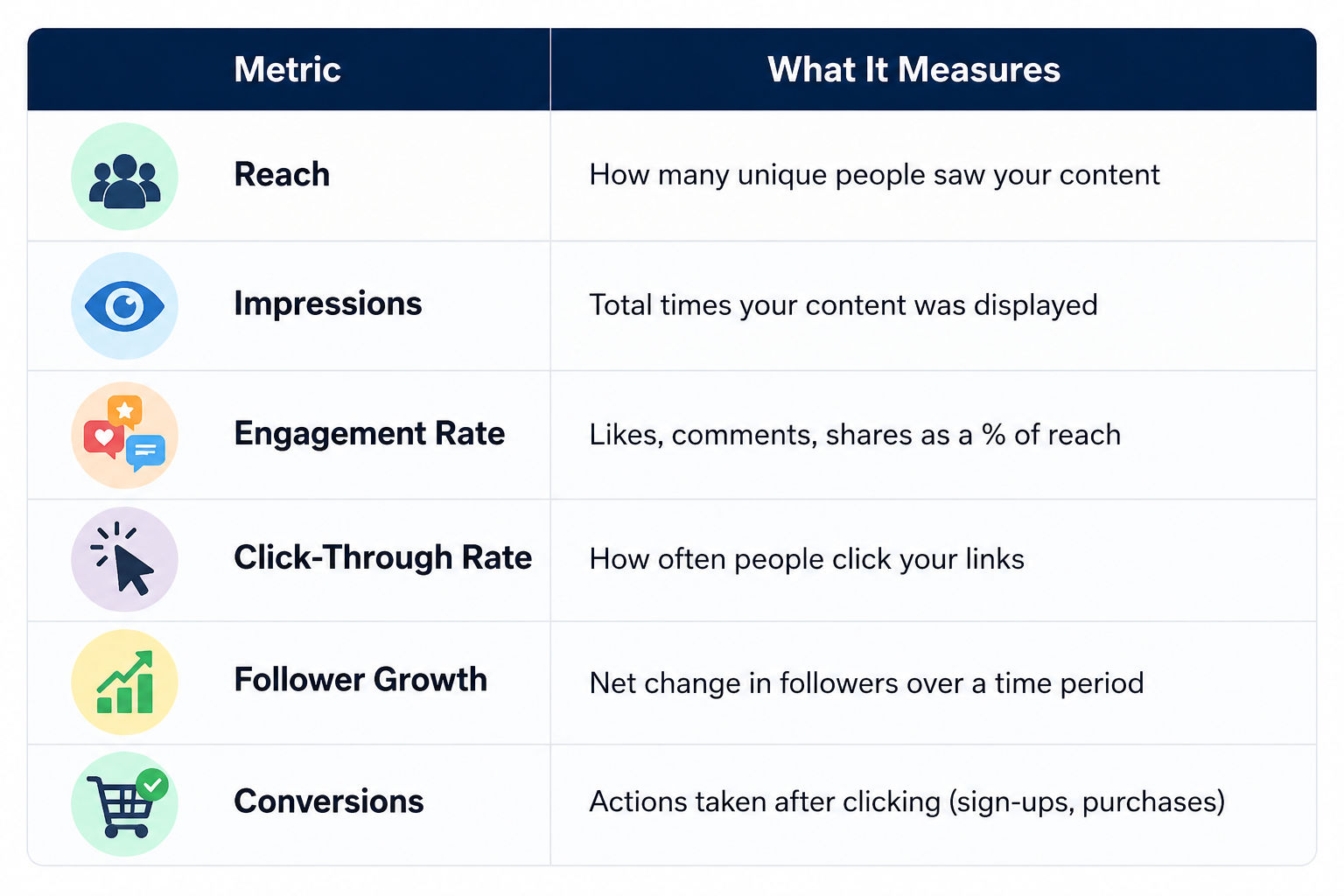
You don't need to track all of these at once. Start with three or four that match your current goal.
Do read: Digital Marketing Course Duration and Fees: Complete Overview
Here’s why you can’t ignore it:
Must Read: Top Marketing Management Courses: Shape Your Future in 2026
Here is a real-life brand example using Gymshark, a company famous for its digital-first strategy and expert use of social media analytics.
Imagine Gymshark posts two different Reels to promote a new "Seamless" legging collection.
Reel A: The "Viral Aesthetic" (The Hype)
|
Reel B: The "Functional Review" (The Converter)
|
|
| Content | A high-energy, cinematic montage of a world-class athlete doing backflips in a neon-lit gym. It uses a trending audio track and fast-paced editing.
|
A micro-influencer (fitness coach) stands in front of a mirror. She does a "squat test" to show the fabric isn't see-through and points out the sweat-wicking zones. |
Analytics
|
|
|
| The Result | The video goes viral. It builds massive Brand Awareness. Thousands of people now recognize the Gymshark logo, but almost no one left the app to buy the leggings.
|
The reach was 80% lower than Reel A. However, the intent was 20x higher. This video solved a specific customer "pain point" (transparency), leading to a flood of traffic and sales. |
Source: Researchgate
If Gymshark’s Social Media Manager only reported on Reach, they would tell the creative team: "Keep making backflip videos! They’re our best performers!"
However, once the Data Analyst looks at the Shopify or Google Analytics dashboard, the conversation changes:
The "Liking" vs. "Buying" Gap: People "Like" what entertains them, but they "Click" on what helps them. Analytics reveals that entertainment and commerce are two different levers.
In social media analytics, a "flop" in views can often be a "win" in revenue. Reel A built the brand, but Reel B built the business.
Must Read: The Ultimate Guide to Digital Marketing Courses You Need in 2026!
Free Courses
Social media analytics isn't a one-time task. It's a repeating cycle that improves over time. Understanding the cycle makes it much easier to build a consistent process.
Here's how it works:
Step1. Set Goals Start with what you want to achieve. More website traffic? Better engagement? Leads? Your goal shapes which metrics matter.
Step 2. Collect Data Use your platform's native tools or a third-party analytics tool to pull your numbers. Most tools let you filter by date range, platform, or content type.
Step 3. Analyze the Data Look for patterns. Which posts got the most clicks? Which format (video, carousel, static image) performs better? When does your audience engage most?
Step 4. Draw Insights This is where raw numbers become useful. An insight isn't "our reach was 10,000." An insight is "our reach dropped 30% after we switched to text-only posts."
Step 5. Act on Findings Change something. Test a new format. Post at a different time. Run a campaign based on what worked before.
Step 6. Repeat Come back in two to four weeks and measure again. The cycle keeps improving.
Most brands skip from step 2 straight to step 5. That's why they see inconsistent results. The analysis step is where the real value lives.
Do Read: Fundamentals of Digital Marketing – What You Need to Know
Digital Marketing Courses to upskill
Explore Digital Marketing Courses for Career Progression
MICA Executive Alumni Status
Knowing what analytics is and actually doing it are two different things. Here's a practical walkthrough.
Step 1: Define Your Metrics Based on Goals
Don't measure everything. It creates noise.
Step 2: Choose Your Tools
You don't need expensive software to start. Most platforms have native analytics built in. More on tools in the next section.
Step 3: Set a Reporting Cadence
Weekly check-ins work well for active campaigns. Monthly reports are better for strategy-level reviews. Pick a schedule and stick to it.
Step 4: Export and Organize Your Data
Export data into a spreadsheet. Group it by platform, content type, and time period. A clean data structure makes analysis faster.
Step 5: Compare Against a Benchmark
Your numbers are meaningless without context. Compare to your previous period, your industry average, or your best-performing month. That's where insight comes from.
Step 6: Build a Dashboard
A live dashboard lets you check metrics without running exports every time. Tools like Google Looker Studio (free) connect to most platforms and update automatically.
Must Read:Digital Marketing Course Duration and Fees: Complete Overview
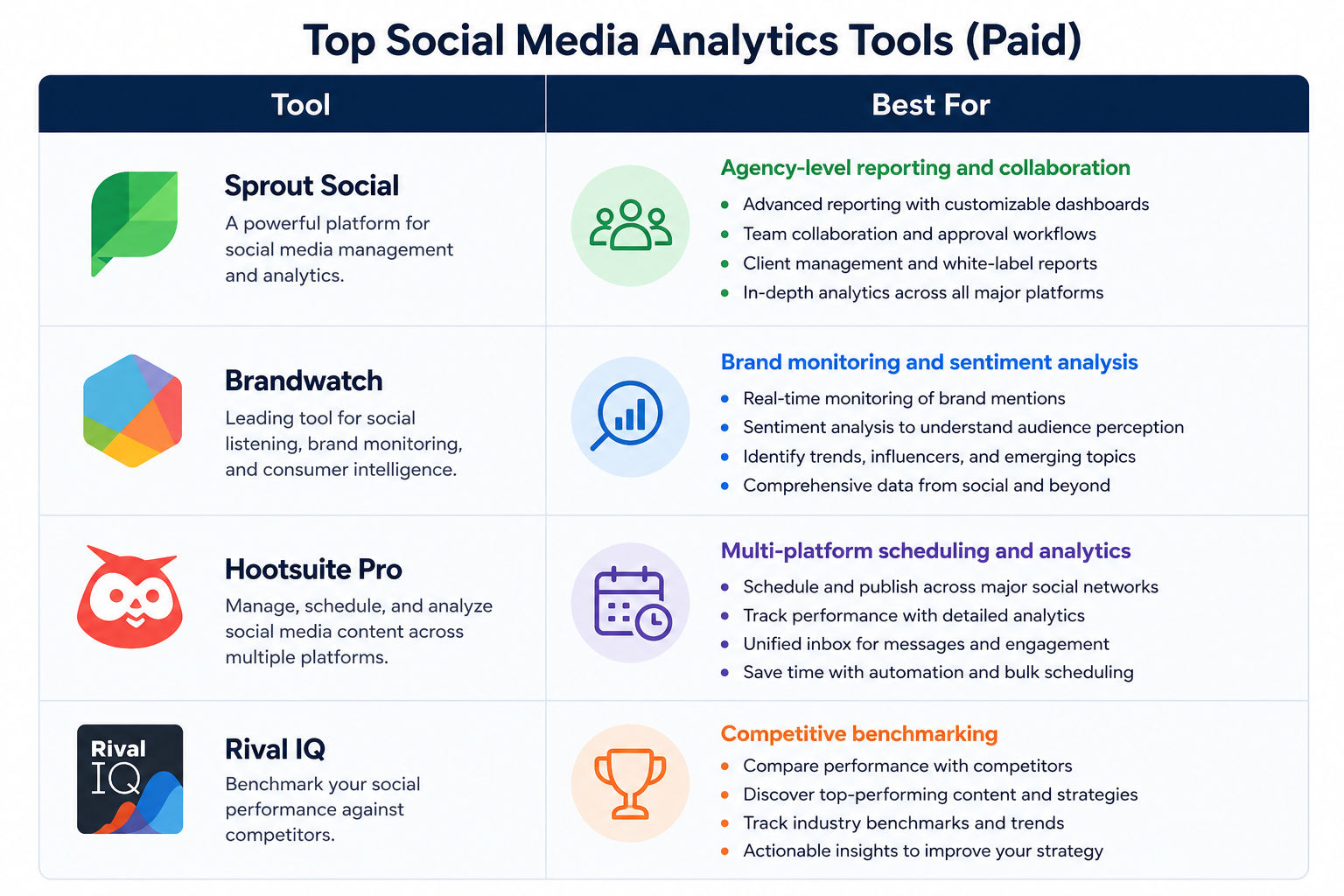
Tools make your life easier. But you don’t need expensive ones to start. There are dozens of tools out there. Here's what actually matters for different use cases.
These are good starting points. They're free, accurate, and easy to use. The limitation is that they only show data for one platform at a time.
Every major platform offers built-in analytics:
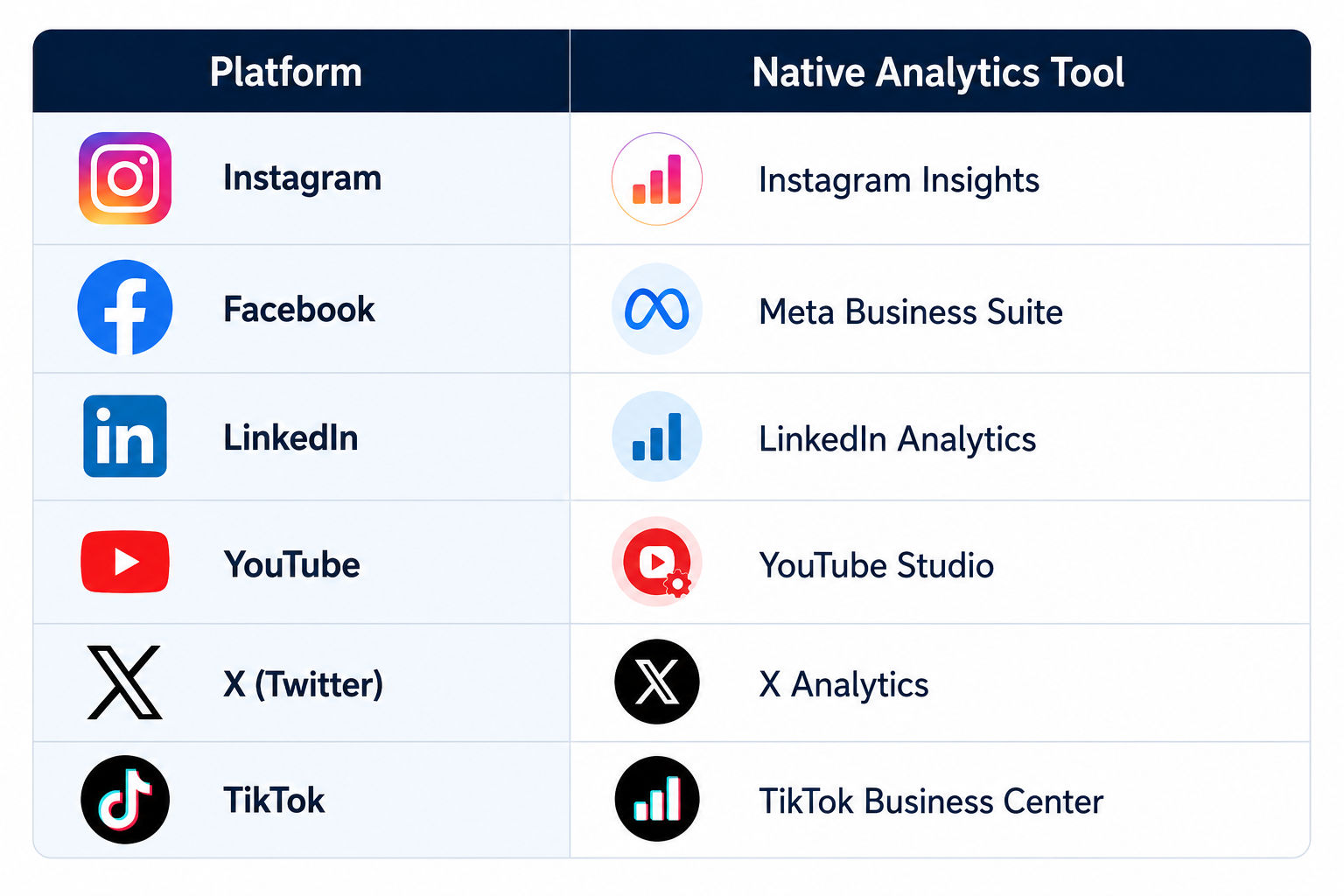
If you're managing multiple platforms, these free tools help:
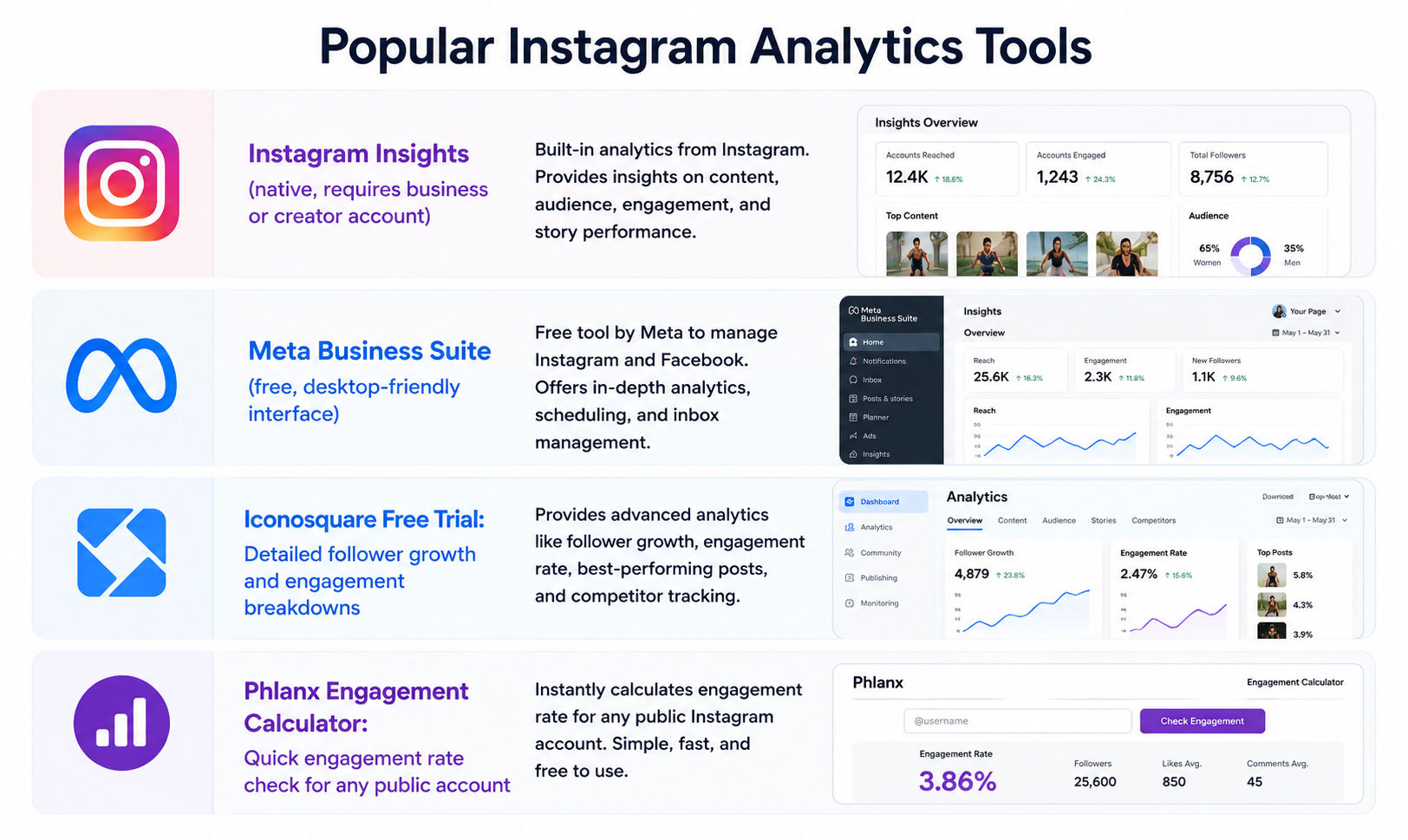
Instagram doesn't always show all the data you need. Some useful free Instagram analytics tools include:
Must Read: Digital Marketing Tutorials: A Complete Guide
Pick based on your needs, Not hype. Most tools look similar at first glance. Same dashboards. Same promises. But once you start using them, the differences show up fast, especially in pricing, reporting depth, and how easy the tool feels in daily use.
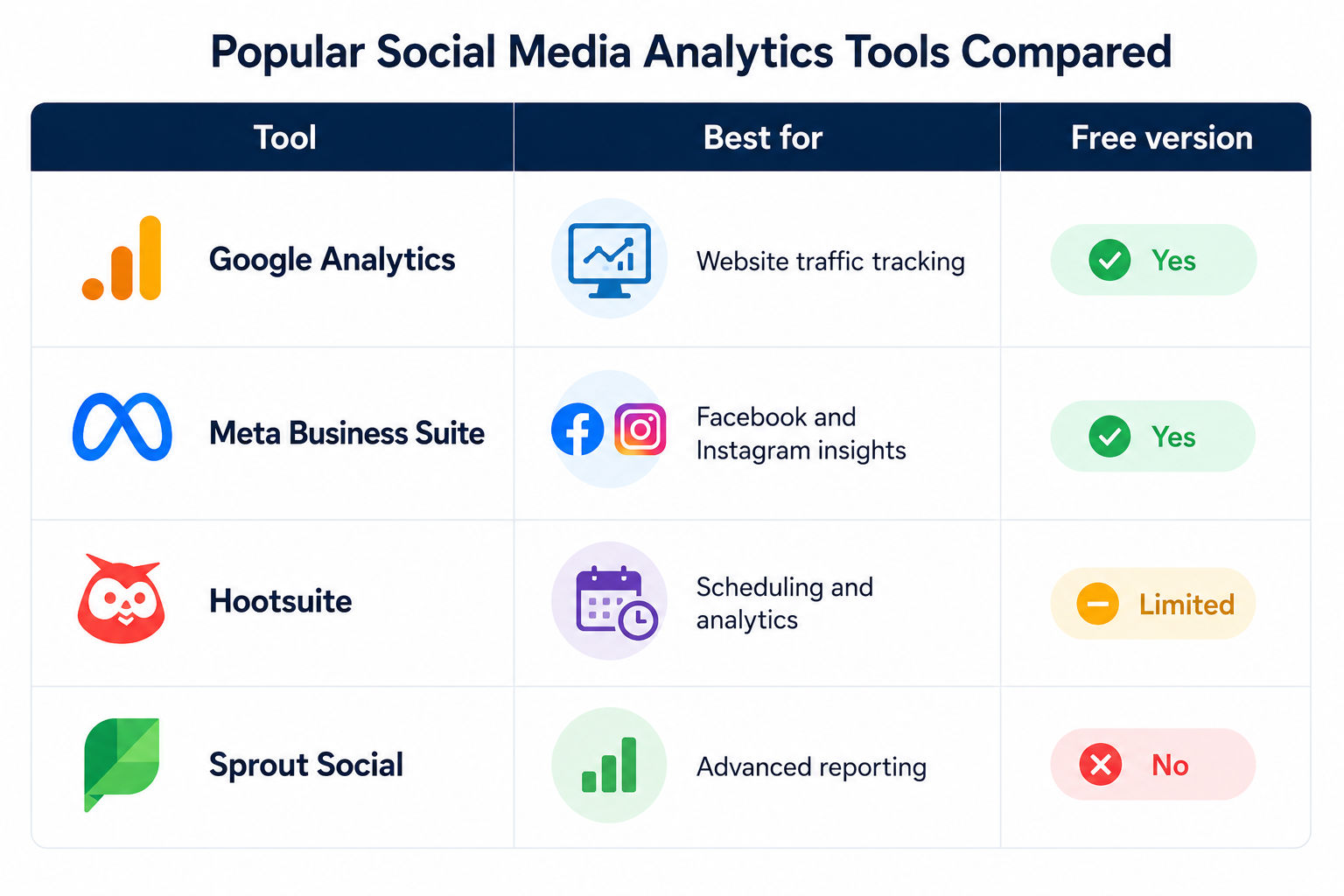
Don’t chase features you won’t use. Most beginners pick tools that look powerful but feel confusing after a week. You don’t need everything at once. You need something you’ll actually open, understand, and use regularly without feeling stuck or overwhelmed.
Do Read: What is Digital Marketing?
Subscribe to upGrad's Newsletter
Join thousands of learners who receive useful tips
Measurement is where most people start struggling. They collect data but don’t know what to do with it. Focus on three layers:
Also Read: Digital Marketing Eligibility: Who Can Apply and What You Need to Know
Google Analytics doesn't just track your website. It tells you which social platforms are actually driving results. Here's how to connect the two.
Step 1: Set up GA4 on your website Add the GA4 tracking code to your site. If you use WordPress, a plugin like Monster Insights handles this without touching code.
Step 2: Use UTM Parameters Add UTM tags to every link you share on social media. A UTM tag is a short string you append to a URL so GA4 knows where that click came from.
Example UTM structure: yourwebsite.com/page?utm_source=instagram&utm_medium=social&utm_campaign=may-launch
You can build UTMs free using Google's Campaign URL Builder.
Step 3: Check the Traffic Acquisition Report In GA4, go to Reports > Acquisition > Traffic Acquisition. Filter by "Session source" to see which social platform sends the most traffic.
Step 4: Set Up Conversion Events Tag actions like form submissions, purchases, or sign-ups as conversion events in GA4. Now you can see which social channel actually drives conversions, not just clicks.
Must Read: How To Boost Your Career With Digital Marketing Certification?
These three questions together will shape your social media strategy.
Avoid these:
Also Read: upGrad Learning Centre: Transform Your Career with Digital Marketing Courses
Data is only useful if people understand it. If your manager or client can’t read your report, it fails. No matter how accurate it is. Keep it simple.
Social media analytics isn’t optional anymore. It’s how you make smarter decisions, improve content, and prove results. Start small, track the right metrics, and build consistency. Over time, your insights will get sharper, and your strategy will feel less like guesswork and more like control.
Social media analytics is how you stop posting hope and start making evidence-based decisions. The data is already there. Every like, click, share, and scroll is telling you something. Start with clear goals. Pick two or three metrics that match those goals. Use the free tools available (there are plenty). Build a simple reporting habit. And keep iterating.
Ready to start your journey? Book a free consultation with upGrad today to find the best path for your career.
Similar Reads
Mica Digital Marketing Syllabus – Advanced Certificate Digital Marketing and Communication
Top 10 Digital Marketing Certifications to Enhance Your Skills in 2026
What is MBA in Digital Marketing? Scope, Career option and Salary
Social media analytics is the process of collecting and analyzing data from social media platforms to understand how your content is performing. It tracks metrics like reach, engagement, clicks, and conversions. The goal is to use that data to make better decisions about what to post and when.
Most platforms give you free access to analytics if you have a business or creator account. Instagram, Facebook, LinkedIn, TikTok, and YouTube all have native analytics dashboards. For multi-platform tracking, tools like Buffer, Hootsuite, or Google Analytics 4 can consolidate your data in one place.
Some of the most useful free options include Google Analytics 4 for website traffic from social, Meta Business Suite for Facebook and Instagram, native TikTok Analytics for video performance, and Buffer or Hootsuite's free plans for basic multi-platform reporting.
Start by defining your goal before looking at any numbers. Then pick two to four metrics that directly connect to that goal. Track them consistently over time and compare period over period. A single month of data isn't enough. You need at least two to three months to identify real patterns.
You don't "add" social media to GA4 directly. Instead, you use UTM parameters on every link you share on social platforms. These tags tell GA4 exactly where a visitor came from. Once set up, you can see social traffic under Reports > Acquisition > Traffic Acquisition in GA4.
The analytics cycle is a six-step repeating process: set goals, collect data, analyze trends, draw insights, take action, and then repeat. Most brands skip the analysis step and go straight to action, which leads to inconsistent results. The cycle works because each round builds on the last.
Start with your highest-performing post from the last month. Ask yourself what made it work. Was it the format? The topic? The time it was posted? Then look at your lowest performer and ask the same questions. You'll start seeing patterns without needing any advanced skills.
Yes. A good course should teach you how to use real tools like GA4 and Meta Business Suite, how to set up UTM tracking, and how to build and present reports. Look for courses that include hands-on projects. Theoretical knowledge alone won't get you far if you can't apply it.
Create UTM parameters for every link you share on social media using Google's free Campaign URL Builder. Add these tagged URLs to your posts. In GA4, go to Reports > Acquisition > Traffic Acquisition and filter by "Session source" to see which social channels are sending traffic and converting visitors.
Reach is the number of unique people who saw your content at least once. Impressions is the total number of times your content was displayed, including multiple views by the same person. If your reach is 1,000 but impressions are 3,000, it means people are seeing your content an average of three times each.
Lead with the insight, not the number. Use visuals like bar charts and line graphs to make trends easy to read. Structure your report with a date range, top-line metrics, a platform breakdown, best-performing content, and a clear recommendation for next steps. Keep it under two pages or five slides for regular reporting cycles.
972 articles published
We are an online education platform providing industry-relevant programs for professionals, designed and delivered in collaboration with world-class faculty and businesses. Merging the latest technolo...
Get Free Consultation
By submitting, I accept the T&C and
Privacy Policy
Level Up Your Digital Marketing Career Today!
Top Resources
MICA
Advanced Certificate in AI-Powered Digital Marketing & Communication from MICAMICA Executive Alumni Status
Certification
5 Specialisation
Classroom
4 Months
Certification
2 Months