Learning Management System (LMS): Meaning, Features & Examples (2026)
By Faheem Ahmad
Updated on May 06, 2026 | 9 min read | 2.57K+ views
Share:

All courses
Certifications
More
By Faheem Ahmad
Updated on May 06, 2026 | 9 min read | 2.57K+ views
Share:
Table of Contents
A learning management system (LMS) is a digital platform that helps you create, manage, deliver, and track learning or training programs in one place. It is widely used by schools, businesses, and individuals to make learning more organized, flexible, and accessible.
In simple terms, if you’re wondering what is a learning management system, it’s like an online classroom where you can upload courses, assign lessons, monitor progress, and evaluate performance, all without needing a physical setup.
In this guide, you’ll learn the meaning, features, benefits, examples, and how to choose the right LMS, explained in a clear and practical way.
Looking to apply workplace efficiency concepts like learning management system in real business settings? Explore upGrad’s management programs to build practical leadership, operations, and process improvement skills.
Popular Management Programs
To put it simply, a learning management system (LMS) is a software application or web-based technology used to plan, implement, and assess a specific learning process. Think of it as the "digital engine" that powers online education and corporate training.
Breaking Down the Acronym
To understand what is a learning management system, it helps to look at the three words individually:
A learning management system is widely used because it makes learning easier and more flexible.
For companies, LMS platforms are especially useful for employee training and development.
Also Read: Management Information Systems: Meaning, Components & Examples (2026)
Free Courses
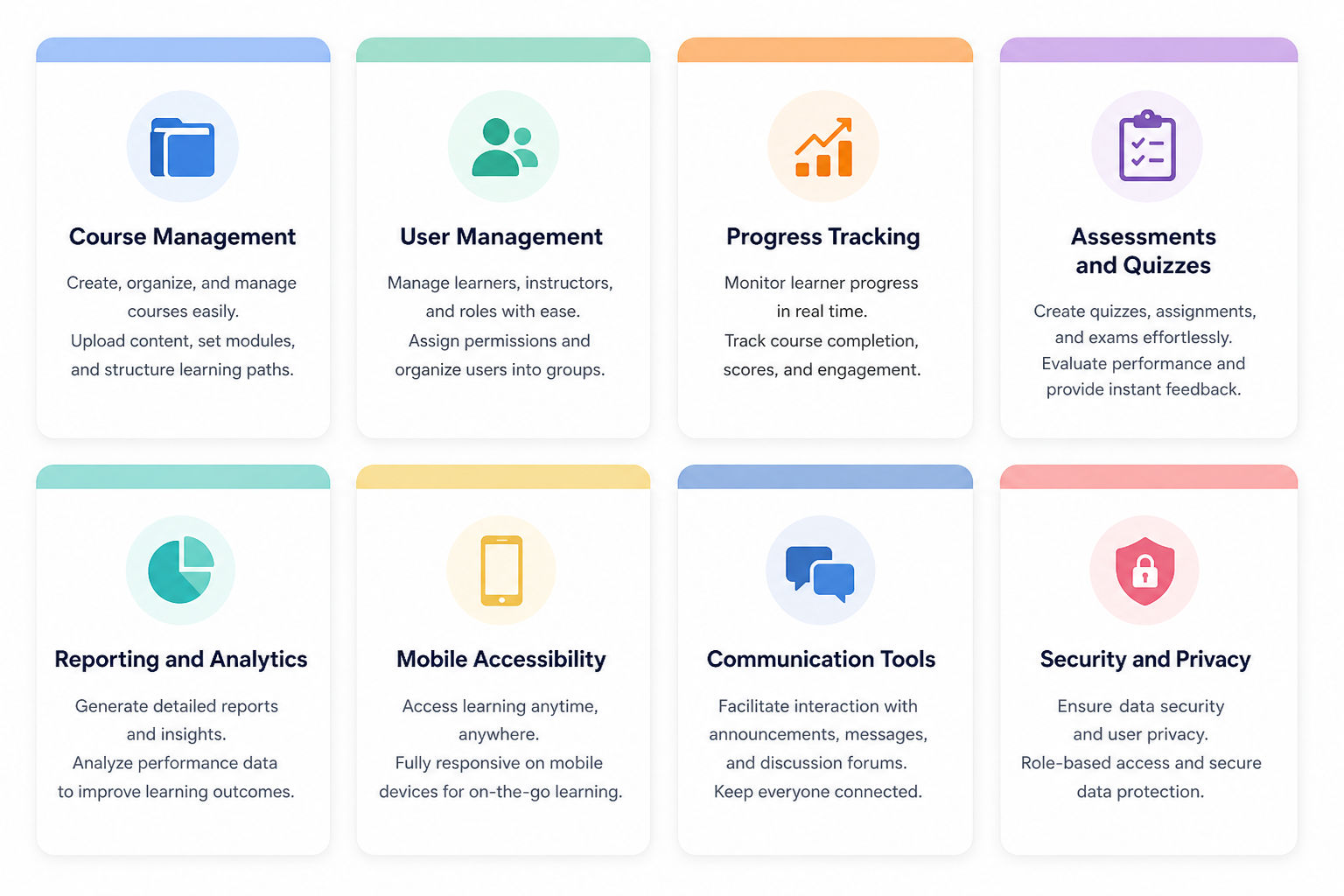
Understanding the core features of a learning management system LMS helps explain why this software plays such an important role in modern online learning and corporate training.
Management Courses to upskill
Explore Management Courses for Career Progression
IIIT-B & IIM, Udaipur
Chief Technology Officer & AI Leadership ProgrammeA learning management system LMS works through a clear and structured process that helps deliver, manage, and track learning efficiently for both administrators and learners.
Step 1: Content Creation and Upload
Admins or instructors create learning content such as videos, documents, presentations, and quizzes. This content is uploaded to the LMS and organized into courses or modules.
Step 2: Learner Enrollment
Learners are enrolled into courses based on their role, department, or learning goals. Enrollment can be done manually or automatically, depending on the system settings.
Step 3: Course Access and Learning
Once enrolled, learners can log in and access course material anytime. They can study at their own pace, revisit lessons, and complete activities according to their schedule.
Step 4: Progress and Performance Tracking
As learners move through the course, the LMS automatically tracks progress, quiz scores, and completion status. This removes manual tracking and keeps all data in one place.
Step 5: Reporting and Evaluation
Admins and trainers generate reports to review learner performance, course effectiveness, and overall engagement. These insights help improve training programs and learning outcomes.
This step-by-step structure saves time, reduces administrative effort, and keeps learning well organized, especially when managing large teams or multiple courses at the same time.
Also Read: Top 10 Management Skills Required to Become a Successful Manager
Different learning management systems are designed to meet specific needs depending on who is using them and how they want to manage their data. Here is a breakdown of the most common types:
Also Read: Techniques of Decision-Making: 15+ Tools & Methods for Success in 2026
To understand how a learning management system LMS works in real life, it helps to look at some commonly used platforms. Each one is built for slightly different needs, but the goal is the same, make learning easier and more organized.
Also Read: AI Proof Jobs: Careers That AI Can’t Replace in 2026
Before choosing a learning management system LMS, it’s important to understand both its advantages and limitations. This helps you make a better decision and know what to expect while using the system.
| Aspect | Key Points |
| Benefits of Using an LMS |
|
| Challenges of LMS |
|
Choosing the best learning management system depends on your specific learning goals, audience size, and budget. Not every LMS is the same, so it’s important to focus on what actually fits your needs.
In a digital-first world, a learning management system LMS is no longer just an optional tool, it’s a necessity for both education and business. By centralizing resources, these platforms simplify training, improve accessibility, and provide the data needed to track progress effectively.
By exploring common learning management system examples and understanding key features, you can find the learning management system LMS software that fits your specific goals. Ultimately, choosing the best learning management system ensures that your training is efficient, engaging, and ready for the future.
Ready to start your journey? Book a free consultation with upGrad today to find the best path for your career.
There are plenty of LMS platforms available, and the right one really depends on your needs. Popular options include Moodle, Blackboard, TalentLMS, and Docebo. Some are more suited for educational institutions, while others are designed for corporate training environments.
Not at all. Most LMS platforms are built with user-friendliness in mind. It might take a little time to get familiar with the interface, but once you do, navigating courses, tracking progress, and accessing materials becomes quite simple.
Yes, that’s one of the biggest advantages of using an LMS. You can include videos, PDFs, presentations, quizzes, and more. This variety helps make learning more engaging and caters to different learning styles.
Generally, LMS platforms offer solid security features like user authentication and data encryption. However, overall security also depends on proper management, keeping the system updated and following best practices is key.
Yes, most LMS platforms allow customization to some extent. You can modify the course layout, add your branding, and adjust features based on your requirements, making it adaptable for different use cases.
In most cases, yes. Many LMS platforms are cloud-based, so an internet connection is needed to access content and features. Some platforms may offer limited offline access, but online connectivity is generally essential.
Definitely. LMS platforms aren’t just for large organizations. Small businesses can use them effectively for employee training, onboarding, and skill development. There are also affordable options that are easy to manage.
An LMS keeps everything organized in one place, learning materials, progress tracking, and assessments. Interactive elements like videos and quizzes also make the experience more engaging, helping learners understand and retain information better.
No, it’s not limited to that. While it’s widely used in corporate settings, LMS platforms are also common in schools, colleges, and even for individual learning purposes.
It’s important to look at ease of use, pricing, available features, and customer support. Choosing a system that matches your actual needs is more practical than opting for a complex platform you may not fully utilize.
Yes, most LMS platforms include tracking and reporting features. They allow you to monitor progress, scores, and course completion, making it easier to identify strengths and areas where improvement may be needed.
79 articles published
Faheem Ahmad is an Associate Content Writer with a specialized background in MBA (Marketing & Operations). With a professional journey spanning around a year, Faheem has quickly carved a niche in the ...
Get Free Consultation
By submitting, I accept the T&C and
Privacy Policy
Top Resources
Certification
3 Months
Certification
6 Months
O.P. Jindal Global University
Masters in International Accounting and Finance (Accredited by ACCA, UK)Master's Degree
12 Months