Top 10 Front End Projects From Beginners to Pro [2026]
By Rohan Vats
Updated on Dec 05, 2025 | 9 min read | 140.53K+ views
Share:

All courses
Certifications
More
By Rohan Vats
Updated on Dec 05, 2025 | 9 min read | 140.53K+ views
Share:
Table of Contents
Interactive 3D Product Showcase, Interactive Storytelling Website, Virtual Reality Travel Experience and Music Player with a Live Visualizer are some examples that represent some of the most engaging front end project ideas for beginners in 2026.
You learn how to build smooth interactions, clean layouts, and responsive interfaces while turning creative concepts into functional web experiences. These projects help you understand real UI behavior and strengthen your portfolio with hands-on work.
In this guide, you’ll read more about beginner-friendly frontend projects, tools you’ll use, essential skills, popular topics, and practical tips to build strong front-end projects from scratch.
Level Up Your Technical Skills! Master SQL, data analytics, and cloud computing with our Online Data Science Course. Start building real-world projects today!
Let’s take a quick look at the frontend projects explained in this blog.
S.No. |
Front-End Project Title |
Estimated Time |
1 |
Interactive 3D Product Showcase |
10-15 hours |
2 |
Interactive Storytelling Website |
8-12 hours |
3 |
Virtual Reality (VR) Travel Experience |
15-20 hours |
4 |
Interactive Music Player with Visualizer |
8-12 hours |
5 |
Augmented Reality (AR) Home Design Tool |
12-15 hours |
6 |
Animated Movie Search Platform |
8-10 hours |
7 |
Interactive Quiz App with Leaderboard |
8-10 hours |
8 |
Virtual Pet Game |
10-12 hours |
9 |
Virtual Art Gallery |
12-15 hours |
10 |
Fitness Tracker Dashboard |
10-12 hours |
Note: You may find the source codes for these projects at the end of this blog
Below are beginner friendly frontend projects you can perform to build your basic skills.
In this frontend project, you’ll create an interactive 3D product showcase, allowing users to rotate, zoom, and pan models for a detailed view. The complexity is moderate, and the completion time is 10-15 hours. This project is well-suited for e-commerce platforms and digital portfolios needing a visually immersive display.
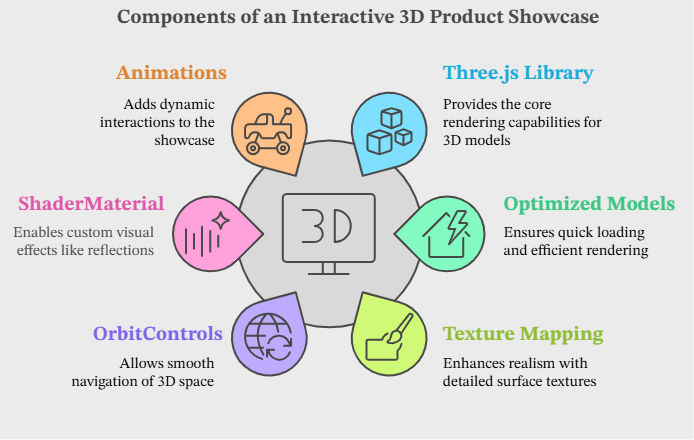
Three.js is the core library for WebGL-based rendering, allowing smooth model interactions. To minimize load times, you’ll import optimized models (GLTF/OBJ formats) via Blender. Realism is enhanced with texture mapping, such as PBR materials and normal maps, alongside smooth navigation with OrbitControls. ShaderMaterial and GLSL enable custom effects like reflections, creating lifelike visuals.
For dynamic interactions, animations via GSAP or Three.js’s AnimationMixer enable features like opening parts or highlighting details. Asynchronous loading supports efficient model rendering, even for textures up to 5MB. Performance optimizations, including frustum culling and Basis Universal compression, help ensure smooth functionality on both desktop and mobile.
Also Read: Computer Science Project Ideas | Software Engineering Projects
Things to Know Beforehand
Frontend Tools
Related Article: Java Projects With Source Code | HTML Project Ideas for Beginners
Skills Required
Real-World Application
Interactive product displays like this are popular in e-commerce and digital product portfolios. They allow customers to explore products in detail, similar to in-store interactions.
Skillsets You Gain from this Project
In this frontend project you will develop an interactive storytelling website, like a digital “choose-your-own-adventure” book, where users’ choices alter the story’s path. The complexity is easy, and it takes 8-12 hours to complete. It is ideal for showcasing digital storytelling and interactive campaigns.
JavaScript manages story branching with JSON or arrays storing each storyline path. DOM manipulation enables real-time updates, guiding users through the story based on choices. Optional GSAP animations add seamless transitions for a polished experience.
CSS animations provide storytelling depth, while lazy loading keeps media efficient, only loading files as needed. Tracking user choices with analytics helps you refine and enhance narrative paths for added engagement.
Read More: Must-Try JavaScript Project Ideas for Developers | CSS Project Ideas for Beginners
Dive Deeper: Best Web Development Project Ideas | How to Create a Dynamic Web Project Using Eclipse
In this frontend project, you’ll create a VR travel experience that allows users to explore virtual locations using 360-degree panoramic views and interactive hotspots. Moderate complexity comes from managing large media files and setting up JavaScript-driven VR interactions, and the project is expected to take 15-20 hours to complete. This experience is ideal for showcasing cities, landmarks, or real estate properties.
Using A-Frame or Three.js, you’ll build VR scenes with high-resolution panoramas (5–10MB) mapped onto sphere geometries. Hotspots embedded within each scene use JavaScript event handling to display additional information or navigate to new perspectives, creating an immersive experience. A-Frame simplifies VR controls like navigation and zoom effects, while asynchronous loading helps manage bandwidth and optimize performance.
To enhance interactivity, add background audio or clickable overlays for directions, making the experience feel more complete. For VR devices or mobile, WebXR enables compatibility, ensuring a smooth experience across platforms.
Recommended for You: Mini-Project Ideas for Engineering Students | Exciting and Hands-On Computer Vision Project Ideas for Beginners
After exploring some beginner level front end project ideas now explore some intermediate frontend projects for resume.
In this frontend project, you’ll develop an interactive music player with real-time visualizations that sync to the music's beats and rhythms. Easy complexity arises from working with the JavaScript Audio API and Canvas API to generate responsive visuals, with an estimated completion time of 8-12 hours. This front-end project is ideal for media apps or audio players aiming to offer both auditory and visual engagement.
The JavaScript Audio API processes the audio, analyzing frequency data to create visualizations like waveforms or frequency bars. The Canvas API handles real-time rendering, updating visual effects every 20–30ms to reflect pitch and volume changes. For additional customization, users can select visualizer styles or upload personal audio files.
With around 100–150 lines of JavaScript code for audio processing and visualization, this project is manageable yet engaging. It offers a visually appealing experience that enhances the user’s music interaction.
You can Also Check - AEM Front End Developer: Salary, Skills, & Responsibilities
This front-end developer project includes building an AR home design tool where users can virtually place and adjust 3D furniture models in their real environment using their device’s camera. Moderate complexity stems from combining AR and 3D rendering, with an expected completion time of around 12-15 hours. This tool is ideal for interior design apps or e-commerce platforms that want to offer interactive, in-home previews.
With AR.js for augmented reality capabilities and Three.js for detailed 3D rendering, users can rotate, scale, and position furniture models for accurate placement. Asynchronous loading supports model sizes of 1-3MB, ensuring smooth interaction even with multiple models. Interactive hotspots allow users to tap items to view additional details or switch colors, adding a deeper level of customization.
This front-end project uses 150-200 lines of JavaScript to manage AR interactions, transformations, and asynchronous loading. Extensions include saving layouts, color customizations, or multi-item placements.
Read here to know more about the Future of Augmented Reality!
Create an animated movie search platform that retrieves and displays movie details from the OMDb API with smooth, engaging transitions. Due to API integration and animated transitions, the complexity is easy, and the estimated completion time is 8-10 hours. This front-end project suits web apps focused on media content or movie databases.
With JavaScript, API calls retrieve movie details (title, poster, summary) in 200-500ms, while GSAP animations and CSS keyframes provide effects like fade-ins and slide-ins for each movie card. Dynamic rendering for each search result enhances user experience, with approximately 100-150 lines of JavaScript managing the API requests and animations.
Potential extensions could include a “favorites” feature, genre filtering, or pop-ups for expanded movie details.
Below are some advanced level frontend projects with source code to explore in 2026.
Build an interactive quiz app that provides real-time feedback for each answer and displays user rankings on a leaderboard. The easy complexity comes from implementing scoring logic and leaderboard updates, with an estimated completion time of 8-10 hours. This app is great for educational sites or engagement-focused applications.
You’ll handle question rendering, answer validation, and scoring with Javascript. After each quiz session, scores are stored and updated on a leaderboard, which persists across sessions. Around 100-150 lines of JavaScript manage quiz functionality, scoring, and data handling to maintain leaderboard rankings.
Possible enhancements include timed questions, multiple categories, or user-generated quizzes for a personalized experience.
Create a virtual pet game where users interact with a digital pet by feeding, playing, and monitoring its health in real-time. The easy complexity arises from managing state changes for attributes like hunger, happiness, and health, with an expected completion time of 10-12 hours. This project is perfect for building user engagement through interactive elements.
JavaScript can be used for state management; each action—such as feeding or playing—affects the pet’s status, with real-time updates providing users with feedback on their interactions. Around 150-200 lines of JavaScript project ideas are dedicated to handling game state and triggering visual updates based on user actions.
Potential extensions include adding levels, pet customization options, or notifications when the pet needs attention to keep users engaged.
In this frontend project you will create a virtual art gallery where users can explore artworks in a 3D-like interactive space. Moderate complexity stems from combining CSS 3D transforms and JavaScript for interactivity, with an estimated completion time of 12-15 hours. This is ideal for digital exhibitions or showcasing artwork in a simulated gallery environment.
With CSS 3D transforms, you’ll simulate spatial depth in the gallery, allowing users to navigate the space. JavaScript enables interactions like clicking on artworks for more information, and the optional integration of Three.js can enhance the realism of 3D effects. With approximately 150-200 lines of JavaScript and CSS, you’ll create animations and transitions to enhance the gallery experience.
Extensions could include a zoom feature, artist biographies, or ambient soundscapes to enrich the atmosphere.
Also take a look at these Top 15 CSS Project Ideas to Boost Your Resume!
Build a fitness tracker dashboard that allows users to log workouts, calorie intake, and track progress over time. Moderate complexity comes from handling data storage and visualizing trends, with an expected development time of 10-12 hours. This dashboard suits apps that focus on user health and fitness monitoring.
JavaScript manages data input and storage, while libraries like Chart.js or D3.js are used for dynamic data visualization, showing weekly or monthly performance trends. With around 150-200 lines of JavaScript, you’ll handle user inputs, data storage, and chart updates that provide meaningful feedback on progress.
Potential extensions include goal-setting features, daily reminders, or customizable chart themes to give users more control over their fitness tracking.
Preparing for a career in front-end development? Make sure to check our guide on 25+ Front End Developer Interview Questions & Answers
Thinking about getting an online certification? It’s a smart way to move beyond entry-level roles, gain the latest skills, and finally see real progress in your career. With upGrad’s hands-on courses, you’ll learn by doing, building real projects and taking practical steps toward a career that excites you.
Before upGrad vs After upGrad
Before upGrad
After upGrad
Ready for a Change?
“Get Started with upGrad Today!”
“Join Now”
Source codes:
The best languages to kickstart your journey are HTML, CSS, and JavaScript. HTML structures the content, CSS handles the visual layout, and JavaScript adds interactivity. Mastering these three is essential before you attempt to build complex frontend projects or move on to frameworks.
Building frontend projects for resume submission is crucial because it proves your practical skills to employers. Instead of just listing skills, a portfolio of functional websites demonstrates your problem-solving abilities. It shows you can translate code into a working product, which is what hiring managers look for.
Popular frameworks like Bootstrap and Tailwind CSS are excellent choices. Bootstrap offers pre-designed components for speed, while Tailwind provides utility classes for custom designs. Using these tools helps you create responsive layouts efficiently, which is a standard requirement for modern front end projects.
You should look for frontend project ideas that align with your current skill level. Beginners might start with a personal bio page, while intermediate learners can tackle a To-Do list app. The goal is to pick a challenge that pushes you slightly out of your comfort zone without being discouraging.
Beyond HTML and CSS, you need to understand responsive design and version control (Git). proficiency in these areas allows you to build professional frontend developer projects that work on all devices. Debugging and understanding browser developer tools are also vital for maintaining clean code.
To ensure your site looks good everywhere, use CSS Grid and Flexbox for layout management.Implementing media queries allows your design to adapt to different screen sizes. This is a non-negotiable feature for high-quality front end developer projects.
Yes, platforms like GitHub Pages, Netlify, and Vercel allow you to host front-end projects with source code for free. These services often link directly to your Git repository, enabling continuous deployment so your live site updates automatically whenever you push new code.
The Mozilla Developer Network (MDN) is the gold standard for documentation. For tutorials, freeCodeCamp and learning platforms like upGrad. These resources often provide walkthroughs for projects for front end developer portfolios, teaching you best practices along the way.
While not mandatory for your very first site, learning React or Vue is highly recommended for professional work. They allow you to build dynamic, component-based front end projects that are scalable. mostly all modern companies expect familiarity with at least one major framework.
You can use native CSS animations with @keyframes for simple transitions or libraries like GSAP for complex motion. well-timed animations make a frontend project feel polished and interactive, improving the overall user experience.
The front-end handles what the user sees, while the back-end manages data and logic. They communicate via APIs. Understanding this flow is helpful when you start building more advanced frontend developer projects that need to fetch and display real-time data from a server.
GitHub is the best place to find frontend projects with source code. logical analysis of other developers' repositories helps you understand folder structure, coding standards, and logic flow. You can clone these repositories to experiment and see how different features are implemented.
A weather dashboard or a movie search app are excellent ideas. These require you to fetch data from a public API and display it dynamically. This type of frontend project teaches you about asynchronous JavaScript (Async/Await) and JSON data handling.
Yes, cloning popular sites like Netflix or the Amazon landing page is a fantastic way to practice. It forces you to replicate complex layouts and pixel-perfect designs. These clones serve as impressive project ideas for front end development because they show you can build industry-standard interfaces.
To build the best front end projects for resume inclusion, ensure your portfolio has a mix of personal creativity and technical utility. Include live demo links, a clear description of the tech stack used, and a link to the code repository. A well-documented portfolio acts as proof of your capability.
You don't need to build the next Facebook. However, front end developer projects should be functional and bug-free. A small, perfectly executed app (like a calculator or expense tracker) is often more impressive than a large, broken application. distinct focus on clean code and user experience is key.
Using Git allows you to track changes and collaborate with others. When you upload front end projects with source code to GitHub, it shows recruiters that you know how to manage code versions. This is a standard workflow in any professional development team.
Building a functional e-commerce cart is a classic and challenging project for front end developer portfolios. It involves state management (adding/removing items), calculations (total price), and local storage (saving the cart on refresh), covering many core concepts in one go.
If you want something unique, try building a virtual drum kit, a typing speed test, or a visualization of sorting algorithms. These front end website ideas are interactive and fun, making them memorable additions to your portfolio that go beyond standard corporate layouts.
Optimization involves compressing images, minifying CSS/JS files, and using lazy loading for media. Applying these techniques to your projects for front end developer jobs shows that you care about page load speed and user retention, which are critical business metrics.
418 articles published
Rohan Vats is a Senior Engineering Manager with over a decade of experience in building scalable frontend architectures and leading high-performing engineering teams. Holding a B.Tech in Computer Scie...
Get Free Consultation
By submitting, I accept the T&C and
Privacy Policy
Top Resources
Classroom
6 Months
Microsoft
Generative AI Mastery Certificate for Software DevelopmentLearn to use GitHub copilot, Azure & more
Certification
2 months
3 Months