Automated Machine Learning Workflow: Best Practices and Optimization Tips
By Mukesh Kumar
Updated on Nov 13, 2025 | 16 min read | 3.77K+ views
Share:

All courses
Certifications
More
By Mukesh Kumar
Updated on Nov 13, 2025 | 16 min read | 3.77K+ views
Share:
Table of Contents
Automated machine learning workflow brings order, speed, and clarity to every ML project. You move from raw data to deployed models through defined steps that standardize how teams set goals, prepare data, build features, train models, and run checks. Each stage works as a structured path that reduces manual load and improves consistency across experiments.
In this guide, you’ll read more about core workflow steps, automation gains, detailed diagrams, best practices, optimization tips, common mistakes, tools, templates and real-world use cases.
Looking to develop your automation skills for an efficient ML workflow? upGrad’s AI Courses can help you learn the latest tools and strategies to enhance your expertise in machine learning. Enroll now!
Popular AI Programs
A machine learning workflow is the step-by-step path that takes your project from a problem statement to a deployed model. It gives you a clear order to follow so you don’t jump between tasks or miss important checks. You move through each stage with purpose, which keeps the process structured and easy to repeat across projects.
The workflow helps you understand how data becomes features, how models learn, and how results turn into real-world outputs. It also makes teamwork smoother because everyone follows the same sequence of steps.
Also Read: Unlocking AI: A Complete Guide To Basic To Advanced Concepts
A machine learning workflow acts as the backbone of your project and sets the stage for deeper automation and optimization steps.
A standard ML workflow works as a structured path that guides you from a simple idea to a reliable model. Each step has a clear purpose, and understanding these steps helps you manage projects with confidence. When the stages are followed in the right order, the workflow of machine learning becomes easier to apply, maintain, and scale.
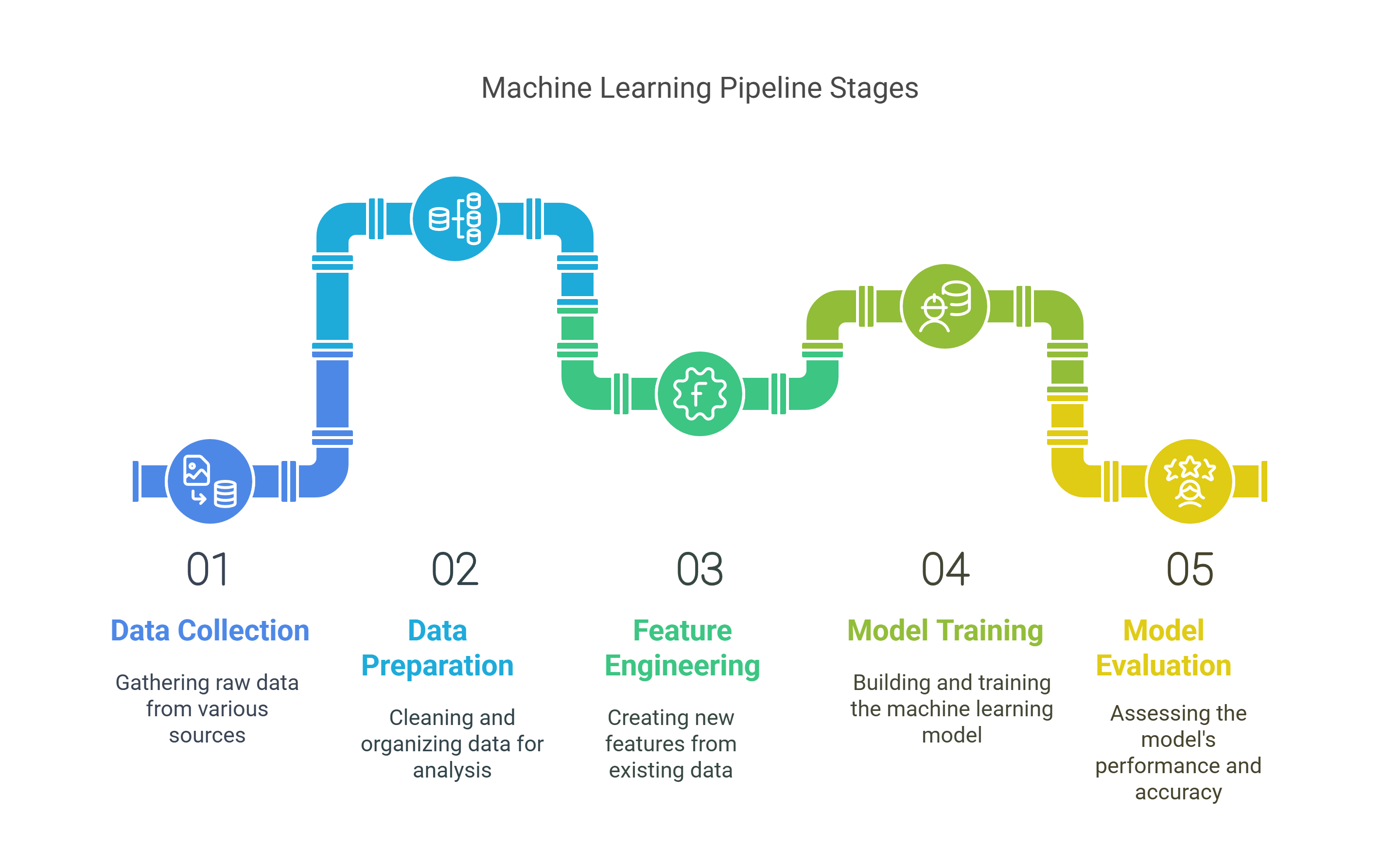
This is where everything begins. You describe the goal in plain language and decide what the model should achieve. A well-defined problem keeps your direction steady and prevents guesswork later.
You set the type of task you’re solving, the metric you will track, and the constraints you must follow. When this step is clear, the rest of the ML workflow falls into place naturally.
You identify:
Also Read: Complete Guide to the Machine Learning Life Cycle and Its Key Phases
You gather the raw information your model will learn from. This step shapes the entire machine learning workflow because the model can only be as good as the data it sees.
You pull data from internal sources, public datasets, logs, forms, sensors, scraped files, or APIs. You check the size, structure, and relevance of the data before moving forward.
Key considerations:
Also Read: What Is Data Collection? : Types, Methods, Steps and Challenges
Raw data usually contains errors. You fix them before modeling so the model does not learn noise or misleading signals. This is one of the most critical steps in the workflow of machine learning because poor data quality leads to weak results even if the model is strong.
You handle missing values, remove duplicates, correct types, smooth out inconsistencies, and prepare the data so it behaves predictably during training.
Typical tasks:
Also Read: Data Cleaning Techniques: 15 Simple & Effective Ways To Clean Data
Features are the expressions of your data. They act as the inputs the model uses to learn. Good features help the model pick up real patterns faster and with less effort.
You create new fields, simplify existing ones, extract useful signals, and remove low-value features. This step often improves performance more than switching between models.
You may:
Also Read: Feature Engineering for Machine Learning: Methods & Techniques
Here you choose the model family that fits your goal. You compare options based on speed, accuracy, complexity, and interpretability. Instead of picking one model blindly, you test multiple candidates and keep the ones that show consistent promise.
This step helps the ML workflow stay flexible because different models shine in different scenarios.
Also Read: How to Perform Cross-Validation in Machine Learning?
The model learns patterns from data during this step. You adjust parameters, run training loops, monitor errors, and track learning curves. Training continues until the model reaches a stable state without overfitting.
You also store experiment details so you can compare versions later.
Also Read: Learning Models in Machine Learning: 16 Key Types and How They Are Used
You test the trained model on data it hasn’t seen before. This helps you confirm whether it learned general patterns or only memorized the training data. You compare results with the chosen metric and check behaviour across different slices of data.
This step builds trust in the model and highlights areas for improvement.
Also Read: Evaluation Metrics in Machine Learning: Types and Examples
Once the model performs well, you move it into real use. It may run inside an app, a dashboard, or an automated service. After deployment, you monitor accuracy, speed, errors, and drift.
Patterns in data change over time, so you refresh or retrain the model when needed. This keeps the entire machine learning workflow healthy and reliable.
Also Read: Guide to Deploying Machine Learning Models on Heroku: Steps, Challenges, and Best Practices
Component |
Description |
| Problem | Define the goal, task type, and metric |
| Data | Gather raw information from trusted sources |
| Prep | Clean and prepare the dataset for modeling |
| Features | Create stronger signals for the model |
| Model | Select suitable algorithms to test |
| Training | Teach the model using prepared data |
| Checks | Validate performance and stability |
| Deploy | Use the model and track real-world outputs |
These components form the backbone of every ML workflow and act as the foundation for automation and optimization in advanced projects.
AI Courses to upskill
Explore Artificial Intelligence Courses for Career Progression
Automated machine learning strengthens every stage of the ML workflow by handling repetitive work, reducing errors, and keeping processes steady across projects. Each step becomes clearer and easier to scale, especially when teams deal with large datasets or frequent model updates. Below is a detailed look at how automation improves the workflow of machine learning from start to finish.
This is where automation adds the most visible value. Raw data often contains missing fields, wrong formats, mixed types, and unusual entries. Manual cleanup takes time, and mistakes are common when the dataset is large.
Automated systems scan the entire dataset, detect issues, and make consistent corrections. They also create reusable pipelines so future datasets follow the same structure without extra effort.
Automation supports you by:
This step ensures your machine learning workflow starts with a stable foundation.
Also Read: Data Preprocessing in Machine Learning: 11 Key Steps You Must Know!
Feature engineering shapes the inputs the model learns from. Doing this manually can take many hours because you need to test multiple feature ideas before you know which ones matter.
Tools generate new features on their own, transform existing ones, and score each feature based on how much it improves performance. You see the strongest options without testing everything manually.
Automation helps by:
This boosts accuracy while reducing the time you spend experimenting.
Choosing the right model is not always simple. Each model behaves differently, and tuning them by hand can be slow. Automated model search explores multiple model families and tuning settings in parallel.
It tests combinations you may not think of, compares them fairly, and returns the top performers with complete logs.
You gain:
This step gives your ML workflow a strong and unbiased model selection process.
Also Read: AI Project Management: The Role of AI in Project Management
Evaluation checks whether the model has learned real patterns or only memorized the training data. Automation runs multiple validation steps, creates reports, and highlights weak areas without needing repeated manual analysis.
Automation improves evaluation through:
This leads to more trustworthy results.
Once the model is ready, automation moves it into real use with fewer manual steps. Monitoring runs in the background and tracks drops in accuracy or shifts in data patterns. When performance changes, retraining starts based on rules you set.
Automation handles:
This completes the machine learning workflow and keeps your system reliable after launch.
Also Read: Top 50 Python AI & Machine Learning Open-source Projects
Stage |
How Automation Helps |
| Data Prep | Fixes issues, standardizes formats, builds reusable cleaning steps |
| Feature Engineering | Creates, transforms, and ranks features with steady logic |
| Model Search | Tests models in parallel and tunes them automatically |
| Evaluation | Produces fair metrics and detects drift |
| Deployment | Pushes models live and triggers retraining when needed |
Automation adds depth, speed, and stability to every part of the ML workflow, making it easier to build strong models and maintain them over time.
A strong workflow depends on clear steps, steady data handling, and consistent model checks. These practices help you avoid confusion, keep experiments reliable, and reduce rework when the project grows. Each point below improves the stability and clarity of the workflow of machine learning, especially when many people or tools are involved.
You keep the same cleaning rules, formats, and steps across all datasets. This avoids surprises when new data arrives. A steady pipeline also makes debugging easier because the structure stays the same in every run.
Key actions:
Also Read: Building a Data Pipeline for Big Data Analytics: 7 Key Steps, Tools and More
A feature store helps you track, reuse, and refresh features across projects. With shared access, teams avoid creating the same features again and again. It also ensures that features used in training match features used in production.
You benefit from:
You record each run, its settings, and its results. This makes comparisons easy and helps you understand why one version performs better than another. Good tracking also prevents lost progress when models or datasets change.
Track elements such as:
Also Read: Why Data Normalization in Data Mining Matters More Than You Think!
You break the workflow into small pieces. Each piece handles one job, such as cleaning, feature steps, model training, or evaluation. When something breaks, you fix only that block instead of rewriting the whole pipeline.
Modular blocks make it easier to:
You review results often and feed new learnings back into your workflow. When patterns shift, you refresh data, adjust features, or retrain models. This keeps your system relevant and prevents model decay.
Feedback loops help you:
Also Read: Top 24 Data Engineering Projects in 2025 With Source Code
Practice |
Why It Helps |
| Standardize pipelines | Stable and predictable prep steps |
| Update feature stores | Reusable and consistent inputs |
| Track experiments | Clear comparisons and faster fixes |
| Use modular blocks | Easy updates and clean structure |
| Build feedback loops | You keep models fresh and reliable |
These practices strengthen every stage of the Machine Learning workflow and create a clean foundation for automation at scale.
Many beginners face the same issues when building a Machine Learning workflow. These mistakes often look small but can affect the entire workflow of machine learning if not fixed early. Keeping an eye on them makes your project smoother and more reliable.
These points help you build a stable and predictable Machine Learning workflow.
Also Read: What is Overfitting & Underfitting in Machine Learning?
Subscribe to upGrad's Newsletter
Join thousands of learners who receive useful tips
Automation tools make the ML workflow faster, cleaner, and easier to manage. They handle tasks like data prep, feature work, model search, and deployment so you can focus on decisions instead of repetitive steps. These tools support each stage of the workflow of machine learning and help beginners get steady results without manual effort in every step.
These platforms run many tasks for you, from data prep to model tuning. They test multiple models, choose strong ones, and give clear reports.
They help you:
Also Read: Exploring AutoML: Top Tools Available [What You Need to Know]
These libraries plug into Python workflows and automate large parts of the process without needing a full platform.
Useful for:
Also Read: Machine Learning Tools: A Guide to Platforms and Applications
These tools manage training, tracking, deployment, and monitoring. They keep the Machine Learning workflow organized and repeatable.
They support:
Also Read: Exploring the Scope of Machine Learning: Trends, Applications, and Future Opportunities
Tool Type |
Examples |
What It Helps With |
| AutoML Platforms | Google, Azure, AWS | Model search and tuning |
| AutoML Libraries | Auto-Sklearn, TPOT | Quick tests and feature steps |
| MLOps Tools | MLflow, Kubeflow | Tracking, pipelines, deploy |
These tools strengthen the Machine Learning workflow by giving you reliable automation across data, features, models, and production steps.
An optimized machine learning workflow depends on automating data pipelines, modularizing preprocessing and feature engineering, and deploying models through CI/CD-integrated containers. Tools like Apache Airflow, MLflow, and Kubeflow ensure reproducibility, scalability, and consistent performance across production environments.
You can build resilient ML systems ready for practical demands by aligning automation with model monitoring and retraining triggers.
Curious which courses can help you gain expertise in ML in 2025? Contact upGrad for personalized counseling and valuable insights. For more details, you can also visit your nearest upGrad offline center.
A machine learning workflow is a structured set of steps that guide you from defining the problem to deploying the final model. It helps you handle data, build features, train models, and validate results in a clear and repeatable order.
A structured process reduces confusion, prevents skipped steps, and helps you catch errors early. It also keeps the work consistent across teams, makes results easier to compare, and ensures every model follows the same clear path from data to deployment.
A machine learning workflow diagram shows each stage of the process in visual form, making it easier to understand how data flows from collection to deployment. It also helps teams explain steps clearly and maintain a steady sequence throughout the project.
The workflow of machine learning includes defining the problem, gathering data, preparing and cleaning it, building features, training models, validating performance, and deploying the final output. Each stage depends on the strength and quality of the stage before it.
Poor data quality creates weak features, unstable training, and inaccurate predictions. Clean and consistent data supports smoother progress, reduces noise, and helps models learn the right patterns without unnecessary tuning or repeated corrections in later steps.
Feature engineering shapes the inputs your model learns from. Well-designed features reduce noise, highlight useful patterns, and often improve performance faster than switching algorithms. Good feature choices also make training smoother and help the model generalize better.
Beginners can follow each stage in simple order, check data thoroughly, keep features meaningful, and validate models on new samples. This helps them understand how decisions in earlier steps influence accuracy and keeps the entire learning path predictable.
Tools like draw.io, Figma, Lucidchart, and basic flowchart makers help convert ML steps into clear visuals. They make it easier to explain the process, share ideas with teams, and maintain a consistent layout for future projects.
Automation scans raw datasets, fixes inconsistent types, handles missing values, and highlights unusual patterns. It removes repetitive work, speeds up early steps, and ensures cleaner inputs so you can focus more on feature design and model training.
Automation can create new features, transform existing ones, and rank them based on usefulness. This speeds up exploration, removes weak inputs early, and gives you a strong starting point before moving into model training or tuning.
Tracking lets you compare model versions, review past decisions, and repeat strong results easily. Without logs, it becomes difficult to understand what caused improvements or drops in performance, slowing down progress and creating confusion in later stages.
You reduce overfitting by using proper validation splits, checking results on unseen data, stopping training when improvement stalls, and avoiding excessive tuning. These steps ensure the model learns general patterns rather than memorizing noise in the training set.
Models fail when real-world data changes over time. Without steady monitoring, performance slowly drops as patterns shift. Regular checks, updated samples, and retraining schedules keep the model aligned with current information and maintain accuracy.
Concept drift happens when the relationship between inputs and outputs changes. The model starts making incorrect predictions because its past learning no longer matches new data patterns. Regular monitoring and timely retraining help manage this issue effectively.
Retraining frequency depends on how quickly your data changes. Some tasks require monthly updates, while others remain stable longer. Monitoring helps you decide when performance begins to drop and when a refresh is necessary to restore accuracy.
Tools like Google AutoML, Azure AutoML, and AWS Sagemaker Autopilot support tasks from data preparation to deployment. They handle model search, tuning, evaluation, and monitoring, reducing manual work and helping teams maintain a consistent ML process.
A reusable workflow has clear steps, clean scripts, modular components, and recorded settings. These elements make it easy to repeat the same process with new data, improve older results, and maintain consistent performance across multiple projects.
Teams should use simple diagrams, clear notes, consistent naming, and tracked experiment logs. Good documentation helps others understand the reasoning behind choices, revisit old versions, and reduce confusion when updating or scaling the project.
Slow progress often comes from messy data, weak features, untracked experiments, and long tuning cycles. Automation, clearer steps, and reusable components help reduce delays and keep the process efficient from start to end.
A machine learning workflow supports scaling by giving you a clear structure for handling larger datasets, multiple models, and more complex tasks. As the process stays consistent, you expand confidently without losing order or adding unnecessary complexity.
306 articles published
Mukesh Kumar is a Senior Engineering Manager with over 10 years of experience in software development, product management, and product testing. He holds an MCA from ABES Engineering College and has l...
Speak with AI & ML expert
By submitting, I accept the T&C and
Privacy Policy
Top Resources
Master's Degree
18 Months
Executive Diploma
12 Months
IIIT Bangalore
Executive Programme in Generative AI & Agentic AI for LeadersIndia’s #1 Tech University
Dual Certification
5 Months